Desktop block placement rarely maps cleanly to mobile. A sidebar signup, contact CTA, filter panel, or login box may make sense beside the main content on a wide screen, but feel badly buried on a phone. For business owners and agency teams, that is not a cosmetic problem. It affects task completion, lead flow, and how quickly visitors find what matters.
Articles
Inline image pasting is one of those small Drupal improvements that editors notice immediately. If your team publishes screenshots, product callouts, annotated mockups, or internal process notes, being able to paste an image straight into the editor removes friction. The business value is simple: less time spent fighting the CMS, faster page updates, and fewer "I'll upload it later" publishing delays.
Web browser automation is useful when a team is stuck doing the same clicks every day: logging into supplier portals, downloading routine reports, checking landing pages before launch, or pulling data from web apps that do not expose a practical API. For business owners, operations leads, and agency teams, the question is not whether a browser can be automated. The real question is whether the task can be turned into a dependable process that saves time without creating a maintenance headache.
If you operate in Thailand, even a tiny sourcing note can save real time. The original version of this page was just two raw store links. That worked as a personal bookmark, but it was too thin for a business owner, operations lead, or agency team that needs repeatable buying, cleaner handoffs, and fewer ordering mistakes. This updated note keeps the same intent: a short list of online store links in Thailand that are worth checking, with enough context to make the links useful.
CSV imports still sit behind product feeds, finance uploads, CRM migrations, and supplier handoffs. When they fail, the business problem is usually not “PHP is bad at CSV.” It is rework, silent data drift, or a delayed launch because the import path was never made robust.
Most off-the-shelf irrigation timers sold online are built for light garden use. They are fine for a hose, a few pots, or a short drip run, but they often become the bottleneck once you need decent flow, a remote valve, or a tank-and-pump setup. That is why a DIY irrigation timer and valve system can still make sense in Thailand: not because it is fancy, but because it lets you size the control parts around the water you actually have.
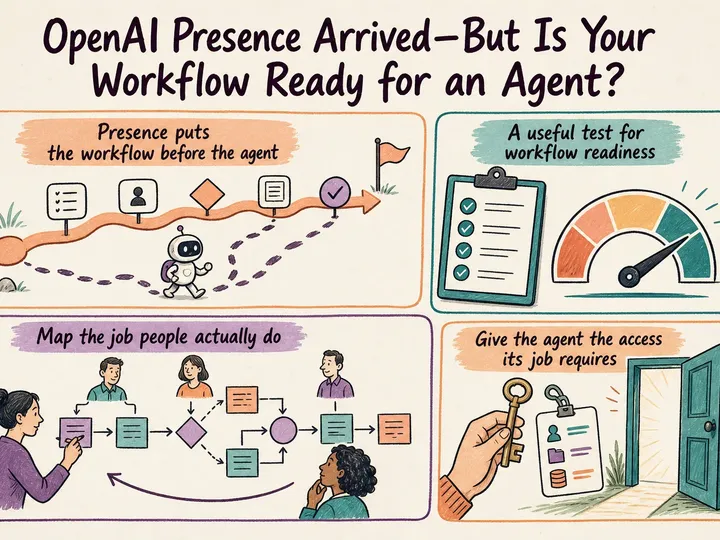
Most AI automation problems do not begin with the model. They begin with the workflow around it.
If you still run a Drupal 8 site and want a better Google PageSpeed result, Advanced CSS/JS Aggregation can still help, but only when you use it as part of a disciplined cleanup, not as a magic switch. The real job is to reduce render-blocking CSS and JavaScript, stop loading libraries that a page does not need, and confirm that any score improvement also improves real user experience. For most teams, that means treating AdvAgg as a legacy optimisation tool, not a substitute for platform maintenance.
If you inherited a Drupal 8 site, inline responsive images are less about visual polish and more about editorial control. The problem is familiar: authors drop large images into body copy, set arbitrary widths in the editor, and the page looks acceptable on desktop but messy on mobile. The original note here was directionally right that the Inline Responsive Images approach works on a mostly standard Drupal build. What it needed was the practical context: how to configure it cleanly, where teams get stuck, and when not to spend any more time on a Drupal 8-only solution.
Drupal 8 development means two very different things in 2026. If you are planning a new build, Drupal 8 is the wrong target. If you are inheriting a live Drupal 8 site, though, development is still very real work: stabilizing the platform, protecting business processes, and preparing a clean route to a supported version without breaking publishing, integrations, or reporting.
If by Drupal wiki you mean an internal handbook, client documentation portal, process library, or support knowledge base, Drupal can do the job well. The mistake is treating it like a pile of editable pages. The better approach is to build a structured knowledge system with clear navigation, sensible search, revision history, and ownership.
This situation comes up more often than teams admit: a site build is ready, the client host is restrictive, FTP is slow, and there is no SSH access or useful file manager. In that setup, uploading one ZIP archive and extracting it on the server can be the simplest workable option. The important part is choosing the right PHP approach and not turning a quick fix into an avoidable risk.
If you need a stable outgoing IP for testing, vendor allowlisting, or one-off admin access, a VPS can double as a lightweight proxy. For most teams, the cleanest approach is not to install a public proxy daemon at all. It is to use SSH dynamic port forwarding, which creates a local SOCKS proxy on your machine and sends traffic through the VPS over an encrypted SSH session.
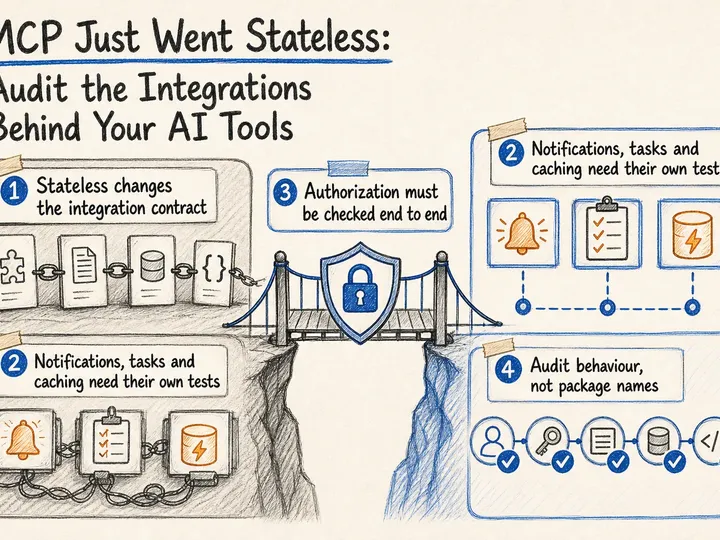
Between October 2025 and late May 2026, OpenAI moved ChatGPT apps and MCP from early product material into something companies can actually deploy. On October 6, 2025, OpenAI introduced apps in ChatGPT and the Apps SDK on top of the Model Context Protocol. On December 17, 2025, it opened app submissions for review and publication. And as of June 1, 2026, OpenAI’s help documentation says full MCP support, including modify and write actions, is rolling out in beta to ChatGPT Business, Enterprise, and Edu. That shifts the real question.
Broken characters in a database export are rarely just a file problem. They usually mean the client connection, database defaults, or individual columns are not using the charset you think they are. If you are preparing a handover, a staging refresh, or a platform migration, the safe move is to verify the source encoding first and then dump with that exact setting. Guessing is what creates mojibake, bad imports, and long cleanup work later.
The original version of this page was a single command: sudo apt-get install mysql-server-5.6. That matched an older Ubuntu era, but it is not the right default on a current Debian or Ubuntu host. As of May 31, 2026, Oracle's MySQL APT repository publishes current release tracks such as 9.7 LTS, 8.4 LTS, Innovation, 8.0, and 5.7. In other words, the modern job is usually not "find an old package name" but "pick the right supported MySQL series, then install it cleanly."
If your Drupal status report shows the HTTPRL or drupal_http_request() warning that your system or network configuration does not allow Drupal to access web pages, the problem is usually not content, permissions, or a broken module update. It is usually a server-to-itself HTTP problem on a legacy Drupal 7 stack. In plain English: the site can answer a browser request, but it cannot reliably call itself for background work, status checks, or module features that depend on outbound HTTP.
Why This Became Real Work
Email is one of those Drupal jobs that looks simple until it costs you leads or support time. Password resets, contact forms, quote requests, approvals, receipts, and internal alerts all rely on the same pipeline. If that pipeline is brittle, the site may appear to work while messages quietly land in spam or never leave the server at all.
In current Drupal 10 and 11 projects, the right question is not just “how do I send mail?” It is “how do I make sure the right mail is composed clearly, delivered reliably, and easy to maintain later?” That is where many builds go wrong.
The short version: switching on Cloudflare does not finish SSL for a VPS. You are securing two separate connections, one from the visitor to Cloudflare, and another from Cloudflare to your server. If the second part is weak or misconfigured, you can still end up with redirect loops, trust errors, or an origin that is less protected than it looks from the browser.