By Greg Nowak. Updated 29 October 2026.
A browser agent filling out a supplier form makes a convincing demo. Running that task every week raises harder questions: whose account does it use, what can it change, and who takes over when the screen looks different?
For business owners, operations leads, and agency teams, those questions belong in the project brief. OpenAI computer use can help with awkward interfaces and variable workflows. Its business value depends on clear permissions, verifiable results, and a workable handoff when something goes wrong.
Choose one workflow worth operating
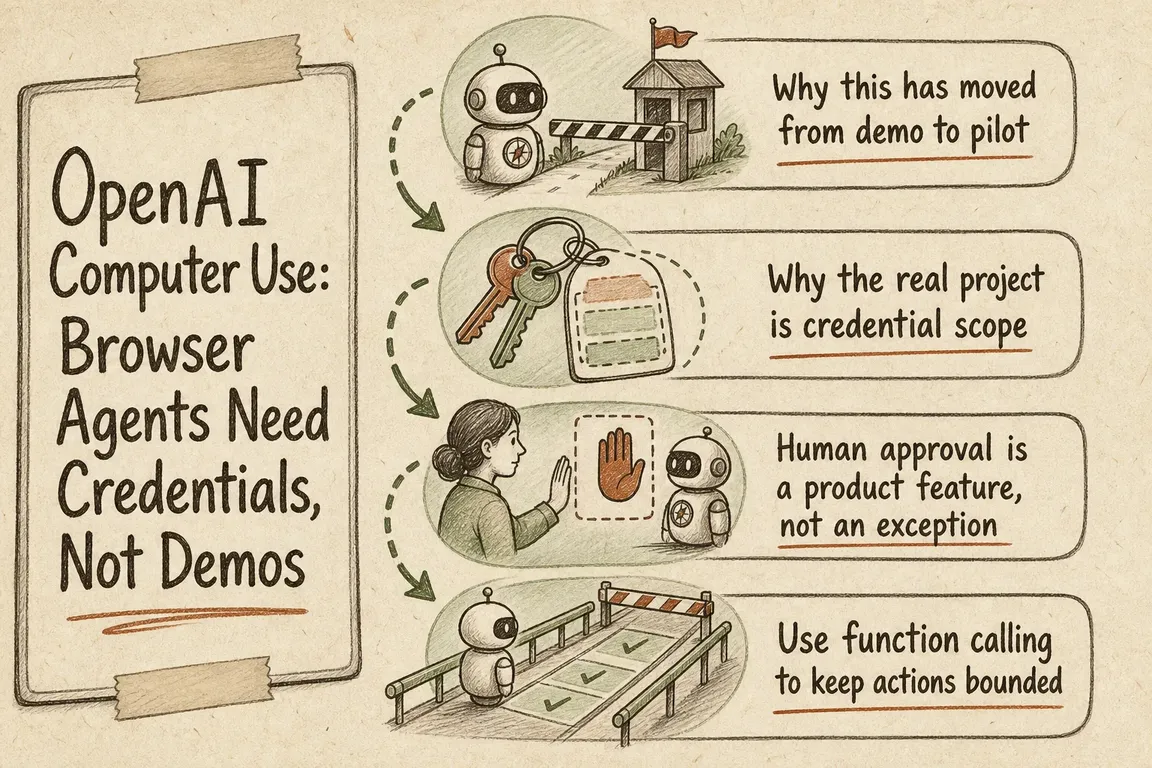
Start with a bounded task: collect order statuses from one portal, prepare a draft purchase request, or reconcile a defined set of records. Specify the inputs, expected result, exceptions, and person responsible for unresolved cases.
My starting recommendation is to check for a supported API first. If the interface is predictable, conventional Playwright or Selenium automation may be easier to maintain. Use an agent where interpreting changing screens or conditional steps adds enough value to justify the extra uncertainty.
| Situation | Starting approach | Acceptance check |
|---|---|---|
| A supported API covers the task | Direct integration | Validate the saved record |
| Stable pages and repeatable rules | Conventional browser automation | Detect missing fields and page changes |
| Variable screens requiring interpretation | Computer use with bounded tools | Verify the outcome independently |
| Payments, deletion, or external submissions | Automation with human approval | Approve the exact action before execution |
The implementation options have expanded. OpenAI documents ComputerToolset for screenshot-based actions, BrowserToolset for page text and browser controls, and a separate Agents API route for OpenAI-hosted browsers. Direct Responses API integrations can use code execution or structured computer actions; code execution remains the recommendation for GPT-6 Astra. See the computer-use guide. Agree who owns browser sessions, permissions, and cleanup before choosing an approach.
Separate API credentials from website access
There are two distinct identities: the workload calling OpenAI and the account signing into the target website. Solving one does not solve the other.
For the target system, use a dedicated account where supported, with access limited to the required records and actions. Separate development from production. Decide who handles multi-factor authentication, expired sessions, access revocation, and account recovery. An employee’s administrator login creates an avoidable dependency on that person.
For OpenAI API access, workload identity federation can exchange a trusted workload identity for a short-lived token mapped to a service account. It avoids storing a long-lived OpenAI API key in supported setups. It does not authenticate the agent to your supplier portal.
Keep secrets out of prompts, screenshots, and routine logs. For agency delivery, document account ownership and the handover process so the client can operate and revoke access independently.
Make approval specific enough to be useful
Use an isolated browser or desktop, restrict reachable sites and permitted actions, and treat page content as untrusted. A website cannot authorize a new task or expand the agent’s permissions. OpenAI’s safety guidance also treats entering sensitive information into a form as transmission: the approval boundary may come before the final Submit button.
For example, an order approval should show the supplier, items, quantities, total, delivery address, and account being used. Bind approval to those values. If they change, request approval again.
Define who receives the request, how long it remains valid, and what happens if nobody responds. These are operational decisions your team needs to make before rollout.
Put important changes behind narrow functions
Where an API or backend integration exists, expose specific operations such as create_order or change_access. Application code can validate the proposed change, check authorization, and record the outcome.
Preserve these useful implementation controls from OpenAI’s function-calling documentation:
- Set
strict: trueto enforce the declared argument schema. - Set
additionalProperties: falseon every parameter object and mark all properties as required; represent optional values with a nullable type. - Use
tool_choicewith an allowed-tools subset to constrain available operations. - Set
parallel_tool_calls: falsewhen you need at most one function call per turn.
A valid schema still needs business checks. A correctly formatted order can contain the wrong quantity or exceed the approved budget.
Plan for an uncertain result
Consider an order submission followed by a timeout. Repeating the click could create a duplicate. First inspect the portal’s order history or query its API; if the result remains uncertain, send the case to an operator.
Store durable job states such as queued, running, awaiting approval, completed, failed, and cancelled. Record the workflow version, account, approved values, and confirmation reference. Set time, step, and cost limits, with an accessible cancellation control.
OpenAI’s background mode supports asynchronous response generation with background: true and status polling. For a browser you operate, your application must separately preserve or recover the browser session.
If you use webhooks, verify signatures against the raw request body before processing. Deduplicate deliveries using webhook-id. Receiving a completion event should trigger outcome verification before marking the business task complete.
Give the pilot a clear finish line
Test ordinary cases alongside expired logins, changed pages, rejected approvals, and interrupted submissions. Measure cost per verified completion, elapsed time, exceptions, and human intervention. Include browser hosting and support effort in the operating cost.
Before handover, name the workflow owner, exception handler, and technical maintainer. An agency deliverable should include those responsibilities and recovery instructions alongside the automation.
If you are assessing a browser-agent project, Greg can help map the workflow, define credential and approval boundaries, and coordinate delivery across business and technical teams. Bring one candidate process and its awkward exceptions. Discuss your pilot with Greg.
Related on GrN.dk
- A Voice Agent Is Only Ready When the Human Handoff Works
- AI automations need a spend dashboard before the first runaway bill
- Browser Automation for Operations and Agency Teams: What Should You Automate?
Need help with this kind of work?
Discuss your browser-agent pilot with Greg Get in touch with Greg.