By Greg Nowak. Last updated 2026-10-16.
When a customer requests access to their personal data, the information needed for your response may be spread across several places: your WordPress webshop, a plugin and Microsoft 365. You need to find the information and keep track of which systems have been checked. Someone then needs to review what should be disclosed to the customer.
Could your business use this? nowa.dk sets up AI automation for Danish companies.
AI can help group text and flag possible personal data. How much it helps depends on the work surrounding the tool. If a data source is missing, or it is unclear who approves the response, text analysis will not solve the problem.
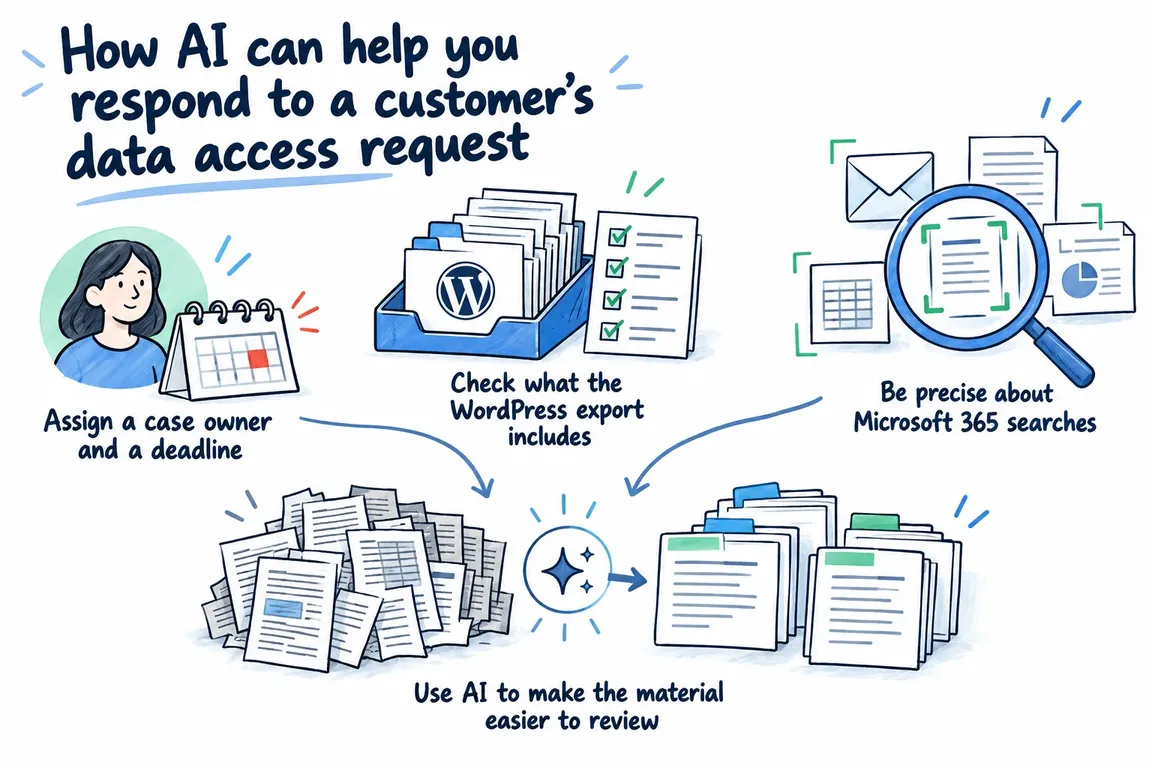
Assign a case owner and a deadline
According to the Danish Data Protection Agency’s guidance for small businesses, you must generally respond within one calendar month. This also applies if you refuse the request. Record the date received and the response deadline, and appoint an employee to see the case through.
You also need to establish the requester’s identity. Check who is making the request, but ask for ID only if absolutely necessary. Make this a separate approval checkpoint, so it is clear when the recipient’s identity has been confirmed and collection can continue under your procedure.
A simple case tracker can record the owner, status and next action. Whenever a case is marked as “pending”, record what is missing and who will follow up. Also agree who will take over during absences. Automatic reminders only help if a specific employee is responsible for acting on them.
Check what the WordPress export includes
WordPress documents an export function that allows plugins to register their own personal data exporters. The function uses the email address as its key. Being able to run an export is therefore not, in itself, evidence that data from all your plugins is included.
List the components that handle customer data. For each one, establish what information it stores, whether that information is included in the export, and how it can otherwise be retrieved. An unanswered question must remain an open task. Otherwise, the case owner risks approving a collection that looks more complete than it is.
If a plugin lacks export support, the documentation explains how a developer can add it. Then test the export by comparing known test data with what actually comes out.
Use separate statuses for “checked, no findings”, “data retrieved” and “not checked”. They mean three different things. Also retain a reference to the system and the specific record behind each finding, so the employee can return to the original during the review.
Be precise about Microsoft 365 searches
The Microsoft Graph API for subject rights requests can automate recurring tasks and searches in Microsoft Priva. Its documented scope covers Exchange Online, SharePoint Online, Teams chats and OneDrive for Business. Other systems and other areas of Microsoft 365 still need to be searched separately.
Before commissioning the integration, clarify the licensing, permissions and specific areas to be covered. Include them in the project brief. The phrase “Microsoft 365 connected” says too little about what the solution can actually access and search.
Require a result for each agreed area: completed, no findings or error. If a search fails, the case owner must receive a task to follow up. Gaps in coverage must be just as visible as the documents the search finds.
Use AI to make the material easier to review
One specific task for AI is to group the collected text by topic and flag passages that may contain information about other people. Every group and flag must be traceable to the original material. The employee must be able to check both the overview and the findings behind it.
Presidio Analyzer is one possible component for this analysis. The tool combines techniques including pattern matching, rules and named entity recognition models. It can be extended with custom detectors and support multiple languages.
Danish-language material requires testing with relevant language models and rules. Even when the tool correctly identifies a name, a judgment is still needed: does the name belong to the customer or to someone else? The employee must assess that in context.
Agree, therefore, that a flag means “review this passage”. Test both for information the tool misses and for incorrect flags. Use different types of text, and also review material that has not been flagged. Before putting the solution into operation, you must also decide where the analysis will run and who will have access.
| Step | The system can help with | The employee checks |
|---|---|---|
| Create a case | Recording the date, case owner and reminders. | Identity, the request and responsibility for follow-up. |
| Collect information | Retrieving data from agreed sources and displaying search and export errors. | Which sources have been checked and where answers are still missing. |
| Prepare the material | Grouping text and suggesting flags with references to the originals. | Findings, flags and unflagged material. |
| Approve the response | Assembling the material for review. | The content, additional information, the final file for disclosure and the recipient. |
Open the file the customer will receive
The Danish Data Protection Agency emphasises checking for information about other people. Information that needs to be removed must be removed in a way that prevents the recipient from recovering it. You must therefore check the final file for disclosure after editing. The analysis tool’s flags are suggestions for review and cannot serve as approval of the file.
The response must also include additional information covering matters such as the purposes of processing, the source of the information, retention, sharing, and the options for erasure and rectification. Include these points on the approval checklist alongside the material itself.
Consider splitting the review into two stages: first the content, then the final delivery package. In the final review, the employee opens the files, checks the recipient and looks for working notes or internal flags that may have been included unintentionally. Agree in advance who approves sending the response.
Commission a workflow you can test
A manageable first project is to map the data sources and build one continuous process from receiving the request to having material ready for review. Once that process is documented, you can choose where automation makes sense. Some steps can be handled with predefined exports. Others require text analysis or manual processing.
Through nowa.dk, Greg’s AI automation service for Danish companies, Greg can map data sources, investigate the coverage of the WordPress export and build missing export functions. Relevant Microsoft 365 features can be included once access and licensing have been clarified, alongside preparation of the material for human review.
Include failures in your testing: missing access, an export that fails, and flags that require closer assessment. The case owner must be able to see what has been checked, what is missing and where someone needs to make a decision. Use this as an acceptance criterion when commissioning the solution and assessing what is delivered.
Related on GrN.dk
- Jeg bygger AI-agenter til små virksomheder. Jeg mangler en, der kan sælge dem.
- Alt-tekster med AI: Sådan får webshoppen styr på billedbunken
- Opskriften er ændret: Kan AI finde de menukort, der skal rettes?
Need help with this kind of work?
Define your workflow for data access requests Get in touch with Greg.