By Greg Nowak. Last updated 2026-11-03.
When a quote request arrives in Outlook, the salesperson needs to see what the customer is asking for and take the next step. A useful CRM record brings together the contact person, job description, deadline and responsible salesperson, so the enquiry does not have to be pieced together from the inbox first.
Could your business use this? nowa.dk sets up AI automation for Danish companies.
This can be automated using an email trigger, AI to extract information and rules for creating records. But you also need to address the less straightforward enquiries: the customer already exists, the deadline is missing, or the email is a reply concerning a quote already in progress. For the business owner and operations manager, it therefore makes sense to measure the time spent creating records, the accuracy of the information and whether enquiries are followed up.
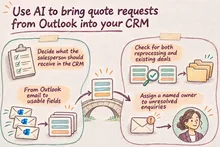
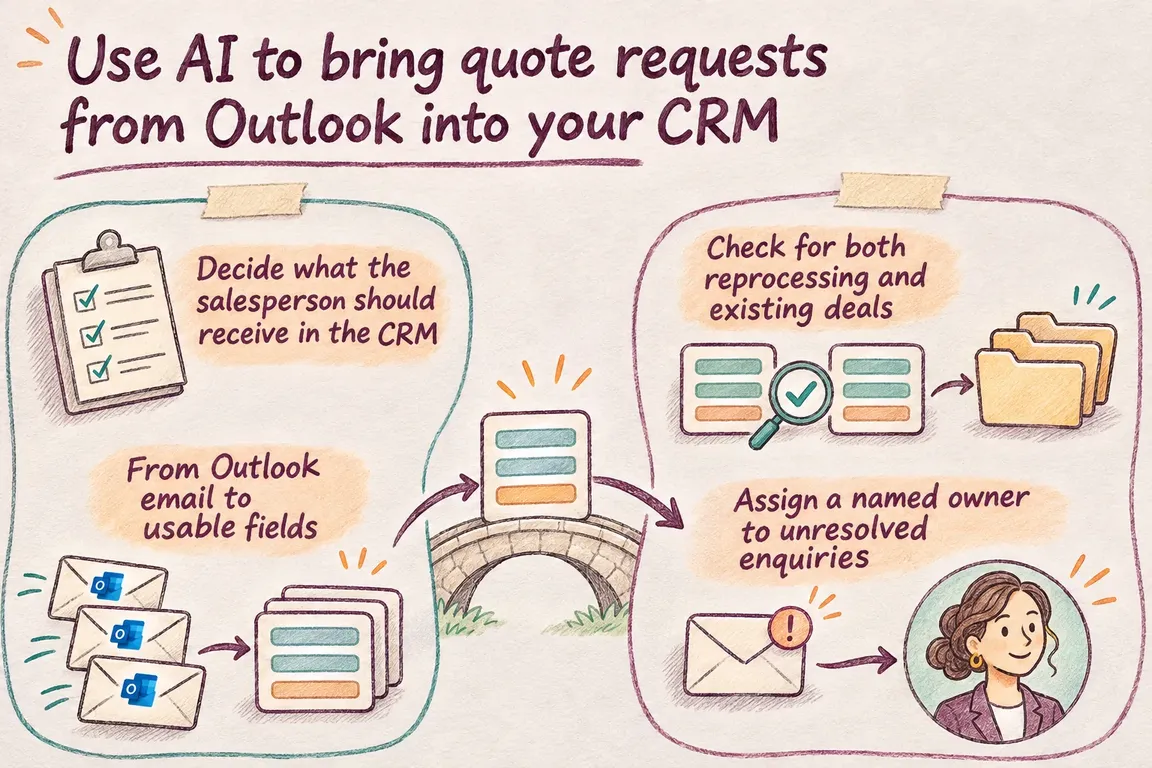
Decide what the salesperson should receive in the CRM
Before building the integration, choose how a quote request should be recorded. In HubSpot, for example, the quote itself can be tracked as a deal, while the contact is stored separately. Use one structure throughout the pilot and decide where each piece of information belongs.
Sales and operations need to agree on what makes a record usable. What needs to be in place immediately, what can wait, and who handles uncertain cases? A missing quote deadline does not have to prevent a record from being created. It can be the first thing the salesperson needs to clarify with the customer.
The customer's deadline and your own follow-up deadline need separate fields. The customer's deadline must be identifiable in the enquiry; the follow-up deadline can follow an internal rule. Otherwise, the salesperson may mistake an automatically assigned task deadline for a customer requirement.
From Outlook email to usable fields
n8n's Microsoft Outlook Trigger supports the Message Received event, which can start the workflow when a message arrives. The documentation describes several access options, including Outlook OAuth2 and access through a Microsoft Entra application. The choice needs to be settled during setup.
Start by defining which emails should be processed. These might be enquiries in a dedicated quote request inbox that meet agreed criteria. Also decide whether the first version will read only the email text. If essential information is in attachments, these require separate processing.
n8n's Information Extractor can extract structured information from the text using a schema you define. Fields can be described as attributes or using JSON Schema. One detail matters for setup: when the schema is generated from a JSON example, all fields become mandatory.
That does not mean the customer has actually supplied those details. Define how a missing value should be represented, and validate the result after extraction. The AI model must stick to the email's content. If a date or contact person is unclear, the enquiry must be able to move on to manual clarification without the model filling the gap with a guess.
| Information or check | What needs to be established | If there is uncertainty |
|---|---|---|
| Contact person | Do the name and sender match the existing contact? | Send for review if the sender and customer are different. |
| Job description | Have the deliverables, scope and any explicit caveats from the customer been preserved? | Have the salesperson clarify what the customer wants a quote for. |
| Customer's deadline | Does the date apply to the quote or to delivery? | Mark the customer's deadline as unresolved. Keep internal follow-up in a separate field. |
| The same email again | Has the message identifier already been recorded as processed? | Check the processing result before creating another record. |
| Existing deal | Is the email about a new job or a continuation of a quote already in progress? | Send uncertain matches for manual review. |
| Responsible salesperson | Who receives the enquiry under the rules for account ownership and assignment? | Have a named coordinator take over if no rule applies. |
Check for both reprocessing and existing deals
n8n's HubSpot node supports searches for contacts, companies by domain, and deals, as well as creating and updating these records. These functions provide the building blocks. You still need to decide when an enquiry should result in a new record.
Duplicate checking has two jobs. First, it needs to detect whether the same message has already been processed. One way to do this is to store the message identifier alongside the processing result. Second, it needs to check whether the enquiry concerns an existing customer or deal. Both checks need to be tested when the pilot is run again on the same emails.
A contact match alone is not enough to decide how to handle an enquiry. An existing customer may have a new job, while a new email in a thread may clarify a quote already in progress. Define which pieces of information, taken together, establish a reliable match.
Be specific about updates, too. If a salesperson has already clarified a field, a later email should not automatically overwrite it. When information conflicts, it is better to save a proposed change for review.
Assign a named owner to unresolved enquiries
A queue for manual clarification is part of the solution. It needs a fixed location, a responsible owner and a clear condition for when a record is considered fully processed. Without these, enquiries may simply end up waiting in a new queue instead of the inbox.
Missing customer information and technical errors require different responses. An unclear delivery deadline needs professional judgement or clarification with the customer. A failed CRM entry needs technical attention. Both must be visible, but responsibility does not have to sit with the same person.
Sales assignment can follow existing account ownership or an agreed product area. Where the rules do not provide an answer, a named coordinator takes over. AI can suggest a category based on the text; ownership should still be explainable through the rules you have agreed.
A CRM summary can help the salesperson move forward
HubSpot's guide, updated on 3 August 2026, describes the Summarize records action. It can summarise data from CRM records and associated records, allowing the result to be used in subsequent workflow actions. The guide includes the example of a contact summary handed over to a salesperson.
Plan the summary as a separate step after the record has been created. The extraction from the quote request email must first place the information correctly in the CRM. The summary can then give the salesperson an overview of the relevant CRM context. The salesperson must still be able to open the original enquiry and check the details.
The feature has requirements for the subscription, enabled AI settings and HubSpot Credits. If credits run out, the summary action fails and any outputs used become blank. The workflow must therefore be able to alert the salesperson to a new enquiry and allow it to be handled even when the summary is missing.
Test the solution on the emails you actually receive
A pilot can start with one inbox and a limited selection of your own enquiries. Include straightforward requests, replies in existing threads and emails with missing information. Agree on the correct result for each email in advance, so you have a shared basis for assessing the solution.
The time spent creating records must include review and corrections. Also record entries created in error, duplicates and relevant enquiries that reach neither the CRM nor the clarification queue. Fast record creation is only a benefit if the salesperson can use what has been recorded.
Acceptance criteria need to be in place before the results come in. Decide which fields must be correct, which errors must be resolved before going live, and who approves the assignment of enquiries to salespeople. You then have a concrete basis for deciding whether to expand the solution.
Through nowa.dk, Greg's AI automation service for Danish companies, Greg can deliver an integration with a defined scope from Outlook to your CRM, including AI extraction, duplicate checks, sales assignment and a queue for incomplete enquiries. A practical first step is to review your quote request emails and CRM fields with Greg. This provides the basis for a pilot that measures the time spent creating records and the number of overlooked enquiries using your own examples.
Related on GrN.dk
- Jeg bygger AI-agenter til små virksomheder. Jeg mangler en, der kan sælge dem.
- AI chatbot til hjemmeside: Hvad må den love kunden før booking?
- AI til Excel: Automatisér månedsrapporten med tal, du kan kontrollere
Need help with this kind of work?
Talk to Greg about an Outlook-to-CRM pilot Get in touch with Greg.