By Greg Nowak. Last updated 2026-11-16.
Before you increase AI-assisted publishing, take a few pages from your existing output and ask three questions. Who checked the claims? What does each page help a reader understand or decide? Who approved it? If you cannot find those answers, an editorial audit is a better use of the next budget than another batch of drafts.
Start with what you already have and follow the route from draft to published page. Once you know where checks happen and who owns them, you can make a more informed decision about which pages deserve further editorial work.
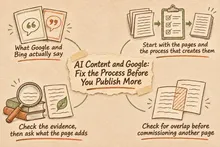
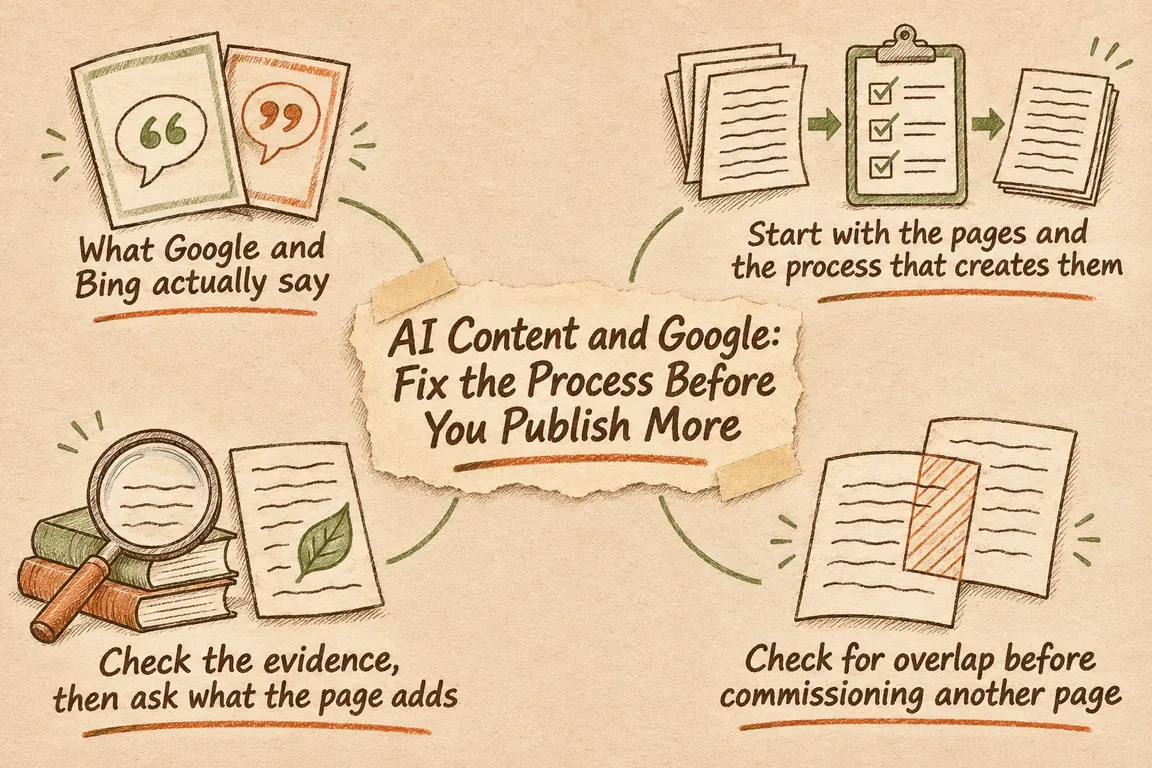
What Google and Bing actually say
Google’s guidance on generative AI content recognises its usefulness for research and structuring original material. It also warns that generating many pages without adding value for users may violate its scaled content abuse policy. Google explicitly calls for manual fact-checking and review before publication.
Bing’s Webmaster Guidelines identify large-scale automatically generated content without oversight, quality control, or editorial review as a practice that may lead to exclusion from indexing.
For a business running an AI publishing workflow, that means agreeing on what a useful, verified page looks like and giving reviewers clear criteria. A tick in an approval box tells you little unless someone has checked the evidence and the page’s contribution.
Start with the pages and the process that creates them
Build an inventory of generated or substantially AI-assisted pages, including unpublished drafts. For each one, record the URL or draft identifier, intended reader, main question, publishing status, creation method, sources, reviewer, and next review date. If you do not know something, mark it as unknown. Those gaps are part of the audit.
Trace the automation too. Which process creates each type of content? Where does it get its source material? Which account sends the result into the CMS, and can that account publish immediately? The answers show where an unchecked draft could become a public page.
If the backlog is large, start with consequential claims, commercially important service information, and batches built from the same template. Use what you find to decide where to inspect next. Sampling can help you organise the work, but each page still needs review before approval.
Give every reviewed page a decision: retain, revise, consolidate, or withdraw. Add a reason and an owner so the inventory becomes a queue someone can work through.
Check the evidence, then ask what the page adds
For each material claim, a reviewer should be able to open the evidence and see that it supports the wording. Check the conditions and limitations as well as the headline finding. A source about the general subject does not support a specific promise about your service.
Keep a source record with the draft. It should identify the claim, where the supporting evidence can be found, when it was checked, and any qualification that affects the wording. If evidence is missing, hold the page until the claim has been verified, narrowed, or removed.
Accuracy is one part of the review. A separate question is whether the page gives its intended reader something useful. Can they compare options, follow a documented procedure, or understand a technical tradeoff more clearly after reading it? Those are concrete contributions an editor can assess. If you use an example without a documented case behind it, label it as hypothetical.
Review the publication fields alongside the article. Google’s guidance also covers titles, meta descriptions, structured data, and image alternative text. An unsupported promise in a search description needs the same attention as one in the body copy.
Check for overlap before commissioning another page
Group pages by the question the reader is trying to answer. Different titles and target phrases can still lead to substantially the same article. Look for a distinct audience, decision, or substantive answer that gives each page a reason to exist.
Bing warns that the same or substantially similar content across multiple URLs reduces confidence in selecting a preferred version. It recommends addressing duplication at its source.
Use the inventory to decide which existing page should answer each question and where a separate page is justified. If consolidation makes sense, specify the useful material to keep and send the URL changes for technical review. Similar wording alone is not a good reason to delete a page.
Give reviewers a clear decision to make
This checklist can help turn review findings into assigned work. It is a proposed internal process, not a search engine scoring system.
| What the reviewer finds | Decision | What happens next |
|---|---|---|
| A material claim has no supporting evidence | Hold or revise | Verify the claim, qualify its wording, or remove it |
| The answer is accurate but offers little useful detail | Revise | Specify and add a contribution that helps the intended reader |
| Several pages substantially answer the same question | Assess consolidation | Select the main page, identify material to preserve, and review URL handling |
| The content and publication fields pass review | Approve | Record who reviewed the page and the decision to release it |
| A published page contains outdated information | Correct or withdraw | Assign someone to act and set an appropriate deadline |
Make WordPress permissions match the handoff
WordPress roles and capabilities give you a foundation for separating content creation from publication. By default, Contributors can write and manage their own posts but cannot publish them. Authors can publish their own posts. Editors can publish and manage other users’ posts.
Check the permissions of both people and automation accounts against their actual responsibilities. For standard posts, Contributor may be a useful starting point for an account that should create content without publishing it. Check your integration and content types before applying that role, because they may require different capabilities.
WordPress post statuses include draft and pending-review states. Pending content awaits publication by someone with the relevant capability. A workable sequence is to generate into draft, complete the evidence record, submit for review, and have an authorised editor approve publication.
Agree on the approval criteria separately from the permissions. Roles and statuses control the handoff; reviewers still need to know what to check. If the project needs source records, mandatory checks, or review reminders, include the implementation of those features explicitly in the scope.
Keep an owner after publication
When a page is approved, assign an editorial owner and a next review date. As an internal policy, bring forward checks for information that changes often or has a strong influence on a buying decision. Stable explanatory content can have a review interval suited to its subject.
At each review, check that the evidence still supports the wording and that service details remain correct. Look for newer pages that overlap with the original, then record the outcome and any action needed.
Unresolved factual issues, drafts waiting for review, recurring reasons for rejection, and overdue checks all tell you something about the workload. Use them to judge whether the team can handle more publishing. They are useful operational measures, though a well-run workflow does not guarantee search visibility.
Give the audit a clear implementation scope
A focused GrN.dk project could cover the page inventory, publishing permissions, review states, source records, and scheduled content checks. Greg could coordinate the editorial requirements and technical implementation, with clear responsibilities for content approval.
Define completion in terms you can test. Generated drafts should wait for review. Reviewers should be able to inspect the evidence. Publication should follow a recorded decision. Before expanding production, test how the workflow handles an unsupported claim and drafts that cover the same ground.
If your publishing pipeline needs this structure, discuss a defined audit scope with Greg. The work should leave you with a reviewable workflow and enough information to choose a publishing pace your business can maintain.
Related on GrN.dk
- Apache 2.4.68: What to Check Before You Call It Patched
- AI Meeting Notes: Who Owns the Work After the Call?
- Before Your AI Agent Issues a Refund, Add an Approval Step
Need help with this kind of work?
Discuss your publishing workflow with Greg Get in touch with Greg.