By Greg Nowak. Last updated 2026-11-11.
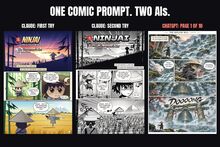
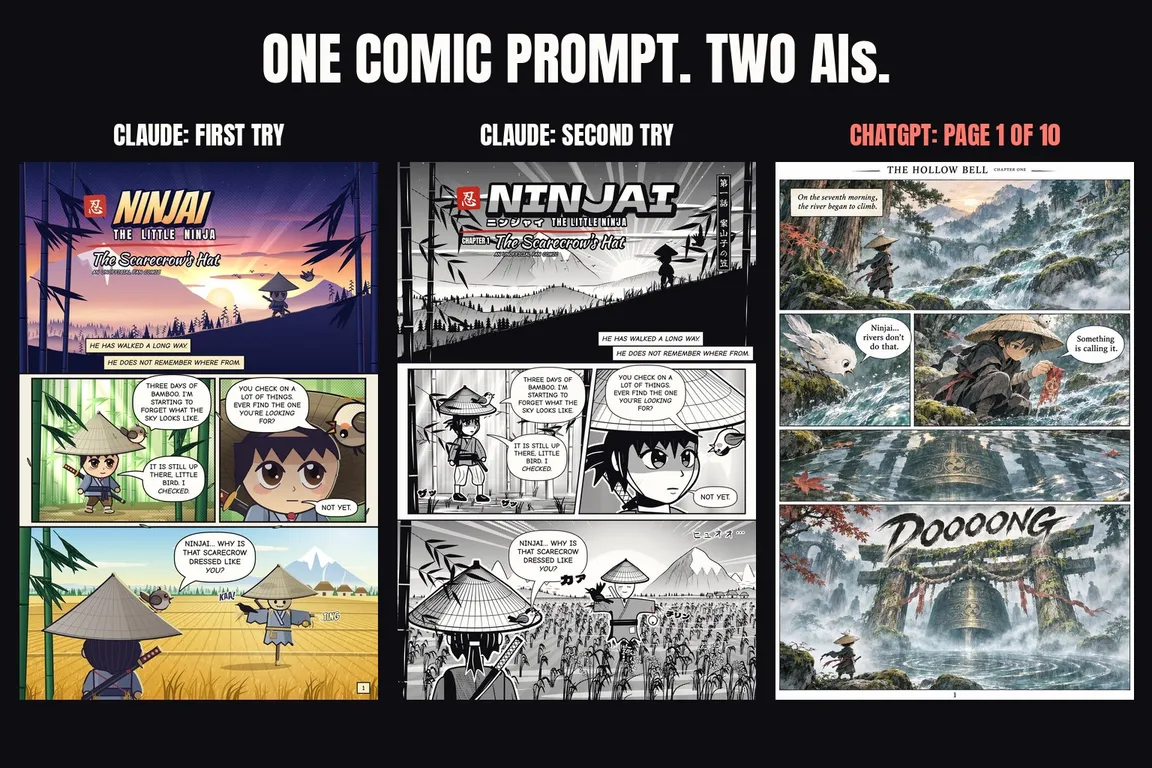
For this comic job, ChatGPT was the clear winner. On 10 November 2026, I gave Claude and ChatGPT the same prompt. ChatGPT produced a finished ten-page comic with detailed painted artwork. Claude produced two versions of page 1, drawn in code, plus a script for the remaining pages.
ChatGPT's artwork was better, and it delivered the whole comic. There is a reason Claude stopped after one page: I had asked it to wait for approval. That matters when judging the process, though it doesn't change the difference in illustration quality. Both results are in my Ninjai comic test log.
Here is the entire prompt:
Create an awesome comic 10 pages based on ninjai the little ninja. Start with page 1 for approval before you continue.
No style reference, story outline, tool or file format. Both tools had plenty of room to decide what I meant.
Claude built its own drawing system
Claude Fable 5.2 ran in Claude Code as an unattended agent on my server, picking up the work from a task card. There was no image generator in that setup. Instead, Claude wrote a small comic engine: about 1,000 lines of JavaScript drawing on HTML Canvas, rendered with headless Chrome.
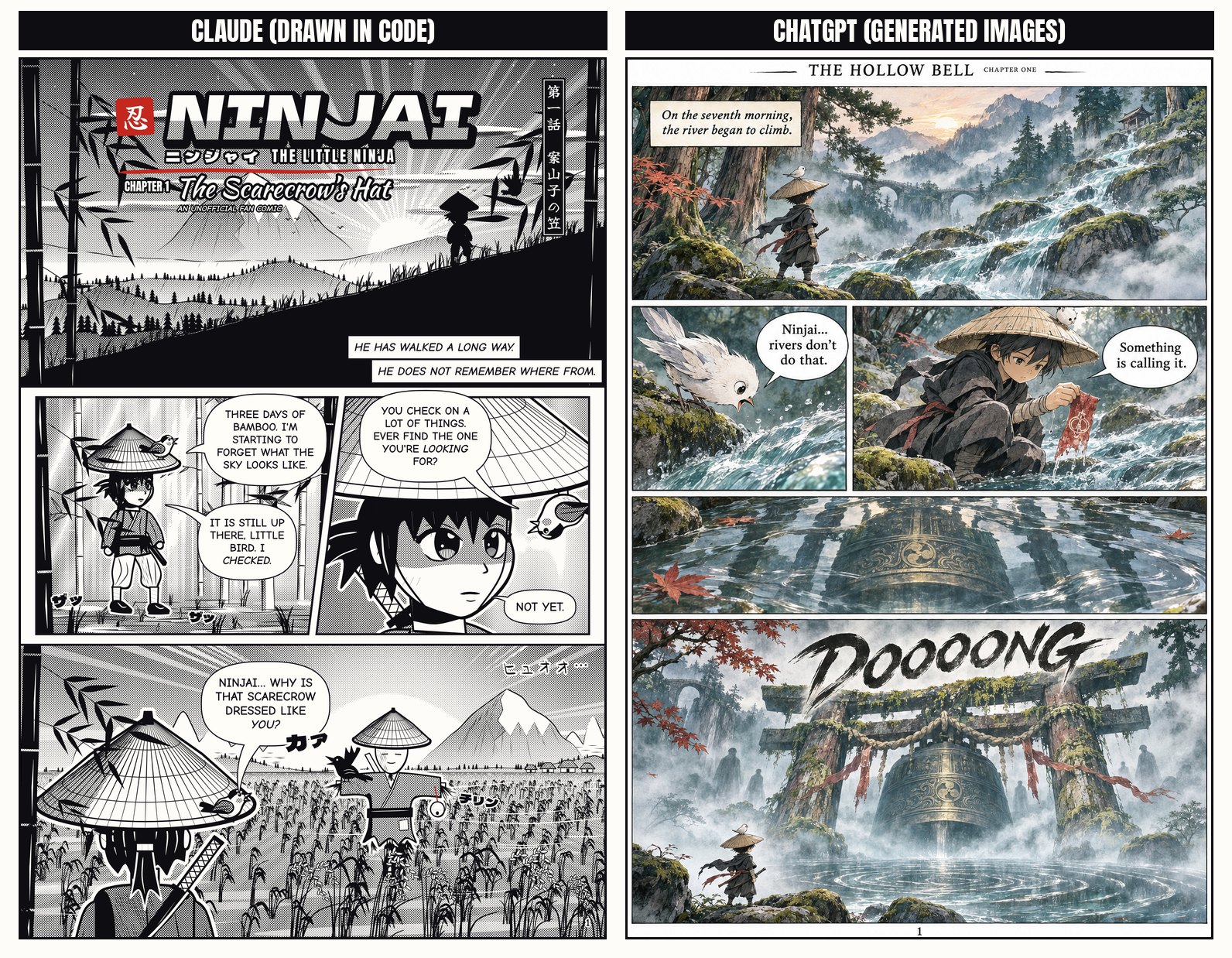
Its story, The Scarecrow's Hat, followed Ninjai and Little Bird out of a bamboo forest, where they found a scarecrow dressed like Ninjai. Page 1 arrived 30 minutes after the task started. The flat-colour artwork used figures built from simple shapes, and that construction was very visible.
I hadn't specified manga in the brief. Once I saw the page, my feedback was blunt: “The drawing style is just not enough manga. It looks like a 5 year old drew it…”
Claude returned a redraw 24 minutes later. It used black and white, tapered pen lines, dot screentone, a taller Ninjai and Japanese sound effects. The story and dialogue stayed the same. The page looked more recognisably like manga, but still had far less detail than ChatGPT's painted version.
Claude acknowledged the limits of drawing this artwork in code. It offered to use an image model and add the lettering afterwards. The log records no verdict on the redraw.
It also waited for approval, as requested. That approval never came. Pages 2 to 10 remained undrawn, although Claude had written a script covering all ten pages.
ChatGPT delivered all ten painted pages
ChatGPT's output was a 14.6 MB PDF titled Ninjai: The Hollow Bell - Complete 10-Page Comic. It contained ten finished full-colour page images, each with four or five panels. Speech balloons, captions, sound effects, a running header and page numbers gave it the feel of a finished comic. Page 10 closed with The End.
The story held together, too. A river begins to climb and a sunken bell tolls. Ninjai and Little Bird discover a girl who gave her name to the bell fifty springs earlier to save her village from a flood. Little Bird sacrifices its song to help her recover that name, Aki. At dawn, she returns to the village and an old man's waiting arms.
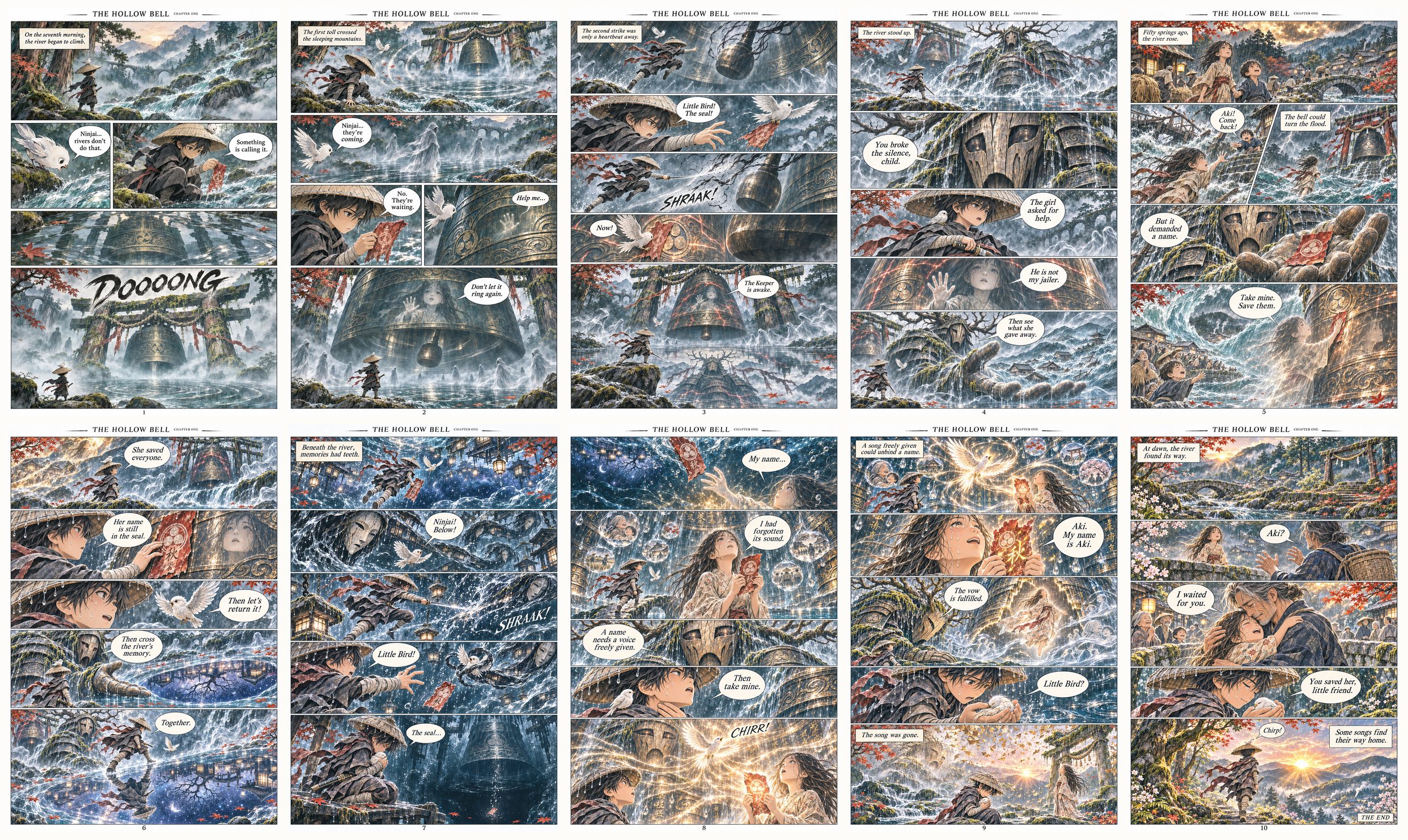
Ninjai kept his straw hat, dark clothes and red sash throughout, with the small white bird alongside him. On the four pages checked closely for the log (1, 5, 8 and 10), the lettering was clean and correctly spelled. Most pages used wide panels stacked vertically.
The page images measured 1024 x 1536 pixels. That was fine for viewing on screen, but small for print.
There are gaps in the record. The log doesn't identify ChatGPT's model or settings, elapsed time or message count. It also doesn't establish whether ChatGPT paused after page 1.
What each setup actually delivered
| Detail | Claude Fable 5.2 in Claude Code | ChatGPT |
|---|---|---|
| Artwork method | JavaScript on HTML Canvas, rendered with headless Chrome. No image generator was available. | Generated images. |
| Deliverable | Two versions of page 1 and a written script for ten pages. | Ten finished colour pages in one 14.6 MB PDF. |
| Timing | First page after 30 minutes; redraw 24 minutes after feedback. | Elapsed time not recorded. PDF on my server at 00:00 UTC on 11 November 2026. |
| Page dimensions | 2000 x 3000 pixels. | 1024 x 1536 pixels. |
| Verdict recorded in the log | First version: drawing style insufficiently manga. Redraw: no verdict recorded. | No verdict recorded. |
Check what the proposed setup can produce
The available tools explain much of the gap. OpenAI's ChatGPT documentation describes image generation and editing, with availability and usage limits depending on the plan and workspace settings.
Anthropic's documentation says Claude does not generate photos or illustrations in the way image-generation tools do. It can create diagrams, charts and visuals using HTML and SVG. In this test, it chose JavaScript and Canvas.
Claude's approach had useful properties. Individual elements could be changed, and the page rendered identically each time at 2000 x 3000 pixels. But those properties didn't supply the illustration quality the comic needed. A larger image wasn't enough.
For a commissioned project, ask to see a sample made with the setup that will do the work. Look at the artwork and lettering, then check the dimensions and export format. Confirm that the necessary tool is available in the account or environment being used. Knowing the product name doesn't answer those questions.
The brief left too many decisions open
“Awesome” gave neither tool much to work with. I wanted a stronger manga style, but only said so after Claude had spent 30 minutes producing a page. The prompt left the visual treatment, story and delivery format up to the tool.
On a business project, those are decisions to make before production starts. The brief should name the audience and intended use, include visual references, and specify page dimensions and required files. It should also explain what you need to see before approving the sample. A screen preview and a print file call for different checks.
The approval instruction needed an owner as well. Someone has to review the sample, say which parts they are approving and decide what happens while the work is waiting. Claude followed my instruction to stop. My comment on the style gave it feedback; it didn't authorise the remaining nine pages.
This is useful work for a freelance digital project manager: turn a loose request into a workable brief, check that the tools can deliver it and make sure approval decisions reach the person doing the work. Those details belong in the project plan.
How much can you conclude from this test?
There was one run per tool, using one prompt on one day. The setups differed, Claude had no image generator, and it never drew pages 2 to 10. I would choose ChatGPT for this comic job based on what it delivered. This run doesn't establish a universal ranking.
It doesn't remove the need to check the output, either. OpenAI's image generation API guide documents image generation as a built-in tool, along with known limitations involving precise text, recurring characters and composition. The successful pages here don't make those limitations disappear. Every page still needs review before you accept it as a business deliverable.
If you're commissioning creative work with AI, I can help define the deliverables, select suitable tools and organise approvals so the project can move forward.
A disclosure on how this article came together: my article pipeline, which runs on OpenAI Codex, drafted it from a test log compiled by Claude. Both sides had a hand in the write-up.
Ninjai: The Little Ninja was created by The Ninjai Gang. Both comics are unofficial, non-commercial fan pages.
Related on GrN.dk
- Give an AI Agent Its First Job on a Simple Task Board
- Apache 2.4.68: What to Check Before You Call It Patched
- Before an AI Assistant Issues a Refund, Put Approval in Its Path
Need help with this kind of work?
Get a digital project manager for your AI creative project Get in touch with Greg.