By Greg Nowak. Last updated 2026-11-08.
You want to change a button on your website. The wording is agreed, and the contact page already exists. Someone still has to find the button, make the change, check it and let you know what happened.
Could your business use this? nowa.dk sets up AI automation for Danish companies.
That is a manageable first job for an AI agent. On board.nowa.dk, you describe the work in ordinary language and follow it through four columns: Todo, Working, Waiting and Done. One small change gives you something concrete to assess before you commit more work.
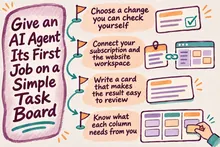
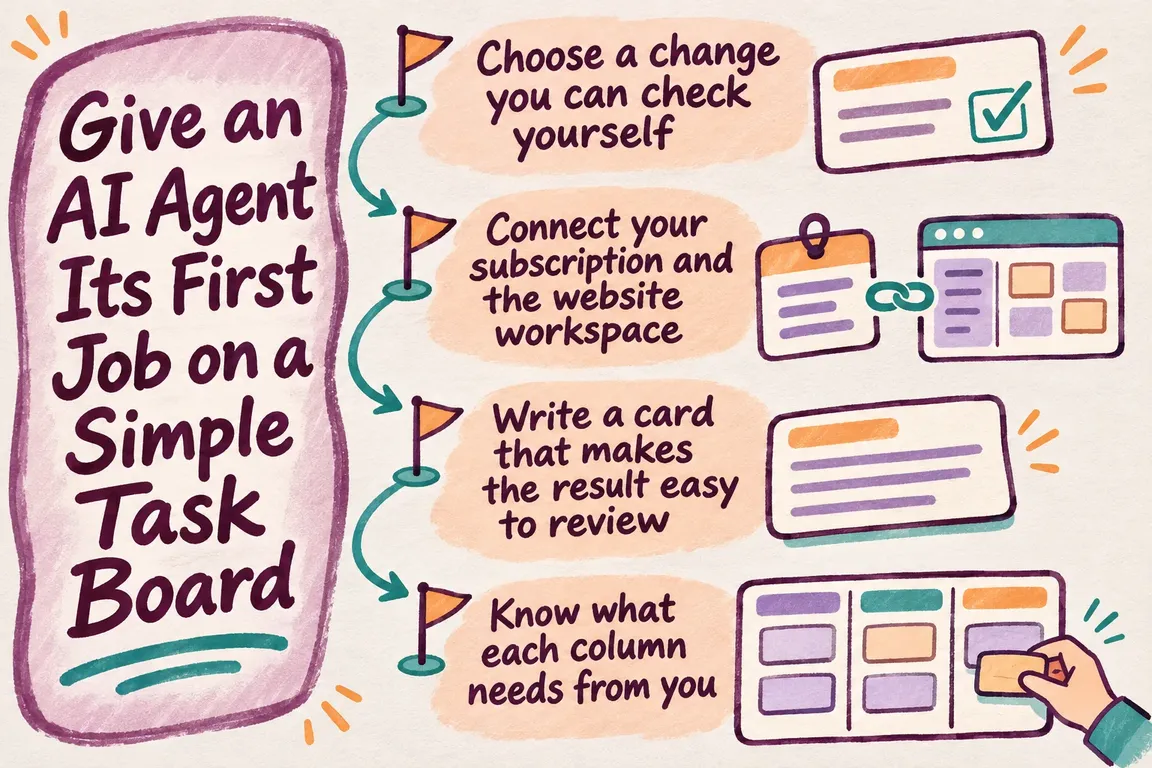
Choose a change you can check yourself
Take a hypothetical homepage task: replace the main button label, “Learn more”, with “Request a callback”, and link it to your existing contact page.
You can check that result yourself. Open the homepage, read the label and follow the link. By comparison, “make the website more effective” leaves the agent to interpret both the problem and what would count as a good result.
The first task also tells you something about working together. Can you explain the change clearly? Can you understand and answer the agent’s questions? Does the finished work give you enough evidence to approve it?
The GOV.UK guidance on alpha delivery recommends building only enough to test important assumptions before committing further. For this trial, the useful principle is to test the workflow with one contained change before handing over a long backlog. It is a small working trial; there is no need to treat it as a formal government-style alpha project.
Connect your subscription and the website workspace
Sign up at app.nowa.dk and connect your own ChatGPT (Codex) or Claude subscription there. Your board then waits at board.nowa.dk, where you describe the work on a task card. A new account starts with a small starter app and five short lesson tasks, so you can practise on that before you touch your real website.
Before you queue that card, establish which website workspace the agent will use and how you will receive the result. Your AI subscription and access to the website work are separate parts of the setup. Whoever manages your website may need to help with the connection.
NOWA’s services include agents that work from a task queue, as well as implementation and ongoing operation of business automations. For your first task, check whether the agent has the access and context needed to make this particular change.
Write a card that makes the result easy to review
A useful card does not need to be long. It needs to identify the change, set its boundaries and explain how you will judge the result.
Title: Change the homepage button to “Request a callback”.
Task: On the homepage, change the main “Learn more” button to “Request a callback”. Link it to our existing contact page. Use the current button design and keep the surrounding text and layout.
Completion checks: Show the updated button on a desktop and a narrow mobile screen. Check that it opens the intended contact page. Summarise what changed and which checks you completed. If you cannot identify the right button or destination, ask before choosing.
Publishing instruction: Prepare the change for my review before publication.
Use the actual page and destination in your own card. If the homepage has several “Learn more” buttons, identify the one you mean by its position or a nearby heading. That small detail can save a round of questions.
OpenAI’s guidance on Goals in Codex emphasises a defined outcome, evidence you can inspect and constraints that remain intact. It also says a normal prompt suits a simple edit. Those principles make a useful task card without requiring a complex Goals exercise for a button change.
Know what each column needs from you
The agent takes the top Todo task and works on one task at a time in a private workspace. Put your trial at the top of the queue so its priority is clear.
As the card moves across the board, your role changes:
| Column | What it tells you | What to check or do |
|---|---|---|
| Todo | The change is queued. | Confirm the button, replacement wording, destination and review-before-publication instruction. |
| Working | The agent is making the change in its private workspace. | Keep the requested outcome stable. State any necessary correction clearly. |
| Waiting | An answer, access or a decision is needed. | Read the specific blocker and provide what is missing. |
| Done | The agent reports that the task is complete. | Check the label, link and mobile result against the card. Confirm whether the change is awaiting review or is public. |
Answer the question that is holding up the task
Suppose the agent finds two possible contact pages. If they serve different audiences, choosing between them needs your business knowledge. A reply such as “Use the general contact page linked from the main navigation” gives the agent a clear decision.
Keep that reply focused. Adding a homepage redesign at this point changes the job while the original question is still open. Give the redesign its own card so you can consider its scope and priority separately.
Anthropic’s research on agent autonomy found that Claude Code asks for clarification more often as tasks become more complex. The researchers also caution that stopping does not prove an agent has chosen the right moment to ask. The findings support making room for human intervention, but they do not establish how this particular board will perform.
A Waiting card makes an unresolved decision visible. Read the question itself and answer it precisely, rather than assuming the status tells you everything you need to know.
Review the work, then decide what comes next
When the card reaches Done, open the original request alongside the result. Read the button label, follow the link and inspect the narrow-screen version. Look through the agent’s report for checks it could not complete. Anything unverified remains an open point.
Also confirm where the change exists. Is it in the review workspace, or on the public website? The example card asks for review before publication, so publishing requires a separate decision. Agree that handover explicitly with whoever operates the site.
Then consider whether the process helped. Did you spend less effort coordinating the change? Were the questions understandable? Could you verify the result without reconstructing the agent’s work? Your answers give you a practical basis for choosing its next task.
Greg at GrN can help you choose a suitable first website change, clarify the setup and write a card with clear completion checks. Bring one change you already want made, and use it to establish how requests, questions and reviews will work.
Related on GrN.dk
- Apache 2.4.68: What to Check Before You Call It Patched
- Who Can Read That Answer? Permissions for Internal AI Search
- Your AI Workflow Runs on One Person’s API Key. Now What?
Need help with this kind of work?
Get help with your first agent task Get in touch with Greg.