By Greg Nowak. Last updated 2026-11-05.
A meeting recap can look complete while leaving the next step unclear. “Follow up on the website” gives an agency or operations team very little to work with. Someone still needs to agree what will be delivered, who is responsible, when it is due, and where progress will be tracked.
Microsoft’s Facilitator documentation draws a distinction worth checking before you build a process around it: collaborative live notes are generally available, while task tracking integration with Planner remains in public preview. The handoff needs its own review process, even when the software can create tasks.
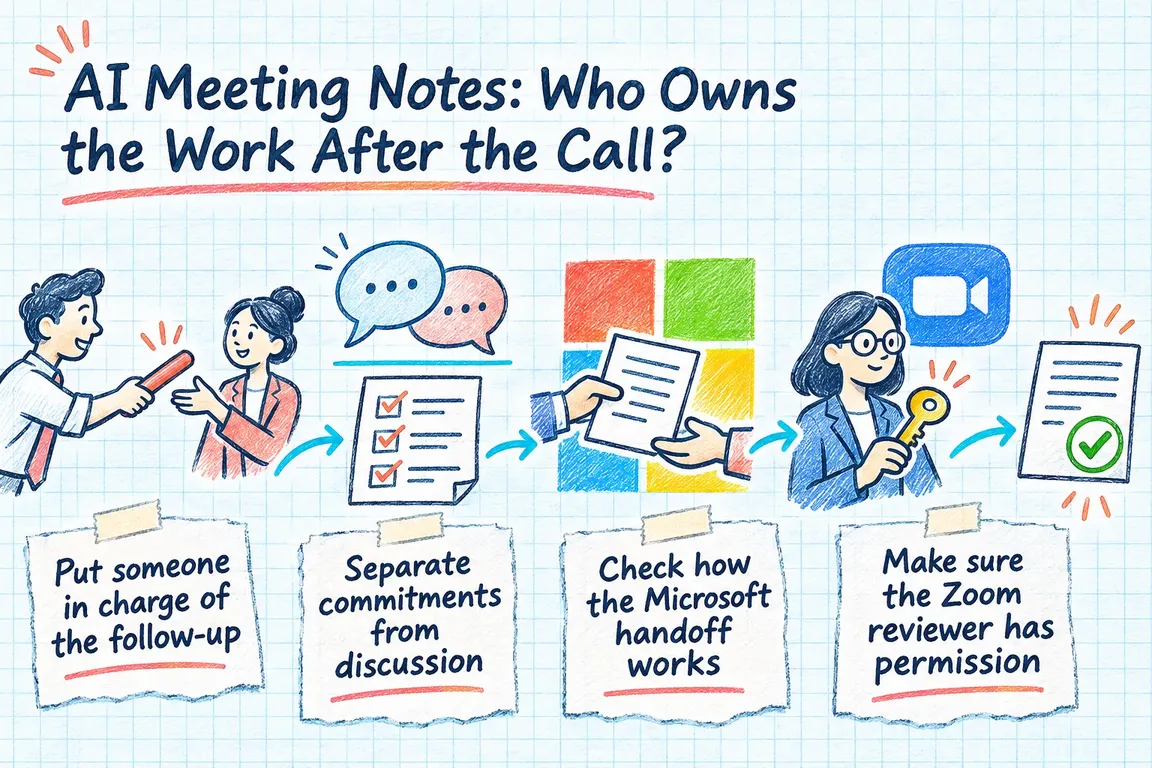
Put someone in charge of the follow-up
Name the person who will review the meeting’s output and make sure accepted actions reach the right place. That might be the project manager, meeting chair, or operations lead. They need to resolve unclear wording and outstanding assignments before those gaps disappear into the recap.
This responsibility is separate from doing the work. The reviewer might coordinate five actions and deliver only one. Each task still needs one accountable owner, even when several people contribute.
Agree when that review happens. Reviewing the recap before sending the final follow-up is a practical starting point, with unresolved assignments settled before the next planning checkpoint. Fit the timing to the meeting rather than giving every team the same arbitrary deadline.
Separate commitments from discussion
Read proposed actions against what was actually discussed. Was there an agreement to proceed, an unanswered question, or simply useful background? Only confirmed commitments should go straight to assignment. Send unclear items back to the relevant participant.
The wording should make sense to someone who missed the call. For example, “Send the revised homepage copy for approval” describes an output and a completion condition more clearly than “follow up on the website.” The detail will depend on what the team agreed.
Ask the proposed owner to accept responsibility and confirm the timing. Record any approval dependency. If nobody agreed a date, leave the action awaiting scheduling. A requested deadline and a deadline the owner has accepted need to remain distinguishable.
| Check | Ready to proceed when… | If something is missing |
|---|---|---|
| Decision | The agreement to proceed is clear. | Ask the relevant participant to clarify. |
| Deliverable | The output and completion condition are specific. | Rewrite the action with the requester. |
| Owner | One accountable person has accepted it. | Leave it awaiting assignment. |
| Timing | An agreed date or explicit scheduling status is recorded. | Request confirmation; keep requested dates distinct from commitments. |
| Existing work | The reviewer knows whether to create a task or update one. | Check the tracker before creating anything. |
| Handoff | The destination task has been checked and linked back to the action. | Keep the handoff visible for follow-up. |
Check how the Microsoft handoff works
Facilitator’s preview integration and the separate meeting-notes task-list workflow need to be assessed separately. Microsoft’s task-list guidance explains that lists added to meeting notes create and synchronise with a Planner plan. Users can edit titles, assignees, and due dates in the notes. Richer task features require opening Planner.
Two details affect how you manage that plan. Moving a task out of its synced bucket removes it from the meeting notes, although it remains in the plan. Plans created through these task lists also have no plan owner, and any member can delete them.
Decide whether a plan created for a meeting is the right home for ongoing project work. Give someone operational responsibility for it, recognising that this does not create a platform-level plan owner. Test what people can see after tasks move, and agree where the team will check status. While evaluating a preview-based handoff, keep a documented manual route available.
Make sure the Zoom reviewer has permission
The person reviewing a Zoom recap needs the right account permissions. The Zoom Meetings release notes document May 2026 support for hosts and summary owners to resend summaries with an adjusted recipient list. June 2026 changes added account and group controls that can prevent hosts from editing or deleting their summaries.
Check that your nominated reviewer can correct the summary and distribute the reviewed version under your settings. If editing is restricted, agree an approved place for corrections and accepted actions, then tell recipients where to find them.
Check distribution separately: who should receive the recap, and who needs access to the tasks? Receiving a summary does not establish that someone has accepted the work assigned to them.
Connect to the tracker the team already uses
If delivery is managed in an existing project tracker, assess whether approved actions should go there directly. Write down the field mapping first: the reviewed action supplies the task title, the confirmed owner supplies the assignment, the agreed date supplies the deadline, and the decision context supplies supporting detail. Specify the destination project too.
Asana’s Create a task reference documents creation through a POST request, requires the tasks:write scope, and explains workspace selection. A task’s workspace cannot be changed once set, so validate the destination before submitting it.
The integration also needs a way to handle uncertain results. Retain a reference for each approved action and record the resulting task identifier. If a submission’s outcome is unclear, check whether it created a task before retrying. Do not assume the creation endpoint prevents duplicates.
Give failures a named owner. The Asana reference distinguishes successful creation from authentication, permission, malformed-request, and server errors. Failed or uncertain handoffs should stay visible until someone resolves them. Mark an action as handed over only after checking its destination record.
Check recurring actions against existing work
Before creating a task, compare the action with the project’s current work. A recurring meeting may have changed an existing commitment’s scope, deadline, or dependency. In that case, propose an update to the existing task and ask the responsible person to confirm it.
Similar wording alone is a weak match. Compare the deliverable, project, owner, and previous meeting reference. Send uncertain matches for review, and keep a record of changes so people can see why a commitment moved.
At the next meeting, review the destination tasks. The recap provides context; the agreed tracker holds the delivery status. Use that record to discuss completion, blockers, and any revised commitments.
Start with one recurring project meeting
A focused GrN engagement could follow one recurring meeting from discussion through task acceptance. Greg could review the available native handoff, configure a suitable route, and build an API integration where the existing tracker requires one.
The scope could include a task-field mapping, clear review responsibilities, rules for reconciling existing tasks, an exception-handling process, and a walkthrough using the chosen meeting. The acceptance check is specific: every approved action has a confirmed owner, an agreed deadline or scheduling status, and a verified destination record.
Bring GrN one recurring meeting and the tracker your team already uses. That gives Greg a concrete starting point for working through the gaps in your follow-up.
Related on GrN.dk
- Your AI Workflow Runs on One Person’s API Key. Now What?
- Apache 2.4.68: What to Check Before You Call It Patched
- AI Invoice Processing: Catch the Errors Before They Reach Your Books
Need help with this kind of work?
Discuss your meeting-to-task workflow Get in touch with Greg.