By Greg Nowak. Last updated 2026-11-15.
An AI agent can find a payment, gather the relevant support details and prepare a refund proposal. Before that proposal becomes an instruction to move money, a person should approve the exact payment and amount.
The sequence is straightforward: retrieve the payment, calculate the permitted refund, show the proposal to a reviewer, then validate it again before execution. The work is in deciding what happens when someone rejects it, nobody responds or the payment changes while approval is pending.
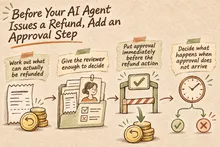
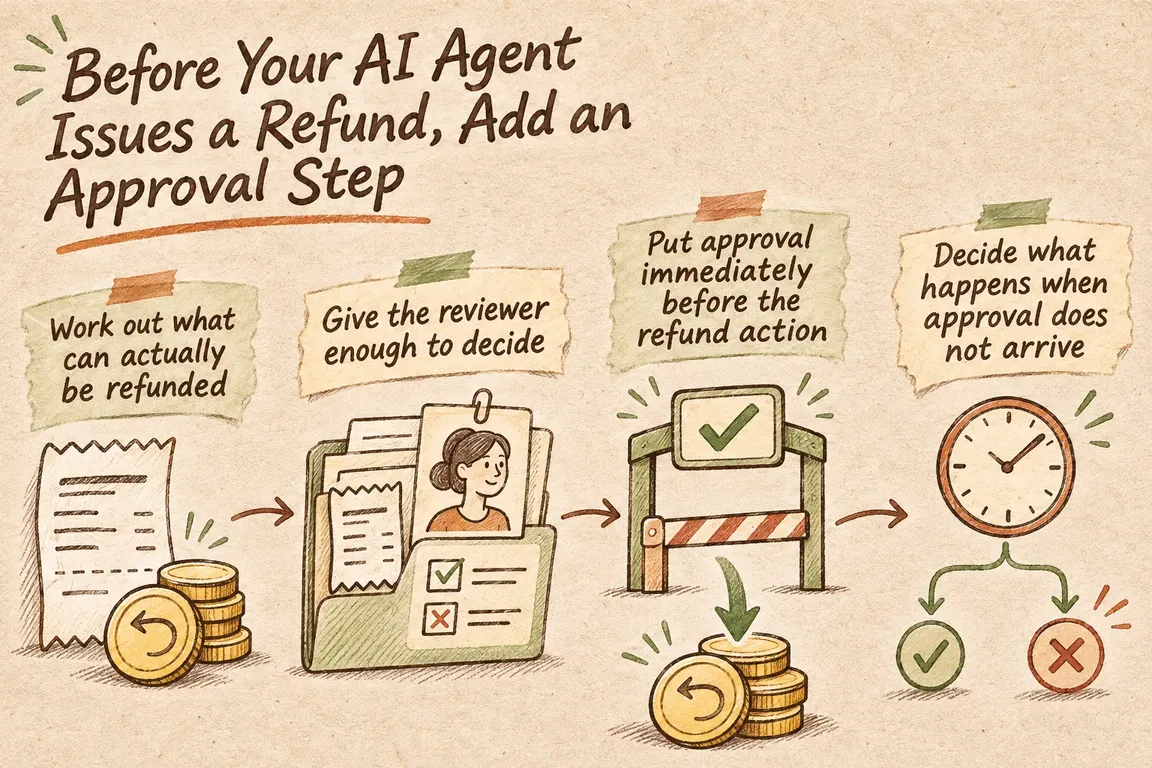
Put approval immediately before the refund action
n8n’s March 2026 Production AI Playbook on human oversight describes approval gates that pause a proposed tool call before it runs. Reviewing a drafted customer reply and authorising a financial action carry different responsibilities. Your workflow needs to make that distinction explicit.
According to the n8n tool review documentation, reviewers can inspect the tool and its proposed parameters. Approval allows it to execute with those inputs; denial cancels the action. You can apply review to selected tools, giving payment lookups and refund execution different controls.
For refunds, put the gate around a narrowly defined refund operation. The approval request must show the same payment and amount that operation will receive. Approving a customer-service response should never also authorise an unspecified refund.
Work out what can actually be refunded
First, resolve the customer’s request to a specific payment record. If there is more than one possible match, ask for clarification or send the case for manual handling. The customer’s description gives you something to investigate; it does not establish which transaction should be refunded.
Stripe’s refund documentation allows partial refunds and multiple refunds against a charge, as long as the total does not exceed the original charge amount. An uncaptured PaymentIntent with the status requires_capture must be cancelled rather than refunded directly.
Use fixed workflow logic to calculate the proposed amount. Check what the customer requested, what your refund policy permits and how much remains available to refund. A payment can be technically refundable while the request falls outside your policy.
The reviewer should be able to follow that calculation. Show the original payment, previous refunds, requested amount and proposed amount. Where policy information is missing or contradictory, route the case for manual handling. Asking the model to fill that gap leaves the financial decision resting on an assumption.
Give the reviewer enough to decide
A reviewer should not have to reconstruct the support conversation to understand the proposal. Include the customer and order reference, payment identifier, currency, exact refund amount, reason and policy basis. Say whether this is a full or partial refund.
Separate the customer’s stated reason from the agent’s interpretation. Payment records, customer requests and the workflow’s recommendation should each be recognisable for what they are.
Store the proposal under a unique reference and bind approval to that version. Preserve the reviewed parameters through execution; the agent should not generate a fresh amount after approval. If the reviewer wants a different amount, create a revised proposal and have that version approved.
Decide what happens when approval does not arrive
An approval button covers only one part of the process. Before connecting the refund operation, define how the workflow handles each outcome. This table is a recommended operating model for the integration, including waiting, expiry and the result returned by the payment provider.
| State or event | Required action |
|---|---|
| Waiting for review | Keep the proposal pending. Do not call the refund operation. |
| Reviewer rejects | Close the proposal, record the decision and prevent automatic resubmission. |
| Approval expires | Block execution, including late approval clicks. Escalate the case or prepare a fresh proposal. |
| Approved and validation passes | Execute the exact approved proposal once. |
| Relevant payment details change | Stop execution and present an updated proposal for review. |
| Refund is pending or fails | Track the provider’s outcome and assign follow-up to an owner. |
n8n’s playbook describes time limits and separate branches for approved, rejected and timed-out reviews. Choose an expiry that fits your support operation, then implement it in the review mechanism or surrounding integration. Check what your chosen setup provides; the full approval lifecycle is not something to assume.
A rejected proposal should not automatically return to the reviewer. An expired proposal should stay expired even if someone clicks an old approval link. In both cases, someone still needs to own the customer’s unresolved request.
Check the payment again after approval
Another support colleague may have acted while the proposal was waiting. Retrieve the current payment state before execution and compare it with the stored proposal. Check the payment identity, remaining refundable amount and any other relevant conditions that have changed.
If the proposal is no longer valid, stop and prepare an updated version with the changes visible. Silently reducing the refund would mean executing an action the reviewer never approved.
Duplicate and concurrent executions also need explicit handling. Two executions can pass a final lookup at the same time, so that lookup alone is insufficient. Give each proposal a controlled execution state. If the provider’s response leaves the result uncertain, reconcile it before trying again.
Enforce financial permissions in the integration
OWASP’s Excessive Agency guidance identifies excessive functionality, permissions and autonomy as causes of damaging agent actions. It recommends narrowly scoped tools, minimum permissions, human approval for consequential actions and authorisation enforced in downstream systems.
For this workflow, give the agent access to a purpose-built refund operation. A general payment administration tool would expose more functionality than the task requires. Before making the financial request, the operation should verify the reviewer’s authority, the proposal’s validity and the amount limits. Credentials belong inside the integration.
The prompt can explain the process and tell the agent what to do after rejection. Execution code must enforce those rules even when the agent proposes an unsuitable action.
Follow the refund through to its outcome
Approval does not mean the customer has received their money. Stripe refunds use the available balance. Insufficient funds can leave card refunds pending, while refunds for other payment methods fail. Cancellation of an issued refund is limited, so the recovery plan cannot depend on undoing it later.
Stripe documents refund events and recommends verifying webhook signatures. Use those events to update the support record. Customer communications should distinguish between human approval, submission to Stripe and the refund’s subsequent status.
Before launch, test rejection, expired approvals, changed payment state, repeated approval attempts and pending or failed refunds. For every exception, agree who receives it and what information they need to resolve the case.
Greg could build this as a scoped n8n workflow or API integration, including the review message, validation rules and exception handling. A useful starting point is one clearly defined refund process with agreed acceptance criteria: the exact approved action executes, stale proposals stop, and every unresolved outcome has an owner.
Related on GrN.dk
- Your AI Workflow Runs on One Person’s API Key. Now What?
- Apache 2.4.68: What to Check Before You Call It Patched
- Give an AI Agent Its First Job on a Simple Task Board
Need help with this kind of work?
Discuss your refund approval workflow Get in touch with Greg.