GrN.dk

Main navigation

  • Articles
  • Cases
  • Contact
  • Your Digital Project Manager
  • About Greg Nowak
  • Services
  • Container
    • Excel Freelancer
    • Kubuntu - tips and tricks
    • Linux Apache MySQL and PHP
    • News
    • Image Gallery
User account menu
  • Log in

Join my community / free newsletter — sign up here

Breadcrumb

  1. Home

Your AI Agent Has Shell Access. What Can It Reach?

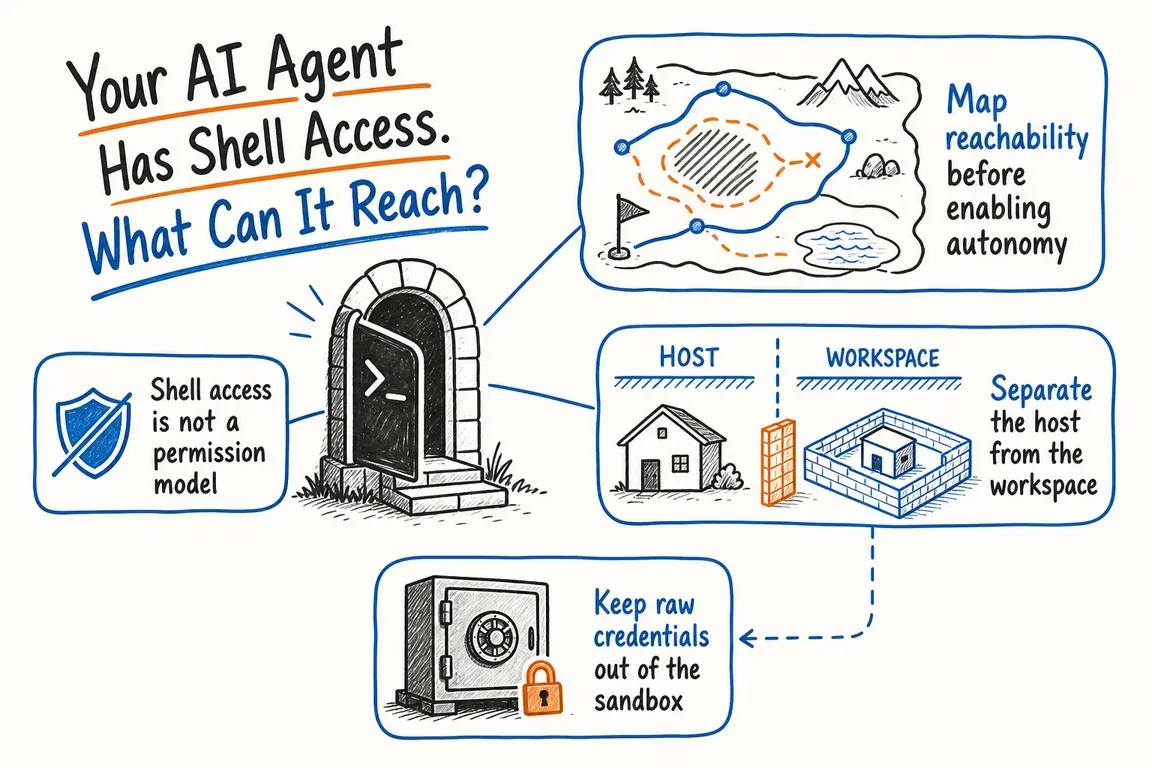
Illustrated infographic summarizing: Your AI Agent Has Shell Access. What Can It Reach?

By Greg Nowak. Last updated 2026-08-13.

Once an AI agent has a shell, the quality of its answers is only part of the risk. The more important question is what the resulting process can read, change, execute, contact, or authorize.

That question is already relevant to production work. OpenAI's Agents SDK supports agents that inspect files, run commands, edit code, install dependencies, and continue working on long-running tasks inside controlled sandboxes. The Responses API combines a shell tool with a container workspace, filesystem, optional database storage, and restricted networking. These agents are useful because they can act on an environment. That same ability gives mistakes and misuse somewhere to land.

The shell is just the entry point. The real security boundary is the full set of systems reachable through it.

Shell access is not a permission model

The model proposes a command. An orchestrator or platform executes it and returns the result. Separating those roles helps, but it does not settle the security question. If commands run automatically, the agent's practical authority comes from the runtime: its user identity, mounted directories, environment variables, installed tools, network routes, connected services, and access to privileged components.

Putting the process in a container is not enough by itself. A container may still share a writable repository, expose secrets through environment variables, reach internal services, or control the host through a Docker socket. The useful review question is straightforward: which boundaries still stand between a model-generated command and a valuable system?

Map reachability before enabling autonomy

Start with the agent process and trace every path leading out of it. Include direct access and less obvious routes through setup scripts, package managers, databases, orchestration services, installed tools, and Model Context Protocol servers. For each route, document what the agent can see, what it can change, and whether a separate approval is required.

Surface Inspect Prefer Test
Workspace Mounts, hidden files, Git metadata, build files, and CI configuration An ephemeral workspace or private clone with controlled outputs Can the agent alter a file that later runs on the host?
Credentials Environment variables, configuration files, signing keys, and API tokens Short-lived, scoped credentials applied outside model-visible execution Can a command display or copy the raw secret?
Network Internet egress, DNS, private ranges, localhost, and internal services Default-deny egress with destination-specific allowlists Can data leave through an unapproved destination?
Tools Shell commands, MCP servers, databases, deployment tools, and messaging tools Task-specific tools with resource and operation limits Can a read-only task reach a write-capable tool?
Infrastructure Host Docker sockets, privileged runtime APIs, and setup processes A dedicated execution engine inside the isolated environment Can the agent move from its sandbox into host control?
High-impact actions Deletion, publication, deployment, external communication, and irreversible changes An independent policy check and action-specific human approval Does approval cover the exact target and parameters?
A practical reachability map links each exposed surface to a boundary and a question you can actually test.

This exercise catches combinations that separate checklists often miss. A repository might be mounted read-only while still exposing a readable .env file. Internet access might be tightly filtered while an integration running outside the sandbox keeps broader connectivity. What matters is the complete execution path.

Separate the host from the workspace

Development workspaces need particular care because an apparently ordinary file can become a delayed execution path. Docker documents that a directly mounted workspace gives an agent read-write access to the same files the host sees. That can include source code, Git hooks, CI workflows, build scripts, IDE tasks, hidden executables, and AI-tool configuration. Some of those files will run only later, when a developer commits, pushes, builds, installs dependencies, or opens the project.

A private clone creates a stronger boundary. The agent changes its own copy, and nothing reaches the host until someone fetches and reviews the work. It does not, however, solve secret exposure. Docker notes that the original repository may remain readable, including ignored and untracked files such as .env. Keep secrets outside the exposed working tree or supply them through a separate credential mechanism.

For untrusted or higher-risk tasks, a disposable workspace is the safer default. Export only the declared artifacts. Treat returned code as an untrusted contribution: review the diff, pay close attention to execution-sensitive files, and validate it in another controlled environment before integration.

Keep raw credentials out of the sandbox

A credential stored in an environment variable or file inside the sandbox can usually be displayed with a shell command. An instruction telling the agent not to reveal it does not prevent the process from reading it.

OpenAI describes a stronger approach for hosted containers. Outbound traffic passes through a policy layer, and destination-scoped secrets are applied at egress. The container receives placeholders instead of raw values. Docker describes a comparable credential proxy that injects authentication headers outside the sandbox. In both cases, a compromised or misdirected process has less secret material available to extract.

The credential still needs a narrow scope. Restrict it to the required service, operation, dataset, and duration. An agent preparing a report has no reason to inherit a deployment token. One checking a repository should not receive organization-wide administrative access.

Treat outbound access as a deliberate capability

Agents may need a network to install packages, call APIs, or retrieve live data. Unrestricted egress also creates an obvious route for data exfiltration and can expose internal or third-party systems.

OpenAI's hosted-container design and Docker's sandbox networking both put outbound policy in a central layer. Docker also isolates sandbox networks, blocks host localhost and private ranges, and allows only explicitly approved domains. GitHub's Copilot cloud agent restricts internet access by default and supports organization- and repository-level allowlists, including narrower URL-path rules.

Those controls have edges. GitHub documents that its firewall covers processes started through the agent's Bash tool, but not MCP servers or configured setup steps, and warns that sophisticated bypasses may still be possible. Docker draws a similar boundary: local MCP servers can run on the host, outside the sandbox's Docker Engine boundary. The reachability map therefore needs every network-capable component, including anything that runs before the agent or alongside it.

Put policy between the command and the consequence

Least privilege needs to apply to individual tools and resources. OWASP recommends giving an agent only the tools required for its task, separating read operations from write operations, avoiding wildcard permissions, and requiring explicit authorization for sensitive actions.

Approvals should follow consequences rather than command names. Reading a known input can often run automatically. Writing inside a disposable workspace may be acceptable too. Deleting records, deploying software, sending external messages, or making security-sensitive changes should go through an independent policy component and, when appropriate, a human gate.

A useful approval records the actor, tool, target, normalized parameters, time, and expiry. A general approval to deploy is too broad. It should authorize one defined action so that the same confirmation cannot be reused for a different target or an altered command.

Build for evidence, limits, and failure

A production boundary must leave evidence. Record agent decisions, tool calls, authorization results, approvals, execution outcomes, and the policy version used. Redact sensitive material before it reaches the logs. Alerts should flag unusual tool frequency, repeated denials, elevated privileges, unexpected destinations, and sharp increases in high-risk activity.

Set hard resource limits as well. OWASP recommends controls for tokens, cost, retries, recursion, and tool chains, backed by circuit breakers. These limits contain accidental loops and deliberately expensive behavior.

Then test the boundary as an attacker would. Try to read excluded files, modify host-visible configuration, print credentials, contact unapproved destinations, reach private services, bypass approval, and continue after limits have been reached. Keep the tested agent version, tool policy, abuse cases, observed results, and any residual risk the business has chosen to accept.

Start with the environment the agent actually receives

The first useful deliverable is an honest inventory, not another security product. Once the agent's real environment is visible, the controls become specific: ephemeral or cloned workspaces, read-only inputs, destination-scoped credentials, egress allowlists, isolated execution engines, resource limits, structured audit logs, and gates for destructive actions.

Greg can help trace those boundaries and turn the findings into a workable execution design. The aim is to keep the automation useful while preventing the agent from quietly inheriting authority over production systems.

Related on GrN.dk

  • OpenAI Presence Arrived—But Is Your Workflow Ready for an Agent?
  • AI Agents Need a Spending Brake, Not Just a Billing Dashboard
  • A stray Set-Cookie can waste your CDN: audit the cache at the edge

Need help with this kind of work?

Review your agent's execution boundaries Get in touch with Greg.

Sources

  • The next evolution of the Agents SDK
  • Equipping the Responses API with a computer environment
  • OWASP AI Agent Security Cheat Sheet
  • Docker Sandbox isolation layers
  • GitHub Copilot cloud-agent firewall controls
Last modified
2026-08-13

Tags

  • AI agents
  • sandboxing
  • Linux
  • workflow security
  • OpenAI API

Review Greg on Google

Greg Nowak Google Reviews


Illustrated infographic summarizing: Your AI Agent Has Shell Access. What Can It Reach?
Your AI Agent Has Shell Access. What Can It Reach?
2026-08-13

A practical guide to mapping what a shell-enabled AI agent can reach, then containing its access to files, credentials, networks, tools, and high-impact actions.

Illustrated infographic summarizing: Cloudflare Changed DoH JSON. What Else Is Parsing DNS as Text?
Cloudflare Changed DoH JSON. What Else Is Parsing DNS as Text?
2026-08-12

Cloudflare’s DoH JSON change exposes brittle DNS parsing. Find affected scripts, test both formats, and choose a safer integration contract.

Illustrated infographic summarizing: Your Website Can Answer Questions Now. Should It?
Your Website Can Answer Questions Now. Should It?
2026-08-11

NLWeb makes conversational website search practical to deploy. The real question is whether your content, users and team are ready to support it.

Illustrated infographic summarizing: AI Search Finally Has Reports. Now Connect Visibility to Revenue
AI Search Finally Has Reports. Now Connect Visibility to Revenue
2026-08-11

Google and Bing now expose first-party AI search data. The real task is connecting citations and impressions to analytics, CRM outcomes, and revenue.

Illustrated infographic summarizing: The Bot Passed Your CAPTCHA. What Did It Do Next?
The Bot Passed Your CAPTCHA. What Did It Do Next?
2026-08-11

Passing a challenge is only one signal. Session analysis, server-side validation and endpoint-specific controls help reduce bot abuse without blocking customers.

Illustrated infographic summarizing: WordPress 7.1 Moves Image Work Into the Browser—Test Every Media Hook
WordPress 7.1 Moves Image Work Into the Browser—Test Every Media Hook
2026-08-11

WordPress 7.1 shifts image processing into supported browsers. Here is what to test across hooks, CDNs, formats, security headers, and fallbacks.

Illustrated infographic summarizing: Prompt Caches Have Write Costs Now—Audit What Your Workflow Reuses
Prompt Caches Have Write Costs Now—Audit What Your Workflow Reuses
2026-08-10

GPT-5.6 makes cache writes billable. See how to spot wasted writes, stabilise prompt prefixes, place breakpoints and measure whether caching pays.

Illustrated infographic summarizing: The AI Crawler in Your Logs May Be Wearing a Borrowed Name
The AI Crawler in Your Logs May Be Wearing a Borrowed Name
2026-08-09

A User-Agent is a claim, not proof. See how to verify AI crawler traffic before it shapes reporting, robots.txt decisions, or WAF exceptions.

Illustrated infographic summarizing: AI Agents Need a Spending Brake, Not Just a Billing Dashboard
AI Agents Need a Spending Brake, Not Just a Billing Dashboard
2026-08-08

AI agent costs can climb inside a single workflow. Runtime budgets, loop detection, outcome metrics, and safe handoffs keep that spending under control.

Illustrated infographic summarizing: Drupal 12 Slipped to December. Drupal 10 Still Runs Out of Road
Drupal 12 Slipped to December. Drupal 10 Still Runs Out of Road
2026-08-07

Drupal 12 arrives as Drupal 10 support ends in December 2026. Moving to Drupal 11.3+ first keeps two mandatory upgrades manageable.

More articles
RSS feed

Footer

  • All articles
  • Contact

GrN.dk web platforms, web optimization, data analysis, data handling and logistics.









