By Greg Nowak. Updated 21 September 2026.
An AI assistant that drafts a reply creates something for a person to review. An agent connected to your CRM, helpdesk, mailbox, or document store can change the business before anyone notices. It may send a message, move an opportunity, expose a confidential note, or trigger another system.
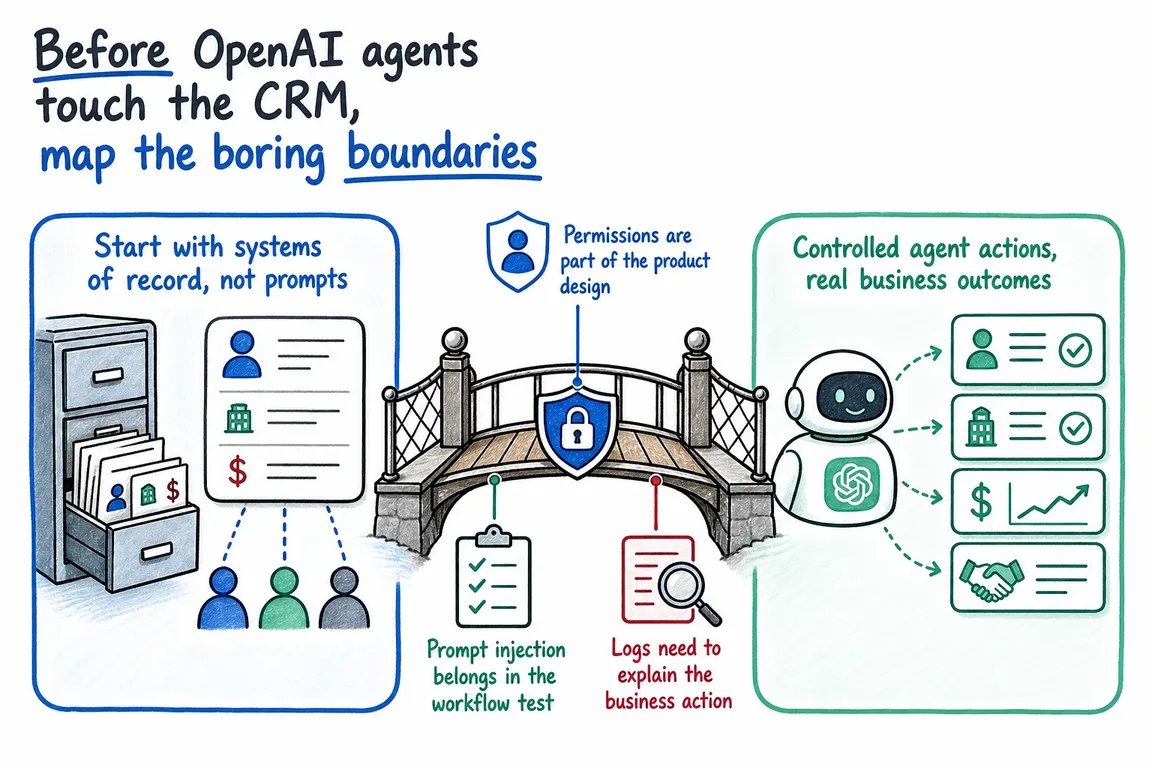
That does not make agentic automation a bad idea. It means the useful planning starts with boundaries, not prompts. Before choosing a model or polishing a demo, decide what the agent may see, which actions it may take, when a person must intervene, and how your team will investigate and reverse a mistake.
Define the business action, not just the integration
“Let the agent update Salesforce” is not a workable requirement. Correcting a job title is materially different from merging accounts, changing an opportunity stage, deleting a note, or emailing a customer.
Write each proposed action as a small operational rule. For example: “The agent may create an internal follow-up task on the current opportunity, using one of five approved task types. It may not change the owner, value, stage, or close date.” That is specific enough for an operations lead to approve, a developer to implement, and a tester to challenge.
Name the system of record as well. If the CRM owns account and opportunity data, the agent should not maintain a competing version in a spreadsheet or its conversation history. Define what happens when retrieved information conflicts, is missing, or is older than the source record.
| Boundary | Decision to make | Sensible first-release control |
|---|---|---|
| Data | Which records and fields are needed? | Allow named objects and fields; deny everything else. |
| Identity | Whose authority does the agent use? | Use a dedicated integration identity with an accountable owner. |
| Actions | What may it create, change, send, or delete? | Begin with recommendations or drafts rather than execution. |
| Approval | Which actions require human judgement? | Pause before customer-visible, financial, destructive, or permission-changing actions. |
| Evidence | Can the team reconstruct what happened? | Record the source, proposed action, tool call, approval, result, and failure. |
| Recovery | How will a bad action be contained? | Add rate limits, a kill switch, rollback instructions, and an incident owner. |
Treat permissions as part of the product
Give the agent the smallest combination of data and tools that can complete the approved task. Microsoft Graph, for example, distinguishes delegated access, where an application acts for a signed-in user, from application access, where it operates under its own identity. Application permissions can reach data without a signed-in user and therefore deserve particularly careful review.
Read-only access is a useful starting point, but it is not risk-free. An agent that cannot edit the CRM may still retrieve a confidential note and place it in the wrong response. Limit scope by object, field, team, region, or purpose where the connected platform permits it. Avoid shared administrator credentials and tokens without a documented owner, rotation process, and revocation route.
A practical authority ladder is:
- Read and recommend: retrieve approved context and propose the next step.
- Draft and queue: prepare a reply, note, task, or field change for review.
- Bounded execution: perform explicitly listed, low-impact actions with validation and logging.
Move upward one action at a time. A successful summarisation pilot is not evidence that the same agent should issue refunds, merge customer records, or send unsupervised messages.
Put approval around the actual tool call
“Ask before doing anything important” leaves too much interpretation to the model. Approval should be enforced by the workflow around the tool. The OpenAI Agents SDK can mark tools as requiring approval, expose the pending call as an interruption, save the run state, and resume after a person approves or rejects it.
The reviewer should see the concrete operation: target record, changed fields, recipients, message content, and any sensitive information being shared. Approving a friendly summary is not the same as approving an API payload assembled later.
Do not interrupt people for every harmless lookup. Excessive confirmation prompts encourage rubber-stamping. Reserve mandatory review for actions that are customer-visible, costly, legally significant, destructive, hard to reverse, or capable of changing access.
Test prompt injection in the real workflow
Prompt injection is not confined to a chat box. Instructions can arrive through customer emails, ticket descriptions, CRM notes, uploaded documents, websites, and enrichment data. OpenAI describes prompt injection as malicious third-party instructions entering the model’s context; OWASP’s agentic guidance broadens the operational concern to risks such as goal hijacking, tool misuse, and identity or privilege abuse.
Place hostile content in every untrusted source the workflow reads. Test requests to reveal another customer’s data, change the wrong record, call an unapproved tool, or bypass review. A passing result means the surrounding controls prevented the action—not merely that the model declined it in most attempts.
Use several layers together: narrowly defined tools, strict schemas, server-side validation, least-privilege scopes, approval gates, rate limits, and monitoring. Prompt wording helps guide behaviour, but it is not an access-control system.
Build an audit trail people can use
The Agents SDK can trace model activity, tool calls, handoffs, and guardrail events. Technical traces help developers debug, but an operations team also needs a business-readable record: which object was affected, why the action was proposed, which source supported it, who approved it, and whether the connected system accepted it.
Decide which sensitive information may enter traces and how long it should remain there. OpenAI’s SDK documentation notes that model and function spans can contain sensitive inputs and outputs; these payloads can be excluded with trace_include_sensitive_data=False or OPENAI_AGENTS_TRACE_INCLUDE_SENSITIVE_DATA=0. Your application may still need its own redacted event log for operational accountability.
Recovery belongs in the same design. Set action-rate limits, document token revocation, identify a kill-switch owner, and rehearse how to find and reverse affected records. If an action cannot be reliably undone, its approval threshold should be higher.
Start with one narrow workflow
- Choose a frequent task with a clear owner and a tolerable failure mode.
- Document its system of record, data scope, permitted actions, and prohibited actions.
- Run in read-and-recommend mode with representative and adversarial cases.
- Review corrections, approval decisions, failures, and unexpected tool attempts.
- Grant bounded execution only to individual actions that have earned it.
Good early candidates include internal ticket summaries, CRM research briefs, routing recommendations, renewal-preparation notes, and draft follow-up tasks. They can remove repetitive work without immediately handing an agent control of sensitive customer communication.
Turn the boundary map into a buildable plan
This work crosses operations, security, integration architecture, and day-to-day ownership. I can help your team turn those perspectives into a scoped workflow: mapping systems of record, translating business rules into permissions, defining approval and injection tests, and planning a rollout that remains manageable after the demo.
If you are considering an OpenAI agent for CRM or support work, talk to Greg about mapping the boundaries before granting production access.
Related on GrN.dk
- OpenAI Is Retiring Agent Builder: Save the Workflow, Not Just Prompts
- A Voice Agent Is Only Ready When the Human Handoff Works
- OpenAI's Guardrails and Run State Make Internal Agent Rollouts a Paid Approval-and-Audit Job
Need help with this kind of work?
Plan a controlled agent rollout with Greg Get in touch with Greg.










