Home
GrN.dk

Main navigation

  • Articles
  • Cases
  • Services
  • Your Digital Project Manager
  • About Greg Nowak
  • Image Gallery
  • Contact
User account menu
  • Log in

Join my community / free newsletter — sign up here

Breadcrumb

  1. Home

Prompt Caches Have Write Costs Now—Audit What Your Workflow Reuses

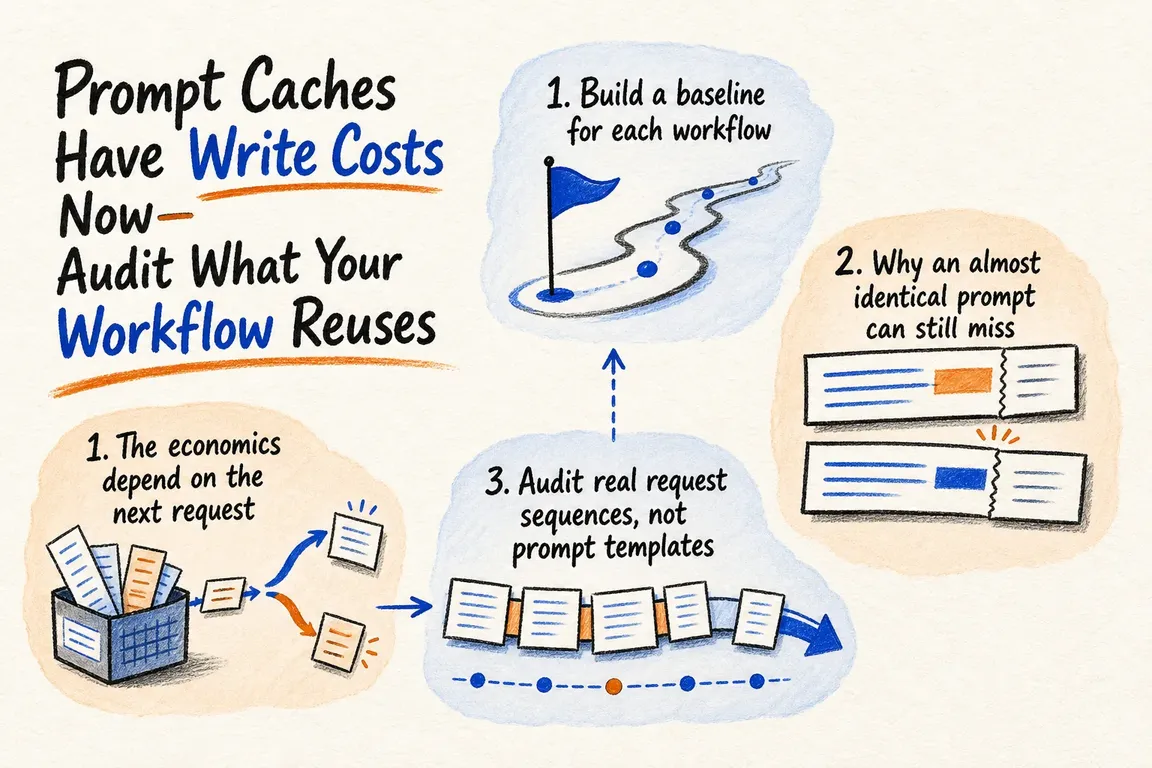
Illustrated infographic summarizing: Prompt Caches Have Write Costs Now—Audit What Your Workflow Reuses

By Greg Nowak. Last updated 2026-08-10.

Prompt caching is no longer something teams can safely leave running in the background and assume it saves money. With GPT-5.6, cache writes cost 1.25 times the uncached input rate, while cache reads receive a 90% discount. OpenAI has also introduced explicit breakpoints and a minimum cache lifetime of 30 minutes.

That changes the question. It is not enough to ask whether caching is enabled. You need to know whether the prefix written on one request is actually reused by the next.

This is particularly relevant to applications with long system instructions, tool definitions, examples, reference documents, retrieval context or growing agent histories. These workloads have plenty to gain from caching. They also have more opportunities for a timestamp, reordered tool definition or frequently changing document to create a new prefix and another billable write.

The economics depend on the next request

Take a cacheable prompt prefix and set aside output tokens and the changing suffix. Writing the prefix costs 1.25 units. Reading it from the cache on a later request costs 0.10 units. Processed twice, the total is 1.35 units rather than 2.00. One successful reuse already covers the write premium.

If the two requests write different versions of the prefix, however, the cost is 2.50 units instead of 2.00. Prompt length alone does not determine whether caching saves money. What matters is whether a write is followed by a read.

The GPT-5.6 release confirms the 1.25-times write rate, discounted reads and 30-minute minimum cache life. The OpenAI implementation guide shows where to find the evidence: writes appear as cache_write_tokens, and reads as cached_tokens. Log both by workflow, prompt version and deployment. An account-wide total is too blunt to reveal which workflow is repeatedly rewriting a large prefix.

Why an almost identical prompt can still miss

GPT-5.6 caches exact prefixes at cache breakpoints. In the default implicit mode, the service places a breakpoint at the latest user or tool message. Unlike earlier OpenAI models, it does not automatically fall back to the longest shared but unmarked prefix.

That distinction matters. Thousands of stable tokens can be followed by one changing timestamp, tool result or user message. If the breakpoint includes that changing content, the full prefix may differ on every request. The practical result is zero cached tokens and another charged write.

The match covers more than the prose you can see. Images and tools must also remain identical. A changed tool description, parameter schema or serialization order can alter the rendered prefix. Anthropic documents a similar structural risk: its hierarchy runs from tools to system content to messages, so changing a tool definition invalidates that layer and everything after it. Its troubleshooting guidance also identifies unstable JSON key ordering as a cause of cache misses.

Provider Evidence to capture Question worth asking
OpenAI GPT-5.6 cache_write_tokens, cached_tokens, breakpoint mode and 30-minute minimum lifetime Does the breakpoint end after stable content, or does it include something that changes on every request?
Anthropic cache_creation_input_tokens, cache_read_input_tokens, breakpoint placement and TTL Are the tools, system content and breakpoint locations identical across calls?
Gemini usage.total_cached_tokens, implicit caching on Gemini 2.5 and newer, and model-specific minimums Does the request put large shared content first, and do similar calls arrive close enough together?
Amazon Bedrock cacheReadInputTokens, cacheWriteInputTokens, checkpoints and TTL details Do the chosen model, endpoint and checkpoint meet that platform's requirements?
A useful cache audit looks for proof of reuse. Feature availability on its own says very little.

Audit real request sequences, not prompt templates

1. Build a baseline for each workflow

Start with representative, production-shaped requests. Capture cache reads, cache writes, uncached input, latency and the final task outcome. Group the results by workflow and prompt version.

This level of detail matters because averages hide expensive exceptions. A healthy account-wide hit rate can sit alongside one agent that continually rewrites a large prefix. Equally, a low-volume workflow with excellent reuse may barely register in the overall numbers.

2. Inspect the prefix the API actually receives

The prompt template in source control is only part of the request. Inspect the rendered payload after variables, retrieved documents, tool schemas and conversation history have been assembled.

Create a stable fingerprint for every candidate prefix, then compare requests that should share a cache entry. When the fingerprints differ, identify the first block that changed. That is usually much more useful than staring at a dashboard and wondering why the hit rate fell.

3. Put stable content before volatile content

Versioned system instructions, fixed examples, unchanged tool definitions and a reference file that stays constant for a run may all belong in the stable prefix. User input, timestamps, new tool results, changing retrieval output and the latest conversation turn belong later. This follows the prefix-ordering guidance shared by OpenAI, Anthropic and Google's Gemini documentation.

Stability always has a time boundary. A knowledge-base snapshot might remain unchanged throughout one agent run but change during the next daily refresh. Give the snapshot and its cache key an explicit version. This keeps different tenants, workflows and document versions from being bundled under an ambiguous routing key.

4. Put breakpoints where reuse is likely

For GPT-5.6, an explicit breakpoint can mark the end of the stable prefix. Explicit request mode disables the automatic breakpoint, so the changing suffix does not become eligible for additional writes. Requests that share the prefix should use the same prompt_cache_key, which OpenAI says provides more reliable matching. The rendered prefix must contain at least 1,024 tokens to qualify.

This configuration is not portable between providers. Anthropic supports automatic caching and block-level breakpoints, with a five-minute default lifetime and an optional one-hour lifetime at a higher write cost. Gemini's Interactions API offers implicit caching only; explicit cache objects require its generateContent API. Amazon Bedrock varies minimum prefix sizes, checkpoint counts, TTLs and request fields by model.

If an application uses more than one provider, its caching layer therefore needs provider-specific policies and telemetry adapters. A single generic caching flag will not capture these differences.

5. Test cost, latency and output quality together

Single requests tell you very little about reuse. Replay realistic sequences: a cold start, the first repeated call, several tool turns, a document refresh and a prompt deployment.

Measure the ratio of read tokens to write tokens, the share of writes followed by a read within the relevant lifetime, cost per completed workflow, and latency for cold and warm requests. Run the same quality evaluation used for the uncached implementation. Moving content around to improve cache matching should not quietly change the system's behaviour.

Make deployment conditional on measured reuse

A long prompt is not automatically a good caching candidate. It still needs to exceed the provider's minimum, remain byte-for-byte or structurally identical where required, and be reused before the opportunity expires. On the other hand, an expensive write can make financial sense when one stable prefix serves many calls during an agent run.

The deployment rule is straightforward: promote a cache configuration only when representative tests show that discounted reads outweigh the write premium without reducing output quality. Keep the telemetry after launch. A small change to a tool schema, timestamp field, document order or breakpoint can alter the economics overnight.

Greg can help instrument read and write tokens, map stable and changing prompt sections, adjust API request construction, place provider-appropriate breakpoints and test production-shaped workloads. The handover can include revised code, per-workflow cache metrics, prompt-version conventions and a deployment runbook with rollback thresholds. That gives the team a cache setup it can inspect and manage, rather than a discount it merely assumes is working.

Related on GrN.dk

  • A stray Set-Cookie can waste your CDN: audit the cache at the edge
  • OpenAI Is Retiring Agent Builder: Save the Workflow, Not Just Prompts
  • When AI writes JSON, one bad field can break the workflow

Need help with this kind of work?

Audit your AI workflow Get in touch with Greg.

Sources

  • GPT-5.6 release and new cache economics
  • OpenAI prompt-caching implementation guide
  • Anthropic prompt-caching documentation
  • Gemini context-caching guide
  • Amazon Bedrock prompt-caching guide
Last modified
2026-08-10

Tags

  • AI integration
  • prompt caching
  • API costs
  • Performance
  • workflow automation

Review Greg on Google

Greg Nowak Google Reviews


Written recommendations from Trafik og Veje, Aarhus Municipality (2011) and AgroTech (2010) — read them on LinkedIn.

Illustrated infographic summarizing: Zero Data Retention Is a Workflow Audit, Not a Checkbox
Zero Data Retention Is a Workflow Audit, Not a Checkbox
2026-08-30

Zero Data Retention covers the provider, not every copy in your stack. See how to audit endpoints, logs, storage, deletion and project-level controls.

Illustrated infographic summarizing: MCP 2026-07-28 Is an Auth Migration, Not a Version Bump
MCP 2026-07-28 Is an Auth Migration, Not a Version Bump
2026-08-29

MCP’s July 2026 release removes protocol sessions and tightens OAuth. Here’s a practical plan for migrating clients, servers and enterprise access safely.

Illustrated infographic summarizing: Turn a Technician’s Voice Note into a Work Order—Not Raw Audio
Turn a Technician’s Voice Note into a Work Order—Not Raw Audio
2026-08-28

Voice input can reduce the technician’s documentation burden when hours, materials and status are validated before the information is saved in the work order system.

Illustrated infographic summarizing: ChatGPT Disabled Personal Knowledge Sync. What Broke on Your Team?
ChatGPT Disabled Personal Knowledge Sync. What Broke on Your Team?
2026-08-27

ChatGPT retired personal sync connections for Enterprise and Edu. Here is how to find affected workflows, migrate access, and test permissions.

Illustrated infographic summarizing: Cloudflare’s September Bot Defaults Could Quietly Cut AI Visibility
Cloudflare’s September Bot Defaults Could Quietly Cut AI Visibility
2026-08-26

Cloudflare’s September bot defaults give publishers more control, but one training block could also cut search crawling and AI-driven discovery.

Illustrated infographic summarizing: Does Your AI Chatbot Clearly Identify Itself?
Does Your AI Chatbot Clearly Identify Itself?
2026-08-25

The EU’s transparency requirements for AI chatbots now apply. Here is how to make your bot’s identity clear, limit its system access and provide a genuine route to a member of staff.

Illustrated infographic summarizing: Should publishers add Google’s new Preferred Sources button?
Should publishers add Google’s new Preferred Sources button?
2026-08-24

Google’s Preferred Sources button is worth a controlled test for eligible publishers, with careful choices around placement, performance and measurement.

Illustrated infographic summarizing: Search Console Can See TikTok Now. Your Reporting Has to Catch Up
Search Console Can See TikTok Now. Your Reporting Has to Catch Up
2026-08-23

Google can now report how social profiles appear in Search. Here is how to measure cross-channel discovery without mistaking visibility for business results.

Illustrated infographic summarizing: Your AI workflow has logs. Can they explain one bad decision?
Your AI workflow has logs. Can they explain one bad decision?
2026-08-22

Logs can show that every service worked while leaving a bad AI decision unexplained. See how connected traces and careful redaction close the gap.

Illustrated infographic summarizing: Security Questionnaires Eat Into Selling Time—Let AI Find the Evidence
Security Questionnaires Eat Into Selling Time—Let AI Find the Evidence
2026-08-21

NIS 2 is generating more supplier questionnaires. A controlled AI assistant can find approved answers and sources—and route uncertain cases for review.

More articles

Built by AI — available for your business. The daily articles on this site are researched, written and illustrated by an autonomous AI pipeline. At nowa.dk I install the same kind of AI automation in businesses at fixed prices — site in Danish, English version here, and web/marketing agencies have a dedicated page.

RSS feed

Footer

  • All articles
  • Contact

GrN.dk — AI automation, web platforms, web optimization, data handling and logistics.

© 2026 GrN.dk · LinkedIn · Contact · AI automation in Danish: nowa.dk

Behind GrN.dk: Individual Entrepreneur Codecrafter · Tax ID 305669096 · Bakhtrioni St. 22, 0194 Tbilisi, Georgia · official business register









