By Greg Nowak. Last updated 2026-08-11.
WordPress 7.1 is scheduled for August 19, 2026. For editors, uploading an image may look much the same as before. Underneath, however, WordPress is changing where much of the work happens—and that affects plugins, custom code, CDN integrations, and hosting infrastructure.
In supported browsers, WordPress will use WebAssembly to compress, resize, crop, rotate, convert, and generate thumbnails on the user's device. It then uploads the original and generated files through a sequence of REST requests. Moving that work out of PHP can reduce server CPU and memory pressure, especially with large images. It also means a site now has two media-processing paths to support.
This should not hold up a WordPress 7.1 upgrade. It does mean the upgrade needs to be treated as a change to the media pipeline, not just another core update.
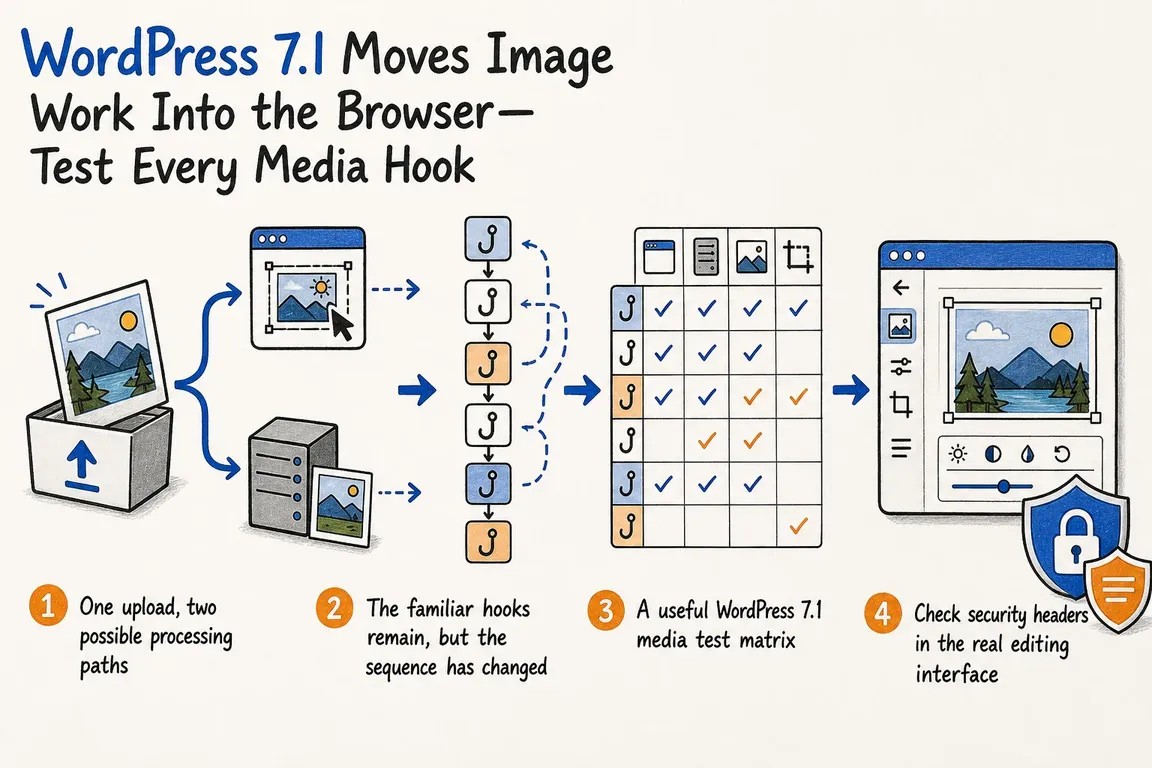
One upload, two possible processing paths
Until now, the usual path has been straightforward: WordPress sends an image to the server, where GD or Imagick creates the registered sizes. With 7.1, a supported browser can run libvips inside a WebAssembly worker instead.
WordPress describes that sequence as preparation, optional transcoding, original upload, thumbnail generation, sideloading of the generated sizes, and finalization. The architecture documentation also explains when WordPress reverts to server-side processing: an unsupported browser, insufficient device resources, restrictive security policies, or an administrator explicitly disabling the feature.
Automatic fallback is useful, but it makes testing less obvious. A successful upload in Chrome does not confirm that the traditional server path still works. Testing only in Firefox may do the opposite: it can exercise the fallback without covering the new WebAssembly path.
This distinction is particularly important for sites that use media offload, watermarking, custom metadata, automatic format conversion, custom image sizes, or code that modifies files during intermediate-size generation.
The familiar hooks remain, but the sequence has changed
The helpful part of the WordPress 7.1 developer note is that both paths eventually converge on wp_generate_attachment_metadata. On the browser path, though, the upload reaches the server in several stages.
The original file follows the normal create lifecycle and triggers wp_generate_attachment_metadata with the create context. Each size produced in the browser is then sent through the sideload endpoint and passes through upload handling. The final request runs wp_generate_attachment_metadata again, this time with the update context and the complete sizes array.
That sequence can expose assumptions hidden in existing callbacks. Watermarking, CDN synchronization, metadata enrichment, and similar side effects need to be idempotent. Receiving both passes must not duplicate work, overwrite a finished result, or publish an attachment before all its files are ready. WordPress already uses a second metadata pass for deferred big-image processing, so the pattern is not entirely new. In 7.1, it becomes part of an ordinary upload in supporting browsers.
Three server-editor hooks do not fire on the client path: wp_image_editors, image_make_intermediate_size, and image_memory_limit. Any code that relies on a custom server-side editor or modifies every intermediate file through those hooks needs another route. If that cannot be made safe before launch, WordPress provides wp_client_side_media_processing_enabled to disable browser processing.
Other filters still shape the result, although their role is different. Values from image_editor_output_format, big_image_size_threshold, wp_editor_set_quality, jpeg_quality, image_strip_meta, and image_max_bit_depth are resolved on the server and sent to the client. Callbacks written on the assumption that they run once per server-side encode may receive different arguments or run a different number of times.
A useful WordPress 7.1 media test matrix
| Test case | Likely path or behaviour | What needs checking |
|---|---|---|
| JPEG or PNG in supported Chromium | WebAssembly processing with client-generated sizes | Every registered size, format rules, quality, metadata, watermarking, and CDN delivery |
| HEIC photo | Browser decoding where the platform supports it, producing JPEG while retaining the source companion | Orientation, metadata policy, attachment deletion, CDN synchronization, and browser differences |
| AVIF on a host without server AVIF support | Client-side handling can bypass the missing server-editor capability | Original acceptance, generated sizes, MIME metadata, and front-end delivery |
| Opaque animated GIF | Optional MP4 or WebM companion and poster generation where browser APIs support them | Long-file handling, block transformation, companion cleanup, and fallback to the original GIF |
| Custom sizes or sizes with duplicate dimensions | Client generation with matching-dimension files deduplicated | Expected metadata keys, physical files, downstream transformations, and URL selection |
| Firefox, Safari, a low-resource device, a slow network, or restrictive CSP | Automatic server-side fallback, with a separate HEIC capability in Safari | Upload completion, server memory behaviour, consistent output, and useful error logging |
Check security headers in the real editing interface
The WebAssembly pipeline requires SharedArrayBuffer. On relevant editor screens, WordPress enables the required isolation for supported Chromium versions with Document-Isolation-Policy: isolate-and-credentialless. This is more targeted than applying COOP and COEP to the whole page, but it can still affect third-party resources loaded inside an editor.
A Content Security Policy set by a plugin also needs attention. Its worker-src directive must allow blob:. If it does not, the worker cannot start and WordPress falls back to server processing. The upload may still succeed, which makes this easy to miss: a green test result can simply mean the new path was never exercised.
The broader cross-origin isolation guidance covers the ways isolation can change the behaviour of cross-origin scripts, frames, popups, embedded resources, and credentials. WordPress adds anonymous cross-origin handling to external scripts but deliberately leaves images out of that adjustment. It also imports external images through the server, avoiding browser-side CORS failures inside an isolated editor.
Even with those safeguards, sites using page builders, analytics, separate asset hosts, or remote-media tools should be tested in their actual editing screens. Watch the browser console and network panel as well as the upload result.
One early test will not be enough
The release schedule placed the first WordPress 7.1 release candidate on August 5 and the final release on August 19. The July developer update described this as the period for finding compatibility problems before release.
The Gutenberg release history shows why the build number matters. Recent entries include fixes for hangs during long animated GIF uploads, EXIF-rotated sideload and finalize operations, HEIC progress counting in Safari, metadata stripping and bit-depth settings, worker failures, and GIF conversion guardrails. These changes affect the pipeline itself, not its appearance.
Record the exact WordPress candidate and Gutenberg build used for each test. Then rerun the critical cases against the final available build and review the release log before production deployment. A pass against an older candidate is useful evidence, but it is not release approval.
What production readiness looks like
Begin with an inventory of every plugin and custom callback that touches uploads, attachment metadata, image quality, output formats, generated sizes, remote assets, or CDN offload. For each one, record the hooks it uses and whether it creates side effects during the create, sideload, or finalize stages.
Establish a server-path baseline before testing the browser path with representative source files. Compare the attachment metadata, physical files, transformed output, CDN objects, front-end URLs, and deletion behaviour. Test Content Security Policy and external editor dependencies separately. Once the last relevant update is available, repeat the cases that could block deployment.
It is also sensible to keep a controlled way to disable client-side processing if an integration cannot be corrected in time. That is a release safeguard, not a substitute for understanding which component depends on the old path.
Greg can coordinate this as a staged upgrade: map the site's media hooks, build the browser and format matrix, trace duplicate processing or missing derivatives, and check CDN synchronization before production. The practical standard is higher than “the upload completed.” Every expected file, metadata record, external asset, and fallback should behave consistently whichever path WordPress selects.
Related on GrN.dk
- WordPress Forced an Emergency Update. Did Every Site Take It?
- AI Images Need a Chain of Custody, Not Just a Disclosure Label
- Google’s AI Search toggle needs a test plan, not a gut decision
Need help with this kind of work?
Plan your WordPress 7.1 media test Get in touch with Greg.










