By Greg Nowak. Updated 18 September 2026.
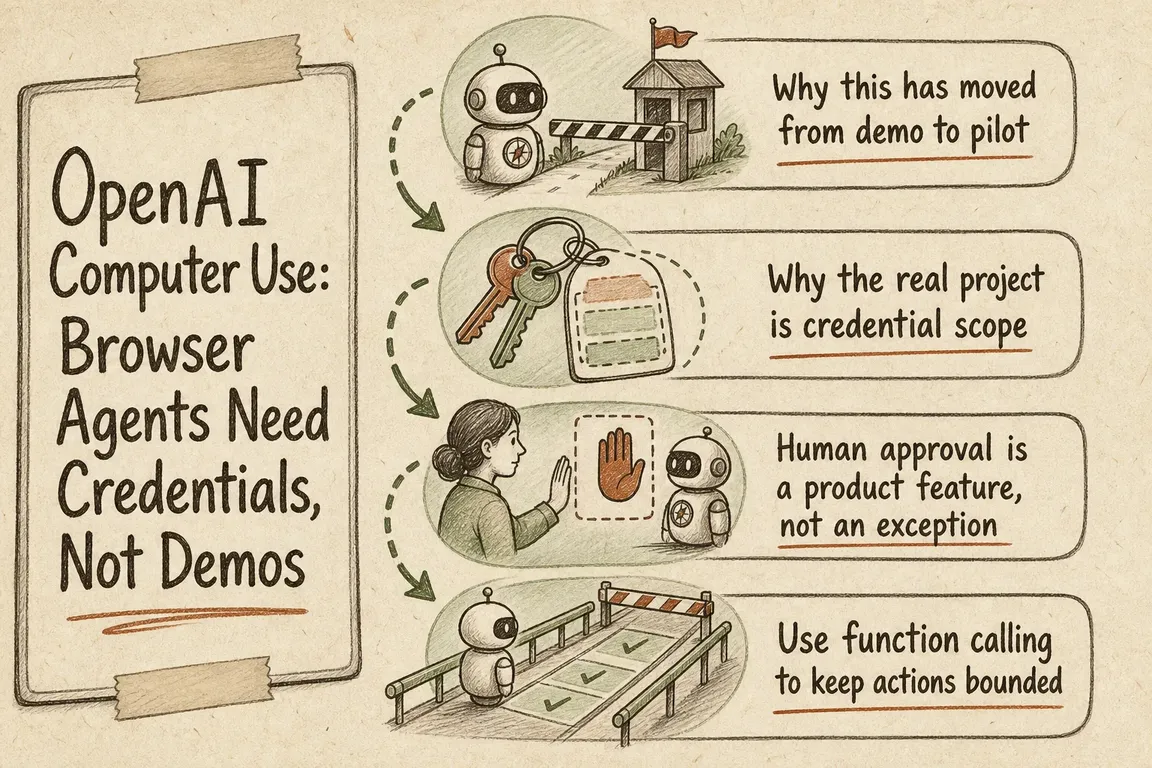
A browser agent completing a supplier form makes a persuasive demo. The real test starts when it signs in, handles customer or commercial data, encounters an unexpected page, and reaches a button that can spend money or change a record.
At that point, OpenAI computer use is no longer just an AI experiment. It is an identity, security, and operations project. Business owners, operations leads, and agencies should evaluate the surrounding controls as carefully as the model itself.
Start with the workflow, not the moving cursor
Current OpenAI documentation presents two main computer-use patterns. With code execution, the model writes code that operates an isolated browser or desktop through tools such as Playwright or PyAutoGUI. With the computer tool, the model returns structured mouse and keyboard actions for your application to execute. Existing function or MCP-based UI tools can also remain in place.
For GPT-6 Astra, OpenAI currently recommends code execution; the structured computer tool remains supported. That is an important update for pilots based on older models or computer-use-preview: treat modernization as a deliberate migration, not a model-name substitution.
The AI option is not automatically the right one. A stable page with predictable fields may be cheaper and easier to support with conventional Playwright or Selenium automation. Computer use earns its place when visual variation, irregular layouts, or conditional steps make rigid selectors disproportionately fragile.
| Workflow characteristic | Sensible starting point | First control to add |
|---|---|---|
| Stable fields and predictable rules | Conventional browser automation | Tests, retries, and page-change detection |
| Variable screens and multi-step logic | Code-execution computer use | Isolated runtime with time and step limits |
| Existing action-based automation harness | Structured computer tool or custom UI tools |
Screenshot verification and action allowlists |
| Money, deletion, permissions, or external communication | Hybrid agent-and-human workflow | Approval immediately before execution |
Give the workload its own identity
Do not let a production agent borrow an employee’s administrator account. Create a dedicated account or role in each target system where possible, grant only the records and actions the workflow needs, and keep development credentials separate from production.
For OpenAI API access, workload identity federation can avoid storing a long-lived API key in supported environments. A trusted workload presents a short-lived identity token or verified certificate; OpenAI maps that identity to a service account and returns a short-lived access token. The mapped service account should still receive only the permissions required for the job.
Run the browser in an isolated environment or virtual machine. Allow only named sites and actions, limit access to local files and secrets, and treat everything displayed on a page as untrusted. Text inside a website cannot authorize a payment, expand the task, or override the operator’s instructions.
Put approval where the consequence begins
Approval does not need to interrupt every harmless navigation step. Let the agent inspect a page and prepare an action, then pause immediately before the risk changes.
- Confirm purchases, payments, deletions, permission changes, and difficult-to-reverse submissions.
- Confirm before sending, publishing, or uploading information to another party.
- Treat typing sensitive information into a form as data transmission.
- Stop and escalate when page content introduces suspicious instructions or an unexpected destination.
A useful approval request identifies the exact action, destination, important values, and likely consequence. “Continue?” is not enough for an operator to make an informed decision.
Move consequential actions behind narrow functions
Visual control is valuable for interpreting an irregular interface. It is a poor reason to make every side effect an unrestricted click. Where the system permits it, expose actions such as create_order, change_access, or send_message as explicit functions. Ordinary application code can then validate inputs, enforce policy, record the event, and execute the approved change.
OpenAI recommends enabling strict: true so function arguments conform to the declared schema. In strict schemas, object definitions need additionalProperties: false, and every property must be listed as required. Use tool_choice to restrict available tools. When order matters, set parallel_tool_calls to false, allowing no more than one tool call in that turn.
Design the browser run as a recoverable job
Sessions expire, layouts change, approvals wait, and networks fail. Represent the business workflow with durable states such as queued, running, awaiting approval, completed, failed, and cancelled. Store the workflow version, account used, allowed domains, requested actions, approvals, outcome, and safe error details.
OpenAI background mode can run a long API response asynchronously by setting background: true and polling its status. It does not preserve your browser session for you. Your application must keep the execution environment available and reconnect model conversation state to the correct browser state.
Webhooks can notify your system when an API response completes. Verify the webhook signature using the raw request body before accepting the event. Make retries action-specific: repeating a page read may be safe, while repeating an uncertain order submission can create a duplicate.
What should the first pilot prove?
- Value: one bounded workflow has enough delay, volume, or manual friction to justify intervention.
- Containment: the agent reaches only named systems, accounts, and actions.
- Control: sensitive and irreversible steps stop at the intended approval boundary.
- Recovery: an operator can inspect, resume, cancel, or safely abandon a failed run.
- Maintainability: the team can detect page drift and update the workflow without rebuilding the demonstration.
Measure completed cases, exceptions, human interventions, elapsed time, and cost per successfully completed case. A clean escalation is often better than an apparently high completion rate that hides uncertain outcomes.
The procurement question is not simply, “Can an agent use this website?” It is, “Can we operate this workflow safely when credentials expire, screens change, and people need to intervene?”
Planning a controlled browser-agent pilot?
Greg can help map the workflow, choose the right automation pattern, define credential and approval boundaries, and coordinate delivery across business and technical teams. Talk through the project with Greg.
Related on GrN.dk
- A Voice Agent Is Only Ready When the Human Handoff Works
- AI Agents Need a Spending Brake, Not Just a Billing Dashboard
- AI automations need a spend dashboard before the first runaway bill
Need help with this kind of work?
Plan your browser-agent pilot with Greg Get in touch with Greg.