Internal AI rollouts stop being simple the moment an agent can do more than answer questions. If a system routes tickets, prepares quotes, enriches leads, or pulls research into a working queue, it is no longer just a chatbot. It is participating in a business process. From there, the important questions change. Who approved the action? What exactly happened? How do you inspect it later when something looks off? OpenAI's current agent documentation is useful because it treats deployment in those terms: guardrails, approvals, resumable state, and tracing. That is a good signal that internal agent rollout is as much a governance job as a model job.
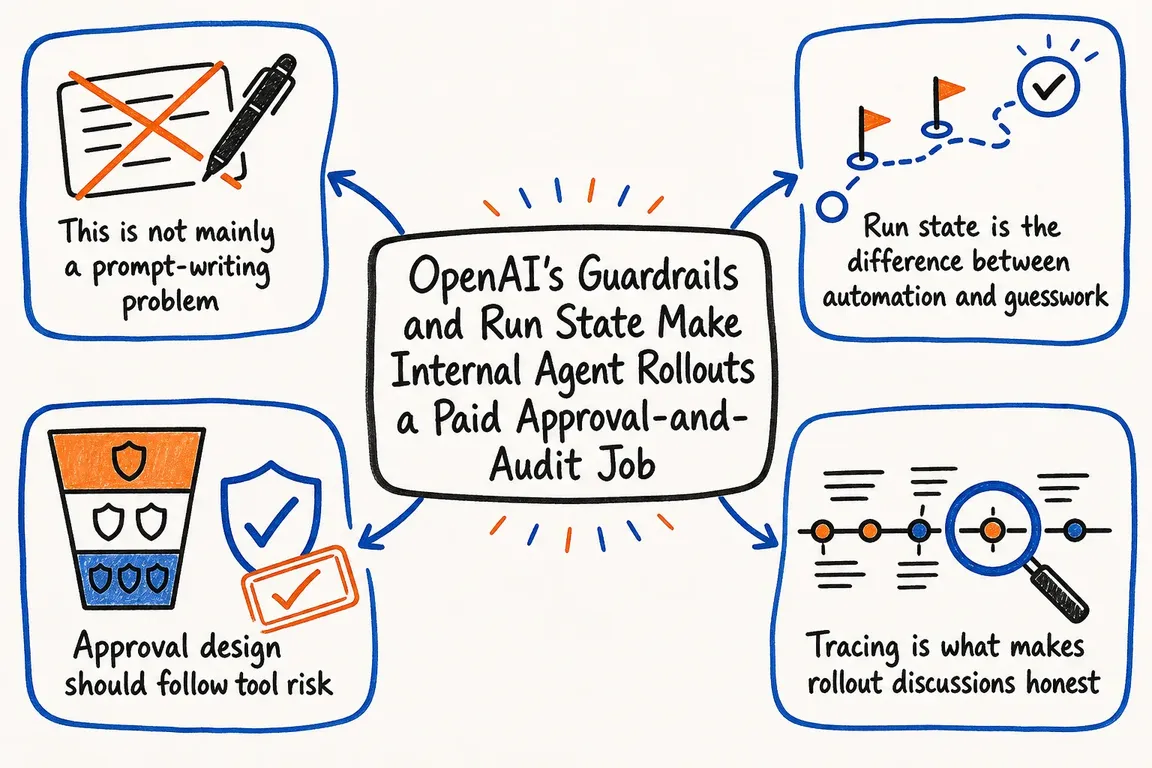
This is not mainly a prompt-writing problem
The guardrails documentation breaks control into four categories: input guardrails, output guardrails, tool guardrails, and human review. Each one handles a different failure mode. Input guardrails stop bad or out-of-scope requests before the workflow starts. Output guardrails validate, filter, or redact what leaves the system. Tool guardrails sit around specific function calls and check arguments or results. Human review pauses the run before side effects like edits, cancellations, shell commands, or sensitive MCP actions.
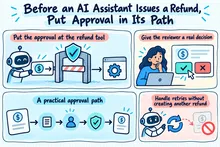
That separation matters because the real risk in internal AI is usually tied to authority, not phrasing. An agent that reads a ticket and drafts a recommendation is one thing. An agent that updates a CRM record, sends a quote, or triggers a script is another. The OpenAI pattern is useful because it lets the model identify the next step without assuming that step should execute automatically. In practice, that pushes rollout planning toward a tool inventory and sensible risk tiers: read-only tools, write tools, customer-facing tools, and higher-impact tools that should not run without approval.
Run state is the difference between automation and guesswork
The Running agents and Results and state guides describe the agent as a loop rather than a one-shot answer. One run is one application-level turn. The runtime can call the current agent, inspect its output, execute tool calls, hand off to another specialist, and continue until it reaches a real stopping point. That looks much more like an actual business workflow than the simpler chatbot pattern.
The result surface is broader too. The docs cover final output, history, the last agent for the next turn, the last response ID for server-managed continuation, and, most importantly for governed rollouts, interruptions plus state. In an approval flow, a run can stop without producing a final answer. Interruptions show which pending tool calls need a decision, and state is the saved snapshot passed back into the runtime after approval or rejection. For a business, that creates a clean place to attach audit evidence instead of relying on screenshots, inbox threads, or somebody's memory of what the system did.
Approval design should follow tool risk
The integrations and observability guide also helps clarify where control should sit. OpenAI distinguishes between hosted MCP tools and SDK-managed connections to local or private MCP servers. That maps well to real rollout design. Some capabilities can live comfortably in a hosted surface. Others should stay inside your own runtime so you control connectivity, filtering, approvals, and network boundaries.
It also supports a staged rollout that makes operational sense. If an internal research agent only uses approved public sources, broad autonomy may be acceptable. If a sales support agent can search internal files, enrich a lead, update a deal stage, and draft outbound communication, the safer setup is narrower tool access with approval checkpoints around the write paths. The guardrails guide is explicit that tool guardrails belong next to the tools they protect. For side-effecting actions, control at the tool layer matters more than a generic check at the beginning or end of the conversation.
Tracing is what makes rollout discussions honest
Once a workflow touches live systems, observability stops being optional. OpenAI's guide says tracing is built into the Agents SDK and enabled by default in the normal server-side path. The trace can capture model calls, tool calls, handoffs, guardrails, and custom spans. The docs also show how multiple runs can sit inside one trace so a broader workflow can be inspected as a single unit.
That matters commercially because most internal AI disputes are not really about the model. They are about uncertainty. Did the agent call the wrong tool? Did a handoff bring in context nobody expected? Did a guardrail fire? Did a human reviewer approve something ambiguous? Without structured traces, those conversations get vague fast. With traces, a team can inspect what actually happened and decide whether the fix belongs in prompts, tool design, approval policy, or application code.
Security controls still matter in internal use cases
The cybersecurity checks guide is a useful reminder that production rollout needs explicit risk handling beyond prompt design. OpenAI notes that additional automated safeguards apply to higher-capability models in the API, and that suspicious activity can lead to temporary access limits with a cyber_policy error. The documentation also notes that per-user safety identifiers can narrow disruption so an issue affects a specific user rather than an entire organization.
The practical implication is straightforward: production agents need to handle interruption and degraded execution cleanly. If a model request is blocked, a review is delayed, or a tool call is rejected, the workflow still needs a controlled fallback. Maybe the item moves into a human queue. Maybe the agent drafts but does not submit. Maybe the system logs the blocked step and asks someone to finish it manually. That is the difference between a demo that looks impressive and an internal automation that can survive day-to-day operations.
What businesses should actually buy
If you strip away the hype, the OpenAI guidance points to a very practical delivery model: define the workflow, separate read actions from write actions, keep tool access as narrow as possible, add approvals where side effects matter, persist run state so work can resume cleanly and be audited later, turn on tracing, and roll out in stages. That is what saves time without creating a new control problem. It is also why internal agent projects are best sold as workflow governance and API integration support, not as vague AI strategy.
Need help with this kind of work?
Need help turning internal AI workflows into approval-aware automations with traceable run state and controlled tool access? Get in touch with Greg.