By Greg Nowak. Updated 6 November 2026.
A supplier PDF can give you a perfectly plausible price for the wrong product. It can also give you the right product with a price per box, while your shop sells individual items. A tidy spreadsheet makes either mistake surprisingly easy to miss.
AI can help interpret awkward layouts and inconsistent descriptions. The business needs a workflow that checks what was extracted, identifies the intended product and holds unclear changes for review. Here is how I would structure that work before anything reaches a live catalogue.
Agree what this supplier update may change
Start with the destination: are you creating products, updating existing ones or doing both? Specify the fields this batch may change. A supplier price update should not overwrite descriptions your team has already edited.
Choose one supplier format for the first run. Include difficult examples: missing codes, repeated identifiers, pack prices and variations. Agree who resolves commercial questions and who approves the destination mapping. For agency teams, those responsibilities belong in the brief alongside the technical deliverables.
Check coverage before trusting the extracted rows
Ask for a supplier spreadsheet or structured export first. Where usable data already exists, read it directly and reserve AI for content that needs interpretation.
Input routes matter. According to OpenAI’s file-input documentation, PDF inputs on vision-capable models include extracted text and page images. Spreadsheet inputs use a different process: up to the first 1,000 rows per sheet, plus summary and header metadata. That route should not be treated as complete workbook ingestion.
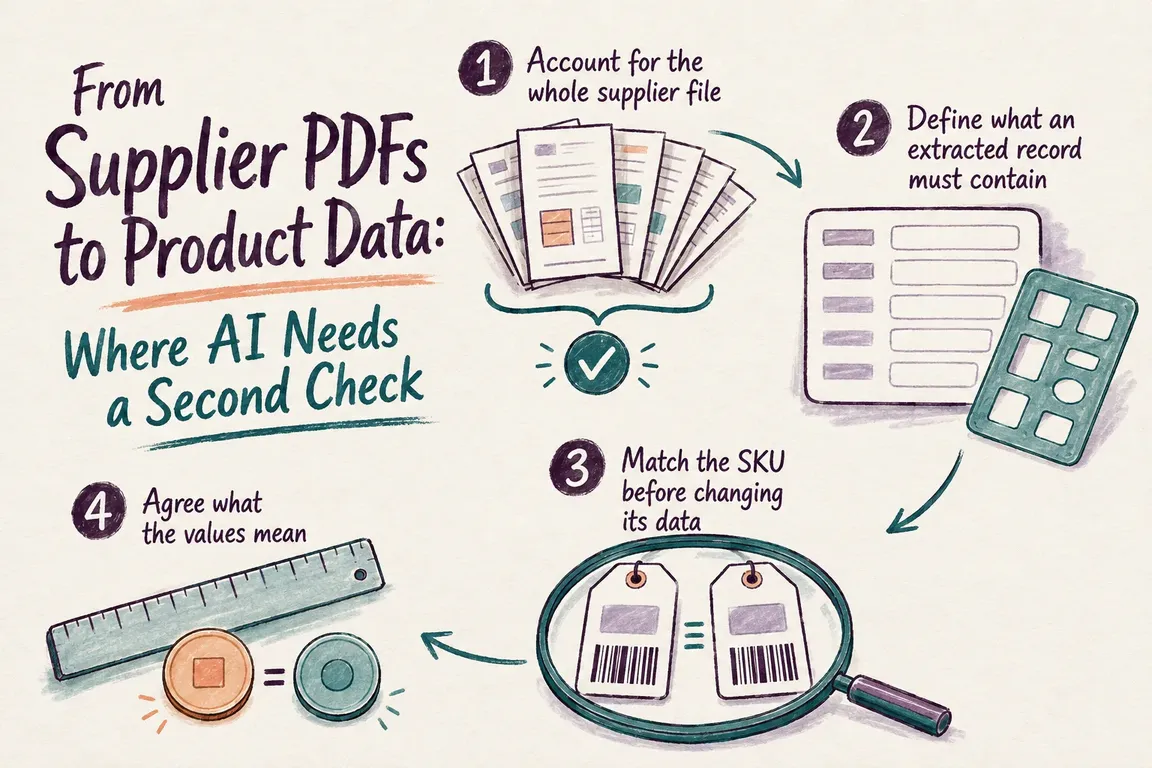
For workbooks, read all relevant sheets and rows in Python. For PDFs, track both page coverage and product coverage: processing every page does not prove every product was captured. Compare extracted records with visible tables or supplier totals where available. Record exclusions, such as headings, discontinued ranges and repeated catalogue entries.
Keep evidence beside each proposed value
Use a consistent extraction schema covering supplier, supplier identifier, description, raw price, currency, selling unit, pack quantity and source location. Keep the original wording beside normalized values. Allow an explicit unknown when the source does not answer a question.
OpenAI Structured Outputs can enforce a response schema, but the documentation explicitly warns that outputs can still contain mistakes. Handle refusals and incomplete responses before accepting records. Verify critical values and source references against the document; a model-generated page number also needs checking.
| Check | Proceed when | Hold when |
|---|---|---|
| Coverage | Relevant products are accounted for | Pages, rows or products may be missing |
| Product identity | An approved key identifies the intended SKU | The key is missing, ambiguous or unexpectedly duplicated |
| Price and units | Currency, pack basis and measurement meaning are confirmed | A conversion requires an assumption |
| Proposed changes | Only agreed fields change within approved rules | A change exceeds a review threshold |
| Import test | Destination records match the approved export | Rows fail or unexpected products appear |
Match the product before updating it
Store identifiers as text so leading zeros survive. Preserve punctuation unless you have an agreed normalization rule. Where codes are unique only within a supplier, match on supplier plus identifier.
For a Python implementation, pandas.merge provides useful controls. Put incoming records on the left and use how="left" to retain them, indicator=True to expose unmatched records, and validate="one_to_one" when both sides should have unique keys. Use validate="many_to_one" only when repeated incoming keys are expected and the catalogue lookup is unique.
Reject blank and null matching keys first: pandas can match null keys to each other. Investigate duplicates rather than silently dropping them. Similar product names can suggest candidates for review; updating an existing SKU should require an approved match.
Resolve the commercial meaning of prices and units
EUR 48 for a box of 12 becomes EUR 4 per item only after confirming that the price covers the whole box and your catalogue sells those items individually. Keep purchase cost separate from retail price. Confirm tax treatment, minimum order quantities and effective dates.
Measurements need definitions too. Product weight, shipping weight and pack weight belong in different fields. Document decimal separators, rounding and any currency conversion rule. Keep the raw value and calculation so someone can follow the change. Compare proposed updates with current catalogue values and flag unusual differences using thresholds agreed with the business.
Give reviewers a decision they can make
A useful exception report shows the source location, original value, proposed value, failed check and decision needed. Assign an owner: purchasing may confirm pack quantities, while the catalogue lead resolves attributes.
Account for every incoming product as approved, held or deliberately excluded. If one source product creates several destination rows, preserve that relationship. Save repeatable corrections as rules and retain individual judgments with their records. This makes the next supplier update easier to review.
Test what the destination actually does
Export approved records only. For WooCommerce, use UTF-8 CSV and review column mappings against its product CSV importer guide. Test an existing-product update and representative variations on staging, then inspect failed or skipped rows and compare saved products with the approved export.
Check your installed version. WooCommerce 11.1 introduced eligible new variations during update imports. In 11.2 and later, updates can match a mapped Global Unique ID when both ID and SKU are blank; a supplied ID or SKU takes precedence. Include those cases in testing if your workflow uses them.
Before production, back up the store, retain the previous values and agree how to reverse the batch. Then inspect the changed products in the storefront as well as the administration screens.
Start with one supplier and a reviewable result
Greg can help define the acceptance rules and build a Python/OpenAI workflow with traceable extraction, reliable product matching, an exception report and a tested export. Bring a representative supplier file and a catalogue export. Discuss your supplier-data workflow with Greg to scope a first batch your team can review and approve.
Related on GrN.dk
- AI automations need a spend dashboard before the first runaway bill
- Not Every AI Job Needs an Instant Answer: Batch the Backlog
- Before Your Support Bot Learns the Help Center, Make Sure It Can Forget
Need help with this kind of work?
Discuss your supplier-data workflow with Greg Get in touch with Greg.