GrN.dk

Main navigation

  • Articles
  • Cases
  • Contact
  • Your Digital Project Manager
  • About Greg Nowak
  • Services
  • Portfolio
  • Container
    • Excel Freelancer
    • Kubuntu - tips and tricks
    • Linux Apache MySQL and PHP
    • News
    • Image Gallery
User account menu
  • Log in

Breadcrumb

  1. Home

Not Every AI Job Needs an Instant Answer: Batch the Backlog

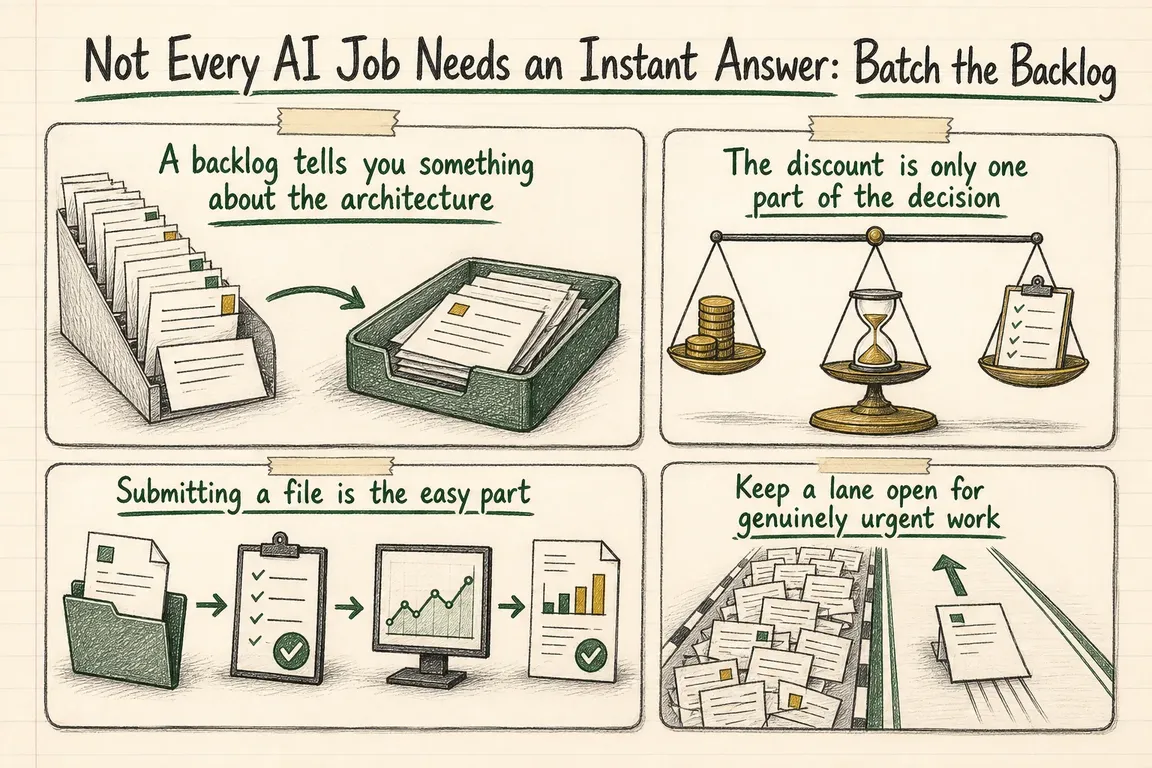
Illustrated infographic summarizing: Not Every AI Job Needs an Instant Answer: Batch the Backlog

By Greg Nowak. Last updated 2026-07-28.

Most AI integrations start with the same pattern: send a request, wait for the answer, continue. That is appropriate when a customer is chatting with an assistant, an employee is drafting a live reply, or another system is blocked.

It is harder to justify when 40,000 product classifications simply need to be ready by tomorrow morning.

Classification, enrichment, evaluation, summarisation, and data-cleanup jobs are still important. They just are not interactive. Running every one of them through a synchronous API means paying for responsiveness the business may never use.

A backlog tells you something about the architecture

OpenAI's guidance on managing AI investments recommends matching commercial and processing options to proven demand. The useful point for project teams is that token price alone does not tell you whether a workflow is economical. What matters is the cost of reaching an accepted outcome, including failures, latency, retries, and human review.

So the first design question should not only be which model can do the job. It should also be when the result is genuinely needed. A five-second response and a next-morning result are different service levels. There is no good reason to force both through the same processing path.

Batch processing trades immediate availability for lower-cost asynchronous delivery. All three major providers now document versions of that trade:

  • OpenAI: The Batch API accepts asynchronous jobs with a 24-hour completion window and discounted pricing. Its batch object includes lifecycle states, input and output file identifiers, an error file, and separate counts for completed, failed, and total requests.
  • Anthropic: The Message Batches API is priced at 50% of standard API rates. Anthropic says most batches finish in under an hour, although processing may take up to 24 hours. One batch can contain as many as 100,000 requests or 256 MB, whichever limit is reached first.
  • Google: Gemini batch processing is documented at 50% of the equivalent standard interactive cost, with a target turnaround of 24 hours. Smaller jobs can be submitted inline; larger ones can use JSONL input files. The feature currently applies to the generateContent API.

If a workload can wait, asynchronous processing should at least be considered during the architecture review.

What the workload looks like Sensible starting point What must be in place
A person or system is waiting Synchronous processing A latency target, timeout handling, and useful failure feedback
The result is needed later today or overnight Batch candidate Deadline monitoring, reconciliation, and selective retries
A large classification, enrichment, or evaluation run repeats regularly Strong batch candidate Stable job IDs, validation, quality checks, and cost reporting
The payload contains sensitive data with strict retention requirements Decide after a controls review Confirmed endpoint storage, retention, region, and deletion rules
Most work can wait, but occasional requests are urgent Batch queue with a synchronous fallback Explicit urgency criteria and an auditable override
A practical routing guide: the business deadline suggests the processing path, while operational and data requirements decide whether that path is acceptable.

The discount is only one part of the decision

Cheaper processing is attractive, but it cannot override the rules for handling the data. Changing the processing mode may also change where inputs and outputs are stored and how long they remain available.

OpenAI's endpoint controls table lists /v1/batches as retaining application state until deletion and as ineligible for Zero Data Retention. By comparison, /v1/responses and /v1/chat/completions are listed as eligible, subject to the documented limitations.

Anthropic says batch request and response data may be stored for up to 29 days after the batch is created. Results remain available during that period, and completed batches can be deleted through the API.

Moving a synchronous call into a batch is therefore more than a pricing change. The team needs to review the payload, provider, endpoint, region, project settings, and deletion process. Depending on the dataset, the right answer may be to keep the synchronous route, redact fields before submission, or exclude that workload from batching.

Submitting a file is the easy part

A JSONL upload does not make a dependable batch system. The real work sits around the provider call: choosing eligible records, tracking them through processing, and importing the results without losing or duplicating anything.

  1. Define the service level. Record the business deadline, expected volume, data sensitivity, model requirement, and acceptable fallback. “Non-urgent” should be a deliberate category, not an assumption buried in code.
  2. Give every job and item a stable ID. The source identifier must survive export, submission, download, retry, and reconciliation. Otherwise, a perfectly valid model response can still be unusable to the business.
  3. Validate locally. Check required fields, encoding, request size, supported endpoints, model availability, and provider limits before uploading. A malformed file is faster to diagnose before it reaches the provider.
  4. Keep a submission record. Store the internal job ID, provider batch ID, submission time, requested completion window, model, prompt version, item count, and expected cost basis. That record becomes essential when a job is late or an output is questioned.
  5. Monitor the full lifecycle. The worker needs to detect validation failures, completion, expiry, cancellation, and partial failures. An overdue job should trigger an alert before it misses the business deadline.
  6. Reconcile item by item. Compare the expected IDs with successful outputs and errors. A completed batch does not prove that every request succeeded. OpenAI's batch object, for example, reports completed and failed counts separately.
  7. Retry only what should be retried. Resubmit retryable failures with a recorded reason and retry count. Re-running the whole batch wastes money and may duplicate downstream updates.
  8. Check the outputs. Schema validation, allowed-value checks, sampling, and task-specific evaluations still apply. Asynchronous delivery changes the mechanics, not the quality threshold.
  9. Report cost per accepted outcome. Track input and output usage alongside failures, retries, rejected outputs, and review effort. A lower token rate is useful only if the resulting work is accepted.

This does not have to become a large platform. A straightforward Python or PHP queue can handle the pattern: a scheduler selects eligible records, a producer creates validated requests, a provider adapter submits them, and a reconciliation worker imports the results. Keeping provider-specific details behind adapters also makes it easier to compare OpenAI, Anthropic, and Google without rebuilding the surrounding business workflow.

Keep a lane open for genuinely urgent work

Batching works best as a routing decision, not a wholesale migration. An overnight catalogue refresh can wait. A correction that is holding up an order may need an immediate response.

The application should retain a synchronous fallback, but the urgency rules need teeth. If every caller can mark a request urgent, the batch queue will gradually empty and the saving will disappear. Log who or what selected the urgent path, why it was needed, and how often the override occurs. Frequent exceptions usually point to a poorly chosen service level or a process that genuinely needs interactive capacity.

Start with the AI calls already in production

The practical first step is an inventory: what each call does, daily volume, actual latency requirement, provider, endpoint, data class, failure rate, and current spend. Most organisations will find a mixed portfolio. Some calls should stay synchronous. Some may suit another supported processing mode. Others belong in a nightly or scheduled batch.

Run a controlled pilot with representative records and the same acceptance criteria for both paths. Compare completion time, successful reconciliation, quality, retries, review effort, and cost per accepted output. Once those figures are understood, the queue can become the default for that workload.

The aim is not to make useful AI work slower. It is to stop paying for immediacy when immediacy has no business value, while putting the monitoring, validation, retention controls, and fallback route in place to operate the cheaper path safely.

If that review has been sitting on the backlog, Greg can help map the existing calls, identify credible batch candidates, and turn the decision into a working Python or PHP queue with the operational safeguards around it.

Related on GrN.dk

  • A Voice Agent Is Only Ready When the Human Handoff Works
  • Background AI Tasks Need Queues, Not Just Longer API Calls
  • OpenAI Is Retiring Agent Builder: Save the Workflow, Not Just Prompts

Need help with this kind of work?

Review your AI processing mix Get in touch with Greg.

Sources

  • How to manage AI investments in the agentic era
  • OpenAI Batch API reference
  • Claude batch processing documentation
  • Gemini Batch API documentation
  • OpenAI API data controls by endpoint
Last modified
2026-07-28

Tags

  • AI automation
  • Batch API
  • OpenAI integration
  • cost optimization
  • python

Review Greg on Google

Greg Nowak Google Reviews


Illustrated infographic summarizing: Not Every AI Job Needs an Instant Answer: Batch the Backlog
Not Every AI Job Needs an Instant Answer: Batch the Backlog
2026-07-28

Move delay-tolerant AI work into dependable batch queues to cut processing costs without compromising quality, data controls, or urgent workflows.

Illustrated infographic summarizing: A stray Set-Cookie can waste your CDN: audit the cache at the edge
A stray Set-Cookie can waste your CDN: audit the cache at the edge
2026-07-27

Cloudflare Cache Response Rules can recover wasted CDN capacity, but first you need a route-level audit of public, personal and authenticated responses.

Illustrated infographic summarizing: Shorter TLS certificates expose every renewal you never automated
Shorter TLS certificates expose every renewal you never automated
2026-07-26

Shorter TLS lifetimes leave less room for manual handoffs and faulty deploy hooks. Build a renewal path that protects service availability.

Illustrated infographic summarizing: One Timeout, Two Orders: Make AI Actions Safe to Retry
One Timeout, Two Orders: Make AI Actions Safe to Retry
2026-07-25

A timed-out AI action may already have succeeded. Stable keys, durable ledgers, queues and stored results prevent a routine retry from duplicating real work.

Illustrated infographic summarizing: Your AI Visibility Dashboard Needs a Methodology, Not More Charts
Your AI Visibility Dashboard Needs a Methodology, Not More Charts
2026-07-24

A practical framework for measuring AI-search visibility with fixed prompts, repeated tests, separate metrics, retained evidence, and honest reporting.

Illustrated infographic summarizing: AI Admin APIs Are Here—But Your Directory Is Still the Source of Truth
AI Admin APIs Are Here—But Your Directory Is Still the Source of Truth
2026-07-23

New AI admin APIs can automate access and spend controls, but reliable governance still starts with authoritative directory data and clear ownership.

Illustrated infographic summarizing: OpenAI Presence Arrived—But Is Your Workflow Ready for an Agent?
OpenAI Presence Arrived—But Is Your Workflow Ready for an Agent?
2026-07-22

Before an AI agent can take on real work, its workflow needs clear scope, permissions, handoffs, evaluation cases, and production monitoring.

Illustrated infographic summarizing: Chatbot Transcripts Quietly Became a Retention and Redaction Problem
Chatbot Transcripts Quietly Became a Retention and Redaction Problem
2026-07-21

Chatbot transcripts spread across providers, logs and support tools. Here is how to map each copy, redact sensitive data and test deletion properly.

Illustrated infographic summarizing: Cloudflare Service Keys Stop in September: Find Every Caller
Cloudflare Service Keys Stop in September: Find Every Caller
2026-07-20

Cloudflare Service Keys stop working on September 30, 2026. Here is how to find every caller, move to scoped API tokens and avoid a late outage.

Illustrated infographic summarizing: Your AI Workflow Needs an Acceptance Test Before It Meets Customers
Your AI Workflow Needs an Acceptance Test Before It Meets Customers
2026-07-19

A practical way to test AI workflows using realistic scenarios, tool checks, human rubrics, regression suites, and clear release gates.

More articles
RSS feed

GrN.dk web platforms, web optimization, data analysis, data handling and logistics.