GrN.dk

Main navigation

  • Articles
  • Contact
  • Your Digital Project Manager
  • About Greg Nowak
  • Services
  • Portfolio
  • Container
    • Excel Freelancer
    • Kubuntu - tips and tricks
    • Linux Apache MySQL and PHP
    • News
    • Image Gallery
User account menu
  • Log in

Breadcrumb

  1. Home

Background AI Tasks Need Queues, Not Just Longer API Calls

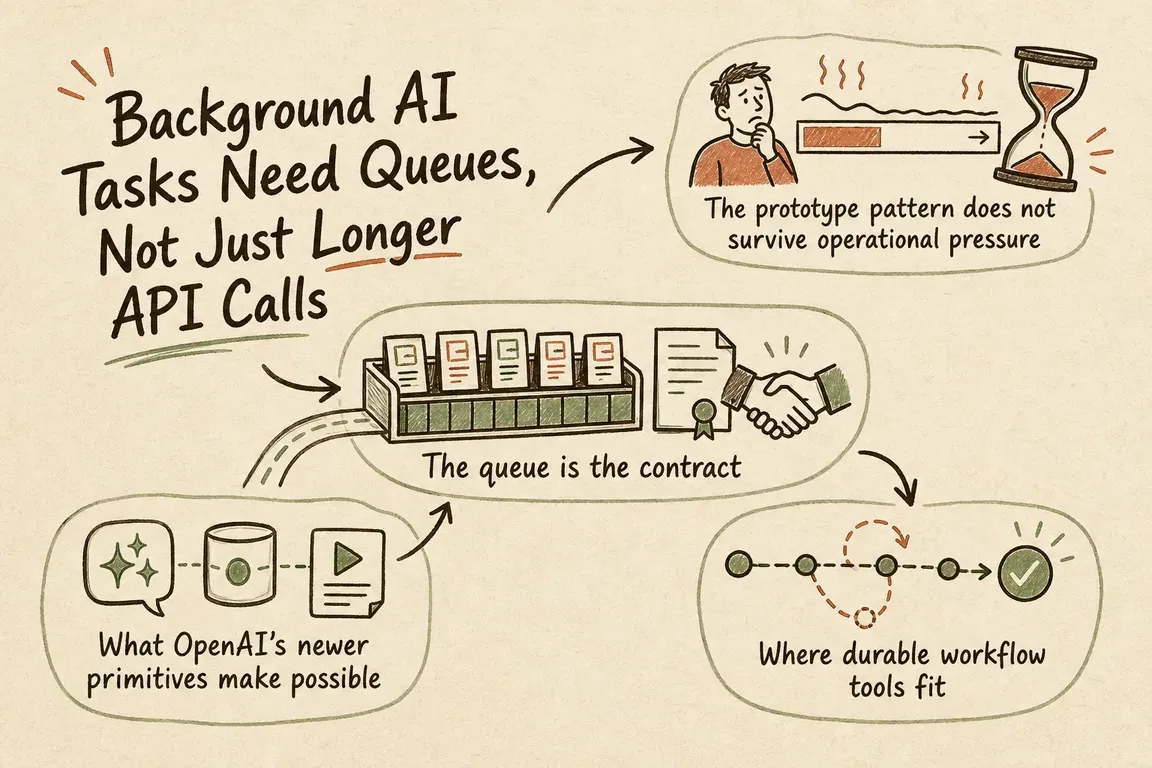
Illustrated infographic summarizing: Background AI Tasks Need Queues, Not Just Longer API Calls

By Greg Nowak. Last updated 2026-06-30.

Long-running AI work is moving from interesting demo to practical building block. OpenAI's Responses API now supports background mode for asynchronous tasks, and its webhook guidance shows how systems can receive updates when events such as background response completion happen. That opens the door to useful internal workflows: drafting reports, enriching records, reviewing documents, classifying support queues, preparing publishing changes, and coordinating multi-step back-office work.

Still, a model call that can run for several minutes is not the same thing as a production automation. The risky part usually sits around the model, not inside it. What happens while the job is running? What if the callback arrives twice? What if the user refreshes the page? What if the CRM, billing platform, helpdesk, or publishing system is unavailable at the exact moment the AI output is ready? And who gets the chance to stop the job before it commits a real business change?

OpenAI's background mode solves an important technical problem: complex reasoning tasks can run asynchronously instead of depending on one live request that may time out or lose connectivity. The documentation also covers status polling, terminal states, cancellation, and streaming from background responses when streaming was started that way. Those are useful primitives. They are not, by themselves, the operating model.

The practical lesson is straightforward: put a queue and job-state layer between long-running AI work and the systems that run the business.

The prototype pattern does not survive operational pressure

The tempting prototype is simple. A user clicks a button, the app calls the AI API, waits for the result, and writes something into a database or third-party tool. That is fine for a demo or a narrow internal experiment. It becomes fragile when the workflow runs for minutes, costs money, triggers external side effects, or needs a person to approve the final action.

Once the task runs in the background, the application needs a vocabulary for what is happening. Is the job queued, running, waiting for review, completed, failed, cancelled, or rolled back? Can the user check progress without starting the same work again? If a webhook is retried, can the system prove whether the result has already been applied? If the model output is ready but a downstream API fails, is there a retry path that will not duplicate the customer-facing action?

These questions sound mundane because they are. They are also the difference between a useful AI tool and an automation that quietly creates duplicate tasks, stale records, confusing status screens, and manual cleanup.

Operational risk Handoff layer response Business value
Timeouts or dropped connections Track the AI task as a durable background job. The interface can recover without submitting the same work twice.
Duplicate webhook delivery or retries Use idempotency keys and record applied side effects. CRM, billing, support, or publishing updates happen once.
No clear progress Expose states such as queued, running, review, failed, cancelled, and complete. Operations teams get status they can act on, not just a spinner.
Sensitive or poor output Require human approval before external writes. AI can prepare work without being allowed to commit everything automatically.
Partial failure Log each step and define retry, cancel, and rollback behavior. Recovery is designed before a production incident forces the issue.
A queue-first handoff turns a long model call into a managed operational workflow.

What OpenAI's newer primitives make possible

The Responses API update matters because it gives teams better building blocks for agentic applications. OpenAI describes background mode as a way to handle long-running tasks asynchronously and more reliably, alongside features such as reasoning summaries and enterprise reliability improvements. The background mode guide explains how developers can create a response with background enabled, then poll the response while it is queued or in progress until it reaches a terminal state. It also documents cancellation and resumable streaming patterns for background responses created with streaming enabled.

Webhooks bring the event-driven side of the design. OpenAI's webhook guide describes real-time notifications for API events, including when a background response is generated and delivered to a developer-controlled HTTP endpoint. The examples also show signature verification through the SDK, which matters because webhook endpoints are public integration surfaces. A production system should verify the event, store it, correlate it to an internal job, and only then decide what happens next.

OpenAI's production best practices guidance covers the wider move from prototype to production: secure access, robust architecture, billing limits, usage monitoring, and API key safety. Long-running automations make those concerns more visible. A background job can keep consuming resources after the user has left the page. A retry loop can create unexpected cost if it is not bounded. A leaked key or over-permissive integration can turn a useful workflow into an operational exposure.

The queue is the contract

A queue-first design changes the shape of the system. The front end no longer asks the AI to finish immediately. It creates a job with a clear type, input snapshot, requesting user, permissions context, idempotency key, and intended side effect. A worker or workflow engine performs the AI task, updates status, records request metadata, stores the output, and moves the job to its next valid state.

That job record becomes the operational contract. It should show what was requested, who requested it, which input version was used, which AI response is linked, whether the result has been approved, and which external systems have been touched. For sensitive workflows, it should also separate generated output from committed action. Drafting a billing note is not the same as sending it. Classifying a support ticket is not the same as closing it. Preparing product copy is not the same as publishing it.

Webhook handling should be deliberately boring. Receive the event. Verify the signature. Persist the event or a normalized reference. Look up the related job. Move the job forward only if the transition is valid. If the job is already complete, return success without repeating the side effect. If the job has been cancelled, record the late event and do nothing destructive. If the event cannot be matched, quarantine it for review rather than guessing.

Where durable workflow tools fit

Cloudflare Workflows is one current serverless option for this kind of orchestration. Its documentation positions Workflows for reliable AI applications, data pipelines, user lifecycle automation, and human-in-the-loop approval systems. The documented features include durable multi-step execution without timeouts, automatic retries and error handling, observability and debugging, pausing for external events or approvals, and programmatic lifecycle management for workflow instances.

Those features map closely to the gap around long-running AI work. A workflow can call the model, wait for a webhook or approval event, retry a transient step, and only then publish, update, or notify. The point is not that every team needs Cloudflare. The point is that production AI automation needs a durable coordinator somewhere: Cloudflare Workflows, a database-backed worker queue, a cloud-native queue and worker, or an existing internal orchestration platform. What matters is memory, status, retries, and control points.

A practical first version

For most business systems, the first production version should be conservative. Start with one workflow type. Design the job states before polishing the prompt. Name the side effect that must not happen twice. Decide which outputs need human approval. Define what cancellation means before and after an external write. Add an admin view that shows failed jobs, pending approvals, last webhook time, retry count, and linked external record IDs.

Logging should help an operator, not only a developer. Store enough metadata to explain why a job is blocked, which step failed, whether a retry is safe, and whether the external system was updated. Keep secrets out of logs. Treat API keys as production credentials, follow key-safety practices, and monitor usage and cost thresholds. A background-capable AI workflow is still a production integration. It should be managed like one.

This is where Greg's digital project management and implementation role is commercially useful. The work is not just wiring an API call. It is scoping the handoff layer around the actual business risk: queue design, job-state tables, webhook verification, retry and idempotency rules, admin status views, logging, and a rollback path before the workflow touches CRM, billing, support, or publishing systems.

Long-running AI tasks make bigger internal automations possible. Queues make them usable in real operations. The teams that get value fastest will be the ones that give AI work a controlled path into the business, with status, approvals, retries, and a clear record of what happened.

Related on GrN.dk

  • OpenAI's Guardrails and Run State Make Internal Agent Rollouts a Paid Approval-and-Audit Job
  • When Google can call the business, your local data stops being cosmetic
  • Agent-ready APIs need a contract audit before MCP rollout

Need help with this kind of work?

Plan a production handoff for your AI workflow Get in touch with Greg.

Sources

  • New tools and features in the Responses API
  • Background mode
  • Webhooks
  • Production best practices
  • Cloudflare Workflows
Last modified
2026-07-15

Tags

  • AI automation
  • OpenAI API
  • workflow operations
  • queues
  • webhooks

Review Greg on Google

Greg Nowak Google Reviews


Illustrated infographic summarizing: If the Facts Need JavaScript, AI Search May Miss the Full Page
If the Facts Need JavaScript, AI Search May Miss the Full Page
2026-07-14

A practical guide to finding and fixing JavaScript rendering gaps that can hide services, prices, contact details and metadata from AI search crawlers.

Illustrated infographic summarizing: Search Console Can See Social Posts—Your Reports Need a New Map
Search Console Can See Social Posts—Your Reports Need a New Map
2026-07-13

Search Console now reports how social posts perform across Google. Here’s a practical way to manage properties, permissions, baselines and exports.

Illustrated infographic summarizing: WordPress 7.0 Has an AI Client. Plugins Need Their Own Guardrails
WordPress 7.0 Has an AI Client. Plugins Need Their Own Guardrails
2026-07-12

WordPress 7.0 standardizes how plugins call AI providers, while leaving developers responsible for access control, cost limits, capability checks and graceful failures.

Illustrated infographic summarizing: Google’s AI Search toggle needs a test plan, not a gut decision
Google’s AI Search toggle needs a test plan, not a gut decision
2026-07-11

Google’s AI Search control creates a measurable publishing choice. Test visibility, traffic and leads before changing the setting across your site.

Illustrated infographic summarizing: OpenAI Is Retiring Agent Builder: Save the Workflow, Not Just Prompts
OpenAI Is Retiring Agent Builder: Save the Workflow, Not Just Prompts
2026-07-10

OpenAI retires Agent Builder on November 30, 2026. Here is what teams need to preserve, how to choose a migration path, and how to cut over safely.

Illustrated infographic summarizing: AI agents need a browser policy before they start clicking around
AI agents need a browser policy before they start clicking around
2026-07-09

Browser-using AI agents can save time, but they need clear rules before they enter CRMs, CMSs, portals, or admin tools and start taking action.

Illustrated infographic summarizing: When AI writes JSON, one bad field can break the workflow
When AI writes JSON, one bad field can break the workflow
2026-07-08

Structured AI output is useful in real workflows, but teams need schemas, validation, retries, and logs before JSON reaches production systems.

Illustrated infographic summarizing: AI search is eating the click: measure the queries before rewriting pages
AI search is eating the click: measure the queries before rewriting pages
2026-07-07

AI summaries are cutting into search clicks. Start with a practical dashboard that shows query risk, bot purpose, page value, and crawler policy.

Illustrated infographic summarizing: AI shopping visibility now depends on boring product-data plumbing
AI shopping visibility now depends on boring product-data plumbing
2026-07-07

AI-assisted shopping puts more pressure on ecommerce catalog data, feeds, schema, prices, availability, and return-policy governance.

Illustrated infographic summarizing: Drupal AI Demos Need a Permissions Rehearsal Before Launch
Drupal AI Demos Need a Permissions Rehearsal Before Launch
2026-07-07

Drupal’s July 2026 AI advisories show why agencies should test permissions, uploads, approval loops, logs, and rollback before client demos go live.

More articles
RSS feed

GrN.dk web platforms, web optimization, data analysis, data handling and logistics.