GrN.dk

Main navigation

  • Articles
  • Cases
  • Contact
  • Your Digital Project Manager
  • About Greg Nowak
  • Services
  • Portfolio
  • Container
    • Excel Freelancer
    • Kubuntu - tips and tricks
    • Linux Apache MySQL and PHP
    • News
    • Image Gallery
User account menu
  • Log in

Breadcrumb

  1. Home

The AI-built tool your team relies on needs an owner

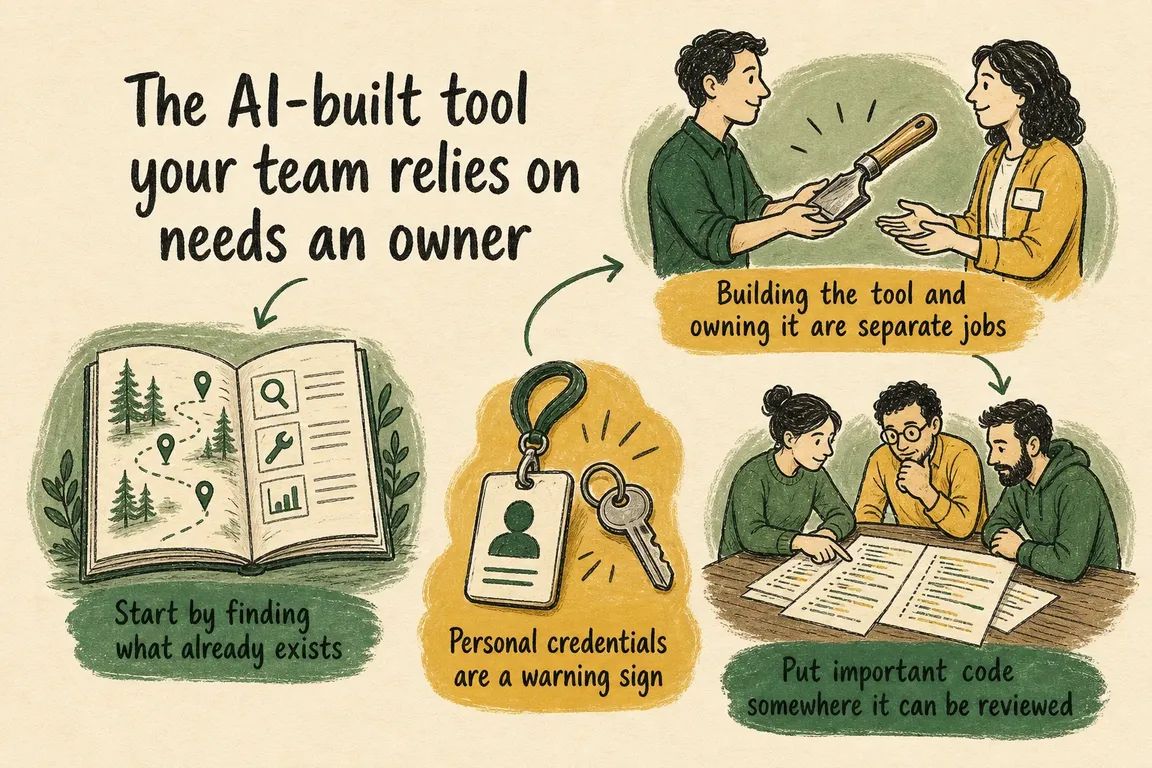
Illustrated infographic summarizing: The AI-built tool your team relies on needs an owner

By Greg Nowak. Last updated 2026-07-31.

It often starts with a small, sensible request. Reconcile two exports. Build a dashboard. Enrich a customer list. Automate the report that consumes Friday afternoon. Someone uses an AI coding assistant, gets a working result, and shares it with the team.

Then the tool sticks. Colleagues begin to depend on it, perhaps without knowing who built it or how it works. What began as a quick experiment is now part of the operating machinery, but nobody has formally accepted responsibility for it.

This is becoming a normal management issue. OpenAI reports that non-developers, including analysts, marketers, operators, designers, researchers, investors, and bankers, account for about 20% of Codex users. That group is growing more than three times as fast as developers. OpenAI also describes non-technical teams using Codex to build internal apps and dashboards.

The question is no longer whether people outside IT will create software. They already do. The practical question is what happens when their work becomes useful enough that other people rely on it.

Building the tool and owning it are separate jobs

The original builder probably understands the immediate problem better than anyone. That does not make them the automatic owner of access control, testing, monitoring, recovery, and continuity. They may move to another role, lose access to an account, or forget an undocumented dependency months later.

Ownership does not have to sit with a full-time developer. It belongs with someone accountable for the tool's continued fitness for use. That person should know what the tool does, who relies on it, what information it touches, and who must approve a significant change. They also need enough authority to pause or retire it when the risk is no longer acceptable.

A script running without errors tells you very little. It may still produce incomplete but plausible output. A renamed spreadsheet column can quietly break a calculation. A scheduled job may depend on one employee's credentials. An integration may have much broader permissions than its task requires. These are manageable problems once somebody is expected to notice them.

Start by finding what already exists

NIST's AI Risk Management Framework Core calls for mechanisms to inventory AI systems and allocate resources according to organisational risk. It also covers clear responsibilities, ongoing monitoring, periodic review, and safe decommissioning. Not every AI-assisted script is itself an AI system, but the same operating principles work well for the wider collection of tools built with AI assistance.

The inventory can be modest. For each tool, record its purpose, business owner, technical contact, users, inputs, outputs, data access, credentials, dependencies, schedule, code location, and recovery procedure. Add a simple status: experimental, supported, due for replacement, or ready to retire.

How this exercise is presented matters. If disclosure sounds like a prelude to shutting everything down, people will keep useful experiments out of sight. The message should be straightforward: once a tool matters to the business, it deserves enough support to keep doing its job safely.

What you find Priority Sensible next step
A personal experiment with no shared data or dependent process Low Record its purpose and creator, then set a review or expiry date
A tool used repeatedly by a team, with outputs checked by a person Medium Assign an owner, version the code, document inputs and outputs, and add basic checks
A scheduled job or shared app connected to business systems High Use managed credentials, reduce permissions, add monitoring, and require review
A tool that influences customer, financial, security, or operational decisions Critical Set accountable ownership, specialist review, recovery procedures, change controls, and regular reassessment
A duplicate tool or one with no remaining users Retire Check dependencies, preserve required records, revoke credentials, and decommission it safely
A short triage guide for matching controls to business dependence and potential impact. The size of the codebase is rarely the deciding factor.

Personal credentials are a warning sign

Credentials are often the first thing worth fixing. OWASP notes that API keys, database credentials, IAM permissions, SSH keys, and certificates are frequently hardcoded in plaintext source code or spread across configuration files. Its guidance recommends centralising how secrets are stored, provisioned, audited, rotated, and managed.

Taking a key out of the script is only part of the work. The replacement credential should belong to the service or managed process, not to an individual employee. It should have only the access the tool needs. The organisation should also retain the relevant metadata: the credential's purpose, consumers, history, contact person, and rotation requirements.

If a departing employee's account is the only route through which a daily process can reach its data, the company does not yet own that process in any meaningful operational sense.

Put important code somewhere it can be reviewed

Code that supports an important business process should sit under version control. Another person should be able to see how it runs, understand what changed, and restore the previous version if necessary.

A change history is useful, but it cannot decide whether a change is safe. Sensitive work still needs the right reviewer. GitHub's required-reviewer rule is one example of how that can be enforced: designated teams can be required to approve changes to selected branches, files, or folders. GitHub gives examples such as asking a data platform team to review SQL changes or a security team to review authentication files.

GitHub also makes a useful distinction: review rules strengthen ownership mechanisms; they do not replace them. The same applies here. The owner decides whether a tool remains suitable and worth supporting. A specialist reviewer judges a particular change. Sometimes one person can do both, but the two responsibilities should still be clear.

Write down the tool's operating contract

This does not call for a large technical manual. A short operational note is often enough, provided it answers the questions somebody will ask when the usual operator is unavailable:

  • What business task does the tool perform?
  • What inputs does it expect, and where do they come from?
  • What does it produce or change?
  • Which systems, libraries, models, or file structures does it depend on?
  • Who owns the result, and who reviews sensitive changes?
  • How will somebody know that it failed or returned an incomplete result?
  • How can the previous process or version be restored?

Tests should cover the failures that would cause real trouble. For a reconciliation script, that might mean detecting missing columns, duplicate rows, unexpected totals, or an empty output. A scheduled integration may need alerts for authentication failures and unusual record counts. The point is to catch a bad result before the business treats it as trustworthy, without wrapping every prototype in heavyweight process.

Good ownership includes retirement

An inventory will often uncover several tools doing roughly the same job. Keeping all of them means inconsistent output, repeated maintenance, and credentials nobody remembers. NIST explicitly includes safe decommissioning in its governance model, along with responsibility for disengaging or deactivating systems that no longer behave as intended.

Retirement needs a small plan of its own. Confirm who still uses the tool, trace downstream dependencies, preserve required records, revoke credentials, stop scheduled jobs, and tell users what replaces it. An archived repository with a clear status is far more useful than code quietly abandoned on a laptop.

Give experiments a route into production

Useful ideas should not have to wait for a project board before anyone can test them. Teams can experiment within defined boundaries, then register a tool when it becomes shared, recurring, connected to business systems, or influential in decisions. That transition point keeps early work light while recognising when the stakes have changed.

Greg can help identify AI-built scripts and lightweight apps, sort them by business impact, and put proportionate controls around the ones worth keeping. That can include moving secrets into managed storage, placing code under version control, assigning owners and reviewers, documenting how tools operate, adding focused tests and monitoring, and retiring unsafe duplicates.

There is a simple test for whether a tool has crossed the line from experiment to operational dependency: if it stops working tomorrow, who will notice, decide what to do, and take action? When nobody can answer, the tool needs an owner.

Related on GrN.dk

  • Your AI Visibility Dashboard Needs a Methodology, Not More Charts
  • OpenAI Is Retiring Agent Builder: Save the Workflow, Not Just Prompts
  • A Voice Agent Is Only Ready When the Human Handoff Works

Need help with this kind of work?

Bring your internal tools under control Get in touch with Greg.

Sources

  • Codex for every role, tool, and workflow
  • NIST AI RMF Core
  • OWASP Secrets Management Cheat Sheet
  • GitHub required-reviewer rule
Last modified
2026-07-31

Tags

  • ai-governance
  • internal-tools
  • shadow-IT
  • operational-consulting
  • secrets-management

Review Greg on Google

Greg Nowak Google Reviews


Illustrated infographic summarizing: The AI-built tool your team relies on needs an owner
The AI-built tool your team relies on needs an owner
2026-07-31

AI-built internal tools can become business-critical before anyone owns them. Here is how to secure, review, monitor, and retire them without blocking useful work.

Illustrated infographic summarizing: Your AI model has an expiry date: build the migration lane now
Your AI model has an expiry date: build the migration lane now
2026-07-30

AI models retire on a schedule. Learn how to map dependencies, test replacements, release safely and preserve a working rollback route.

Illustrated infographic summarizing: Copilot Has Repo-Level Metrics Now. What Should Teams Measure?
Copilot Has Repo-Level Metrics Now. What Should Teams Measure?
2026-07-29

GitHub’s repo-level Copilot metrics show where AI is active, but not whether it adds value. This scorecard connects usage with delivery, quality, and cost.

Illustrated infographic summarizing: Not Every AI Job Needs an Instant Answer: Batch the Backlog
Not Every AI Job Needs an Instant Answer: Batch the Backlog
2026-07-28

Move delay-tolerant AI work into dependable batch queues to cut processing costs without compromising quality, data controls, or urgent workflows.

Illustrated infographic summarizing: A stray Set-Cookie can waste your CDN: audit the cache at the edge
A stray Set-Cookie can waste your CDN: audit the cache at the edge
2026-07-27

Cloudflare Cache Response Rules can recover wasted CDN capacity, but first you need a route-level audit of public, personal and authenticated responses.

Illustrated infographic summarizing: Shorter TLS certificates expose every renewal you never automated
Shorter TLS certificates expose every renewal you never automated
2026-07-26

Shorter TLS lifetimes leave less room for manual handoffs and faulty deploy hooks. Build a renewal path that protects service availability.

Illustrated infographic summarizing: One Timeout, Two Orders: Make AI Actions Safe to Retry
One Timeout, Two Orders: Make AI Actions Safe to Retry
2026-07-25

A timed-out AI action may already have succeeded. Stable keys, durable ledgers, queues and stored results prevent a routine retry from duplicating real work.

Illustrated infographic summarizing: Your AI Visibility Dashboard Needs a Methodology, Not More Charts
Your AI Visibility Dashboard Needs a Methodology, Not More Charts
2026-07-24

A practical framework for measuring AI-search visibility with fixed prompts, repeated tests, separate metrics, retained evidence, and honest reporting.

Illustrated infographic summarizing: AI Admin APIs Are Here—But Your Directory Is Still the Source of Truth
AI Admin APIs Are Here—But Your Directory Is Still the Source of Truth
2026-07-23

New AI admin APIs can automate access and spend controls, but reliable governance still starts with authoritative directory data and clear ownership.

Illustrated infographic summarizing: OpenAI Presence Arrived—But Is Your Workflow Ready for an Agent?
OpenAI Presence Arrived—But Is Your Workflow Ready for an Agent?
2026-07-22

Before an AI agent can take on real work, its workflow needs clear scope, permissions, handoffs, evaluation cases, and production monitoring.

More articles
RSS feed

GrN.dk web platforms, web optimization, data analysis, data handling and logistics.