By Greg Nowak. Last updated 2026-09-25.
Everyone in the meeting may agree on the next steps, yet the project plan remains untouched the following day. No one has been assigned the task. The deadline exists only in the conversation. A change that sounded sensible in the room has never been assessed for its impact on time or cost.
Could your business use this? nowa.dk sets up AI automation for Danish companies.
The transcript alone does not solve that problem. It documents what participants said, but it cannot reliably distinguish between an idea, a tentative agreement and a decision that the project must actually act on.
This is where AI can make a real difference: It can identify the relevant passages and prepare a structured draft. The project manager must still determine what is binding, who owns the work and whether the scope of the deliverable has changed.
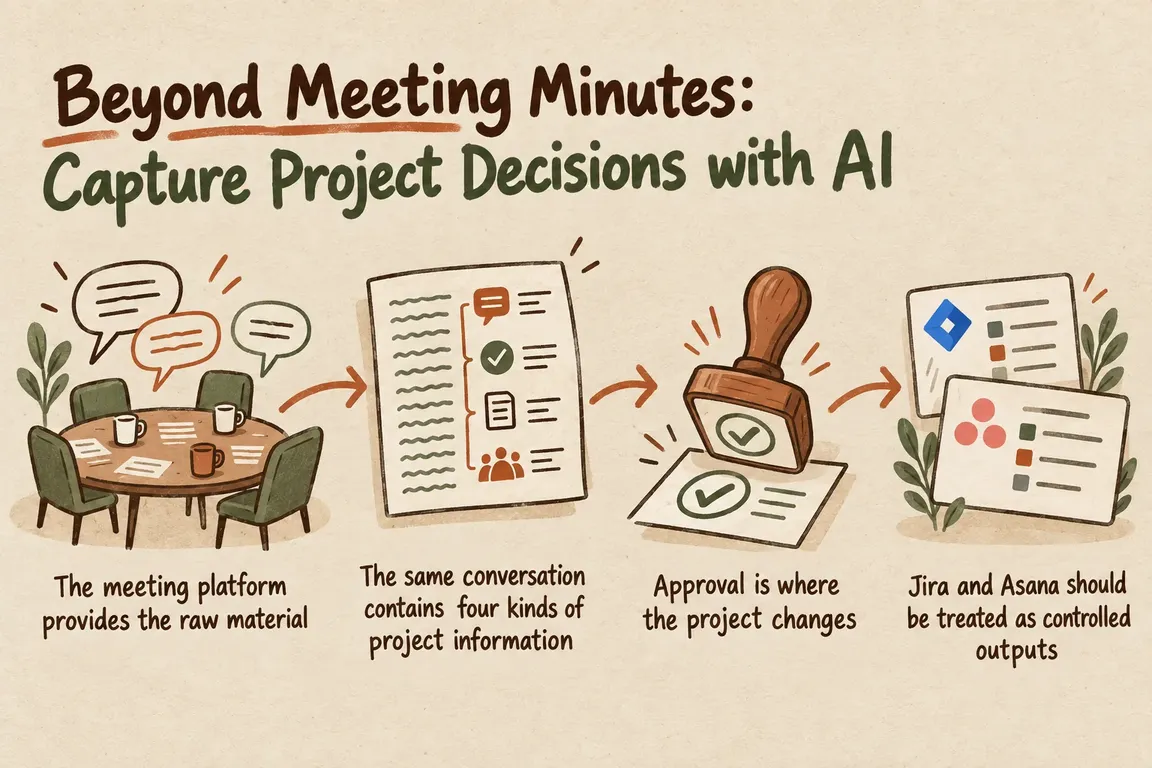
The meeting platform provides the raw material
The necessary technical access routes already exist. The Google Meet REST API provides access to meeting artifacts such as transcripts and smart notes. Transcription can be used independently of recording, so there is no need to store video solely to continue working with the conversation.
Timing does matter, however. Google states that individual transcript entries in the Meet REST API are deleted 30 days after the conference ends. By default, the artifacts follow the rules in the organizer’s Google Drive, but the integration should retrieve the necessary information while the API window is still open.
For Teams, Microsoft Graph can retrieve transcripts from scheduled online meetings. Access depends on permissions and administrator settings in the tenant environment. If Graph access to transcripts is disabled, the integration receives an error instead of data. The workflow must therefore be able to distinguish between a meeting with no decisions and a meeting whose transcript was never retrieved.
The same conversation contains four kinds of project information
The task is not to produce more polished minutes. The AI must classify statements according to what they mean for the project. Four categories provide a sensible foundation for an initial workflow:
| Category | What the draft should include | Project manager’s review |
|---|---|---|
| Decision | The selected option and the alternatives that were rejected | Confirm that the decision is final and accurately worded |
| Task | Action, proposed owner, deadline and dependencies | Validate the owner, deadline and position in the project |
| Risk | Uncertainty, possible impact and proposed follow-up | Assign the risk to the appropriate owner |
| Change request | The requested change, affected deliverable and any reservations | Assess scope, cost and timeline separately |
The differences may be subtle in language but significant in practice. “We will investigate an integration” does not necessarily assign a task to anyone. A request to move the launch date does not automatically change the schedule. And when the client mentions reporting, that does not make the feature part of the agreed scope.
The draft should therefore show its work. Who said what? At what point in the meeting? Which passage supports the proposed task or decision? With a source link or timestamp, the project manager can verify the interpretation without having to review the entire transcript again.
Approval is where the project changes
The workflow should pause after the analysis. The project manager receives a draft containing the identified decisions, tasks, risks and change requests and can accept, edit or reject each item.
Only then should the integration be allowed to create or update anything in Jira or Asana. The AI prepares the work; it does not assume the project manager’s authority. This reduces the risk of a loose idea being recorded as a delivery requirement or the same task appearing again after the next meeting.
A single “Approve minutes” button is rarely precise enough. Ten suggestions can have ten different consequences. Approval should happen at the individual-item level and explain what the click will do: Will it create a new task, update an existing one, record a risk or send a change request for separate assessment?
Jira and Asana should be treated as controlled outputs
The Jira Cloud REST API supports both creating and editing issues. The integration is also constrained by Jira’s project and user permissions. Creating an issue requires, among other things, permission to view the project and create issues. An integration account with limited permissions therefore makes more sense than broad administrator access.
In Asana, an integration can create a task via the API when it has permission to write tasks. The task must belong to a specific workspace, either directly or through a project or parent task. The destination must therefore be known before the workflow sends anything.
The output should follow the same fixed structure in both tools: a precise title, meeting context, proposed owner, deadline, source reference and an internal ID from the approval flow. The internal ID makes it possible to determine whether an approved item has already been processed.
Duplicate checks and error logs belong in the core design
Imagine that the integration creates a Jira issue and then loses its connection before the local process can record the result. On the next attempt, it may create the same issue again. Each approved item therefore needs a stable key, and the workflow should check both its own history and the relevant project object before creating anything new.
Errors should be placed in a visible queue. For each problem, it should be possible to see the meeting, the affected item, the step that failed and whether the action can safely be retried. The entire transcript does not need to be included in the log; a reference, a status and a brief error message will often be sufficient.
This creates a usable audit trail from the meeting artifact and AI suggestion through human approval to the result in the project tool. If someone later wants to know why a task was created or how a scope change entered the project, the sequence can be traced.
Decide on retention before deploying the workflow
Transcripts may contain personal data and details that should not be stored permanently in a project tool. The EDPB’s guide for small businesses emphasizes, among other things, that people must be informed about how their data is processed, that the organization should maintain records of processing activities and that personal data must be deleted or anonymized when it is no longer needed.
Raw transcripts, AI drafts, approved project information and technical logs serve different purposes. They do not therefore need to have the same retention period. Before the solution goes live, the company should decide who can view each type of data, how long it will be stored and exactly what deletion covers.
Start with one clearly defined decision flow
An initial version does not need to cover every meeting and project. Choose one type of meeting, one project tool and a few clearly defined fields. At first, the workflow can retrieve the transcript, classify the content into the four categories and send a draft for approval without creating anything itself.
Once the categories are producing accurate results and the responsibilities work in day-to-day operations, write access to Jira or Asana can be enabled. This makes it possible to refine the language, fields and approval rules before errors affect the active project plan.
Greg can help define the categories, connect Meet or Teams to the project tool and build the controls for approval, duplicates, source links, retention and errors. Through nowa.dk, Greg’s AI automation service for Danish companies, the solution can be adapted to the workflow the company already uses instead of becoming yet another standalone meeting-minutes tool.
The result should be simple to work with: What was said becomes a carefully prepared proposal, and only human approval turns that proposal into a project commitment.
Related on GrN.dk
- Montørens talenote skal blive til en arbejdsordre – ikke rå lyd
- Kundeindbakken må sortere sig selv – men ikke kommandere din AI
- Fra salgsmøde til CRM: Automatisér opfølgningen uden datarod
Need help with this kind of work?
Talk to Greg about a controlled meeting workflow Get in touch with Greg.










