Home
GrN.dk

Main navigation

  • Articles
  • Cases
  • Services
  • Your Digital Project Manager
  • About Greg Nowak
  • Image Gallery
  • Contact
User account menu
  • Log in

Join my community / free newsletter — sign up here

Breadcrumb

  1. Home

Your AI Image Has Content Credentials. Will Your Website Keep Them?

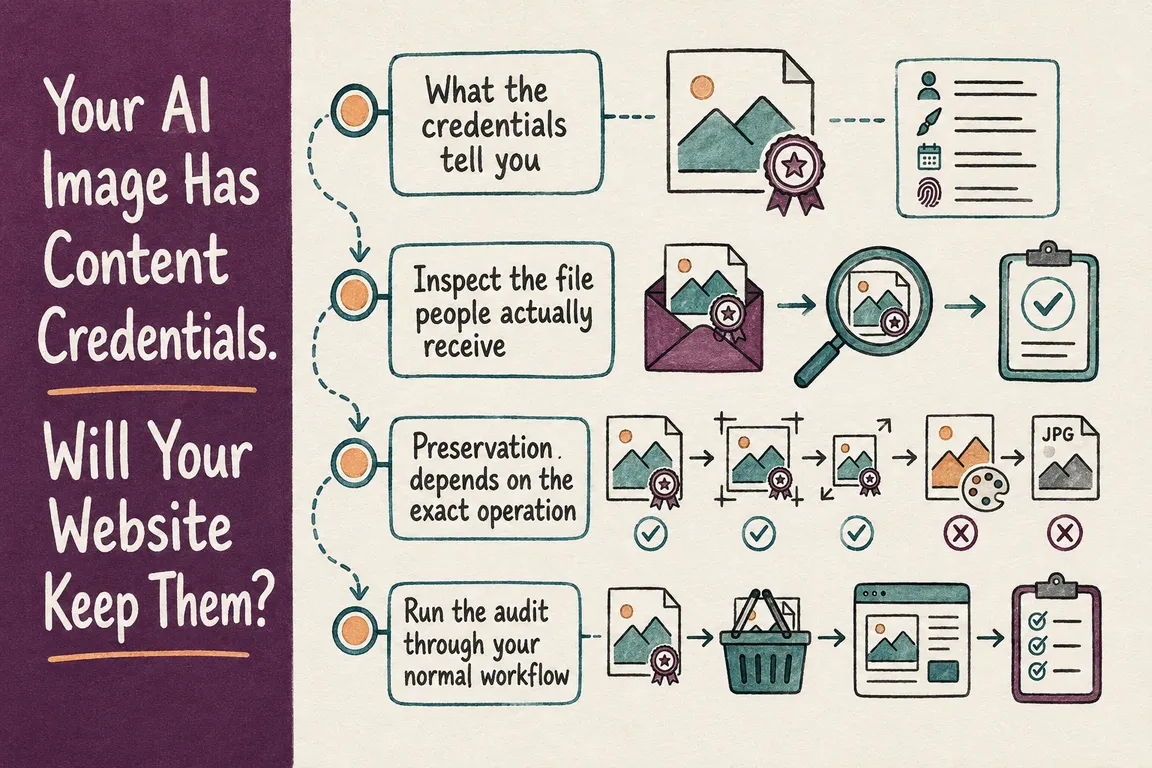
Illustrated infographic summarizing: Your AI Image Has Content Credentials. Will Your Website Keep Them?

By Greg Nowak. Last updated 2026-09-05.

An AI-generated image may arrive with machine-readable provenance and appear on your website without it. No one has to remove anything deliberately. A routine resize, format conversion, CMS derivative, optimization rule, or social export can be enough to separate the image from its Content Credentials.

So this is not just a question about what the image generator provides. It is a publishing-pipeline problem. If your organisation wants to disclose how its media was created, checking the downloaded master is only the first step. You also need to inspect the files delivered to visitors, partners, search services, and social platforms.

What the credentials tell you

C2PA is an open standard for recording the origin and history of media. It is not limited to AI content. Cameras, publishers, editing tools, and generative services can all use it. A manifest may identify the tool or service involved, record creation or editing events, and provide signed evidence that a verifier can check.

OpenAI’s provenance guidance says supported images created through ChatGPT, Codex, and the OpenAI API can include C2PA metadata and a SynthID watermark. These signals do different jobs. Metadata can carry richer context, but platforms, editing tools, and file conversions may remove it. A watermark is embedded in the media and may survive some transformations, though it generally contains less context and can also be degraded.

Neither signal is a certificate of truth. Its presence does not prove that an image is accurate, unedited, legally owned, or being used in the right context. Its absence does not prove that a person created the image. The file may predate support, come from an unsupported route, or have lost the signal during editing, conversion, compression, cropping, or sharing.

Inspect the file people actually receive

The weak point is often the gap between the source asset and the public response. The C2PA implementation guidance acknowledges that legacy or non-C2PA-capable stages can remove or corrupt manifests. Even when a rendition looks unchanged, altering its resolution, form factor, or quality produces a different binary file.

There are plenty of opportunities for that to happen on a production site. An agency hands over the original. An editor uploads it to WordPress or Drupal. The CMS creates several sizes. An image service converts and compresses them. A CDN caches another version at the edge. Someone later exports the image for a campaign or social post.

At each stage, ask the same practical question: did the system pass through the original, preserve its manifest, or create a new asset without a valid connection to the earlier provenance?

Cloudinary’s image-optimization documentation illustrates why default settings need attention. When a transformation is applied, the documented default is to strip associated metadata apart from a small set of technical fields. Cloudinary offers flags for retaining all metadata or attribution-related metadata, while leaving the untouched original unchanged. That tells you which settings to investigate. It does not replace testing the exact transformation URLs and formats used by your website.

Checkpoint What to inspect What you need to establish
Generator or agency handoff The master asset received The expected credential exists before publishing begins.
WordPress or Drupal upload The stored original and generated derivatives The CMS preserves the master, and each derivative validates independently.
Editorial processing Cropped, resized, and reformatted files The operation preserves provenance, records a new action, or breaks the chain.
Optimizer or CDN Representative public sizes and formats The actual delivered bytes retain the expected signal, including responsive and negotiated variants.
Download or social export The recipient’s downloaded file The disclosure survives after the asset leaves the website.
Regression testing A small set of known-good assets Plugin, CMS, theme, image-service, or delivery-rule changes have not altered the result.
A useful test follows the image all the way from handoff to the version an audience receives.

Preservation depends on the exact operation

Metadata loss is not unavoidable. Adobe documents a defined Creative Studio workflow in which C2PA metadata is attached to images generated or edited with generative AI. The metadata is preserved when its AI Assistant crops or resizes those images, and it remains when the image is downloaded or sent for ad serving.

The boundaries of that claim matter. It describes particular operations and delivery routes. It should not be read as a promise covering every crop, resize, Adobe product, CMS, or advertising system. Provenance support belongs to a particular combination of tools, operations, formats, and export paths. A credible publishing policy should name the paths that have been tested instead of saying broadly that Content Credentials are “supported.”

C2PA also describes options for pipelines with incompatible stages. External manifest repositories and soft bindings, including perceptual fingerprints or embedded watermarks, can help reconnect a rendition with provenance after metadata has been stripped. The guidance warns that these matches may not be exact and recommends human verification. In more capable workflows, a claim generator can add a signed manifest after an important lifecycle event and carry earlier material forward as an ingredient.

Those are distinct controls. Keeping an untouched original is not the same as preserving its manifest through a supported edit. Nor is either the same as creating a new signed assertion about a transformation. Your internal documentation should say which control applies at each checkpoint.

Run the audit through your normal workflow

You do not need to begin with the whole media library. Choose a small test set that represents the image types, dimensions, and publishing routes your team actually uses. First confirm that every master contains the expected signal. Otherwise, a missing credential later in the process tells you nothing about where it disappeared.

Publish the files as an editor normally would. Keep the responsive-image system, optimizer, and CDN in the path. Retrieve the public variants directly, then inspect those files with a compatible verification tool. If visitors can receive different dimensions or formats, sample each meaningful branch. Treat downloadable assets and routine social or campaign exports as separate tests.

Record the result by stage and transformation. The register should include the source file, CMS asset, public URL, delivered format and dimensions, transformation applied, verification result, and responsible system. When a signal vanishes, change one variable at a time. “The website stripped it” can then become a specific finding: a metadata-removal default, an unsupported conversion, or an export route that needs a different control.

Google’s May 2026 product announcement makes the public-output side of this work more relevant. Google described wider SynthID and C2PA verification across Gemini, Search, and Chrome, alongside an AI-content detection API. As verification becomes more visible, businesses should expect provenance claims to be checked outside the service that created the asset.

Turn the test into a publishing rule

A one-off audit gives you a snapshot. To keep the result useful, define which assets require disclosure, retain a known-good master, list approved transformations, and assign responsibility for checking the public output. Run the regression set again after changes to CMS modules, WordPress plugins, Drupal image styles, optimization settings, CDN rules, themes, or export tools.

Greg can map the image journey from generator or agency handoff through storage, WordPress or Drupal processing, optimization, CDN delivery, and social export. The work can focus on representative file tests, configuration changes where preservation is supported, clearly documented exceptions, and a verification checklist that editors can follow without turning every upload into a technical investigation.

The sensible promise is not that every platform will retain every signal. It is that you know what your publishing system does, preserve provenance where the toolchain allows it, and do not make a disclosure claim that the delivered file cannot support.

Related on GrN.dk

  • Background AI Tasks Need Queues—not Just Longer API Calls
  • OpenAI Has Machine Identity Now. Which Jobs Should Lose API Keys?
  • AI Research Assistants Need a Source Trail, Not Just Citations

Need help with this kind of work?

Audit your image publishing pipeline Get in touch with Greg.

Sources

  • Provenance signals in OpenAI-generated content
  • Google expands tools for identifying generated media
  • C2PA implementation guidance
  • Cloudinary image optimization and metadata stripping
  • Adobe Creative Studio C2PA handling
Last modified
2026-09-05

Tags

  • AI content governance
  • C2PA
  • Content Credentials
  • wordpress
  • Drupal

Review Greg on Google

Greg Nowak Google Reviews


Written recommendations from Trafik og Veje, Aarhus Municipality (2011) and AgroTech (2010) — read them on LinkedIn.

Illustrated infographic summarizing: Your AI Image Has Content Credentials. Will Your Website Keep Them?
Your AI Image Has Content Credentials. Will Your Website Keep Them?
2026-09-05

AI image credentials can disappear during routine website processing. Learn how to test your CMS, optimizer, CDN, and publishing workflow end to end.

Illustrated infographic summarizing: What Are Customers Asking? Let AI Find the Patterns in Support Tickets
What Are Customers Asking? Let AI Find the Patterns in Support Tickets
2026-09-04

AI-based ticket analysis can uncover recurring complaints, product defects and gaps in documentation—without the company needing yet another chatbot.

Illustrated infographic summarizing: OpenAI Has Machine Identity Now. Which Jobs Should Lose API Keys?
OpenAI Has Machine Identity Now. Which Jobs Should Lose API Keys?
2026-09-03

OpenAI’s X.509 workload identity can replace API keys for the right workloads. This practical framework helps teams decide where to start safely.

Illustrated infographic summarizing: WordPress 7.1 Exposes AI-Ready Actions. Who Gets to Run Them?
WordPress 7.1 Exposes AI-Ready Actions. Who Gets to Run Them?
2026-09-02

WordPress 7.1 helps AI agents discover and invoke site abilities. Here is how to keep exposure, authentication and permission firmly separate.

Illustrated infographic summarizing: From Sales Meeting to CRM: Automate Follow-Up Without Compromising Data Quality
From Sales Meeting to CRM: Automate Follow-Up Without Compromising Data Quality
2026-09-01

How to use AI for meeting notes and follow-up while fixed rules protect CRM data, customer matching and the sales pipeline from errors and premature changes.

Illustrated infographic summarizing: Your AI Gateway Can Name the User. Decide What That Log Is For
Your AI Gateway Can Name the User. Decide What That Log Is For
2026-08-31

Identity-aware AI Gateway logs can sharpen security and cost control, but only when attribution, access, retention, guardrails, and response are clearly defined.

Illustrated infographic summarizing: Zero Data Retention Is a Workflow Audit, Not a Checkbox
Zero Data Retention Is a Workflow Audit, Not a Checkbox
2026-08-30

Zero Data Retention covers the provider, not every copy in your stack. See how to audit endpoints, logs, storage, deletion and project-level controls.

Illustrated infographic summarizing: MCP 2026-07-28 Is an Auth Migration, Not a Version Bump
MCP 2026-07-28 Is an Auth Migration, Not a Version Bump
2026-08-29

MCP’s July 2026 release removes protocol sessions and tightens OAuth. Here’s a practical plan for migrating clients, servers and enterprise access safely.

Illustrated infographic summarizing: Turn a Technician’s Voice Note into a Work Order—Not Raw Audio
Turn a Technician’s Voice Note into a Work Order—Not Raw Audio
2026-08-28

Voice input can reduce the technician’s documentation burden when hours, materials and status are validated before the information is saved in the work order system.

Illustrated infographic summarizing: ChatGPT Disabled Personal Knowledge Sync. What Broke on Your Team?
ChatGPT Disabled Personal Knowledge Sync. What Broke on Your Team?
2026-08-27

ChatGPT retired personal sync connections for Enterprise and Edu. Here is how to find affected workflows, migrate access, and test permissions.

More articles

Built by AI — available for your business. The daily articles on this site are researched, written and illustrated by an autonomous AI pipeline. At nowa.dk I install the same kind of AI automation in businesses at fixed prices — site in Danish, English version here, and web/marketing agencies have a dedicated page.

RSS feed

Footer

  • All articles
  • Contact

GrN.dk — AI automation, web platforms, web optimization, data handling and logistics.

© 2026 GrN.dk · LinkedIn · Contact · AI automation in Danish: nowa.dk

Behind GrN.dk: Individual Entrepreneur Codecrafter · Tax ID 305669096 · Bakhtrioni St. 22, 0194 Tbilisi, Georgia · official business register









