By Greg Nowak. Updated 23 October 2026.
A spreadsheet can record that an article was reviewed. It struggles to tell you whether that approval still covers the page your customers are reading. Someone changes a claim, replaces an image, or imports a translation, and the evidence starts drifting away from the content.
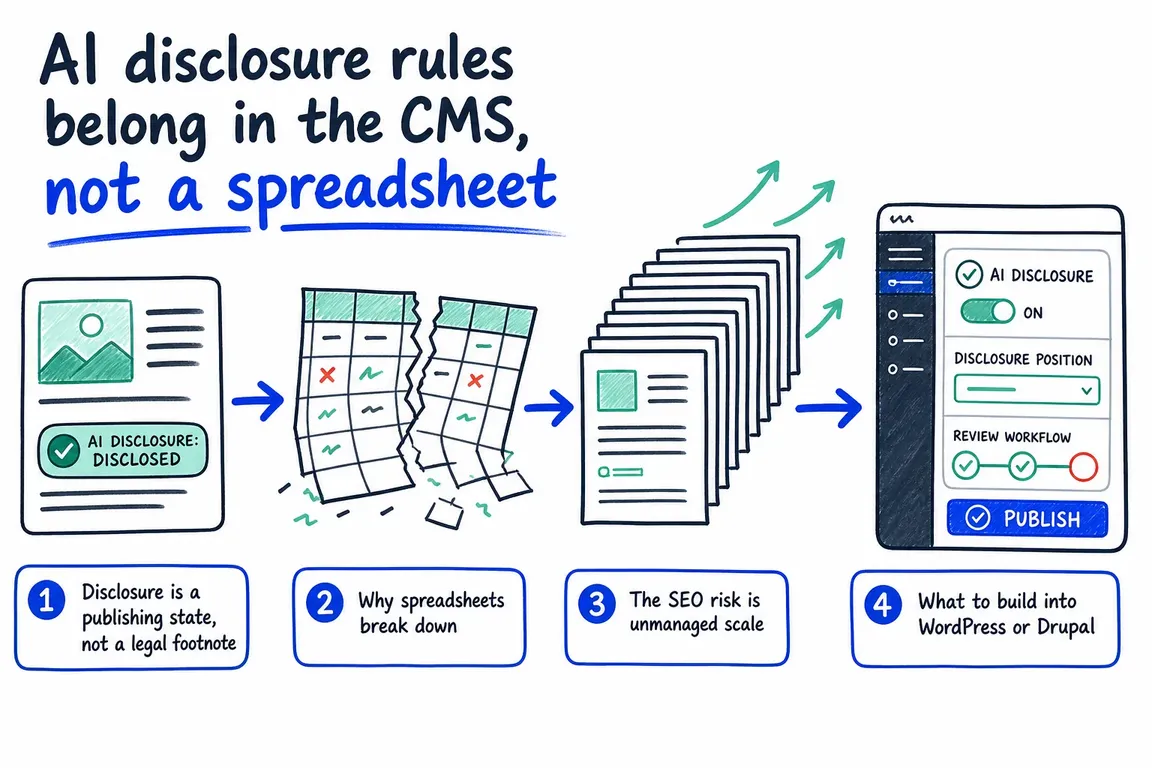
For business owners and agency teams, the practical answer is to keep AI disclosure decisions alongside the content in the CMS. Editors should be able to see what needs checking, who owns the decision, and which version was approved.
What the AI disclosure rules actually require
The European Commission confirms that Article 50 transparency obligations apply from 2 August 2026. For publishing teams, two cases deserve particular attention: deepfakes, and AI-generated or manipulated text published to inform the public about matters of public interest.
Under Article 50(4), the disclosure obligation for that text does not apply when it has undergone human review or editorial control and a person or organisation holds editorial responsibility for publication. That exception concerns text; approving an AI-generated video does not provide the same exemption from deepfake disclosure.
This is not a blanket requirement to label everything AI touches. Providers also have separate duties concerning machine-readable marking. Decide which obligations apply to your organisation and content before configuring the workflow. Where disclosure is required, Article 50 calls for clear, distinguishable, accessible information by the time of first exposure.
Give editors a decision they can complete
A single “AI used” checkbox leaves too much unanswered. Suggesting headings, drafting an article, translating approved copy, and generating realistic media need different checks. Start with a small record that makes those differences visible.
| CMS record | What to capture | When to revisit it |
|---|---|---|
| AI contribution | Ideation, drafting, translation, editing, or generated media | When the contribution changes |
| Content assessment | Public-interest purpose, sensitive claims, or potential deepfake | When subject, audience, or context changes |
| Substantive review | Reviewer, date, source notes, and unresolved issues | After material changes to claims or assets |
| Disclosure decision | Required, not required with reason, or awaiting advice | When content or applicable guidance changes |
| Publication approval | Approved revision and responsible publisher | Before releasing a revised version |
Use short choices and conditional fields. A routine heading suggestion should not trigger the same form as synthetic footage. Keep “awaiting advice” separate from “not required”, so uncertainty cannot quietly become permission to publish.
Make approval mean something
Define substantive review in terms your reviewers can use: check important claims against reliable sources, confirm quotations and permissions, look for misleading omissions, and assess whether the page helps its intended reader. Fixing grammar alone should not satisfy your internal review standard.
Record who reviewed the work and who accepts editorial responsibility. For agency work, agree whether final publication approval belongs to the agency or the client, then reflect that agreement in permissions and handover records.
A workable sequence is Draft → Review → Disclosure decision → Ready to publish → Published. Block publication when required evidence is missing. Changes to claims, translations, or realistic media should reopen the relevant review; a spelling correction can follow a lighter route.
Attach approval to the actual revision. Test scheduled publishing, API imports, bulk updates, and asset replacement as well as the editor’s Publish button. A browser warning cannot enforce a rule on an unattended import.
Implementing this in WordPress or Drupal
WordPress: register governance fields as post metadata, scoped to the relevant post types. The register_meta() reference documents data types, sanitisation, capability callbacks, and revisions_enabled. Enable revisions for the post type and the metadata that needs version history. Treat REST exposure deliberately: internal review notes should not become public API data.
Keep Pending Review if it suits the team. Add publication validation on the server and useful admin filters for missing decisions or overdue reviews. Registering fields alone does not create a publication safeguard.
Drupal: use fields and revisions alongside core Workflows and Content Moderation. Drupal’s editorial workflow guide explains states, transitions, and role permissions. Store the decision evidence with the content revision, restrict approval transitions, and build a View showing items awaiting action. Add validation for your policy requirements; a moderation state alone does not establish that the checks happened.
For media, retain the source asset, available provenance metadata, published derivative, and decision together. Check what image optimisation and asset replacement do to that connection.
Use the same review to protect search quality
Google’s generative AI guidance warns that producing many pages without adding user value may violate its scaled content abuse policy. It also calls for accuracy checks on titles, descriptions, structured data, and image alt text.
Before approving a page, ask what distinct audience need it serves, which claims need evidence, and what useful experience or judgment it adds. For a batch of pages, inspect representative examples and duplication before commissioning the rest. A disclosure label cannot compensate for an unhelpful page.
Start with one publishing workflow
Pilot one content type using an edited AI draft, a translation, generated media, and an unresolved disclosure case. Confirm that missing evidence blocks release, material edits reopen review, and the public label appears wherever the content is delivered.
Give an operations lead a queue showing the page, reviewer, blocker, and next action. Extend the workflow once editors can use it comfortably, then prioritise existing content according to risk.
Greg can help turn an agreed policy into CMS fields, permissions, review queues, and publishing checks. Start with a focused CMS workflow review to identify the gaps and define a manageable implementation.
Related on GrN.dk
- AI Images Need a Chain of Custody, Not Just a Disclosure Label
- Before AI images reach clients, audit your media library
- MariaDB 10.6 EOL: quiet CMS hosting debt needs a real upgrade plan before July 2026
Need help with this kind of work?
Plan your CMS workflow with Greg Get in touch with Greg.
Sources
- European Commission: Guidelines on transparency obligations for providers and deployers of certain AI systems
- European Commission AI Act Service Desk: Article 50
- WordPress Developer Resources: register_meta()
- Drupal User Guide: Concept—Editorial Workflow
- Google Search’s guidance on using generative AI content on your website










