By Greg Nowak. Updated 7 October 2026.
Your agency delivers an AI image with Content Credentials. You upload it, choose a crop, and publish the page. The image looks right. But does the version your visitors download still carry its provenance?
Routine image processing can remove credentials or leave them invalid. For a business using AI imagery, that creates a gap between the disclosure promised at handoff and the evidence delivered by the website. The practical starting point is a small audit of your publishing workflow.
What Content Credentials actually tell you
Content Credentials use the C2PA standard to carry signed information about media creation and editing. They can describe AI generation, but also photography and other workflows. A manifest is the record a compatible tool inspects. It helps establish provenance; it does not prove that the scene is true or that you own the rights.
Keep three questions separate: is a credential present, does it validate against this asset, and does the verifier trust its signer? A missing credential does not establish human authorship. C2PA implementation guidance explains how incompatible distribution stages can detach provenance and how supported edits can record a new manifest linked to the source.
Follow the image beyond the media library
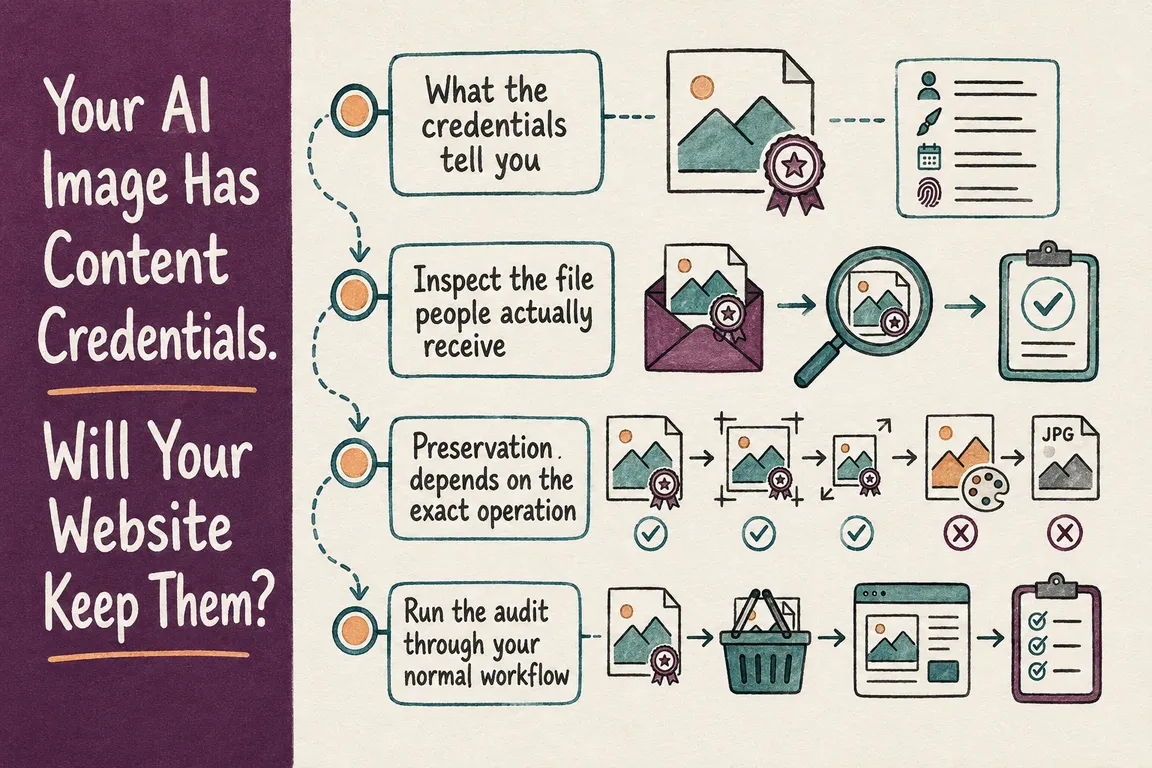
Your stored master and your public image are separate checkpoints. In WordPress, inspect the uploaded file and the generated sizes your theme uses. In Drupal, inspect the source and the image styles used on the page. Then follow any optimizer or CDN transformation and the normal download or social export route.
Use this checklist to divide the work between your editor, agency, and technical team. Each row needs evidence from the file delivered at that stage.
| Checkpoint | Inspect | Decision it supports |
|---|---|---|
| Agency or generator handoff | Master file and initial verification report | Accept the baseline or request a supported export. |
| CMS upload | Stored source and generated sizes | Identify which CMS operation needs attention. |
| Optimizer and CDN | Actual public formats, crops, and dimensions | Approve delivery rules only for tested variants. |
| Downloads and sharing | Recipient's file after export or platform processing | Document where disclosure needs another route. |
| Maintenance | Same assets after configuration changes | Catch regressions before claiming continued support. |
How to run a useful preservation test
Choose a handful of assets covering your usual formats and editorial operations: an untouched upload, a crop, a resized hero, and a downloadable image. Verify each master first. Without that baseline, a missing signal later cannot identify where it disappeared.
Publish through the normal editor workflow with optimization and CDN delivery enabled. In your browser's Network panel, find the image request actually used by the page and save that response. Check mobile and desktop sizes, responsive variants, and negotiated formats such as WebP or AVIF. Keep response headers if provenance is supplied through an external manifest link.
For repeatable local checks, the official C2PA Tool documentation provides an information report and a detailed manifest report. After installing the current tool, run these against the source and downloaded variants, replacing the example filenames:
c2patool master.jpg --info
c2patool delivered.webp --info
c2patool delivered.webp --detailed
The information report shows validation results or errors; the detailed report exposes the manifest structure. Signer trust requires the appropriate trust configuration described in the documentation. Record missing, invalid, and untrusted results separately, together with tool version and trust settings.
Keep a short register: asset ID, public URL, delivered format and dimensions, transformation, verification result, and system owner. Compare consecutive stages and change one setting at a time. That gives the agency a specific issue to fix rather than a vague report that “the website lost it.”
Metadata settings are only part of the fix
Cloudinary's optimization documentation says transformed images normally lose most metadata. It documents fl_keep_iptc for retaining metadata and fl_keep_attribution for copyright-related fields. It also preserves supported DigitalSourceType values by default in JPG and PNG delivery, with input-format and transformation limitations. That origin tag is distinct from a signed C2PA credential.
Cloudinary also documents a separate C2PA signing feature in beta, available on request. Enabled workflows use fl_c2pa, for example c_scale,w_550/fl_c2pa, to add a new signed manifest on delivery. Earlier invalid signatures remain marked invalid. Evaluate this supported route if you use Cloudinary; a generic metadata-retention flag alone does not establish valid provenance.
Preservation can also be built into an editing workflow. Adobe's Creative Studio documentation describes preservation through its AI Assistant cropping and resizing, downloads, and ad serving. That claim covers those operations and routes. Test your subsequent CMS processing independently.
Where embedded credentials cannot survive, C2PA describes external repositories and recovery through fingerprints or watermarks. Recovery matches need verification. Treat this as a separate implementation choice, with a tested retrieval path.
Give the team a publishing rule they can maintain
Decide which assets require provenance, retain their masters, list approved transformations, and assign someone to check public output. Re-run the same test set after changes to WordPress plugins, Drupal image styles, themes, optimizer settings, or CDN rules.
If a delivery route remains unsupported, document the exception and consider a visible AI disclosure plus access to the verified original. A caption helps readers understand the image, but does not repair its credential.
Greg can help map the workflow, test representative files, and coordinate configuration changes with your agency or operations team. If you need a clear answer about what your website preserves, discuss an image publishing audit with Greg.
Related on GrN.dk
- Before AI images reach clients, audit your media library
- AI disclosure rules belong in your CMS, not a spreadsheet
- AI Images Need a Chain of Custody, Not Just a Disclosure Label
Need help with this kind of work?
Discuss an image publishing audit with Greg Get in touch with Greg.