Home
GrN.dk

Main navigation

  • Articles
  • Cases
  • Services
  • Your Digital Project Manager
  • About Greg Nowak
  • Image Gallery
  • Contact
User account menu
  • Log in

Join my community / free newsletter — sign up here

Breadcrumb

  1. Home

WordPress 7.1 Exposes AI-Ready Actions. Who Gets to Run Them?

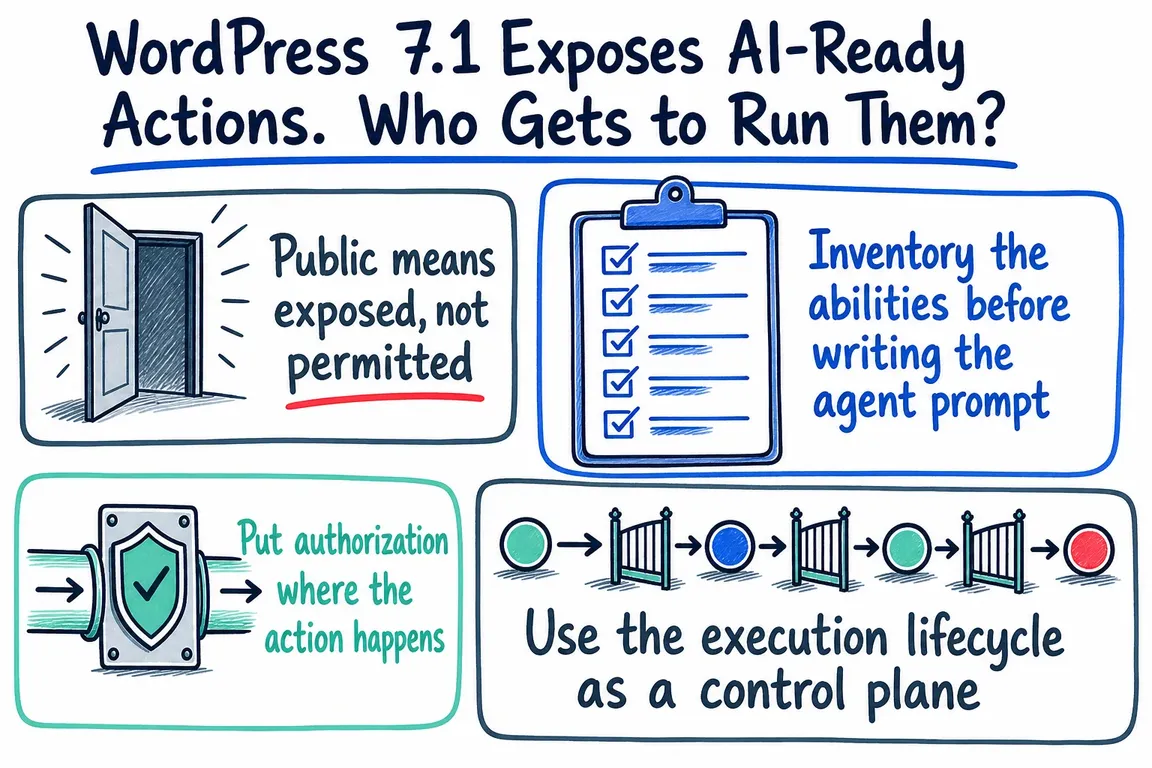
Illustrated infographic summarizing: WordPress 7.1 Exposes AI-Ready Actions. Who Gets to Run Them?

By Greg Nowak. Last updated 2026-09-02.

WordPress 7.1, released on August 19, 2026, gives developers a more capable foundation for automation. The Abilities API now supports shared discovery, custom validation and a filterable execution lifecycle. Plugins can describe their operations in a structured format, and external clients, including AI agents, can find and invoke them through consistent interfaces.

Useful? Certainly. But it brings a familiar security question much closer to the day-to-day operation of a WordPress site: just because a client can find an action, should it be allowed to run it?

This matters for any integration. It matters more when the client is an agent that can select and chain several actions on its own. A short request might result in multiple tool calls. Misinterpreted instructions, poisoned input or an identity with excessive privileges could turn an ordinary workflow into an unwanted publication, data export or administrative change.

Public means exposed, not permitted

WordPress 7.1 introduces meta.public as a shared way to indicate that an ability is intended for external clients. If public is true, REST exposure defaults to true unless a channel-specific setting overrides it. Future integrations can use the same flag, so ability authors do not have to declare that intent separately for every client.

The important word here is exposure. This setting does not grant permission.

The WordPress development note is unambiguous on this point: public, show_in_rest and similar flags are not security boundaries. Each ability still needs an appropriate permission_callback. An external client may be able to see a public ability while only an authenticated user with the right WordPress capability can execute it.

In practice, there are three decisions to keep separate:

  • Can this client see the ability? Exposure metadata decides that.
  • Which identity is making the request? REST authentication establishes that.
  • Can that identity perform this action on this resource right now? The ability's permission logic decides that.

Treating a single public flag as the answer to all three is where trouble starts.

Inventory the abilities before writing the agent prompt

Before connecting an agent, list the abilities registered by WordPress Core and every active plugin. For each one, record what it reads, changes or returns; whether REST or another client exposes it; and which capability its permission callback checks. Review the inventory whenever plugins or integrations change, because the available action surface changes with them.

The REST representation includes useful annotations, such as whether an ability is read-only or destructive. WordPress also maps execution to HTTP semantics: read-only operations use GET, non-read-only operations use POST when input is required, and destructive operations use DELETE. Those signals help a client choose the correct method. They are also a sensible starting point for an internal control policy.

Suggested controls for common classes of WordPress abilities
Ability class Typical effect Control baseline Agent policy
Read-only Retrieve approved site information Authenticated identity, narrow data scope and validated output Allow automatic use within defined limits
Reversible write Create a draft or update recoverable content Resource-level permission, strict input schema and invocation log Allow only inside an explicit workflow
High-impact write Publish content or change important configuration Elevated permission, current-context check and approval gate Prepare or preview first, then require confirmation
Destructive or sensitive Delete records or export user data Least privilege, per-action authorization, approval and detailed audit event Deny by default; enable only for a bounded use case
The exact labels can vary. What matters is deciding explicitly which abilities an AI client may discover, prepare and execute.

The categories themselves are not sacred. The decision is. An authenticated agent used to summarize content does not automatically need publishing rights. An analytics workflow does not automatically need access to a user-export ability. Give the integration identity only the capabilities required for the approved workflow.

Put authorization where the action happens

All Abilities REST endpoints require an authenticated WordPress user, and the documentation recommends application passwords for external access. Authentication tells WordPress who is calling. It does not make every available action appropriate for that caller. The permission callback for each ability must still decide whether execution is allowed.

That check should fit the action closely. A broad administrative capability may be convenient during development, but it can leave an agent with far more reach than the job requires. Where the action concerns a specific post, user or other resource, permission logic should consider that resource and its ownership rather than relying only on a general role. The credentials should belong to the integration's limited purpose, not quietly reuse an administrator's standing access.

This matches OWASP's guidance for agentic systems: apply least privilege and least agency, authenticate calls at the action level, and require human confirmation for high-impact or destructive operations such as publishing, transfer or deletion. OWASP also highlights the risks of inherited credentials and authorization drift during longer workflows. Before a privileged step runs, recheck permission instead of assuming that approval granted earlier in the workflow is still valid.

Use the execution lifecycle as a control plane

WordPress 7.1 adds filters around the ability execution path. A normal call passes through input normalization, schema validation, permission checking, the registered callback, result transformation and output validation. That sequence gives site owners and integration developers several places to enforce policy.

  • wp_pre_execute_ability can stop execution early, perhaps because an integration has been disabled or an approved operating condition is not met. It bypasses the rest of the pipeline, so use it with care.
  • wp_ability_normalize_input can add or normalize contextual input before validation. Whatever it produces must still satisfy the registered input schema.
  • wp_ability_permission_result can apply an additional authorization rule after the ability's permission callback. This filter needs particular care because returning true can override an earlier denial.
  • wp_ability_execute_result can remove internal metadata, turn a result into an error or perform narrowly scoped recovery before output validation.

The existing before-and-after execution actions remain useful for observation. Together, these controls can support approvals, policy enforcement and auditing on the server. The prompt may guide the agent's behaviour; it should not be the mechanism that ultimately decides what the agent can do.

Validate both sides of every call

An ability exposed to an agent needs precise input and output schemas. Input validation keeps ambiguous or loosely structured model output away from business logic. Output validation catches unexpected result shapes after the callback or a later transformation has run.

Review the descriptions and annotations too. Agents choose tools using the interface presented to them. A vague name, misleading description or incorrect destructive marker can lead to a poor choice even when the underlying code is sound. OWASP identifies manipulation of tool descriptions, schemas and routing information as a tool-misuse risk. Ability metadata is part of the security surface, not just developer documentation.

Keep a useful audit trail without copying sensitive data

Each agent invocation should leave enough evidence to investigate later: the ability name, authenticated identity, time, decision, outcome and an appropriate request correlation identifier. For sensitive actions, record whether approval was given and which policy allowed or denied the call.

Avoid storing complete inputs and outputs by default. Drafts, user exports and administrative values may contain personal or confidential information. Structured events, redacted fields and sensible retention rules usually provide a better balance. The log should help reconstruct what happened without becoming a second store of sensitive content.

Test the boundaries in staging

Do more than confirm that the happy path works. Test valid requests from the intended identity and from a user with fewer privileges. Send malformed input. Try to invoke hidden abilities and cross resource boundaries. For destructive actions, confirm that the client recognises the annotation, uses the expected method and stops at the approval gate.

Then test sequences rather than isolated calls. Can the agent combine several acceptable abilities into an unacceptable result? Does it repeatedly retry a denied or failing action? What happens if its permission changes halfway through a workflow? These may look like questions about agent behaviour, but the dependable answers must come from application controls that can be enforced.

A focused WordPress AI review

Using the Abilities API responsibly does not have to become a sprawling transformation programme. Greg can run a bounded review that inventories registered abilities, classifies their effects, checks exposure settings and permission callbacks, scopes external authentication, tightens schemas, introduces proportionate approvals and privacy-conscious logging, and exercises the full workflow in staging.

The working rule is straightforward: discoverability tells an agent what exists. Authorization decides what it may do. Keep those decisions separate, and the Abilities API becomes a much more dependable foundation for WordPress automation.

Related on GrN.dk

  • Background AI Tasks Need Queues—not Just Longer API Calls
  • OpenAI Is Retiring Agent Builder: Save the Workflow, Not Just Prompts
  • Google’s August 18, 2026 Content API Cutoff: Feed Cleanup Before Merchant API Migration

Need help with this kind of work?

Review your WordPress AI controls Get in touch with Greg.

Sources

  • WordPress 7.1 “Mary Lou”
  • A unified public exposure flag for Abilities in WordPress 7.1
  • New execution lifecycle filters for the Abilities API
  • Abilities REST API endpoints
  • OWASP Top 10 for Agentic Applications
Last modified
2026-09-02

Tags

  • WordPress 7.1
  • AI agents
  • Abilities API
  • API Security
  • workflow automation

Review Greg on Google

Greg Nowak Google Reviews


Written recommendations from Trafik og Veje, Aarhus Municipality (2011) and AgroTech (2010) — read them on LinkedIn.

Illustrated infographic summarizing: WordPress 7.1 Exposes AI-Ready Actions. Who Gets to Run Them?
WordPress 7.1 Exposes AI-Ready Actions. Who Gets to Run Them?
2026-09-02

WordPress 7.1 helps AI agents discover and invoke site abilities. Here is how to keep exposure, authentication and permission firmly separate.

Illustrated infographic summarizing: From Sales Meeting to CRM: Automate Follow-Up Without Compromising Data Quality
From Sales Meeting to CRM: Automate Follow-Up Without Compromising Data Quality
2026-09-01

How to use AI for meeting notes and follow-up while fixed rules protect CRM data, customer matching and the sales pipeline from errors and premature changes.

Illustrated infographic summarizing: Your AI Gateway Can Name the User. Decide What That Log Is For
Your AI Gateway Can Name the User. Decide What That Log Is For
2026-08-31

Identity-aware AI Gateway logs can sharpen security and cost control, but only when attribution, access, retention, guardrails, and response are clearly defined.

Illustrated infographic summarizing: Zero Data Retention Is a Workflow Audit, Not a Checkbox
Zero Data Retention Is a Workflow Audit, Not a Checkbox
2026-08-30

Zero Data Retention covers the provider, not every copy in your stack. See how to audit endpoints, logs, storage, deletion and project-level controls.

Illustrated infographic summarizing: MCP 2026-07-28 Is an Auth Migration, Not a Version Bump
MCP 2026-07-28 Is an Auth Migration, Not a Version Bump
2026-08-29

MCP’s July 2026 release removes protocol sessions and tightens OAuth. Here’s a practical plan for migrating clients, servers and enterprise access safely.

Illustrated infographic summarizing: Turn a Technician’s Voice Note into a Work Order—Not Raw Audio
Turn a Technician’s Voice Note into a Work Order—Not Raw Audio
2026-08-28

Voice input can reduce the technician’s documentation burden when hours, materials and status are validated before the information is saved in the work order system.

Illustrated infographic summarizing: ChatGPT Disabled Personal Knowledge Sync. What Broke on Your Team?
ChatGPT Disabled Personal Knowledge Sync. What Broke on Your Team?
2026-08-27

ChatGPT retired personal sync connections for Enterprise and Edu. Here is how to find affected workflows, migrate access, and test permissions.

Illustrated infographic summarizing: Cloudflare’s September Bot Defaults Could Quietly Cut AI Visibility
Cloudflare’s September Bot Defaults Could Quietly Cut AI Visibility
2026-08-26

Cloudflare’s September bot defaults give publishers more control, but one training block could also cut search crawling and AI-driven discovery.

Illustrated infographic summarizing: Does Your AI Chatbot Clearly Identify Itself?
Does Your AI Chatbot Clearly Identify Itself?
2026-08-25

The EU’s transparency requirements for AI chatbots now apply. Here is how to make your bot’s identity clear, limit its system access and provide a genuine route to a member of staff.

Illustrated infographic summarizing: Should publishers add Google’s new Preferred Sources button?
Should publishers add Google’s new Preferred Sources button?
2026-08-24

Google’s Preferred Sources button is worth a controlled test for eligible publishers, with careful choices around placement, performance and measurement.

More articles

Built by AI — available for your business. The daily articles on this site are researched, written and illustrated by an autonomous AI pipeline. At nowa.dk I install the same kind of AI automation in businesses at fixed prices — site in Danish, English version here, and web/marketing agencies have a dedicated page.

RSS feed

Footer

  • All articles
  • Contact

GrN.dk — AI automation, web platforms, web optimization, data handling and logistics.

© 2026 GrN.dk · LinkedIn · Contact · AI automation in Danish: nowa.dk

Behind GrN.dk: Individual Entrepreneur Codecrafter · Tax ID 305669096 · Bakhtrioni St. 22, 0194 Tbilisi, Georgia · official business register









