By Greg Nowak. Last updated 2026-06-24.
ChatGPT is edging into the same territory as the tools people already use to run office work. OpenAI's June 2026 updates point in that direction: scheduled tasks, connected-app permission controls, file storage in Library, active-session review, large-paste handling as attachments, and Lockdown Mode.
That changes the admin conversation. The risk is no longer limited to what an employee types into a prompt on a Tuesday afternoon. It is also what ChatGPT can keep, search, connect to, monitor, and act on later. Once files, recurring jobs, email workflows, and connected apps are in the mix, a prompt policy on its own is not enough.
The first job is not to write a grand AI governance document. It is to get the basics under control: what is connected, what is stored, what is scheduled, which sessions are still active, and where untrusted content could influence a tool that can move data.
| Surface | What to check | Rule to set now | Review rhythm |
|---|---|---|---|
| Scheduled tasks | Active reminders, recurring jobs, and monitoring tasks. | Give each task an owner, purpose, and expiry date. Avoid unattended tasks against sensitive client material. | Monthly, and at project closeout. |
| Connected apps | Apps ChatGPT can read from or write to. | Enable only trusted apps and actions. Use the strictest practical confirmation setting, especially for write access. | Quarterly, and after role changes. |
| File Library | Uploaded and generated files still available to the account. | Delete files from Library when they are no longer needed. Do not assume deleting a chat removes the file. | Monthly, and after delivery. |
| Active sessions | Devices and first-party OpenAI app sessions that remain signed in. | Remove unknown sessions. Use log out of all sessions when the account status is unclear. | Quarterly, or after staff changes. |
| Lockdown Mode | Users and workflows where outbound network access creates extra risk. | Use Lockdown Mode for high-sensitivity work, then test app permissions by role. | Per role and per workflow. |
| Prompt-injection paths | Places where untrusted content can affect browsing, downloads, writes, or sends. | Reduce blast radius with least privilege, human approval, monitoring, and safer API automation where chat is the wrong surface. | Before rollout, and after material changes. |
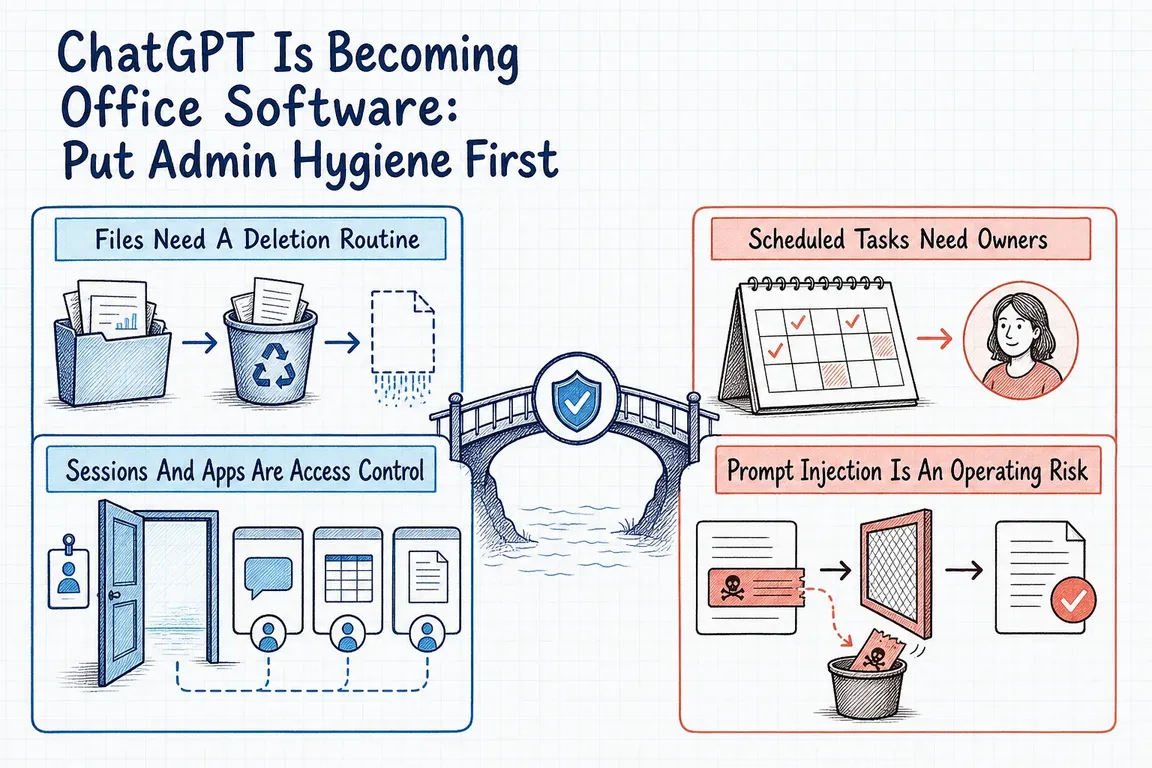
Files Need A Deletion Routine
OpenAI's file storage guidance says ChatGPT automatically saves uploaded and created files into a dedicated Library. That includes documents, spreadsheets, presentations, images, and files uploaded in chats. Users can browse files, search them, filter by type, check storage usage, and bring saved files into later chats.
Useful, yes. But it also means client material and internal work product can outlive the conversation where it first appeared.
The key admin detail is simple: files stay saved until someone manually deletes them. Deleting a chat that contains files does not delete those files from Library. Deleted files are scheduled for permanent deletion from OpenAI systems within 30 days, with the stated exceptions for already de-identified content and security or legal obligations. Temporary Chat matters here too, because files uploaded there are not saved to the account or Library.
So the practical rule is not complicated. Decide when Library is appropriate, when files should be removed, and when a one-off sensitive review should use a mode with different retention behavior.
Sessions And Apps Are Access Control
OpenAI's active-session controls let users review recent sessions and trusted devices from ChatGPT security settings. A session row may show device or browser details, first-party app context such as ChatGPT, Codex, or API Platform, approximate location, sign-in time, trusted-device status, and whether it is the current session. Users can log out individual sessions or all sessions. The feature is not available for accounts linked to an organization's SSO sign-in.
That is useful hygiene, but it is not a full app audit. OpenAI's guidance also says active sessions do not show or manage third-party app sessions, connected apps, Sign in with ChatGPT sessions used only for third-party services, or Codex CLI sessions.
In practice, that means session review and connected-app review are separate jobs. The June 2026 release notes make this more important because ChatGPT added more control over when it asks before using connected apps: always ask, ask before making changes, or ask only before important changes. Read-only lookup and write access should not be treated the same.
Scheduled Tasks Need Owners
Scheduled tasks change ChatGPT from a tool someone visits into a tool that can come back later. OpenAI describes tasks that send reminders, handle recurring work, or monitor things for users. A Scheduled page lets users see active tasks, check when they run next, and pause, resume, edit, or delete them.
Monitoring tasks can search the web and check connected apps for changes, then notify users when something is worth reporting. Tasks can be scheduled for exact times or broader windows. OpenAI also notes limits, including tasks not running more than once per hour and unattended tasks potentially pausing after inactivity.
The admin issue is not whether reminders are helpful. Many will be. The issue is whether recurring work has a named owner, a clear scope, and a stop condition. A task watching public information is one thing. A task checking a connected app, reasoning over client context, and prompting a follow-up is another.
Prompt Injection Is An Operating Risk
The NCSC coverage in TechRadar and ITPro frames prompt injection as more fundamental than old code-injection comparisons. The problem is that LLMs do not enforce a clean security boundary between instructions and data inside a prompt. ITPro reports the NCSC view that security teams should treat this as an inherently confusable deputy problem and focus on reducing risk and impact rather than expecting one perfect mitigation.
That maps directly onto ChatGPT administration. OpenAI's Lockdown Mode is designed to reduce the final data-exfiltration stage of prompt injection attacks by limiting outbound network requests that could send sensitive data to an attacker. It disables or restricts capabilities such as live web browsing, deep research, agent mode, Canvas networking, file downloads for data analysis, and some web-derived image support.
Lockdown Mode is not a magic switch. OpenAI is clear that it does not prevent prompt injections from appearing in content ChatGPT processes, such as cached web content or uploaded files. It also does not automatically disable every app in managed workspaces. Admins still have to decide which apps and actions are trusted.
What Good Hygiene Looks Like
A useful ChatGPT admin review should leave the business with a short operating model people can actually follow.
Start with workspace settings, connected apps, roles, and confirmation defaults. Review Library usage and create a deletion routine for completed projects. Check active sessions where that feature is available, and document the SSO limitation where it applies. Inspect scheduled tasks for owner, purpose, source systems, and expiry. Then identify prompt-injection paths where untrusted content can influence a tool that can browse, download, write, or send information.
The point is not to slow down useful AI work. It is to stop useful workflows turning into unmanaged SaaS sprawl. Greg can help translate the current ChatGPT feature set into practical admin rules, cleanup steps, and safer automation choices. Some work belongs in chat. Some recurring work belongs in a governed API workflow with logging, scoped credentials, and a narrower blast radius. The business value is deciding that deliberately, before habits harden on their own.
Related on GrN.dk
- ChatGPT Apps and Full MCP Access Put Governance Front and Center
- OpenAI File Search Turns Messy Internal Docs Into a Real Retrieval-Governance Project
- OpenAI Computer-Use Rollouts Turn Browser Tasks Into a Scoped-Credentials Project
Need help with this kind of work?
Book a ChatGPT admin hygiene review Get in touch with Greg.