By Greg Nowak. Last updated 2026-07-27.
WP-CLI can make WordPress maintenance faster, but speed is only the immediate benefit. For business owners, operations leads, and agencies, its real value is consistency: recurring jobs become easier to document, review, delegate, and repeat across multiple sites.
The wrong approach is to collect clever one-liners and hope somebody remembers when they are safe. Treat WP-CLI as an operations layer instead. Identify the environment, inspect the current state, preview consequential changes, and know how you will recover before touching production.
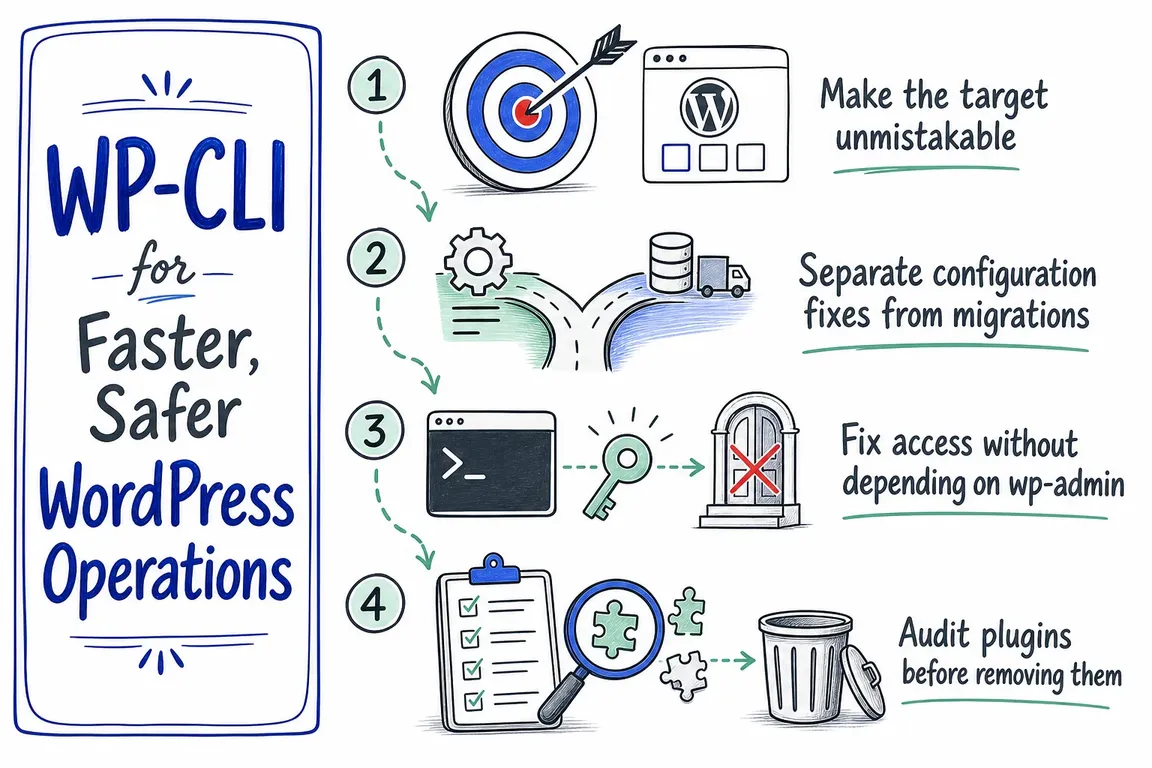
Make the target unmistakable
Many expensive command-line mistakes are context mistakes: the command was correct, but it ran against the wrong site. WP-CLI provides global parameters for local paths, multisite URLs, remote servers, and containers:
wp --path=/var/www/example.com option get home
wp --url=https://client.example.com user list
wp [email protected] plugin list
If your team works across the same environments repeatedly, define named aliases in wp-cli.yml. An alias can include the SSH destination, WordPress path, URL, and user:
@staging:
  ssh: [email protected]
  path: /var/www/example.com
  url: https://staging.example.com

@production:
  ssh: [email protected]
  path: /var/www/example.com
  url: https://example.com
Commands then become both shorter and easier to review:
wp @staging plugin list
wp @production option get home
Use clear environment names, restrict access to the configuration, and never store passwords or private keys in a project file.
| Operational task | Start with | Safety gate |
|---|---|---|
| Correct one URL setting | wp option update |
Check whether WP_HOME or WP_SITEURL overrides the database |
| Rewrite URLs during migration | wp search-replace |
Export the database and run --dry-run |
| Restore administrator access | wp user reset-password |
Confirm the account and protect the generated password |
| Remove an unused plugin | wp plugin uninstall |
Review status, ownership, and uninstall behavior |
| Rebuild a disposable database | wp db reset |
Verify the environment and the restore file first |
Separate configuration fixes from migrations
If only the stored home or WordPress address is wrong, update those options directly:
wp option get home
wp option get siteurl
wp option update home 'https://example.com'
wp option update siteurl 'https://example.com'
Before changing them, inspect wp-config.php. Values defined through WP_HOME or WP_SITEURL override their database equivalents, so a successful option update may not change the site’s effective configuration.
A domain migration is different because old URLs may also appear in content, widgets, and serialized plugin settings. Use search-replace, which understands PHP serialized data, and preview the result:
wp db export before-migration.sql
wp search-replace 'https://old.example.com' 'https://new.example.com' --skip-columns=guid --dry-run
wp search-replace 'https://old.example.com' 'https://new.example.com' --skip-columns=guid
Skipping the guid column remains appropriate for a standard domain change. For a larger or sensitive cutover, create a reviewable transformed SQL file instead of writing immediately:
wp search-replace 'https://old.example.com' 'https://new.example.com' --skip-columns=guid --export=migrated.sqlFix access without depending on wp-admin
WP-CLI is especially useful when an administrator cannot reach the dashboard or a client handover is blocked. Inspect the accounts before changing anything:
wp user list --fields=ID,user_login,user_email,roles
wp user update 123 --user_email='[email protected]'
wp user reset-password 123 --skip-email --porcelain
The dedicated password command can suppress the notification email and return only the generated password. That is convenient for a controlled handover, but the output is still a credential. Do not leave it in shared terminal logs, tickets, or chat history; transfer it through an approved secure channel and record who authorized the reset.
Audit plugins before removing them
Inactive plugins add noise to updates, security reviews, and handovers. Start with an inventory rather than a bulk deletion:
wp plugin list --status=inactive --format=tableThere is an important distinction between deletion and uninstallation. wp plugin delete removes files without running the plugin’s uninstall procedure. When cleanup routines should run, use:
wp plugin uninstall plugin-slugWP-CLI will normally warn and skip an active plugin. The --deactivate option can override that behavior, but it should not replace impact assessment on a live site. Confirm that the plugin is genuinely unused, understand what its uninstall routine removes, and test consequential cleanup on staging.
Keep database resets inside disposable environments
wp db reset --yes removes all tables from the configured database. That is useful for local rebuilds, automated tests, and staging environments designed to be recreated. It is not routine production maintenance.
wp db export before-reset.sql
wp db reset --yes
wp db import known-good.sql
Verify that the export is readable and restorable before resetting anything. Remember that a database dump does not include uploads, themes, plugins, or configuration files; production recovery normally needs both database and filesystem coverage.
Turn commands into an operating playbook
A useful WP-CLI playbook records the target alias, pre-flight checks, approved command, expected output, verification steps, and rollback route. Keep destructive commands separate from everyday diagnostics, require review for production changes, and record what ran against which site.
This is where WP-CLI becomes commercially useful: fewer improvised fixes, clearer handovers, and WordPress work that is easier to scope and support. If your team has the commands but not the operating model, Greg can help turn them into safer migration, launch, and maintenance workflows.
Related on GrN.dk
- Cloudflare Page Rules Debt: How Quiet Configuration Drift Breaks Business Websites
- Debugging WordPress on a Live Site: A Safer Workflow
- WordPress Admin Lockout: A Safe Recovery Guide
Need help with this kind of work?
Improve your WordPress operations with Greg Get in touch with Greg.