By Greg Nowak. Updated 19 September 2026.
Form spam is not merely a website nuisance. It consumes sales time, distorts campaign reporting, triggers pointless automations, and leaves the CRM full of records nobody trusts.
That makes this an intake-quality problem. The useful question is not “Which CAPTCHA plugin should we install?” It is “What must be true before a submission becomes a lead, account, ticket, order, or marketing contact?”
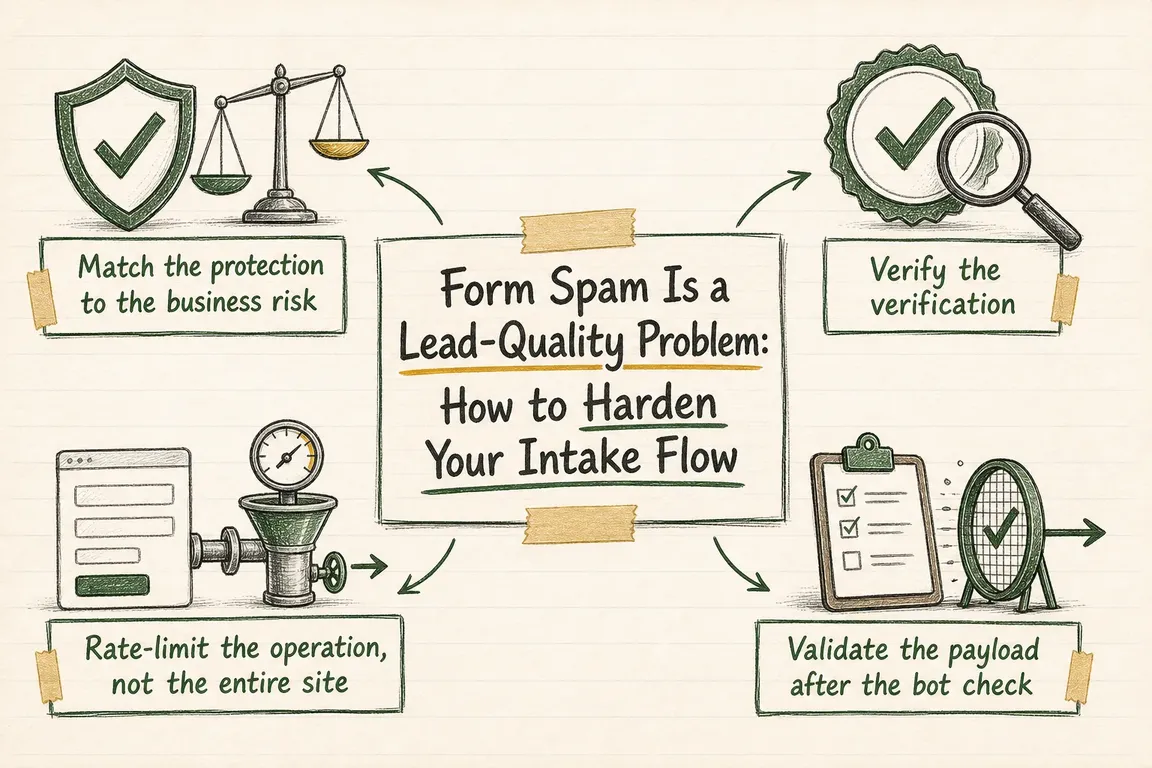
The answer is usually a layered flow: quiet bot detection, mandatory server-side verification, endpoint-specific rate limits, strict payload validation, and a holding area for uncertain submissions. No single layer establishes that a prospect is genuine, but together they make abuse more expensive and bad data less disruptive.
Start with the cost of a bad submission
A newsletter form, quote request, registration page, and checkout do not deserve identical controls. First document what each form creates downstream and who must clean it up. Then apply protection in proportion to that operational cost.
| Intake flow | Cost of abuse | Starting controls | Downstream gate |
|---|---|---|---|
| Newsletter signup | List pollution and poor deliverability | Quiet bot check, basic rate limit, field validation | Confirm the address before activation |
| Contact or quote request | Wasted sales time and misleading pipeline data | Bot check, server validation, payload rules, targeted rate limit | Quarantine suspicious records before assignment |
| Account registration | Fake accounts and follow-on abuse | Stronger rate limits, bot check, email verification | Restrict capabilities until verification |
| Checkout or payment | Fraud, support work, and corrupted order data | Layered bot and operation-specific controls | Keep payment and fraud decisions in transaction systems |
Make browser verification real on the server
If you use Cloudflare Turnstile, displaying the widget is only the browser-side step. The form handler must send the returned token and secret to https://challenges.cloudflare.com/turnstile/v0/siteverify before accepting the submission. The secret belongs on the server and must never appear in client-side code.
Turnstile tokens expire after 300 seconds and are single-use. Reject missing, failed, expired, or replayed tokens before creating downstream work. If your widget uses configured actions or hostnames, compare the response values with the form you expected instead of checking only success.
Long or multi-step forms need a graceful expiry path. Refresh an expired widget with turnstile.reset(), preserve the visitor’s entered data, and explain what happened. For transient Siteverify errors, Cloudflare supports an idempotency_key so the server can retry validation safely.
Test the integration with Cloudflare’s documented test keys before release. Cover successful, failed, expired, and already-redeemed tokens. Also test cached pages, AJAX submissions, consent tools, popups, mobile layouts, and every language variant. If the site has a strict Content Security Policy, allow the required Turnstile script and frame resources or use Cloudflare’s documented nonce-based approach.
Rate-limit the operation, not the contact page
A bot check does not control how often somebody can call the underlying handler. Apply rate limits to the exact hostname, path, and request method that performs the operation—for example, the POST endpoint behind a quote form, not ordinary visits to its landing page.
Do not copy an arbitrary threshold from another website. Examine normal submission volume, campaign peaks, shared-office networks, agency testing, and legitimate integrations. Where your plan and application responses support it, count failed operations separately from successful ones.
Begin with logging or a managed challenge if the false-positive risk is unclear. A hard block that rejects legitimate enquiries during a campaign is not a successful anti-spam rule. Review what the rule actually catches before increasing its severity.
Treat every submitted field as untrusted
Passing a bot check does not prove that the data is safe, accurate, or commercially useful. Client-side validation improves the visitor experience, but the server must enforce the same rules before storing, forwarding, or acting on the payload.
Define a small data contract for each form: required fields, accepted types, maximum lengths, allowed values, and valid relationships between fields. If the form offers a fixed service, country, budget band, or contact method, accept only those defined values. Hidden fields and dropdown values can still be altered in a direct request.
Use allowlists where practical rather than crude keyword and character blacklists. For uploads, check size, permitted extensions, and detected file type; do not trust the filename or browser-supplied content type alone. Only request an upload when the business process genuinely needs one.
Put a gate in front of the CRM
The last—and often most valuable—control belongs in the workflow. One uncertain submission should not immediately create an opportunity, notify a shared channel, enrol a contact in marketing, and assign a sales task.
Add a quarantine state with a structured reason such as verification failure, rate anomaly, invalid field value, or unconfirmed address. Let an authorised team member release a false positive without retyping the lead. Retain enough information to diagnose patterns, but avoid collecting or keeping personal data that the business does not need.
Keep operational metrics separate: attempted submissions, technically accepted submissions, quarantined records, confirmed contacts, and leads accepted by sales. A falling spam count means little if genuine prospects are also disappearing.
A practical hardening sequence
- Inventory every public form and handler, including old landing pages, embeds, popups, registrations, and API endpoints.
- Map what each submission creates and which automations it starts.
- Validate bot-check tokens in the actual server-side handler.
- Add path- and method-specific rate limits based on observed traffic.
- Enforce the form’s data contract before saving or forwarding anything.
- Quarantine uncertain records before CRM assignment and notifications.
- Test failure, expiry, retry, caching, CSP, accessibility, and mobile behaviour.
- Review accepted leads and false positives after launch, then tune one layer at a time.
Make the intake path trustworthy again
If form spam has become a recurring sales, reporting, or website-operations problem, Greg can review the complete path from public form to CRM follow-up. The goal is a quieter, more dependable intake process without making genuine prospects fight the website. See how Greg can support your digital project.
Related on GrN.dk
- Cloudflare Page Rules Debt: How Quiet Configuration Drift Breaks Business Websites
- Logistics Optimization in 2026: Fix the Flow Before You Buy More Tech
- Website Email Deliverability in 2026: A Checklist for Fixing Missing Mail
Need help with this kind of work?
Review your intake flow with Greg Get in touch with Greg.