By Greg Nowak. Last updated 2026-07-12.
WordPress plugins no longer need a separate integration for every AI provider. Since WordPress 7.0, a plugin can describe the result it needs through a provider-agnostic PHP AI Client. WordPress then routes the request to a suitable model configured by the site owner.
That removes a fair amount of provider-specific plumbing. Developers get a consistent prompt builder, normalized responses and familiar WordPress error handling. But the common interface only handles the connection. It does not decide who should have access, what the feature may do, how much it may consume or how the workflow should behave when a provider fails.
For a production plugin, those are the decisions that matter. The question is no longer simply whether the plugin can call a model. It is whether a particular feature can use an appropriate model, for an authorized user, within sensible limits, without putting the rest of the workflow at risk.
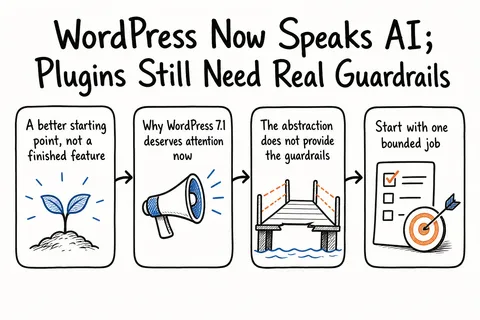
A better starting point, not a finished feature
The AI Client gives plugin developers a WordPress-native entry point for text, image, speech and video operations. It can express model preferences, request structured JSON and return fuller results containing token usage as well as provider and model metadata.
A model preference is still only a preference. The models available on any given site depend on the providers its administrator has configured. WordPress may fall back to another compatible model, and some sites will have no provider configured at all. Capabilities and supported options also vary between providers.
That makes feature detection part of the user experience. A plugin should confirm that an operation is supported before showing the corresponding control. Hiding or disabling an unavailable action is far better than letting someone prepare input and discover the limitation only after clicking the button.
Why WordPress 7.1 deserves attention now
The WordPress 7.1 roadmap schedules the release for August 19, 2026, with generation streaming and embeddings listed among the planned AI Client capabilities. The July developer update places Beta 1 on July 15, followed by weekly betas and an August 5 release candidate. That creates a useful testing window, although the roadmap is clear that planned work is not guaranteed to reach the final release.
Streaming can make generation feel more responsive because output appears progressively. Embeddings represent content as vectors and allow retrieval based on meaning rather than exact wording. For WordPress products, that could support editorial discovery, related-content tools or focused semantic search.
These are development primitives, not ready-made AI products. Core supplies the shared transport and API. The plugin remains responsible for the workflow, access rules and operational boundaries.
The abstraction does not provide the guardrails
The clearest warning in the WordPress guidance concerns arbitrary prompts. The separate client-side JavaScript API uses REST endpoints and allows broad prompt execution. Access is therefore restricted by a high-privilege capability that defaults to administrators, and WordPress does not recommend this pattern for a distributed plugin.
The safer design is a separate REST endpoint for each defined AI feature. The browser asks for a specific operation, while prompt construction and configuration stay on the server. That endpoint becomes the place to validate input, check the user’s capability and limit what the feature can execute.
| Decision | What needs to be settled | Practical control |
|---|---|---|
| Feature scope | What single job may the model perform? | Use a feature-specific endpoint with a server-owned prompt. |
| Authorization | Which WordPress users may run it? | Check a capability appropriate to the action and content. |
| Provider support | Can the configured provider perform the operation? | Detect support before displaying or running the feature. |
| Credentials | Where are provider keys managed? | Use connector-managed credentials and keep secrets out of browser requests. |
| Consumption | How much may one request or user consume? | Set request limits and capture available token metadata. |
| Failure | What happens when AI is unavailable or returns an error? | Handle WordPress errors without losing the user’s original work. |
| Rollout | How will the feature be checked safely? | Test defined inputs, log outcomes and begin with a limited user group. |
Start with one bounded job
A generic AI assistant creates a large permission and testing surface before it has proved useful. A bounded feature is easier to explain, authorize and assess. Reasonable starting points include suggesting an editorial summary without publishing it, classifying content into an approved taxonomy or retrieving relevant internal content through embeddings.
Each of these has a recognizable input, a constrained output and a point where a person decides what happens next. The model can help without silently changing content or site configuration. Permissions can also reflect the actual operation: authority to read eligible content is not the same as authority to edit or publish it.
The REST contract should describe that product action rather than expose the prompt beneath it. A classification endpoint, for example, could accept a post identifier and return categories matching an expected schema. It does not need to accept unrestricted browser instructions. Keeping the prompt inside the plugin reduces accidental misuse and lets the implementation change without altering the public contract.
Account for provider differences from the outset
Define the feature before choosing implementation details. Record what success looks like, which content the feature may read, the required output shape and whether a person must approve the result. Empty, malformed or unavailable results also need an explicit outcome.
Then create a provider capability matrix. WordPress can route requests through configured providers, but a plugin cannot assume that every provider supports the same operation. The matrix should cover the required modality, structured-output requirements, any dependency on streaming or embeddings, model preferences and acceptable fallback behaviour. The interface can then use the AI Client’s support checks to decide whether the feature should be available.
The endpoint itself should stay narrow. Authenticate the request and check the relevant WordPress capability before constructing the prompt. Keep system instructions, model preferences and output schemas on the server. According to the WordPress 7.0 guidance, feature plugins using the AI Client do not need to manage provider credentials themselves; those remain in the connector infrastructure.
Consumption limits still require application policy. The prompt builder supports maximum-token settings, while full results can report token usage and identify the provider and model that responded. Those details can support per-request ceilings, rate or budget rules and diagnostic logging. WordPress cannot decide what level of usage is commercially acceptable for a particular site.
Testing also needs to go beyond the ideal request. Cover empty and unusually long input, unsupported providers, missing credentials, malformed structured output and provider failure. Generation methods return standard WordPress errors, and WordPress provides a filter that can prevent prompts from running. Use those mechanisms to give the user a clear fallback, preserve their input and avoid presenting partial output as a successful result.
Existing integrations need a migration plan
The standalone WordPress AI Client repository is now deprecated in favour of the client built into WordPress 7.0. On WordPress 7.0 and later, Core provides the PHP SDK infrastructure. The package may still retain its REST endpoints and JavaScript API because those parts are not yet in Core.
A plugin that targets only WordPress 7.0 and later can remove redundant package dependencies and use the Core entry point. Supporting older WordPress versions requires a deliberate compatibility path. Loading the bundled SDK again on 7.0 or later can create duplicate class definitions, so this is better handled as a small migration project than as a one-line API replacement.
The advantage comes from controlled usefulness
WordPress now offers a credible shared layer for AI-enabled plugins, and version 7.1 is set to broaden what developers can build on it. The best first release is still modest: one valuable task, one explicit endpoint and a workflow whose behaviour can be observed.
That scope makes permissions reviewable, provider differences testable and consumption measurable. It also gives stakeholders something concrete to assess before funding a wider rollout. Does the feature save editorial time? Does it improve discovery? Does it behave reliably across the providers the site can actually use?
Greg can help turn one of those questions into a contained delivery project: define the feature, map provider capabilities, implement the endpoint and permissions, set operating limits, test the failure paths and stage the rollout. WordPress now supplies the common AI plumbing. The commercial value still depends on choosing the right job and putting firm boundaries around it.
Related on GrN.dk
- When AI writes JSON, one bad field can break the workflow
- WordPress 7.1's Media Pipeline Needs a Real Plugin and CDN Test Pass
- Background AI Tasks Need Queues, Not Just Longer API Calls
Need help with this kind of work?
Plan a guarded WordPress AI feature Get in touch with Greg.