By Greg Nowak. Updated 16 October 2026.
Imagine an AI workflow reading an enquiry and preparing an update for your CRM. Every required field is present. The customer ID has the right format. Unfortunately, it belongs to another customer.
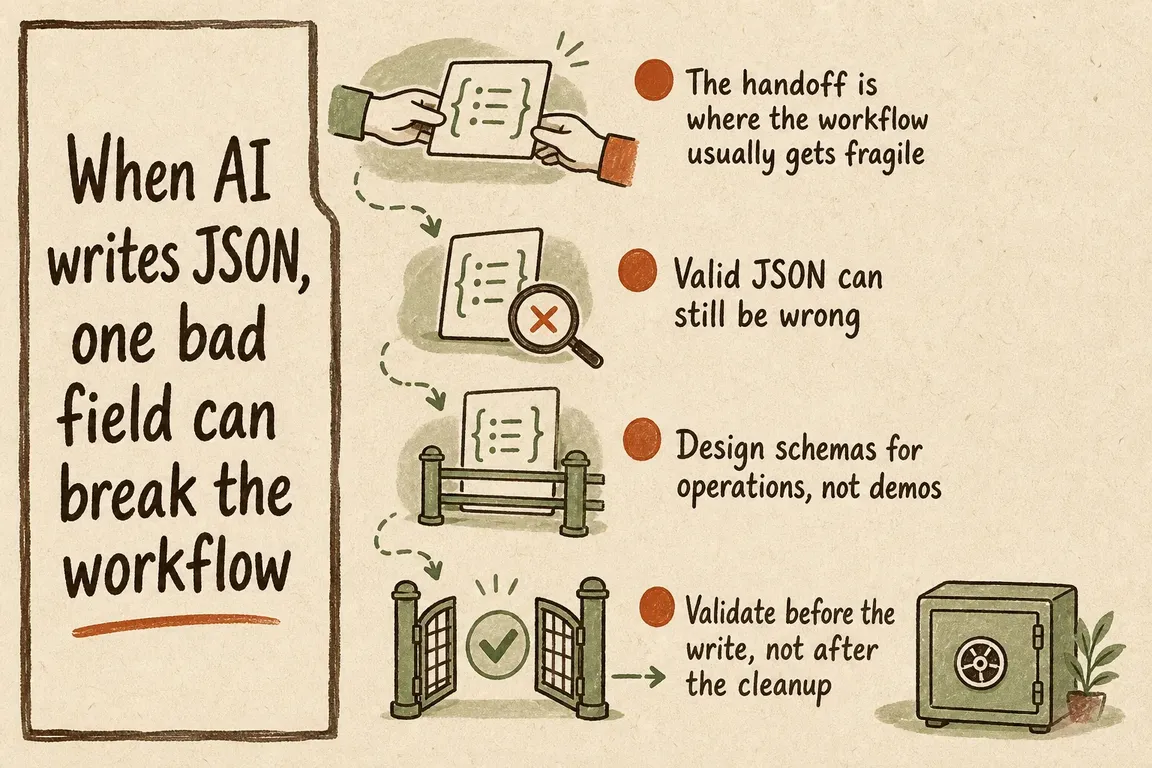
The JSON is valid. The proposed change is wrong.
For business owners, operations leads, and agency teams, this is the important distinction: structured output makes information easier for software to process. It does not establish that the information is true or that the action is authorised. Before connecting AI to live records, decide what must be checked, what can proceed automatically, and who handles exceptions.
What do structured outputs actually guarantee?
A JSON Schema describes fields, types, and allowed values. Structured output features constrain a model’s response to a supported schema, reducing formatting failures and making integrations more predictable.
Read the provider’s exceptions, though. Claude’s documentation describes unsupported constraints, refusals, truncated responses, and an enum capitalisation caveat. Some SDK helpers transform the schema before sending it, so the constraints enforced during generation may differ from those checked afterwards.
Check the response status and completion reason before using the payload. Keep application validation even when the provider offers schema guarantees: the model cannot establish account ownership or permission merely by returning a correctly shaped object.
Put five checks between the model and the write
Use this checklist when reviewing an integration proposal or deciding whether a workflow is ready for production.
| Checkpoint | Evidence needed | If it fails |
|---|---|---|
| Response | Completed output without refusal or truncation | Stop and classify the failure |
| Schema | Valid JSON, required fields, correct types and values | Reject or allow a bounded repair attempt |
| Business rules | Matching record, plausible dates, permitted state change | Retrieve evidence or request review |
| Authority | Correct account scope and any required approval | Deny the action |
| Execution | Duplicate protection and confirmed downstream result | Reconcile uncertain outcomes before retrying |
Define fields around the receiving system
Start with the CRM, CMS, or support API. If priority accepts only low, normal, and urgent, use those exact values in an enum. For money, specify currency, units, precision, and tax treatment.
Declaring a property does not make it mandatory. Use required explicitly and additionalProperties: false where undeclared fields must be rejected. As the JSON Schema object reference explains, a missing property differs from one containing null. An empty string needs its own treatment too. Define whether each means “unknown,” “leave unchanged,” or “clear the field.”
Dates need explicit checks. JSON Schema’s format is an annotation by default; enforcement depends on the validator and configuration. Enable supported checks, parse dates in application code, and define the timezone and acceptable scheduling window. The format documentation explains this distinction.
Version the schema alongside the consuming code and check compatibility with both the model provider and your application validator.
Resolve the customer before changing the customer
In the enquiry example, checking that customer_id is a string proves very little. The application should confirm that the customer exists, belongs to the authorised account, and matches the enquiry. Several plausible matches should produce a review task.
Let the model extract the requested service, summarise the message, or suggest a priority. Retrieve authoritative values such as ownership, permissions, and payment status from your systems. Keep the account boundary in application code, especially when an agency serves several clients through shared infrastructure.
Check relationships between fields: a delivery date must not precede the order date, and closing a ticket may require a resolution. Incoming emails and documents remain untrusted content; instructions inside them must not grant extra permissions.
For consequential actions, bind approval to the exact proposed change. Recheck permissions and relevant record state before execution.
A repair attempt and a write retry need different rules
A malformed date may justify one repair attempt with a precise error message. An ambiguous customer needs evidence. A denied permission should remain denied. Set a retry limit, minimise personal data in error feedback, and rerun all checks after repair.
A timeout after a write needs different handling: the receiving system may already have completed it. Preserve the validated payload and operation identifier rather than asking the model to generate another version.
Where supported, use an idempotency key to identify retries of the same operation. Keep the key and request parameters stable. Check the receiving API’s retention and error behaviour: Stripe documents different retry semantics for API v1 and API v2. Without suitable duplicate protection, check the downstream result before repeating the write.
Make exceptions manageable before launch
Begin with a preview stage that shows proposed changes without applying them. Test missing fields, unknown IDs, conflicting dates, denied actions, duplicate requests, timeouts, and instructions embedded in source content. Include a record that changes between preview and execution.
Give unresolved cases a named owner. The review queue should show the proposed change, the failed check, and the next useful action. “Validation failed” leaves the operator guessing; “two customers match this enquiry” tells them what to resolve.
Record the correlation ID, model and schema versions, validation outcome, retry count, and confirmed execution result without collecting unnecessary sensitive data. Track recurring review reasons alongside completed work. Frequent manual correction is evidence that the workflow still needs attention.
Review one workflow before it changes live records
Greg can help turn these checks into an implementation brief or review an existing integration with your team. Bring one workflow, a representative payload, and the action it is allowed to take. Discuss the validation, approval, and recovery paths with Greg before enabling production writes.
Related on GrN.dk
- When the AI API Says “Try Again,” What Does Your Customer See?
- Your AI workflow has logs. Can they explain one bad decision?
- NGINX Can Read JSON Before Routing—Should It Handle Your AI API?
Need help with this kind of work?
Discuss your AI workflow with Greg Get in touch with Greg.