By Greg Nowak. Last updated 2026-07-30.
WordPress 7.0 “Armstrong” has been available since May 20, 2026. One important fact changes how businesses should plan the upgrade: real-time collaboration was removed before the final release. WordPress 7.0 does not provide Google Docs-style simultaneous editing, and classic meta boxes do not disable a collaboration feature that is present in this release.
That correction does not make upgrade testing unnecessary. WordPress 7.0 raises the minimum PHP version, modernises significant parts of the administration experience, and introduces new editor, design, AI, and developer capabilities. The practical job is to test what your team actually uses—not an abandoned pre-release feature list.
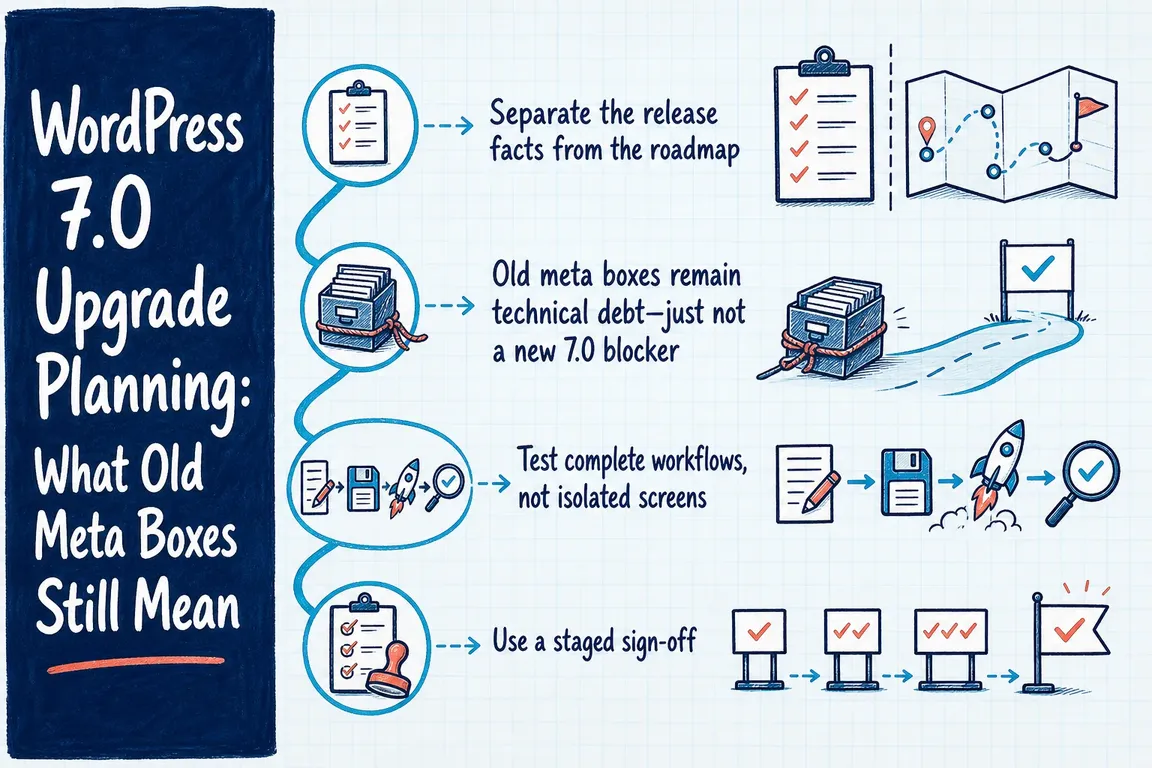
Separate the release facts from the roadmap
Collaboration was removed on May 8 after concerns about race conditions, server load, memory use, and recurring bugs found during testing. Work may continue for a future release, but businesses should not buy, schedule, or announce a 7.0 upgrade on the assumption that shared editing is included.
The features that did ship include the modernised dashboard, visual revision improvements, additional blocks and design controls, AI-related APIs and connectors, and a broader developer toolkit. Each may be useful, but none replaces the need to test established publishing, commerce, membership, multilingual, and approval workflows.
| Upgrade area | Decision question | Evidence required |
|---|---|---|
| PHP and database | Does the production platform meet the new baseline? | PHP 7.4 or later is mandatory; WordPress currently recommends PHP 8.3+, MariaDB 10.11+, or MySQL 8.0+. |
| Plugins and theme | Are business-critical extensions ready for 7.0? | Vendor confirmation plus staging tests of the actual workflows—not merely an absence of PHP errors. |
| Editor customisation | Do custom blocks, sidebars, fields, and patterns still behave correctly? | Create, edit, preview, revise, schedule, and publish representative content. |
| AI and connectors | Should new integrations be enabled at all? | A named owner, approved provider, access review, data-handling decision, and cost controls. |
| Release recovery | Can the team reverse the change safely? | A tested backup, documented rollback route, maintenance window, and responsible decision-maker. |
Old meta boxes remain technical debt—just not a new 7.0 blocker
Classic interfaces built with add_meta_box() can continue to matter because many sites use them for product data, campaign settings, legal approval, SEO controls, or client-specific fields. Their presence does not trigger a missing collaboration mode in WordPress 7.0. Rewriting them solely to “unlock 7.0 collaboration” would therefore be work based on an outdated premise.
Modernisation can still be worthwhile. Registered post meta is easier to expose consistently through the REST API, connect to block-editor interfaces, and include in revision history. A typical registration looks like this:
register_post_meta( 'post', 'example_subtitle', array(
    'show_in_rest'      => true,
    'single'            => true,
    'type'              => 'string',
    'revisions_enabled' => true,
) );
For show_in_rest to take effect, the post type must support custom-fields. Permissions, sanitisation, validation, default values, revision behaviour, and any front-end consumers also need deliberate testing. Treat this as a maintainability project with its own acceptance criteria, not as a hidden prerequisite for installing WordPress 7.0.
Test complete workflows, not isolated screens
Start with an inventory of the content types and admin journeys that affect revenue or delivery. That might include publishing a landing page, editing a reusable pattern, processing an order, approving a translation, updating structured data, or scheduling a campaign. Give each journey an owner and expected result.
Restore a current production backup into a protected staging environment, then reproduce realistic permissions and integrations. Test administrator and non-administrator roles, scheduled tasks, email delivery, search, forms, caching, authentication, webhooks, and any API consumers. Browser-console warnings and PHP logs deserve attention even when the page appears to work: they often expose compatibility problems before users encounter a visible failure.
If WP-CLI is part of your operating toolkit, these read-only checks provide a useful starting snapshot:
wp core version
wp plugin list --update=available
wp theme list --update=available
wp core verify-checksums
The checksum command compares WordPress core files with the official distribution. It can reveal unexpected modifications, but it is not a malware scan and does not prove that plugins, configuration, or data are healthy.
Use a staged sign-off
A sensible approval has three layers. Technical sign-off confirms the platform, backups, logs, plugins, and theme. Operational sign-off confirms that staff can complete priority tasks with the correct permissions. Business sign-off confirms the maintenance window, communications, rollback authority, and an observation period after release.
Do not combine the core upgrade, PHP migration, meta-box rewrite, and adoption of new AI integrations unless there is a strong reason to accept that additional diagnostic risk. Smaller, observable changes are easier to approve and easier to reverse.
If your site has years of custom editor work or several teams depending on it, Greg can turn the extension inventory and workflow tests into a practical upgrade plan. Talk to Greg about a WordPress 7.0 readiness review before production becomes the test environment.
Related on GrN.dk
- MariaDB 10.6 EOL: quiet CMS hosting debt needs a real upgrade plan before July 2026
- Google’s AI Search toggle needs a test plan, not a gut decision
- How to Check Whether a PHP Constant Is Defined (Without Breaking Production)
Need help with this kind of work?
Plan your WordPress 7.0 upgrade Get in touch with Greg.