By Greg Nowak. Last updated 2026-06-24.
A WooCommerce scheduled-action backlog is easy to underestimate because the storefront can still look healthy. Products load, customers browse, and checkout may appear normal while the background queue is falling behind on order updates, renewal work, customer emails, webhooks, analytics jobs, and extension callbacks. For a store owner, operations lead, or agency team, the useful question is not only whether cron is broken. It is which business process is now late.
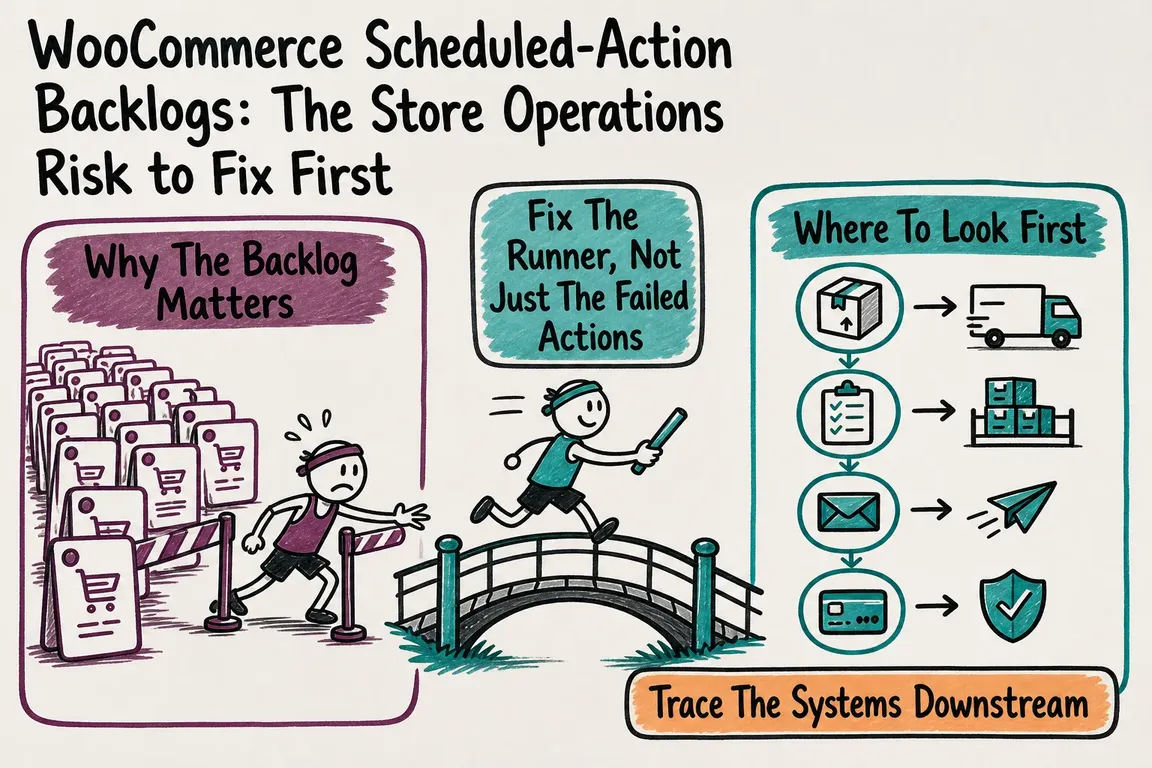
Why The Backlog Matters
WooCommerce documents scheduled actions as background work tied to order notifications and payment processing. It also explains the default dependency chain: Action Scheduler is triggered through WordPress cron, and WordPress cron depends on site activity unless the store has deliberately configured a server-side runner. WordPress itself is clear that WP-Cron does not run continuously like system cron.
That is fine for a low-risk site. It is weaker for a store where renewals, fulfilment, customer notifications, and external systems need predictable timing. A delayed action can become a support ticket, a finance reconciliation problem, a missed CRM update, or a confused customer asking why an email or subscription state does not match payment reality.
Where To Look First
Start in WooCommerce > Status > Scheduled Actions. Filter by pending, failed, and in-progress actions. Search by hook, scheduled date, and group. Read the logs before retrying anything in bulk. One failed callback from yesterday is a different operational issue from thousands of pending renewal and webhook actions that are older than the current business day.
Subscription stores need extra care. WooCommerce Subscriptions notes that some past-due actions can be normal, but multiple actions more than a day old can indicate a WP-Cron problem and may affect orders, subscriptions, or analytics. Before manually fixing a renewal, compare the scheduled-action log, the subscription notes, the order notes, and the payment gateway record. A failure before payment and a failure after payment need different handling.
| Symptom | Likely Business Impact | First Check |
|---|---|---|
| Past-due actions older than a day | Renewals, emails, reports, or integrations may be late | Sort by oldest scheduled date and group hooks by business process |
| Timeouts on subscription actions | Payment may have completed while order or subscription status stalled | Compare action logs with order notes and gateway records |
| Webhook delivery failures | ERP, CRM, shipping, or marketing systems may be stale | Check webhook status and webhooks-delivery logs |
| Queue grows faster than it drains | The runner is underpowered or blocked | Review WP-Cron, loopbacks, PHP limits, and WP-CLI options |
Fix The Runner, Not Just The Failed Actions
Clearing a single failed action may help today, but recurring backlog usually means the runner needs attention. WordPress provides an official pattern for critical scheduled work: configure the system task scheduler to request wp-cron.php, then disable page-load cron with define( 'DISABLE_WP_CRON', true ); once the external scheduler is in place. Do not disable WP-Cron first. If nothing else triggers it, scheduled actions will stop processing.
For heavier WooCommerce stores, Action Scheduler's WP-CLI runner is often the better tool. Its own documentation says WP-CLI is a better choice for large sites, long-running tasks, large queues, and sites where many plugins compete for WP-Cron resources. Useful starting commands include wp action-scheduler status, wp action-scheduler run --batch-size=100 --batches=0, and wp action-scheduler clean --status=complete,canceled --before='31 days ago'. Confirm options on the actual server with wp action-scheduler --help, because hosting paths, users, and environment variables matter.
Treat --force, --hooks, and --group as design decisions, not magic speed switches. The Action Scheduler docs warn that splitting work by hook or group can break implied schedule dependencies. For example, a subscription payment action that should run before an expiration action may not stay ordered if those queues are processed separately.
Trace The Systems Downstream
A moving queue is not the same as a recovered business process. WooCommerce webhook logs record triggered events and receiving-server responses, and WooCommerce can automatically disable a webhook after more than five consecutive delivery failures. If the backlog delayed webhook delivery while the receiver was failing, the store may need both queue repair and downstream reconciliation.
What A Useful Audit Covers
A practical audit should identify the oldest pending actions, the most common failed hooks, the business process behind each hook, the current runner, PHP fatal errors or time limits, loopback restrictions, subscription renewal edge cases, and webhook delivery status. It should also leave a small runbook: what to monitor, what can be safely retried, what must be checked against payment records, and when to escalate.
Greg can help with that kind of WooCommerce operations work: reading the queue, hardening WP-Cron or a WP-CLI runner, tuning batch strategy without breaking dependencies, cleaning old actions carefully, and tracing renewal or webhook failures back to the process that actually matters. If the queue is touching revenue, customer communication, or fulfilment, it deserves more than occasional admin clicking.
Need A Second Set Of Eyes?
If your scheduled actions are already late, or you want to prevent renewal and integration drift before the next busy period, get in touch with Greg for a practical WooCommerce queue audit.
Related on GrN.dk
- AI Crawler Control for Business Websites: Protect Content Without Sacrificing Search Visibility
- Form Spam Is a Lead-Quality Problem: A Practical Hardening Playbook for Business Websites
- When URL Parameters Become an Operations Problem: Fix Crawl Waste, Cache Fragmentation, and Duplicate URLs
Need help with this kind of work?
Get a WooCommerce queue audit Get in touch with Greg.