By Greg Nowak. Last updated 2026-08-28.
Technicians rarely stand still while documenting the day’s work. The tools need to be packed away, the customer may have one final question, and the next job is waiting. This is where voice input makes sense: “Replaced circulation pump, spent two hours and used one gasket set, system tested and commissioned.”
Could your business use this? nowa.dk sets up AI automation for Danish companies.
Recording the note is quick. But the audio file cannot be used directly for invoicing, inventory deductions, scheduling or the next service visit. The company only has a usable work order once the content has been assigned to controlled fields such as work performed, time spent, materials, status and follow-up.
Microsoft’s preview of AI-powered work order updates in Dynamics 365 Field Service follows this model. The technician describes the work using ordinary text or speech-to-text, and Copilot proposes changes to specific fields. These can include booking status, booking times, completed service tasks, product quantities, product line status and service duration. Nothing is updated until the user has confirmed the suggestions.
That sequence is worth preserving. When information can change the invoice, material usage or the operational status of an order, it should not pass unnoticed from the microphone into the work order system.
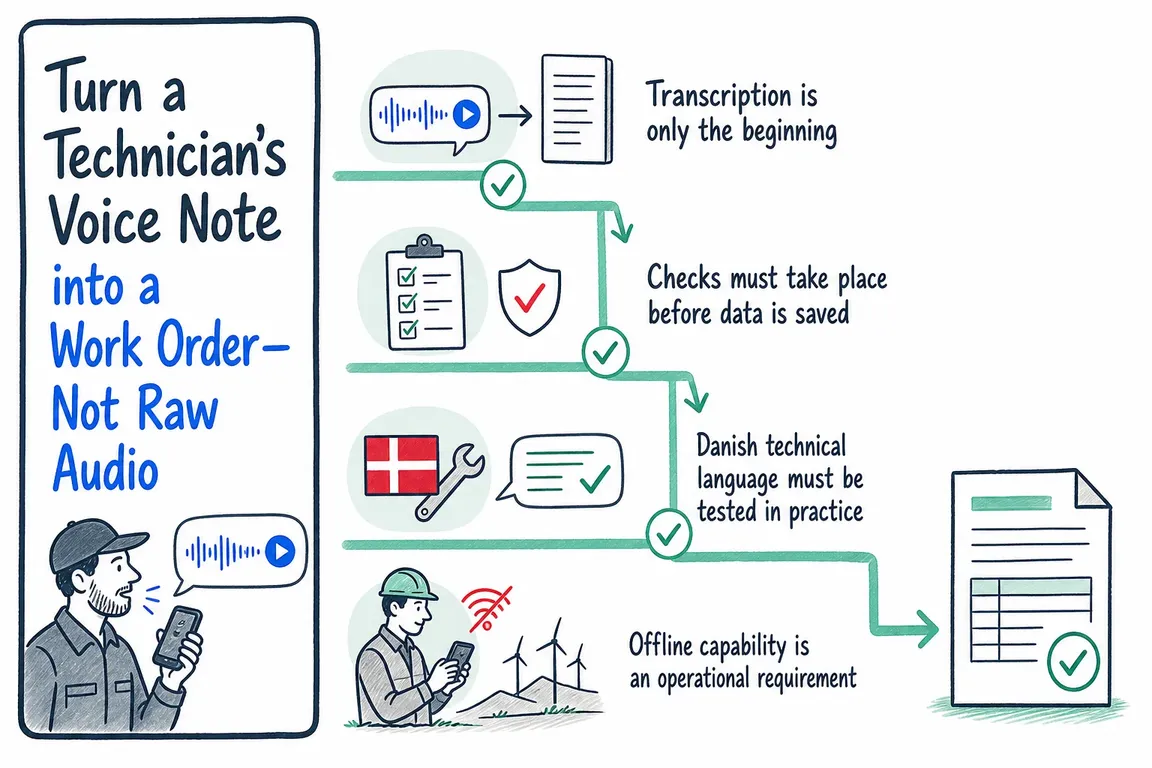
Transcription is only the beginning
Newer voice models can transcribe continuously with low latency. OpenAI describes streaming transcription and models that can understand context, handle corrections and participate in a workflow while the conversation is taking place. The documentation for GPT-Transcribe covers both standard transcription and realtime sessions.
This can make the solution pleasant to use, but an accurate transcript is not necessarily an accurate record. “Two hours” could mean total working time, additional work or the period during which the system was out of operation. “One valve” is too imprecise for a reliable inventory deduction. And “finished” could mean technically completed, ready for invoicing or completed with a spare part on back order.
The solution must therefore distinguish between three tasks:
- Transcribe what was said as accurately as possible.
- Interpret the content using the company’s fields, rules and master data.
- Display the proposed values so the technician can correct and approve them.
Without the final two stages, the company has acquired a voice recorder, not an operational workflow.
Checks must take place before data is saved
Microsoft’s documentation requires the proposed updates to be reviewed and confirmed. The related FAQ on work order summaries points to a similar limitation: the quality of the result depends on the underlying data. Incomplete or incorrect input can produce an inadequate or misleading result. Microsoft also describes the summary as a tool for gaining an overview, not a replacement for a thorough review.
The same caution should apply when AI writes data back to the work order. A technician should not have to read through a lengthy summary on a small screen. Instead, show the few fields that will actually change. Make discrepancies clear, and flag uncertain values rather than filling them in with a plausible guess.
| Step | System task | What must be checked |
|---|---|---|
| 1. Recording | Receive the voice note from the mobile device | Are the audio and work order number linked correctly? |
| 2. Transcription | Convert the speech into readable Danish text | Have technical terms, product names and numbers been recognised? |
| 3. Field extraction | Propose hours, materials, status and notes | Do the suggestions match permitted fields and master data? |
| 4. Validation | Check mandatory fields and business rules | Is anything missing, or does any of the information conflict? |
| 5. Approval | Display a concise, editable overview | Has the technician actively approved the changes? |
| 6. Saving | Write the approved data to the work order system | Has it been saved, and is the action traceable? |
Danish technical language must be tested in practice
Microsoft states that its work order summary feature has been tested in English and that other languages may produce inaccurate results. This does not rule out Danish voice input. But a carefully prepared demonstration using generic sentences reveals very little about how the solution will perform during a busy working day.
A pilot should therefore use the technicians’ actual language: abbreviations, product names, numbers and the phrases they use at customer sites. It should also test noisy environments, different dialects, corrections made mid-sentence and notes that omit required information. Errors involving hours, quantities, item numbers and completion status deserve particular attention because they have a direct financial or operational impact.
Technical terminology can be supported by the technology, but the company must still define its own vocabulary and permitted values. If a product name is ambiguous, for example, the solution can look it up in the item list and ask the technician to choose from the relevant item numbers.
Offline capability is an operational requirement
Microsoft’s FAQ states that the summary feature described only works online. This can be a genuine limitation for Danish service companies. Work also takes place in basements, plant rooms, construction areas and rural locations where the connection is not always reliable.
The mobile solution should therefore have a controlled offline queue. The voice note or local draft data can be stored temporarily and processed when the connection returns. The technician must be able to see clearly whether the order is still a local draft, awaiting processing or actually synchronised. Otherwise, the documentation may appear to have been submitted on the mobile device even though the administrative team has not yet received it.
There must also be a plan for conflicts. If a dispatcher changes the order while the technician’s update is waiting in the queue, the app must not simply overwrite the new information. The versions should be compared, and the user should decide what to do when the same fields have been changed in both places.
Store the work order data, not the raw audio by default
A voice note may contain customer names, addresses, details about site access and informal comments that do not belong in the completed work order. Raw audio should therefore be treated as temporary input, not as another permanent archive.
The Danish Data Protection Agency recommends restricting access to systems and personal data to people who need it for their work. The agency also recommends that personal data should not be retained for longer than necessary. The less data that is stored, the less there is for unauthorised parties to access.
This must be translated into specific decisions. Who is allowed to play the voice note? When will it be deleted? Should that happen automatically after the transcript has been approved and the data saved successfully? Can a note be retained for a documented error investigation? And should technicians, administrative staff and suppliers have different access rights?
A sensible default is to store the validated fields and the necessary description of the work. The raw audio is deleted or retained for a limited period under a fixed policy, unless the company has a specific and legitimate need to do otherwise.
Start with a tightly scoped pilot
“AI for every work order” is too broad for an initial project. Select one type of job, a small group of technicians and a few fields where the value is clear. Agree in advance which errors are critical and when a suggestion must be rejected or passed on for manual processing.
At a minimum, the pilot should cover Danish technical language, mandatory fields, validation against master data, active user confirmation, an offline queue, access controls, deletion policies and API integration with the existing work order system. Measure both time spent and data quality. Faster data entry is of little value if the administrative team subsequently has to correct hours and material lines.
Through nowa.dk, an AI automation service for Danish companies, Greg can build this type of mobile workflow around the company’s existing processes and systems. The work involves more than placing speech-to-text in front of a form. The technician’s words must become data that operations and finance can use without losing control along the way.
The criterion for success is very practical: less administration for the technician, while retaining control over what is saved in the work order.
Related on GrN.dk
- Fra leverandørfaktura til bogføring: AI med en kontrolpost
- Partner søges: bogholder eller revisor til et AI-baseret regnskabskoncept
- Har jeres AI-chatbot husket at sige, at den er en bot?
Need help with this kind of work?
Discuss a pilot with Greg Get in touch with Greg.










