Most AI automation problems do not begin with the model. They begin with the workflow around it.
A support copilot, a multi-minute reasoning task, and a thousand-row evaluation run may all use the same API account, but they are not the same kind of job. OpenAI’s current documentation is fairly explicit about that. Repeated prompts benefit from cache-aware design. Long-running reasoning work belongs in background mode. Large offline runs belong in Batch. Read those guides together and the commercial issue becomes hard to ignore: if everything still runs through one synchronous request path, the system is probably slower, more expensive, and harder to govern than it needs to be.
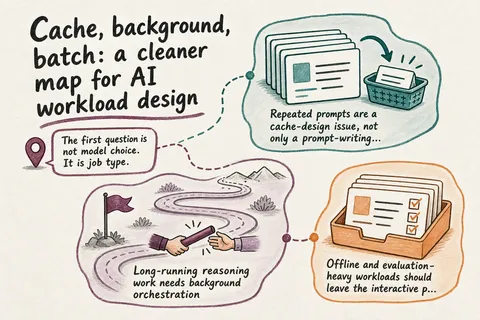
The first question is not model choice. It is job type.
The useful split is straightforward. Interactive work needs a fast answer inside a user-facing flow. Long-running work needs durability more than immediacy. Offline work needs throughput and cost control more than either.
OpenAI’s background guide notes that some reasoning tasks can take several minutes and recommends handling them asynchronously so you do not have to depend on one live connection, one timeout budget, and one client staying open. The Batch guide makes the same distinction from another angle: it is designed for work that does not need an immediate response, with lower cost and much more rate-limit headroom.
That means “just call the model” is no longer a serious production pattern on its own. If one automation includes all three workload types, it will usually work better when those are split properly. Keep the synchronous lane narrow and user-facing. Use a background lane for durable, pollable jobs. Push bulk classification, embedding, evaluation, or other offline processing into Batch. That is not cosmetic refactoring. It changes cost, latency, failure handling, and the retention footprint of the system.
Repeated prompts are a cache-design issue, not only a prompt-writing issue
Prompt caching is the clearest example of where workflow design now matters. OpenAI says prompt caching can cut latency by up to 80% and input token cost by up to 90% on supported requests. But those savings are conditional. Cache hits depend on exact prefix matches, and caching only starts for prompts that are at least 1024 tokens long. The documentation also recommends putting stable instructions, examples, tools, and schemas at the beginning of the prompt, with variable user-specific material pushed toward the end.
In practice, that changes how a production workflow should be assembled. If a team keeps rebuilding large system prompts on every request, inserts variable data too early, or re-sends one-off tool definitions each time, it is working against the conditions that make cache hits likely. OpenAI also documents prompt_cache_key as a way to improve routing when many requests share long common prefixes, and it recommends tracking cached_tokens, cache hit rates, and latency. That matters because cache performance is measurable. If nobody is measuring it, input cost is not actually being managed.
The retention side matters as well. The prompt caching guide distinguishes short-lived in-memory retention from extended retention that can keep cached prefixes active for up to 24 hours. The data controls guide adds the governance implication: extended prompt caching stores encrypted key/value tensors as application state on GPU-local storage, and for gpt-5.5, gpt-5.5-pro, and future models, the docs say extended caching is required rather than optional. So prompt reuse is not just a prompt engineering trick. It is part of architecture and retention design.
Long-running reasoning work needs background orchestration
Once a job may run for minutes, forcing it through a synchronous request path usually becomes self-imposed fragility. OpenAI’s background mode is built for that case. The docs say you can start a response with background=true, poll while the response is queued or in_progress, retrieve the result later, and cancel work if needed.
That is a different operating model, and it usually requires a different contract in the calling system. You need job IDs, polling, retries, cancellation logic, and a user-facing way to explain delayed completion. That is the part many teams underestimate. They treat background mode as a transport detail when it is really a workflow change. Prototypes get away with “wait and refresh.” Production systems need durable state transitions.
There is also a retention tradeoff that has to be handled deliberately. OpenAI says background mode stores response data for roughly 10 minutes so polling works, and both the background guide and the data controls guide say that makes background mode incompatible with Zero Data Retention guarantees. For teams with stricter requirements, the answer cannot be to switch everything to background mode. The workflow has to classify which long-running jobs are allowed to use it, which can rely on Modified Abuse Monitoring instead, and which need a different design entirely.
Offline and evaluation-heavy workloads should leave the interactive path
The Batch API exists because some workloads should not compete with interactive requests at all. OpenAI describes Batch as asynchronous group processing with 50% lower costs than synchronous APIs, a separate pool with significantly higher rate limits, and completion within 24 hours. The example workloads are telling: evaluations, large-scale classification, embedding content repositories, and large offline video-render jobs.
Those are not unusual edge cases. They are common workloads that many teams still try to push through the same path used for user-facing features. Operationally, that is hard to justify. If a nightly enrichment job, evaluation suite, or backlog reclassification task does not need an immediate answer, synchronous execution is paying for the premium lane without getting real value from it.
Batch also changes how scaling is approached. Instead of building awkward pacing and retry logic around interactive limits, the system can move suitable workloads into a file-driven async pipeline with an explicit turnaround window. That is often a cleaner operating model.
It also improves rollout quality. When evaluations and comparison runs become cheap enough to run at proper scale, teams can test more variants across larger datasets instead of relying on a small manual sample. That leads to better prompt decisions and better workflow decisions upstream.
Governance is now part of workflow design, and evals are how you keep it honest
The governance point that changes rollout planning is simple: retention is feature-specific, not just account-wide. OpenAI’s data controls documentation separates training use, abuse-monitoring retention, and application-state retention. For /v1/responses, data is not used for training, but abuse monitoring may be retained for up to 30 days and application state is retained for 30 days by default or when store=true. For /v1/batches, application state is retained until deleted.
So it is not enough to move work out of the synchronous lane and assume the design problem is solved. The redesign also needs project settings, deletion routines, and a clear decision about which workload is allowed in which lane. The docs do not offer one universal safe default because there is no such default.
That is why workflow redesign now includes governance choices alongside engineering choices: which jobs can store response state, which jobs should be structured for cache hits, which jobs must avoid background mode, and which project settings match the business’s retention posture.
OpenAI’s agent evaluation guide rounds this out in a practical way. It recommends starting with traces and graders to inspect end-to-end runs, tool calls, handoffs, guardrails, and policy violations, then moving to datasets and eval runs when repeatability and benchmarking matter. That is the right posture for a redesigned AI workflow. Once work is split into interactive, background, and batch lanes, each lane needs measurable quality gates. Otherwise the system has only redistributed complexity.
That is the real commercial point here. Repeated prompts and long-running AI jobs are no longer just a prompt-tuning problem. They are a workflow-redesign problem. The savings come from classifying workloads properly, structuring prompts for cache reuse, moving durable reasoning into background orchestration where it fits, moving bulk jobs into Batch, and matching eval and retention controls to the final design. Teams that do that get lower run costs, fewer timeout failures, and a much clearer governance story. Teams that do not are still paying prototype penalties in production.
Need help with this kind of work?
If your AI automation still forces everything through one synchronous path, Greg can help redesign it into cheaper, faster, and more governable workflow lanes. Get in touch with Greg.