By Greg Nowak. Reviewed 11 October 2026.
When names, product descriptions, addresses, or CMS content become garbled after a MySQL migration, the dump file often gets blamed. The real problem may have started earlier: incorrect bytes in the source, a mismatched dump connection, a restore using different assumptions, or simply a tool displaying the file with the wrong encoding.
Treat broken characters as evidence, not a diagnosis. Before changing flags or converting files, establish what MySQL believes the data is, inspect representative records, and prove the entire export-and-restore path in a disposable database.
Quick fix: set the charset on both ends
If you only need the short version, use utf8mb4 for the dump and for the import, and let mysqldump write the file itself so no shell or editor re-encodes it:
mysqldump -u USER -p --single-transaction --default-character-set=utf8mb4 --result-file=dump.sql DATABASE_NAME
mysql -u USER -p --default-character-set=utf8mb4 TARGET_DATABASE < dump.sql
If characters are still broken after that, the problem is usually in the source data or in a column with the wrong declared charset. The checks below find which.
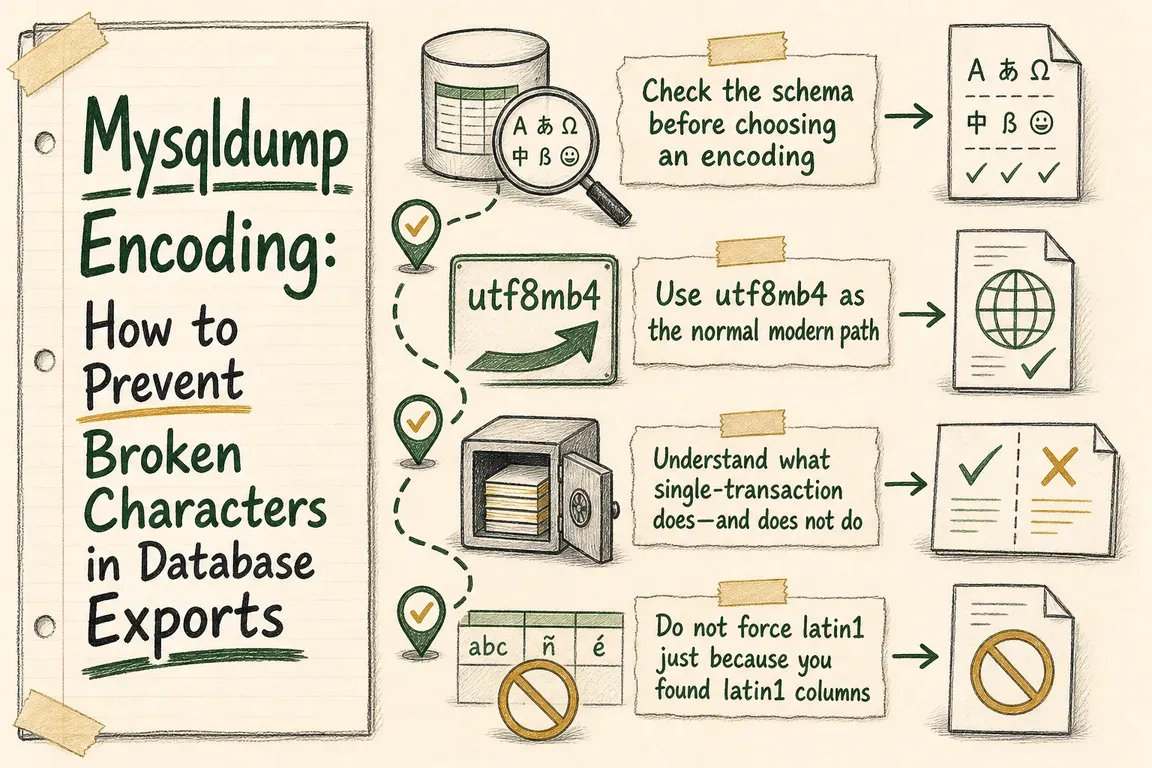
Check the schema before choosing an encoding
A database default does not tell you the whole story. Individual tables and text columns can override it, especially in applications that have been upgraded, imported, or maintained by several suppliers.
SHOW VARIABLES LIKE 'character_set_%';
SHOW VARIABLES LIKE 'collation_%';

SELECT DEFAULT_CHARACTER_SET_NAME, DEFAULT_COLLATION_NAME
FROM INFORMATION_SCHEMA.SCHEMATA
WHERE SCHEMA_NAME = 'DATABASE_NAME';

SELECT TABLE_NAME, COLUMN_NAME, DATA_TYPE,
       CHARACTER_SET_NAME, COLLATION_NAME
FROM INFORMATION_SCHEMA.COLUMNS
WHERE TABLE_SCHEMA = 'DATABASE_NAME'
  AND CHARACTER_SET_NAME IS NOT NULL
ORDER BY TABLE_NAME, ORDINAL_POSITION;
The first two statements show server and session settings. The remaining queries reveal the declared schema and column character sets. Record the result rather than relying on what the application documentation claims.
Next, choose a handful of meaningful records: accented customer names, curly quotes, currency symbols, non-English content, and emoji where the application supports them. If one already looks wrong in production, inspect its stored bytes before attempting a repair:
SELECT id, customer_name, HEX(customer_name)
FROM customers
WHERE id IN (123, 456);
HEX() is a diagnostic aid, not an automatic repair recipe. The same visible mojibake can have different causes, and a blind conversion can damage data a second time.
| What you find | Practical export decision | What to verify |
|---|---|---|
| Valid text in utf8mb4 columns | Use utf8mb4 explicitly | Accents, multilingual text, and four-byte characters |
| Valid latin1 and utf8mb4 columns are mixed | Start with an utf8mb4 dump connection | MySQL converts values according to each column’s metadata |
| Text is already garbled in production | Preserve the source and diagnose separately | Known records, raw bytes, and application connection settings |
| Binary columns are involved | Consider --hex-blob |
Do not treat binary data as a text-encoding problem |
| Non-transactional tables exist | Plan locks or a maintenance window | --single-transaction alone cannot make them consistent |
Use utf8mb4 as the normal modern path
Current MySQL documentation recommends utf8mb4 for new work. The bare name utf8 remains a deprecated alias for the three-byte utf8mb3 character set, so it should not be used as casual shorthand.
For a typical InnoDB database, an explicit, readable export command is:
mysqldump -u USER -p \
  --single-transaction \
  --quick \
  --default-character-set=utf8mb4 \
  DATABASE_NAME > dump.sql
mysqldump currently uses utf8mb4 when no character set is supplied, but stating it explicitly makes the runbook and handoff less ambiguous. The tool also writes a corresponding SET NAMES statement by default. Keep that behaviour unless you control every part of the restore pipeline.
--quick reads large tables row by row and is already enabled through the default --opt group; including it explicitly documents the intended behaviour. There is normally no reason to add --opt itself.
Understand what single-transaction does—and does not do
--single-transaction creates a consistent snapshot for transactional tables such as InnoDB without holding read locks for the full export. It does not make MyISAM or MEMORY tables transactionally consistent. Avoid schema-changing operations such as ALTER TABLE, DROP TABLE, RENAME TABLE, and TRUNCATE TABLE while the dump is running; MySQL warns that these can invalidate or interrupt the read.
This distinction matters to project planning. A technically correct charset cannot rescue an export containing mutually inconsistent orders, customers, and stock records.
Do not force latin1 just because you found latin1 columns
A declared latin1 column is not automatically a reason to run the dump connection as latin1. When the stored text is valid, MySQL can convert it through an utf8mb4 connection and convert it appropriately when restoring into the recreated schema.
Use an explicit legacy connection only when investigation and a test restore show that the application depends on that interpretation:
mysqldump -u USER -p \
  --single-transaction \
  --default-character-set=latin1 \
  DATABASE_NAME > dump-latin1.sql
Avoid --skip-set-charset in files intended for clients, agencies, or future colleagues. It removes the dump’s SET NAMES instruction and transfers an important assumption into undocumented restore procedure.
Prove the restore before calling the export finished
Create a disposable database on the intended target version and load the file:
mysql -u USER -p -e "CREATE DATABASE restore_test"
mysql -u USER -p restore_test < dump.sql
Check the representative records, application pages, row counts, warnings, routines needed by the application, and any tables using non-transactional engines. Also inspect the opening portion of the dump for its charset statement and calculate a checksum before transferring it:
grep -m 1 -i 'SET NAMES' dump.sql
sha256sum dump.sql
On Windows PowerShell, ordinary > redirection can produce a UTF-16 file that MySQL cannot reload correctly. MySQL’s documented workaround is to let the utility create the file:
mysqldump [options] --result-file=dump.sqlMake the handoff operationally useful
Deliver the dump with the exact command, source and target MySQL versions, charset findings, checksum, known anomalies, and the records used for validation. State whether the file has actually been restored or merely generated. That small distinction can prevent hours of launch-day investigation.
If a migration involves mixed legacy data, several suppliers, or a narrow deployment window, Greg can help turn the export into a tested migration and handoff plan.
Related on GrN.dk
- Google’s August 18, 2026 Content API Cutoff: Feed Cleanup Before Merchant API Migration
- NGINX 1.30 changed upstream connection reuse: what to check before you upgrade
- MariaDB 10.6 EOL: quiet CMS hosting debt needs a real upgrade plan before July 2026
Need help with this kind of work?
Plan a safer database migration Get in touch with Greg.
Sources
- MySQL 9.7 Reference Manual: mysqldump — A Database Backup Program
- MySQL 9.7 Reference Manual: Character Sets, Collations, Unicode
- MySQL 9.7 Reference Manual: Connection Character Sets and Collations
- MySQL 9.7 Reference Manual: The INFORMATION_SCHEMA COLUMNS Table
- MySQL 9.7 Reference Manual: The INFORMATION_SCHEMA SCHEMATA Table










