Home
GrN.dk

Main navigation

  • Articles
  • Cases
  • Services
  • Your Digital Project Manager
  • About Greg Nowak
  • Image Gallery
  • Contact
User account menu
  • Log in

Join my community / free newsletter — sign up here

Breadcrumb

  1. Home

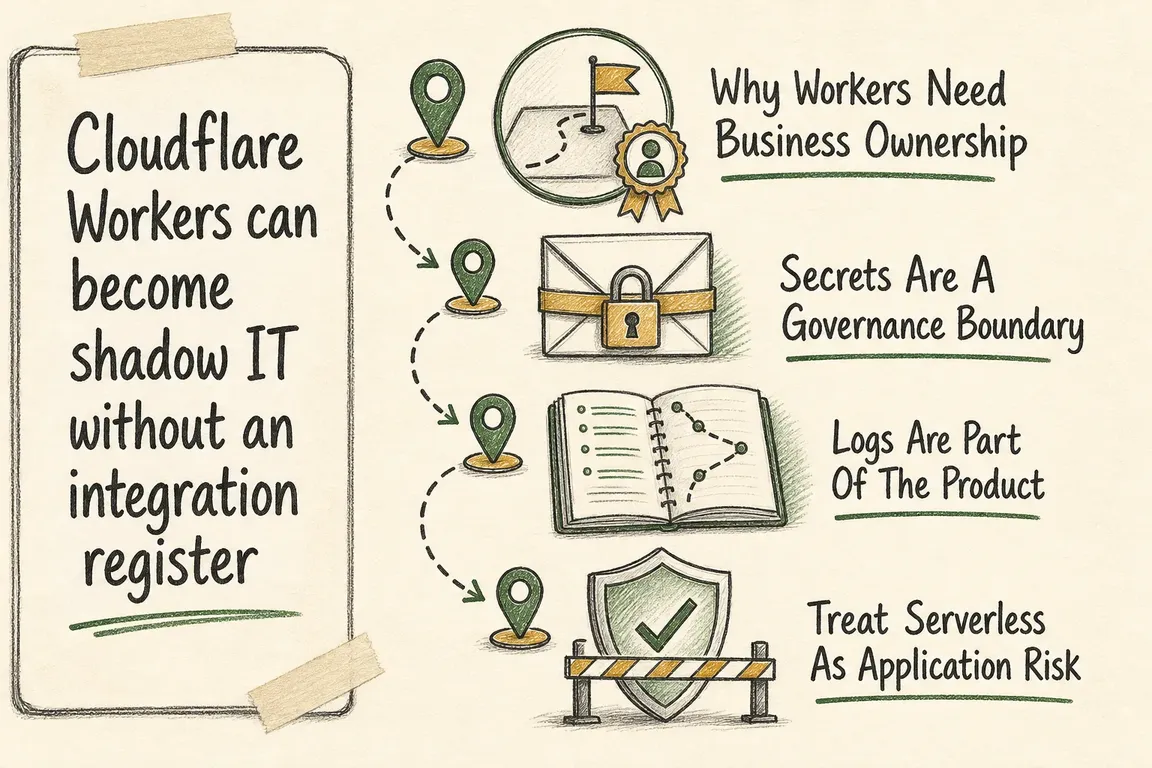
Cloudflare Workers can become shadow IT without an integration register

Illustrated infographic summarizing: Cloudflare Workers can become shadow IT without an integration register

By Greg Nowak. Last updated 2026-07-05.

Cloudflare Workers are usually introduced for sensible reasons. A webhook needs cleaning up before it reaches the CRM. A redirect needs a little more logic. A form has to call an API. A small endpoint needs to run close to users without standing up more server infrastructure.

That is the appeal. Cloudflare describes Workers as a serverless platform for building, deploying, and scaling applications across its global network, without infrastructure to manage. For small integration jobs, that is extremely useful. It is also how production logic can slip outside the normal application backlog.

The issue is not that Workers are a bad choice. The issue is that they are easy to leave undocumented. Cloudflare positions Workers for back-end applications, APIs, background jobs, integrations, and monitoring workflows. Bindings can connect Workers to external services such as databases, APIs, and storage. Once a Worker reads a secret, filters a request, updates lead data, validates a webhook, or handles an order event, it has moved beyond “just a snippet”. It is part of how the business runs.

An integration register is a lightweight way to keep that reality visible. It should answer plain questions: what does this Worker do, which route or trigger runs it, which business process depends on it, which secrets and bindings does it use, where is the code deployed from, what happens when it fails, and who can safely change it?

Without those answers, edge code becomes hard to reason about. A website, CRM, analytics stack, payment flow, or marketing automation setup may depend on behaviour that only exists in a Cloudflare account. The pain usually appears later: a production route behaves differently and nobody knows why, a token exists but has no owner, logs do not explain a failed webhook, or rollback depends on someone remembering what changed.

Why Workers Need Business Ownership

Workers can support front-end applications, back-end APIs, scheduled background work, external service connections, and observability. That range is useful, but it blurs a line many teams rely on: is this infrastructure configuration, or is it application code?

A Worker that rewrites a request might look like edge configuration. A Worker that validates a webhook signature and forwards a payload to another system is business logic. The first inventory pass should therefore be business-led, not only technical.

Name the process in plain English: “newsletter form submission”, “partner webhook intake”, “campaign redirect logic”, “API proxy for product availability”, or “bot check before checkout”. Ownership becomes much easier once the business process is named. If the Worker supports revenue, lead capture, compliance, customer service, or reporting, it needs an accountable owner and a maintenance path.

Register field Business question it answers Evidence to capture
Worker name and purpose Is this production logic, an experiment, or a one-off fix? Plain-language description of the process it supports.
Routes, domains, or triggers Where does this affect live traffic or scheduled work? Route patterns, custom domains, cron schedules, queues, or fetch handlers.
Secrets and bindings Which systems and credentials does this Worker depend on? Secret names, binding names, external systems, and required environments.
Deploy path and rollback owner Can the team change or recover this safely? Repository, Wrangler config, deployment command, approval route, and rollback note.
Logging and alerting Can failures be diagnosed without guesswork? Workers Logs status, structured fields, sampling choice, and alert destination.
A practical Workers register links edge configuration to business ownership, not just technical inventory.

Secrets Are A Governance Boundary

Cloudflare’s secrets documentation describes secrets as encrypted text values attached to a Worker, used for sensitive information such as API keys and auth tokens. It also states that plaintext environment variables should not be used for sensitive information, and that secret values are not visible in Wrangler or the Cloudflare dashboard after they are defined.

That is good security design, but it creates an operational requirement. The register should never contain secret values. It should record the secret name, purpose, owning system, rotation responsibility, and environment coverage.

If a Worker depends on a CRM token, payment provider token, or private API credential, the team needs to know that dependency exists without exposing the credential itself. Cloudflare also supports declaring required secret names in Wrangler configuration, so deployment can fail when required secrets are missing. In practice, both layers matter: configuration protects the deploy, while the register protects the business process.

Logs Are Part Of The Product

When a Worker handles a real workflow, logging is not just a developer convenience. Cloudflare Workers Logs can automatically collect, store, filter, and analyze logging data emitted from Workers. The documentation says logs can include invocation logs, custom logs, errors, and uncaught exceptions. It also recommends structured JSON logging because fields can be extracted and queried more effectively than values buried in plain message text.

For integration work, logs should match the questions people will ask during an incident. Did the webhook arrive? Was it accepted or rejected? Which upstream system was called? Did the downstream API fail? Was the request tied to a form, campaign, order, user, or partner reference?

The answer should not require someone to read raw console output across unrelated requests. At the same time, logging everything is rarely the right answer. Cloudflare documents head-based sampling as a way to log a percentage of incoming requests, especially for high-traffic applications. The register should therefore record each Worker’s logging posture: full logging for low-volume critical workflows, sampled logging for high-volume paths, and clear rules for which identifiers are safe to log.

Treat Serverless As Application Risk

The OWASP Serverless Top 10 project exists to educate practitioners and organizations about common serverless application security vulnerabilities and basic techniques to identify and protect against them. That vendor-neutral framing is useful for Cloudflare Workers because it moves the conversation away from “edge setting” and toward “application component”.

A Worker that accepts events, calls APIs, stores credentials, or changes request behaviour deserves the same questions as any other application component. What input does it trust? What external systems can it reach? What errors does it expose? What happens when a dependency times out? Who reviews changes? How is a broken release rolled back?

These are not heavy-process questions. They are basic software ownership questions applied to serverless code.

A Practical Audit Sequence

Start with discovery. Review the Workers in the account and list their names, routes, domains, triggers, environments, bindings, and configured secrets. Then classify each Worker by the business process it supports. Some will be disposable. Others may sit inside lead capture, analytics enrichment, customer routing, API protection, or operational reporting.

Next, check the deploy path. A production Worker should not depend only on dashboard edits if the behaviour is business-critical. The code, Wrangler configuration, required secrets, observability settings, and environment differences should be recoverable and reviewable. Where possible, deployment should be repeatable from a repository-backed workflow, with a rollback note that a competent developer can follow under pressure.

Then review observability. Enable Workers Logs where appropriate, add custom logs around meaningful integration milestones, and prefer structured JSON fields. The register should list the minimum fields needed to debug the workflow without exposing sensitive values. A webhook Worker, for example, may need event type, external request ID, validation outcome, downstream target, response status, and elapsed time. It does not need full payload dumps.

Finally, rationalize ownership. If two Workers perform similar API glue, consolidate them or document the difference. If a Worker depends on a secret nobody owns, assign rotation responsibility. If a Worker supports a revenue workflow, give it the same change discipline as the system it feeds.

For GrN.dk clients, this is where Greg can be useful as a freelance operator: inventorying Workers, routes, secrets, bindings, logs, and deploy paths; connecting each Worker to a real business process; and turning fragile edge snippets into maintainable Cloudflare and API integration work. The register is not paperwork for its own sake. It is the map that lets the business keep using Workers where they fit, without leaving critical behaviour hidden at the edge.

Related on GrN.dk

  • When Google can call the business, your local data stops being cosmetic
  • Cloudflare Turnstile on Lead Forms: The Widget Is the Easy Part
  • ChatGPT apps need a permissions map before they touch company data

Need help with this kind of work?

Get a Cloudflare Workers integration review Get in touch with Greg.

Sources

  • Cloudflare Workers overview
  • Cloudflare Workers secrets
  • Cloudflare Workers Logs
  • OWASP Serverless Top 10
Last modified
2026-07-15

Tags

  • Cloudflare
  • api-integrations
  • edge-ops
  • webhooks

Review Greg on Google

Greg Nowak Google Reviews


Written recommendations from Trafik og Veje, Aarhus Municipality (2011) and AgroTech (2010) — read them on LinkedIn.

Illustrated infographic summarizing: WordPress 7.1 Forces the Editor Into an iframe—Test Your Custom Blocks
WordPress 7.1 Forces the Editor Into an iframe—Test Your Custom Blocks
2026-08-15

WordPress 7.1 removes the non-iframe editor fallback. Learn how to audit custom blocks, test real workflows and fix compatibility issues before launch.

Illustrated infographic summarizing: GitHub will stop sending jobs to stale self-hosted runners
GitHub will stop sending jobs to stale self-hosted runners
2026-08-14

GitHub starts enforcing runner versions on August 24, 2026. Audit and upgrade self-hosted runners before builds and deployments start stalling.

Illustrated infographic summarizing: Your AI Agent Has Shell Access. What Can It Reach?
Your AI Agent Has Shell Access. What Can It Reach?
2026-08-13

A practical guide to mapping what a shell-enabled AI agent can reach, then containing its access to files, credentials, networks, tools, and high-impact actions.

Illustrated infographic summarizing: Cloudflare Changed DoH JSON. What Else Is Parsing DNS as Text?
Cloudflare Changed DoH JSON. What Else Is Parsing DNS as Text?
2026-08-12

Cloudflare’s DoH JSON change exposes brittle DNS parsing. Find affected scripts, test both formats, and choose a safer integration contract.

Illustrated infographic summarizing: Your Website Can Answer Questions Now. Should It?
Your Website Can Answer Questions Now. Should It?
2026-08-11

NLWeb makes conversational website search practical to deploy. The real question is whether your content, users and team are ready to support it.

Illustrated infographic summarizing: AI Search Finally Has Reports. Now Connect Visibility to Revenue
AI Search Finally Has Reports. Now Connect Visibility to Revenue
2026-08-11

Google and Bing now expose first-party AI search data. The real task is connecting citations and impressions to analytics, CRM outcomes, and revenue.

Illustrated infographic summarizing: The Bot Passed Your CAPTCHA. What Did It Do Next?
The Bot Passed Your CAPTCHA. What Did It Do Next?
2026-08-11

Passing a challenge is only one signal. Session analysis, server-side validation and endpoint-specific controls help reduce bot abuse without blocking customers.

Illustrated infographic summarizing: WordPress 7.1 Moves Image Work Into the Browser—Test Every Media Hook
WordPress 7.1 Moves Image Work Into the Browser—Test Every Media Hook
2026-08-11

WordPress 7.1 shifts image processing into supported browsers. Here is what to test across hooks, CDNs, formats, security headers, and fallbacks.

Illustrated infographic summarizing: Prompt Caches Have Write Costs Now—Audit What Your Workflow Reuses
Prompt Caches Have Write Costs Now—Audit What Your Workflow Reuses
2026-08-10

GPT-5.6 makes cache writes billable. See how to spot wasted writes, stabilise prompt prefixes, place breakpoints and measure whether caching pays.

Illustrated infographic summarizing: The AI Crawler in Your Logs May Be Wearing a Borrowed Name
The AI Crawler in Your Logs May Be Wearing a Borrowed Name
2026-08-09

A User-Agent is a claim, not proof. See how to verify AI crawler traffic before it shapes reporting, robots.txt decisions, or WAF exceptions.

More articles
RSS feed

Footer

  • All articles
  • Contact

GrN.dk — AI automation, web platforms, web optimization, data handling and logistics.

© 2026 GrN.dk · LinkedIn · Contact · AI automation in Danish: nowa.dk

Behind GrN.dk: Individual Entrepreneur Codecrafter · Tax ID 305669096 · Bakhtrioni St. 22, 0194 Tbilisi, Georgia · official business register








