By Greg Nowak. Updated October 16, 2026.
A website migration is nearly finished, the new hosting works, and someone says: “We just need to change DNS.” That last step deserves its own plan. A small edit can send visitors to the wrong server, interrupt email, or change whether traffic passes through Cloudflare.
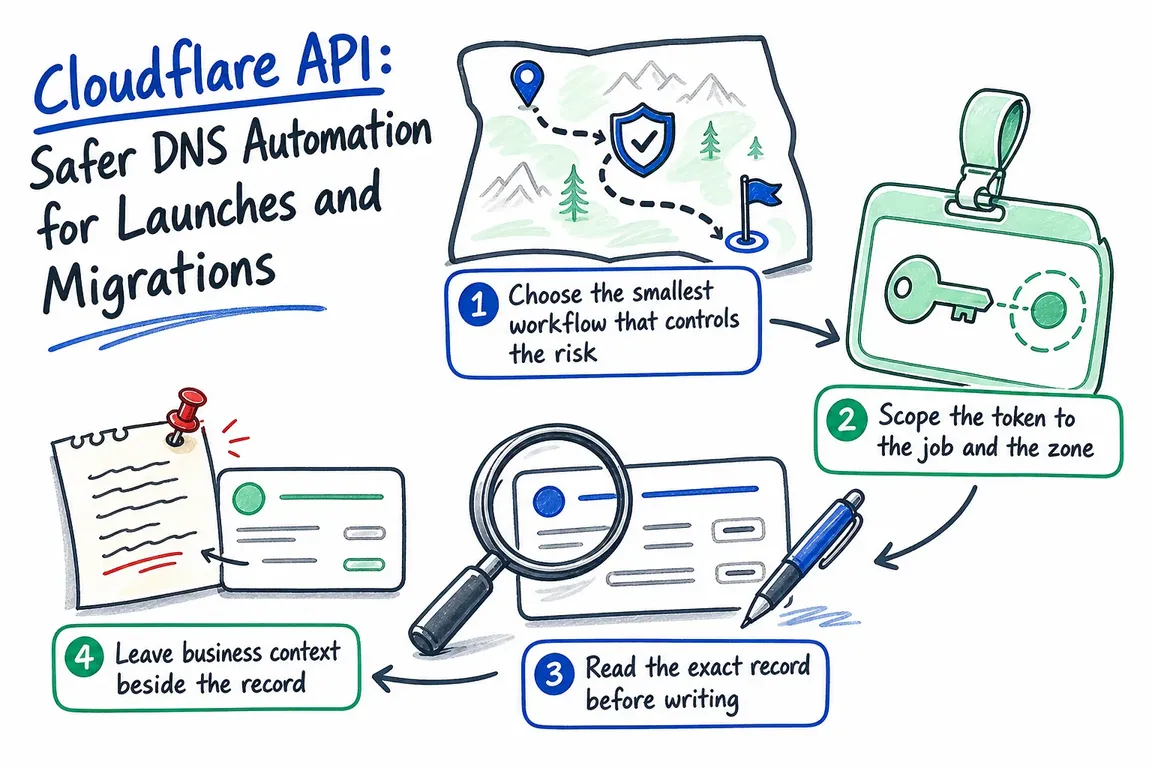
The Cloudflare API helps make those changes reviewable and repeatable. For a business owner or agency lead, the useful outcome is straightforward: someone owns the change, another person can understand it, and the team knows how to recover.
Choose a workflow your team can maintain
A dashboard edit is reasonable for an isolated correction. Automation earns its place when a launch involves several records, client setups repeat, or a reviewer needs to approve an exact change.
| Situation | Practical approach | Before proceeding |
|---|---|---|
| Single correction | Dashboard edit | Check the existing value and affected service |
| Website migration | API read, review, then update | Agree the new origin, proxy status, and rollback |
| Repeated agency setup | Versioned script with separate configuration | Confirm the client zone and credential scope |
| Bulk record changes | Reviewed import or batch request | Export first and identify conflicting records |
| Automated preflight | Read-only API job | Keep production write access out of the job |
Limit access and settle ownership first
Use a scoped API token instead of a Global API key. Give inventory jobs DNS Read and change jobs DNS Write, restricted to the relevant zone. Keep credentials in a secret store and out of repositories, screenshots, and shell tracing.
User tokens suit temporary operator tasks. For ongoing integrations, Cloudflare supports account API tokens for DNS, so automation need not depend on an employee’s account. Creating them requires API Token Provisioning capabilities or Super Administrator status; permissions granted must remain within the creator’s own access.
Before launch, name the approver, operator, and person responsible for checking the service. Supply the zone ID directly as configuration.
: "${CLOUDFLARE_API_TOKEN:?load from your secret store}"
: "${ZONE_ID:?set the target zone ID}"
: "${DNS_NAME:?set the fully qualified record name}"
CF_API='https://api.cloudflare.com/client/v4'
Export first, then write down the reverse change
Save a dated export before a migration. Review email, verification, and delegation records alongside the website records.
curl --fail-with-body --silent --show-error \
  "$CF_API/zones/$ZONE_ID/dns_records/export" \
  --header "Authorization: Bearer $CLOUDFLARE_API_TOKEN" \
  --output "zone-before-$(date -u +%Y%m%dT%H%M%SZ).txt"
An export is useful recovery material, but a rollback needs explicit reverse changes: which values to restore, which newly created records to remove, and who can authorise that action. Keep the previous hosting available through the agreed verification period.
For bulk imports, Cloudflare documents a 256 KiB file limit and three import requests per minute per user. Domain-name targets such as MX and CNAME content should end with a period. Preserve intentional cf-proxied:true or cf-proxied:false tags. Supported directives include $ORIGIN, $TTL, and $GENERATE; $INCLUDE is unsupported.
curl --fail-with-body --silent --show-error \
  "$CF_API/zones/$ZONE_ID/dns_records/import" \
  --request POST \
  --header "Authorization: Bearer $CLOUDFLARE_API_TOKEN" \
  --form "[email protected]"
Read the exact record and stop on surprises
Query the fully qualified name and record type before writing. Cloudflare’s record-list API provides exact filters; its general search parameter is intended for people and has deliberately unspecified matching behaviour.
curl --fail-with-body --silent --show-error --get \
  "$CF_API/zones/$ZONE_ID/dns_records" \
  --header "Authorization: Bearer $CLOUDFLARE_API_TOKEN" \
  --data-urlencode "type=A" \
  --data-urlencode "name.exact=$DNS_NAME" \
  --data-urlencode "match=all"
Check success, errors, and result_info.total_count, rather than counting only the returned page. Zero matches calls for investigation before creating anything, including checking other record types. One match gives you a candidate record ID. Multiple matches may be intentional; stop for review instead of selecting the first.
Show the current and proposed name, type, content, TTL, and proxy status for approval. Immediately before writing, read again and stop if the approved starting state has changed.
Update only the approved fields
The following PATCH request illustrates an approved A-record update. The IP address is a documentation placeholder: replace it with the reviewed origin address. Set DNS_RECORD_ID from the inspected response.
: "${DNS_RECORD_ID:?set the reviewed record ID}"
curl --fail-with-body --silent --show-error \
  "$CF_API/zones/$ZONE_ID/dns_records/$DNS_RECORD_ID" \
  --request PATCH \
  --header "Authorization: Bearer $CLOUDFLARE_API_TOKEN" \
  --header "Content-Type: application/json" \
  --data '{"content":"198.51.100.4","ttl":1,"proxied":true,"comment":"Website origin migration"}'
Here, ttl: 1 means automatic TTL. The request also explicitly enables proxying; keep that field aligned with the approved plan. PATCH leaves unspecified fields unchanged. Check type constraints when restructuring records: A/AAAA records cannot coexist with a CNAME at the same name.
On repeat runs, skip records already in the desired state. If a write times out, read the record again before retrying.
Verify the service before closing the launch
Cloudflare’s batch endpoint applies operations in one database transaction and rejects the batch if an individual action fails. Distribution across its network is not atomic, so API success alone does not establish that every observer sees the change.
- Read back the changed records through the API.
- Query public DNS, checking both A and AAAA where relevant.
- Test the actual website, certificate, email route, or verification flow.
- Record the outcome and revoke temporary write tokens.
dig @1.1.1.1 "$DNS_NAME" A +short
dig @1.1.1.1 "$DNS_NAME" AAAA +short
For proxied records, public answers identify Cloudflare’s edge rather than proving which origin served the request. Check the application response or origin logs too.
If DNS changes keep becoming an uncertain last step, Greg can help plan the migration and document the operating process, giving your team clear responsibilities, verification steps, and a usable handover.
Related on GrN.dk
- AI automations need a spend dashboard before the first runaway bill
- How to Bulk Delete Cloudflare DNS Records Safely: Dashboard or API
- A Voice Agent Is Only Ready When the Human Handoff Works
Need help with this kind of work?
Plan a safer DNS migration with Greg Get in touch with Greg.