By Greg Nowak. Last updated 2026-09-08.
If your online store has lots of images without alt text, it is tempting to have AI fill in all the fields at once. The product images are already there, after all. But the text needs to match the purpose the image serves on the page. Otherwise, you could end up with a lot of new descriptions that still need cleaning up.
Could your business use this? nowa.dk sets up AI automation for Danish companies.
Start with one product category. Map the images, generate suggested text in Danish, and have an editor approve it before publication. Then check the results on the pages. This gives you something concrete to assess: how good are the suggestions, and how much work does it take to get them right?
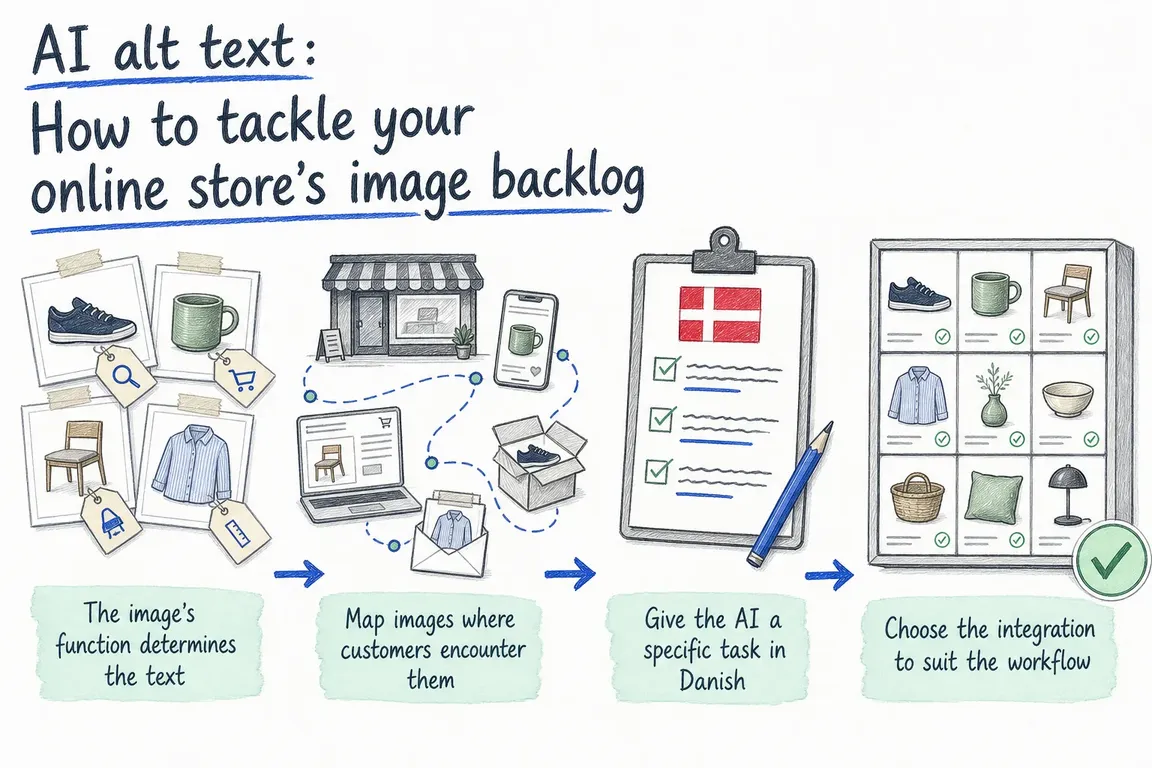
The image’s function determines the text
A product photo, a decorative image and a clickable icon serve different purposes. W3C’s image guidance, updated on 8 April 2026, explains that the text alternative should depend on the image’s content, function and context. Informative images should convey the essential information, decorative images should have an empty text alternative, and functional images should describe the action or destination. See W3C’s guidance on images.
An empty alt field is therefore a reason to take a closer look at the image. It may be entirely correct. Use the table for an initial assessment:
| How the image is used | What should the text alternative convey? | How to handle it in the pilot |
|---|---|---|
| Product photo with relevant visual information | A brief description of the essential details | Create an AI draft and have the editor check it in the context of the page. |
| Purely decorative image | No text content: alt="" |
Record that the empty text alternative is a deliberate choice. |
| Image that is the only content in a button or link | The action or destination | Check what the button or link does on the page. |
| Chart or illustration containing extensive information | A comprehensive text alternative | Set the image aside for a separate review. |
Consider a hypothetical example: a close-up of a bag’s interior compartments may need a description of the layout. An icon whose sole purpose is to open the shopping cart needs to say what it does. A general description of what is pictured cannot meet both needs.
Map images where customers encounter them
Create a working list of the images in the pilot category and the pages where they are used. Give each use its own row. If the same image appears on both a category page and a product page, you need to be able to assess the two uses separately.
The list should include the media ID, page URL, existing alt text, product name, image role and review status. Assign a responsible editor as well. This lets you see which images still need a decision and who needs to make it.
Statuses might include: awaiting assessment, decorative, draft ready, approved and checked on the page. Record the decision to treat an image as decorative separately. Otherwise, the same empty field can easily reappear as an unresolved task during the next cleanup.
Agree from the outset how you will handle existing text. A manageable starting point for the pilot is missing text and clearly defined corrections. More substantial rewrites should require a separate decision so the editor knows what is being changed.
Give the AI a specific task in Danish
Send relevant information from the page along with the image: the product name, variant, nearby text and assessed image function. Keep product data separate from the editor’s information. It should be possible to see what the suggestion is based on.
For informative product images, an instruction might read: Write a short Danish text alternative for this use. Only include details supported by the image or the accompanying product data. Avoid sales language and flag any uncertainty separately for the editor.
Save the suggested text and review notes in separate fields. Uncertainty about the colour or product variant needs to reach the editor without becoming part of the text alternative presented to the customer. Include materials, dimensions and features only when they are documented and relevant to the description.
Collect a few internally approved examples from the pilot category. These give the editor a concrete reference for assessing new suggestions: which product terms do you use in Danish, and how much detail should be included? Use the same examples when you later change the instructions and need to assess whether the suggestions have improved.
Choose the integration to suit the workflow
In WordPress, the media REST API can read the alt_text field and update a specific media item. This is described in WordPress’s media documentation. An integration can therefore retrieve existing values and write approved changes back.
A ready-made plugin may also be an option. AltText.ai’s WordPress and WooCommerce integration documents batch image processing, the use of product names and editing of generated text. On private installations, the plugin can be configured to upload images directly for analysis instead of retrieving them from a public image URL. Analysis therefore does not necessarily take place locally, even if the test installation is private.
Try an existing plugin if it fits your workflow. If you require approval before overwriting, separate decisions for each use of an image or a specific change log, the pilot should establish whether the plugin can be configured accordingly. Otherwise, an additional layer may be needed.
Through nowa.dk, Greg’s AI automation service for Danish companies, Greg can build a WordPress review workflow with AI integration, editorial approval and an undo option. The scope depends on how you publish today and which requirements the pilot needs to test.
Approve first, then check the page
The editor should be able to see the image, its context on the page, the existing text and the AI suggestion together. From there, it should be possible to approve, edit or send that use of the image back for assessment. Review every suggestion before publication during the pilot. This makes it easier to spot recurring errors while the task is still small.
Save the previous value along with the change, timestamp and approval. Also agree on what the undo function should actually restore: the media field, the text in the page content or both. Test it on a specific change before processing more images.
An update in the media library is not enough to complete the task. AltText.ai’s documentation explains that, by default, changing alt text in the media library does not update the alt text for images in existing posts and pages. The plugin has a separate function for updating the content. It is described in the integration guide.
The pilot should therefore also include checks of the category listing, product page and gallery. Inspect the actual alt attribute on the published pages, and test relevant images and image links with a screen reader. Record the result for each use. A successful API response alone does not tell you whether the customer encounters the right text.
Be precise about what the image review covers
The accessibility requirements apply from 28 June 2025 to e-commerce services within their scope. Exemptions include microenterprises that provide services. Use Sikkerhedsstyrelsen’s (the Danish Safety Technology Authority’s) guidance on e-commerce services to clarify how the requirements apply to your company.
The pilot’s deliverable is to improve and check the selected uses of images. A completed image review does not establish that the entire online store meets all relevant accessibility requirements. That boundary should be clear in the brief from the outset.
Let one product category guide the next step
Agree on what you will measure before the pilot starts: editor time, AI service usage, suggestions approved without edits, recurring errors and discrepancies on the published pages. With this information, you can calculate the total effort involved for each fully checked use of an image.
The results should help you decide where further work is needed. You may need to adjust the instructions, improve the product data or adapt the integration before moving on to the next category. Also assign responsibility for new images to a role within the company. Otherwise, the same cleanup will soon need repeating.
Greg can help draw up a concrete proposal for the first category, the approval process and the checks on the pages. This gives you a clearly scoped task and a basis for assessing how AI automation fits into day-to-day operations.
Related on GrN.dk
- Fra salgsmøde til CRM: Automatisér opfølgningen uden datarod
- Har jeres AI-chatbot husket at sige, at den er en bot?
- Hvad spørger kunderne om? Lad AI læse mønstrene i supporten
Need help with this kind of work?
Talk to Greg about an alt text pilot for your online store Get in touch with Greg.