By Greg Nowak. Last updated 2026-07-30.
Forgotten staging sites rarely begin as security mistakes. A developer needs a preview URL, an agency needs temporary access, or a vendor needs an admin screen for a launch. The project moves on, but the public hostname, shared password, or firewall exception remains.
That makes exposed staging and administration surfaces an operations problem as much as a technical one. If nobody can confidently say what is online, who owns it, and which people or machines still need access, adding another login page will not fix the underlying drift.
Cloudflare Access can provide a useful identity layer in front of these applications without requiring a traditional VPN. A successful rollout, however, depends on inventory, correct application boundaries, origin protection, and a deliberate plan for automated traffic.
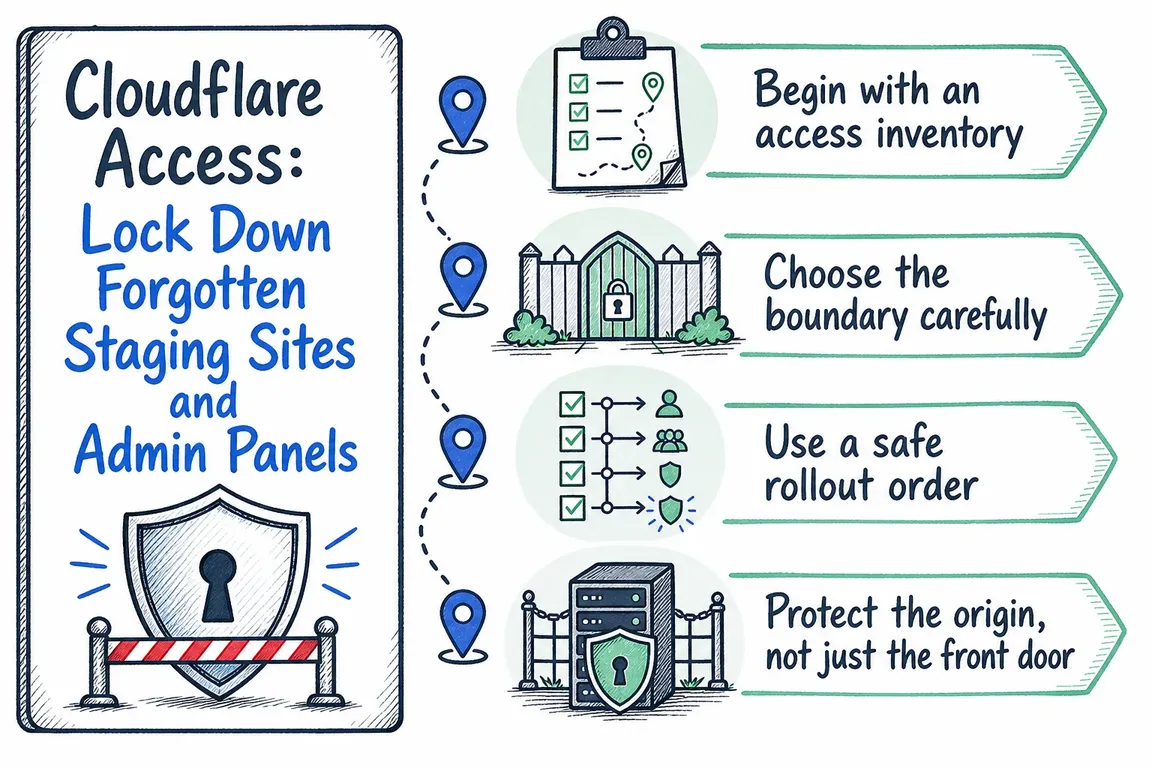
Begin with an access inventory
List every staging hostname, client preview, internal dashboard, partner portal, CMS login, and sensitive path such as /wp-admin. Include endpoints that are considered temporary; those are often the ones least likely to have a named owner.
For each endpoint, record its business owner, technical owner, intended users, hosting location, origin address, authentication method, and any machine traffic. Check monitoring systems, CI pipelines, webhooks, scheduled jobs, and vendor integrations before changing access. Otherwise, the first complete inventory may arrive as a collection of broken alerts after launch.
| Endpoint or workflow | Likely Access model | Important check |
|---|---|---|
| Public staging hostname or web admin | Self-hosted application | Protect the hostname or exact path and validate tokens at the origin |
| Privately routed internal web tool | Self-hosted private destination | Confirm client and private-network routing requirements |
| Third-party product supporting SAML or OIDC | SaaS application | Confirm the vendor’s SSO capabilities and session behavior |
| SSH server requiring port or username controls | Infrastructure application | Plan for the Cloudflare One Client and private routing |
| Link displayed in App Launcher | Bookmark | A bookmark controls tile visibility; it does not protect the destination |
| CI, monitoring, or webhook request | Service Auth policy | Store, rotate, and revoke the credential like any other secret |
Choose the boundary carefully
For most browser-based staging sites and admin panels you control, a self-hosted application is the natural starting point. Access can protect a complete hostname or a specific path. Path-level protection can be useful for an administration area, but inspect the application first: login callbacks, APIs, asset paths, preview links, and background requests may cross the boundary you intended to create.
More-specific application paths take precedence and do not simply inherit every rule from the broader path. Document overlapping applications so a later policy change does not produce an unexpected gap.
Use a SaaS application when Cloudflare will participate in a third-party service’s SAML or OIDC sign-in. Use App Launcher only as a convenient directory. Its policy determines who can open the launcher, while each underlying application retains its own permissions. A polished portal is not evidence that the destination URLs are protected.
Use a safe rollout order
For an internet-facing application, the practical sequence is:
- Create the Access application for the intended hostname or path.
- Add narrow Allow policies and select the appropriate identity provider.
- Set a session duration that fits the sensitivity and working pattern.
- Test with an approved user and with an account that should be denied.
- Publish the origin through Cloudflare Tunnel or restrict the existing public origin.
- Enable origin-side Access token validation and test direct-origin requests.
- Migrate automated clients, then remove obsolete bypasses and shared credentials.
Cloudflare recommends creating the Access application before publishing the tunnel route. Without the application, the newly published service can be reachable from the internet. Access applications are deny by default, but that only helps after the correct hostname and paths are covered by policy.
Protect the origin, not just the front door
An Access login at the Cloudflare edge is incomplete if someone can still reach the origin through its IP address, an old DNS record, or an alternate hostname. Cloudflare’s guidance is to validate the application token at the origin so requests that bypass Access are rejected.
With Cloudflare Tunnel, cloudflared can perform this check through the Protect with Access setting. Alternatively, the application or reverse proxy can validate the token. If the application remains publicly routable without a tunnel, restrict its origin IP using appropriate network controls as well.
Separate people from machines
Interactive users should authenticate as themselves. Engineers who need command-line access can use:
cloudflared access login https://staging.example.comHeadless jobs should not depend on a person’s browser session or a shared employee account. Create a service token and match it with a Service Auth policy:
curl -H "CF-Access-Client-Id: <CLIENT_ID>" \
  -H "CF-Access-Client-Secret: <CLIENT_SECRET>" \
  https://staging.example.com/health
Cloudflare shows the client secret only when the token is created, so capture it directly in an approved secret store. Give tokens recognizable names, owners, expiry dates, and narrowly scoped applications. Cloudflare also supports placing both values in one configured header when an external service accepts only one custom header.
Avoid broad Bypass rules for monitoring or vendor automation. Bypass disables Access enforcement for matching traffic, those requests are not logged by Access, and Bypass and Service Auth actions are evaluated before ordinary Allow and Block policies. A convenient exception can therefore undermine the control you intended to install.
Make the cleanup maintainable
Before closing the project, assign an owner to every protected application, record the policy purpose, and schedule reviews for contractors, agencies, service tokens, DNS records, and dormant endpoints. Include Access changes in onboarding, offboarding, and environment retirement procedures.
The valuable outcome is not simply “Cloudflare Access enabled.” It is a small, understandable access model in which every exposed tool has an owner, every user or machine has an appropriate authentication path, and the origin cannot quietly bypass the policy.
If your staging and admin estate has grown across Cloudflare, DNS, identity providers, CI systems, and vendor accounts, talk to Greg about a focused access audit and rollout plan. The aim is to close the forgotten routes without interrupting the workflows your team still needs.
Related on GrN.dk
- AI automations need a spend dashboard before the first runaway bill
- The risky part of AI workflow pilots is often the OAuth screen
- AI Crawler Control for Business Websites: Protect Content Without Vanishing from Search
Need help with this kind of work?
Discuss your Cloudflare Access cleanup Get in touch with Greg.