GrN.dk

Main navigation

  • Articles
  • Contact
  • Your Digital Project Manager
  • About Greg Nowak
  • Services
  • Portfolio
  • Container
    • Excel Freelancer
    • Kubuntu - tips and tricks
    • Linux Apache MySQL and PHP
    • News
    • Image Gallery
User account menu
  • Log in

Breadcrumb

  1. Home

Your OpenAI and Cloudflare Keys Need an Expiry Date

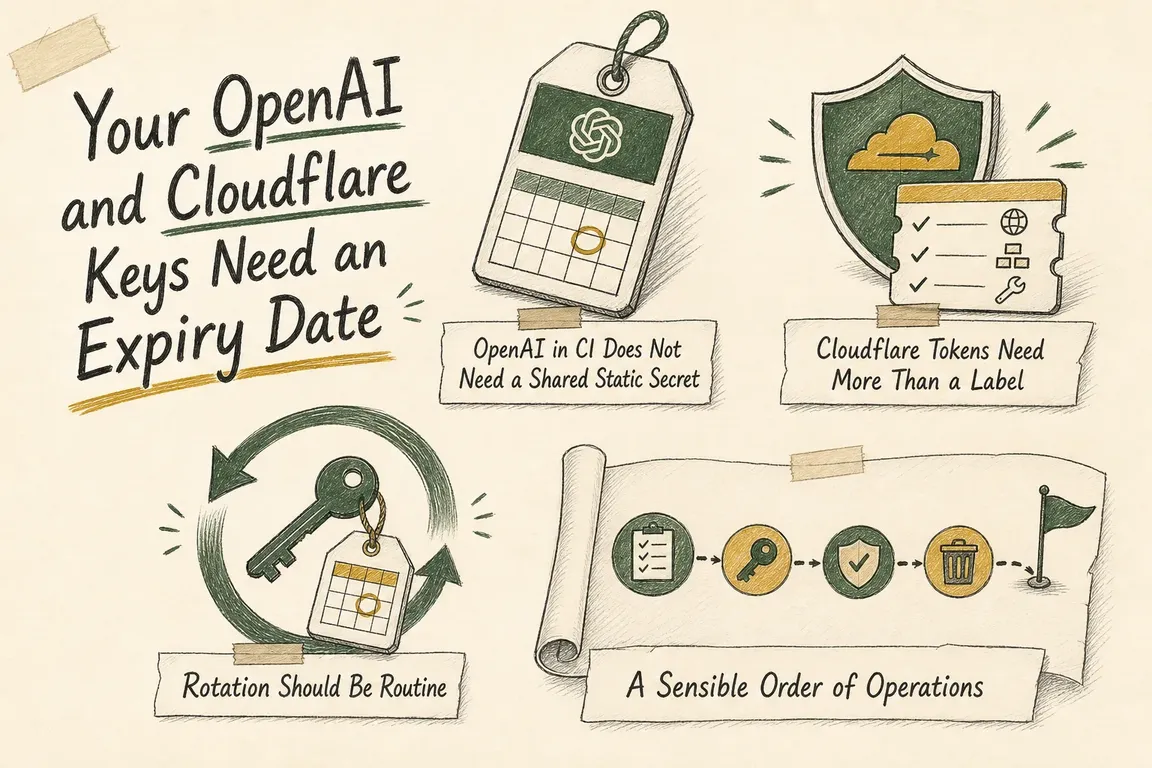
Illustrated infographic summarizing: Your OpenAI and Cloudflare Keys Need an Expiry Date

By Greg Nowak. Last updated 2026-06-17.

Most teams do not set out to create permanent credentials. Someone adds a GitHub secret so a deployment can ship, drops a Cloudflare token into a script, and moves on. Six months later the job still runs, but nobody is fully sure who can use that key, where it works, or when it is supposed to be replaced. That is usually the real problem. Rotation matters, but the bigger issue is that the credential never had an end date in the first place.

The vendor guidance is clearer now than it was even recently. OpenAI documents workload identity federation for GitHub Actions, where a GitHub-issued OIDC token is exchanged for a short-lived OpenAI access token instead of storing a long-lived API key in GitHub secrets. GitHub describes the same model more generally: establish trust once, let each workflow request short-lived credentials for that job, and stop scattering durable secrets across CI. Cloudflare’s token documentation comes at the problem from the other side. If a token still makes sense, Cloudflare gives you the controls to narrow it properly: exact permissions, exact resources, optional client IP filtering, optional TTL, and a documented way to roll the secret later.

OpenAI in CI Does Not Need a Shared Static Secret

OpenAI’s GitHub Actions guide matters because it changes the default architecture, not just the storage location. Instead of treating GitHub as a place to hold an OpenAI API key, you let GitHub prove the identity of the running workflow with OIDC and let OpenAI issue a short-lived access token in response. OpenAI validates the issuer, audience, signature, and mapped attributes before that token is issued. In plain terms: if a workflow only needs OpenAI during one run, keeping a permanent API key in repository secrets is now a choice, not a requirement.

That distinction is important operationally. A static key tends to spread. It gets copied between repositories, reused across environments, and left in place because nothing is forcing a review. The OIDC model changes the conversation. GitHub says the token is generated per job and includes claims about the workflow identity. OpenAI then asks you to trust specific claims such as repository, ref, environment, or workflow context. If you do that work carefully, you are no longer asking, “Where else did we paste this key?” You are asking, “Which workflows are allowed to mint access, under which conditions?” That is a much healthier control point.

It also exposes weak boundaries quickly. If a production service account can still be reached from the wrong repository, the wrong branch, or a pull request context, removing the stored key has not really solved the problem. OpenAI’s own recommendations point in the right direction: separate service accounts for CI/CD and production, constrain mappings by repository and branch or workflow, avoid granting access to pull requests from untrusted forks, and keep the exchanged access short-lived.

There is a smaller but useful implementation detail here too. OpenAI distinguishes between actual bearer credentials and simple identifiers like the identity provider ID, audience, and service account ID. Those values can live in GitHub Actions variables because they are not secrets. The guide also makes an easy-to-miss permission point: id-token: write allows the workflow to request the OIDC JWT, but it does not give the job write access to repository contents. And neither the GitHub OIDC token nor the exchanged OpenAI token belongs in logs.

Situation Safer default Why a client should care
GitHub Actions needs OpenAI access Use workload identity federation and exchange a GitHub-issued OIDC token for a short-lived OpenAI access token. Removes a long-lived OpenAI secret from CI and reduces the blast radius of a workflow mistake.
Automation needs Cloudflare API access Create a token with the exact permission group, access level, and account or zone scope required. Limits what that automation can touch if the token is reused, exposed, or simply forgotten.
A Cloudflare token only needs to work from known systems Add client IP filtering and a TTL. Turns an open-ended credential into one with location boundaries and a built-in end date.
A Cloudflare token must be replaced Roll the token so the old secret is invalidated while access and permissions stay the same. Makes routine rotation possible without redesigning the whole permission model.
A practical decision table: OpenAI removes the static secret from GitHub-based jobs, while Cloudflare lets you keep tokens narrowly scoped, time-bound, and easier to rotate.

Cloudflare Tokens Need More Than a Label

In a lot of environments, the bigger day-to-day risk is not one CI workflow. It is a broad Cloudflare token that quietly powers scripts, DNS changes, deployment hooks, or support tooling for years. Cloudflare’s create-token documentation is explicit about the available controls: start from a template or custom token, choose the permission group, choose the access level, and authorize only the resources that token should reach. If a job only needs DNS access for one zone, the docs make clear that you can scope it to that zone instead of handing it access across the account.

The read-versus-edit choice matters more than teams sometimes assume. Cloudflare defines Edit as full CRUDL access and Read as read or list access where appropriate. That makes permission choice part of the design, not an afterthought. Cloudflare also notes that Account API tokens are available when you want service tokens that are not tied to a user, assuming the relevant endpoints support them. For business automation, that is often a cleaner ownership model and easier to reason about later.

The controls that matter most for this article are the ones many teams still skip. Cloudflare says tokens can be restricted with client IP address range filtering and TTL constraints. If you do nothing, the token can be used from any IP address and it does not expire. Once you add an Is in rule, only the defined addresses can use it. Once you set TTL, you define when it becomes valid and when it stops being valid. That is the difference between creating a token and actually designing a credential.

Cloudflare also notes that dashboard timing uses whole-day timestamps at 00:00 UTC, while the API offers finer control. The practical business takeaway is simple: expiry should be intentional. Some automations really do need long-lived access. Many others only ended up with it because nobody set TTL when the token was created.

Rotation Should Be Routine

Cloudflare’s rolling guidance is useful because it treats credential change as normal operations. If a token is exposed or simply due for replacement, you can create a new one or roll the existing token. Rolling invalidates the old secret, generates a new one, and keeps the same access and permissions. Cloudflare also says the new token uses a scannable format, which helps credential scanning tools detect leaked tokens. That is exactly the kind of detail that makes rotation workable in the real world instead of a disruptive one-off exercise.

OpenAI’s federated GitHub Actions pattern changes the rotation story in a different way. You are not chasing down copied API keys across repositories. You are maintaining the trust relationship, the claim boundaries, and the separation between service accounts that determine which workflows can exchange for short-lived access. That moves the review process closer to the real risk.

A Sensible Order of Operations

If this needs to be cleaned up without breaking live jobs, the sensible sequence is fairly straightforward.

  1. Move GitHub Actions jobs that call OpenAI away from stored API keys and onto workload identity federation where that workflow pattern fits.
  2. Split OpenAI service accounts so CI/CD and production do not share the same access boundary.
  3. Replace broad Cloudflare tokens with scoped tokens built around one task, one permission set, and one resource scope.
  4. Add Cloudflare client IP filters and TTL wherever the automation does not genuinely need universal origin access or indefinite lifetime.
  5. Document how Cloudflare tokens are rolled and who owns the OpenAI trust configuration.

This is not glamorous work, but it is high-value work. A credential with no expiry date has a habit of turning into invisible infrastructure. Once that happens, it becomes hard to replace and even harder to govern. The good news is that the vendor path is clearer now: OpenAI for secretless GitHub-based authentication, GitHub for short-lived workload identity, and Cloudflare for scoped, restrictable, rollable tokens. Greg can help turn that into an actual inventory, a tighter credential model, and a rotation routine that works without interrupting production.

Related on GrN.dk

  • Cloudflare's zombie API endpoints need a real cleanup plan
  • Repeated prompts and long-running AI jobs are now a paid workflow-redesign problem
  • AI Search Visibility Is Now a Measurement Problem After Google's 2026 Guidance Changes

Need help with this kind of work?

Plan a credential scope and rotation audit Get in touch with Greg.

Sources

  • Configuring workload identity federation for GitHub Actions | OpenAI API
  • OpenID Connect - GitHub Docs
  • Create API token · Cloudflare Fundamentals docs
  • Restrict tokens · Cloudflare Fundamentals docs
  • Roll tokens · Cloudflare Fundamentals docs
Last modified
2026-07-15

Tags

  • api-security
  • openai-integrations
  • Cloudflare
  • github-actions
  • secret-rotation

Review Greg on Google

Greg Nowak Google Reviews


Illustrated infographic summarizing: If the Facts Need JavaScript, AI Search May Miss the Full Page
If the Facts Need JavaScript, AI Search May Miss the Full Page
2026-07-14

A practical guide to finding and fixing JavaScript rendering gaps that can hide services, prices, contact details and metadata from AI search crawlers.

Illustrated infographic summarizing: Search Console Can See Social Posts—Your Reports Need a New Map
Search Console Can See Social Posts—Your Reports Need a New Map
2026-07-13

Search Console now reports how social posts perform across Google. Here’s a practical way to manage properties, permissions, baselines and exports.

Illustrated infographic summarizing: WordPress 7.0 Has an AI Client. Plugins Need Their Own Guardrails
WordPress 7.0 Has an AI Client. Plugins Need Their Own Guardrails
2026-07-12

WordPress 7.0 standardizes how plugins call AI providers, while leaving developers responsible for access control, cost limits, capability checks and graceful failures.

Illustrated infographic summarizing: Google’s AI Search toggle needs a test plan, not a gut decision
Google’s AI Search toggle needs a test plan, not a gut decision
2026-07-11

Google’s AI Search control creates a measurable publishing choice. Test visibility, traffic and leads before changing the setting across your site.

Illustrated infographic summarizing: OpenAI Is Retiring Agent Builder: Save the Workflow, Not Just Prompts
OpenAI Is Retiring Agent Builder: Save the Workflow, Not Just Prompts
2026-07-10

OpenAI retires Agent Builder on November 30, 2026. Here is what teams need to preserve, how to choose a migration path, and how to cut over safely.

Illustrated infographic summarizing: AI agents need a browser policy before they start clicking around
AI agents need a browser policy before they start clicking around
2026-07-09

Browser-using AI agents can save time, but they need clear rules before they enter CRMs, CMSs, portals, or admin tools and start taking action.

Illustrated infographic summarizing: When AI writes JSON, one bad field can break the workflow
When AI writes JSON, one bad field can break the workflow
2026-07-08

Structured AI output is useful in real workflows, but teams need schemas, validation, retries, and logs before JSON reaches production systems.

Illustrated infographic summarizing: AI search is eating the click: measure the queries before rewriting pages
AI search is eating the click: measure the queries before rewriting pages
2026-07-07

AI summaries are cutting into search clicks. Start with a practical dashboard that shows query risk, bot purpose, page value, and crawler policy.

Illustrated infographic summarizing: AI shopping visibility now depends on boring product-data plumbing
AI shopping visibility now depends on boring product-data plumbing
2026-07-07

AI-assisted shopping puts more pressure on ecommerce catalog data, feeds, schema, prices, availability, and return-policy governance.

Illustrated infographic summarizing: Drupal AI Demos Need a Permissions Rehearsal Before Launch
Drupal AI Demos Need a Permissions Rehearsal Before Launch
2026-07-07

Drupal’s July 2026 AI advisories show why agencies should test permissions, uploads, approval loops, logs, and rollback before client demos go live.

More articles
RSS feed

GrN.dk web platforms, web optimization, data analysis, data handling and logistics.