By Greg Nowak. Last updated 2026-07-20.
On July 17, 2026, WordPress 7.0.2 arrived with fixes for one critical and one high-severity security issue. WordPress recommended immediate updates and, because of the severity, enabled forced automatic updates for sites running affected versions.
That urgency is justified. But an update starting automatically is not the same as an update being operationally complete. If your website generates leads, processes orders, supports customers, or anchors client campaigns, you still need to confirm what changed, whether the site works, and who owns any follow-up.
A security update is a production change. The right response is not to delay it behind unnecessary ceremony. It is to have a short, tested runbook ready before the notification arrives.
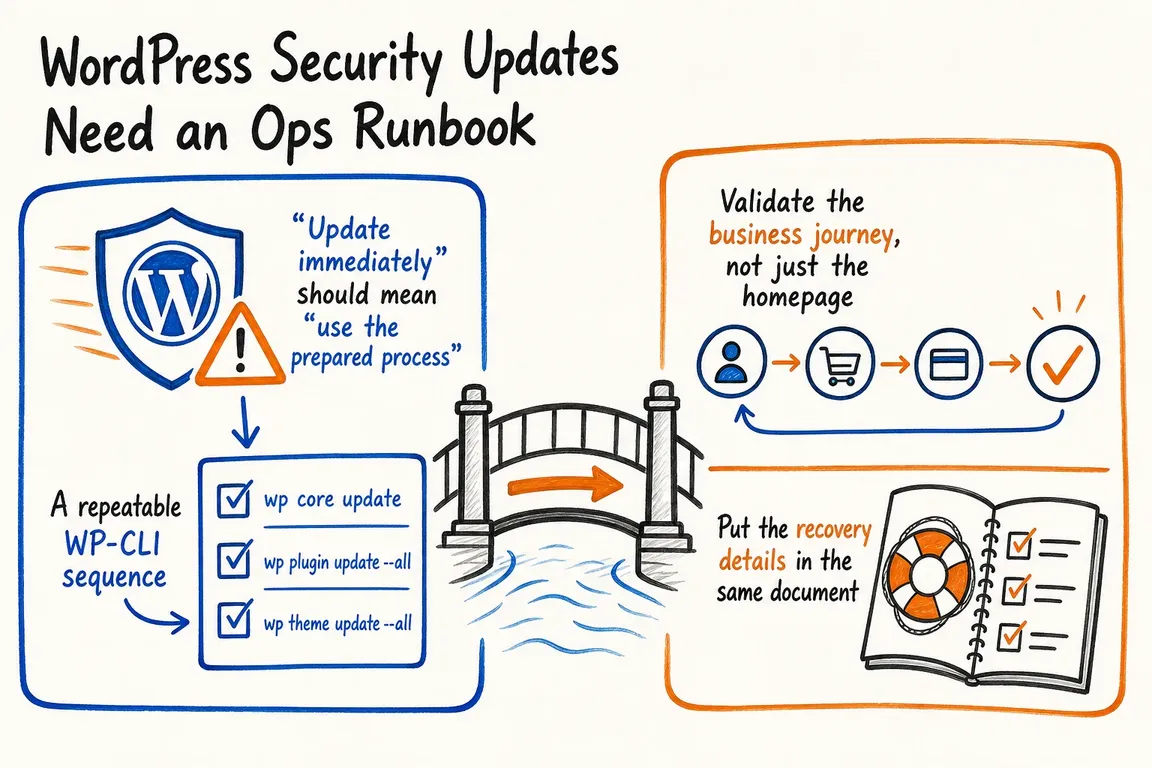
“Update immediately” should mean “use the prepared process”
WordPress can automatically apply many minor and security updates. In an urgent release, your team may discover that production has already updated before the planned maintenance window. A useful runbook therefore needs two paths: one for executing the update and another for verifying an update that has already happened.
For a single business site, ownership may sit with an internal operations lead, a developer, or an external consultant. Agencies need the same clarity for every client: which sites are affected, which workflows are commercially important, who can approve recovery work, and where the evidence is recorded.
| Runbook stage | Practical action | Evidence to keep |
|---|---|---|
| Trigger and triage | Confirm the official release, affected sites, installed version, target version, and whether an automatic update has started. | Release link, site inventory, version output |
| Recovery point | Confirm a fresh backup or infrastructure snapshot and that the person on duty can access the restore process. | Timestamp, location, restore owner |
| Preflight | Check administrative and shell access, file ownership, available disk space, monitoring, and any site-specific risks. | Named operator and exceptions |
| Execute | Update to an explicit release and run the database procedure when required. | Command output and start/end time |
| Validate | Test important customer and editorial journeys, caches, integrations, and error logs. | Completed smoke-test checklist |
| Close or recover | Record the final version, clear temporary controls, and escalate unresolved failures. | Final status and next action |
A repeatable WP-CLI sequence
WP-CLI gives technical teams a clear sequence that can be run in staging and production and attached to a ticket. Replace the placeholder with the release you have verified from WordPress.org:
wp core version
wp core check-update
wp core verify-checksums --include-root
wp core update --version=<target-version>
wp core update-db --dry-run
wp core update-db
wp core verify-checksums --include-root
The first checksum check establishes a useful baseline. The command runs before WordPress loads and compares installed core files with checksums from WordPress.org. The --include-root option also reports unexpected items in the root directory, so warnings need investigation rather than automatic deletion. Sites using another locale may need an explicit --locale value.
Pinning --version prevents the target from changing between approval and execution. The database dry run compares versions without changing the database; the following command performs the procedure if needed. For multisite, document wp core update-db --network as the appropriate database path.
Direct modifications to WordPress core files will be overwritten by an update. If the checksum baseline exposes such changes, do not silently preserve that operating model. Move required customization into a plugin or theme and record the immediate exception.
Validate the business journey, not just the homepage
A green homepage proves very little. Choose tests according to what the site is expected to do: submit a lead form, complete a checkout, run search, load campaign landing pages, authenticate customers, publish content, and send transactional messages. Check analytics or consent behavior where those systems are business-critical.
Also review application and server logs, clear relevant page, object, host, and CDN caches, and confirm that editors can sign in. Agencies should maintain a small validation profile for each site instead of relying on one generic checklist across an entire portfolio.
Put the recovery details in the same document
If a failed update leaves WordPress in maintenance mode, the official guidance says the .maintenance file can be removed. First confirm that no update process is still running. The same caution applies when WP-CLI reports another update in progress: its documentation permits deleting core_updater.lock, but only after checking that the lock is stale.
wp option delete core_updater.lockDo not make --insecure a routine workaround for TLS failures. WP-CLI warns that it disables certificate validation and exposes the download to a man-in-the-middle attack. Treat a failed TLS handshake as a transport problem to fix or escalate.
A rollback also needs judgment. Restoring the previous WordPress version may restore the vulnerability you were trying to remove. When practical, prefer a forward fix; if rollback is unavoidable, add temporary protection or access restrictions and escalate the security decision rather than treating restoration as the end of the incident.
Make patching an owned business process
The strongest runbook is usually short. It names the owner, recovery point, commands, business checks, and escalation route. That is enough to replace improvisation with a process that internal teams and agencies can repeat under pressure.
If your WordPress maintenance still depends on memory, scattered messages, or one indispensable technician, Greg can help turn it into a practical workflow your team can actually operate. Plan a safer WordPress update process.
Related on GrN.dk
- WordPress Forced an Emergency Update. Did Every Site Take It?
- Fixing Website Email Deliverability in 2026: A Practical Checklist for Business Sites
- Cloudflare BYOIP customers need a rollback plan, not just trust
Need help with this kind of work?
Build a safer WordPress update workflow Get in touch with Greg.