Home
GrN.dk

Main navigation

  • Articles
  • Cases
  • Services
  • Your Digital Project Manager
  • About Greg Nowak
  • Image Gallery
  • Contact
User account menu
  • Log in

Join my community / free newsletter — sign up here

Breadcrumb

  1. Home

text recognition

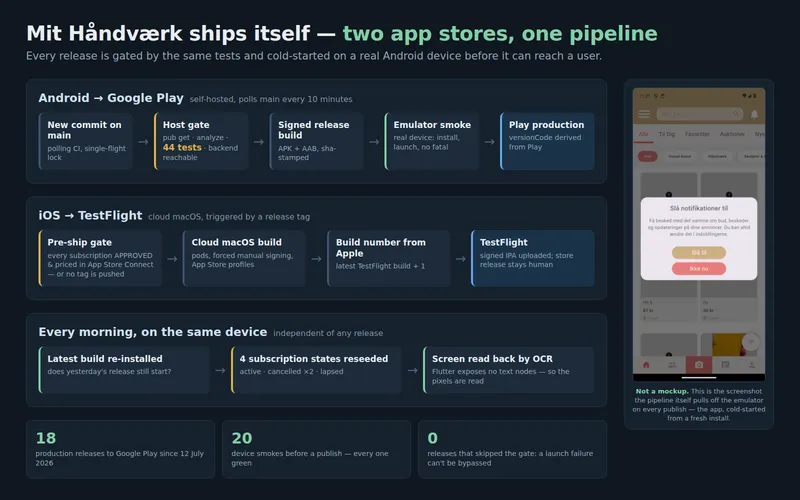
Diagram of the delivery pipeline in three lanes: Android to Google Play (commit on main, host gate of 44 tests, signed build, emulator smoke on a real device, Play production); iOS to TestFlight (App Store Connect subscription-approval gate, cloud macOS build, build number from Apple); and a daily device round that reseeds four subscription states and reads the screen back by OCR. Beside it, the real screenshot the pipeline pulls off the emulator on every publish.

Mit Håndværk publishes itself to two app stores — and a real phone holds the veto

Mit Håndværk — Danish marketplace app for craft, art and design (mithaandvaerk.dk); Flutter on Android and iOS, Laravel backend
Mobile delivery automation — Flutter CI/CD, on-device acceptance testing, Google Play and App Store publishing

Mit Håndværk is a Danish marketplace app for craft, art and design — a Flutter app on Android and iOS over a Laravel backend, with subscriptions, real-time chat and push. This case is not about the app's screens. It is about the machinery that puts a new version of it in front of users: a pipeline that takes a commit on main and, roughly ten minutes later, has published it to Google Play production — but only after the release has been installed and cold-started on a real Android device and survived it.

The same pipeline covers Apple from a Linux server that cannot build iOS at all: a release tag hands the build to a cloud macOS machine, which signs it and uploads it to TestFlight — and the tag itself cannot be pushed unless the app's subscriptions are actually approved and priced in App Store Connect.

Everything in the picture above is read off the running system: the counters come out of the pipeline's own log, and the phone panel is the screenshot the publish gate pulls off the emulator on every single release.

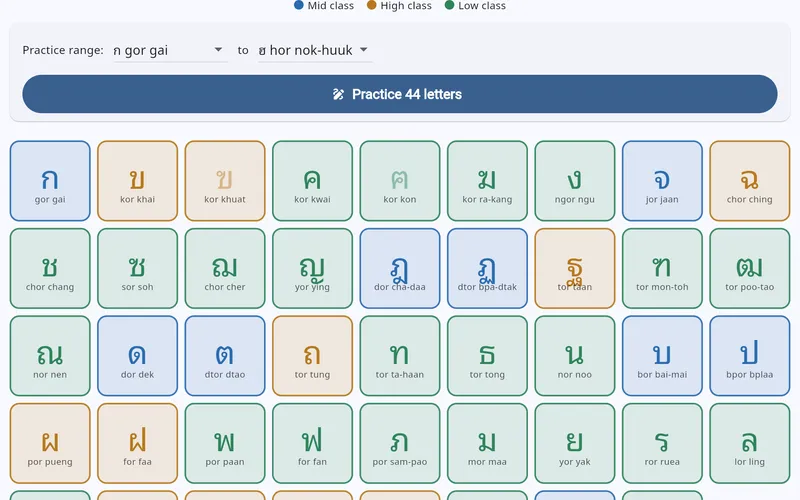
The abc.grn.dk alphabet screen: all 44 Thai consonants as cards colour-coded by class — mid blue, high orange, low green — each with its romanized name, above a practice-range picker and a "Practice 44 letters" button.

Learning to write Thai, one traced letter at a time

GrN.dk — internal build
Educational apps for children

abc.grn.dk teaches a child to write an alphabet rather than to recognise one: pick a letter, trace it with a finger, and the app scores the shape you actually drew and tells you how close you got. Thai first — all 44 consonants, free — with Japanese hiragana and katakana behind a premium gate. Everything happens in the browser: the handwriting recogniser is plain Dart running on the device, the spoken letter names are files bundled with the app, and there is no account, no runtime backend and no advertising.

By Greg Nowak , 21 August, 2020
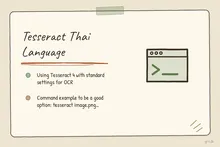
Illustrated infographic summarizing: Tesseract Thai Language

Tesseract Thai Language

Using Tesseract 4 with standard settings for OCR, will you give you odd spaces in the Thai letters.

I found this command example to be a good option: tesseract image.png outfile -l Thai -c preserve_interword_spaces=1

Tags

  • graphics
  • text recognition
text recognition

Review Greg on Google

Greg Nowak Google Reviews


Written recommendations from Trafik og Veje, Aarhus Municipality (2011) and AgroTech (2010) — read them on LinkedIn.

Illustrated infographic summarizing: What Are Customers Asking? Let AI Find the Patterns in Support Tickets
What Are Customers Asking? Let AI Find the Patterns in Support Tickets
2026-09-04

AI-based ticket analysis can uncover recurring complaints, product defects and gaps in documentation—without the company needing yet another chatbot.

Illustrated infographic summarizing: OpenAI Has Machine Identity Now. Which Jobs Should Lose API Keys?
OpenAI Has Machine Identity Now. Which Jobs Should Lose API Keys?
2026-09-03

OpenAI’s X.509 workload identity can replace API keys for the right workloads. This practical framework helps teams decide where to start safely.

Illustrated infographic summarizing: WordPress 7.1 Exposes AI-Ready Actions. Who Gets to Run Them?
WordPress 7.1 Exposes AI-Ready Actions. Who Gets to Run Them?
2026-09-02

WordPress 7.1 helps AI agents discover and invoke site abilities. Here is how to keep exposure, authentication and permission firmly separate.

Illustrated infographic summarizing: From Sales Meeting to CRM: Automate Follow-Up Without Compromising Data Quality
From Sales Meeting to CRM: Automate Follow-Up Without Compromising Data Quality
2026-09-01

How to use AI for meeting notes and follow-up while fixed rules protect CRM data, customer matching and the sales pipeline from errors and premature changes.

Illustrated infographic summarizing: Your AI Gateway Can Name the User. Decide What That Log Is For
Your AI Gateway Can Name the User. Decide What That Log Is For
2026-08-31

Identity-aware AI Gateway logs can sharpen security and cost control, but only when attribution, access, retention, guardrails, and response are clearly defined.

Illustrated infographic summarizing: Zero Data Retention Is a Workflow Audit, Not a Checkbox
Zero Data Retention Is a Workflow Audit, Not a Checkbox
2026-08-30

Zero Data Retention covers the provider, not every copy in your stack. See how to audit endpoints, logs, storage, deletion and project-level controls.

Illustrated infographic summarizing: MCP 2026-07-28 Is an Auth Migration, Not a Version Bump
MCP 2026-07-28 Is an Auth Migration, Not a Version Bump
2026-08-29

MCP’s July 2026 release removes protocol sessions and tightens OAuth. Here’s a practical plan for migrating clients, servers and enterprise access safely.

Illustrated infographic summarizing: Turn a Technician’s Voice Note into a Work Order—Not Raw Audio
Turn a Technician’s Voice Note into a Work Order—Not Raw Audio
2026-08-28

Voice input can reduce the technician’s documentation burden when hours, materials and status are validated before the information is saved in the work order system.

Illustrated infographic summarizing: ChatGPT Disabled Personal Knowledge Sync. What Broke on Your Team?
ChatGPT Disabled Personal Knowledge Sync. What Broke on Your Team?
2026-08-27

ChatGPT retired personal sync connections for Enterprise and Edu. Here is how to find affected workflows, migrate access, and test permissions.

Illustrated infographic summarizing: Cloudflare’s September Bot Defaults Could Quietly Cut AI Visibility
Cloudflare’s September Bot Defaults Could Quietly Cut AI Visibility
2026-08-26

Cloudflare’s September bot defaults give publishers more control, but one training block could also cut search crawling and AI-driven discovery.

More articles
RSS feed

Footer

  • All articles
  • Contact

GrN.dk — AI automation, web platforms, web optimization, data handling and logistics.

© 2026 GrN.dk · LinkedIn · Contact · AI automation in Danish: nowa.dk

Behind GrN.dk: Individual Entrepreneur Codecrafter · Tax ID 305669096 · Bakhtrioni St. 22, 0194 Tbilisi, Georgia · official business register