By Greg Nowak. Updated 30 August 2026.
Drupal’s first-generation Automatic Updates infrastructure is no longer a fallback. The APIs used by the 7.x-1.x and 8.x-1.x branches were discontinued on 6 March 2026. Their release-content hash files expired on 12 May and may now be removed without notice.
If an old site, scheduled task, or internal runbook still relies on that system, the failure may remain hidden until the next urgent security release. That is the worst time to discover an unsupported module branch, an inconsistent Composer lock file, or a production server that cannot safely modify its own code.
The practical response is not to enable automatic updates indiscriminately. It is to give every Drupal site a supported, tested update route that matches how its code reaches production.
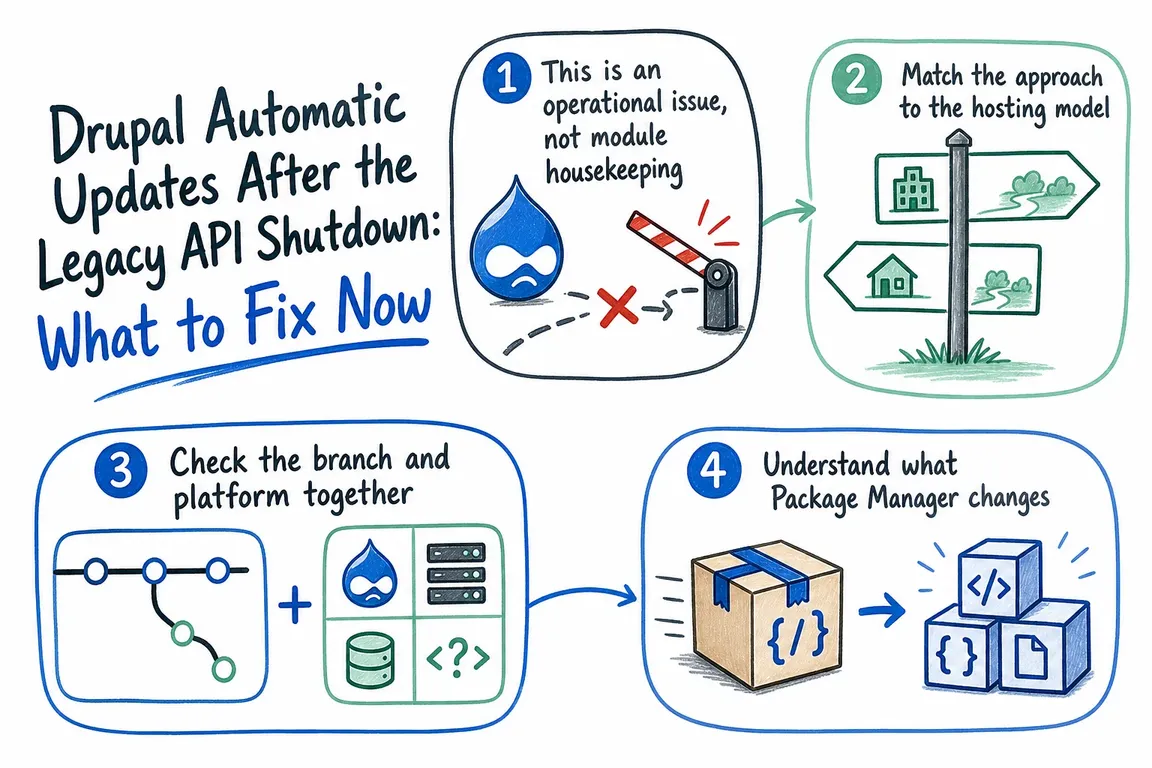
Treat this as an operations problem
Business owners need to know how quickly a security advisory can become a verified production release. Operations leads need a repeatable process with monitoring and rollback. Agencies need to explain responsibilities clearly, especially when hosting, application support, and deployment are split between suppliers.
An inventory should therefore cover more than the module name. Record the Drupal core version, PHP and Composer versions, Automatic Updates branch, hosting model, repository, deployment owner, backup process, and person authorised to approve a release.
Choose the route that fits the deployment model
Browser-driven updates require Drupal to change its own codebase. That can be appropriate on a compatible writable server. It clashes with Git-led deployments, immutable containers, and platforms where production is built from a controlled artifact. Do not weaken a sound delivery process merely to make an update button work.
| Site or environment | Sensible update route | First risk to check |
|---|---|---|
| Drupal 7 or 8 on Automatic Updates 1.x | Plan modernisation or an explicitly supported manual maintenance arrangement | The retired API cannot be restored by changing a local setting |
| Drupal 11.2 or later on a writable Composer-managed server | Evaluate Automatic Updates 4.1 after readiness and recovery testing | Drupal, vendor dependencies, and Composer operations must be writable and permitted |
| Drupal 10.1 or Drupal 11.0–11.1 | Assess the 3.1 branch against the exact core and hosting constraints | Do not copy a constraint intended for Drupal 11.2+ |
| Git or CI/CD deployment | Update and test in development or CI, commit dependency files, then deploy normally | Production must remain reproducible from the repository |
| Immutable container or release artifact | Build, test, and promote a replacement artifact | No runtime process should rewrite application code |
Check core and module compatibility together
As of 30 August 2026, Drupal.org lists Automatic Updates 4.1.0 for Drupal 11.2 or later. Drupal 11.2’s own release notes say sites using Automatic Updates must move to 4.0.0 or later as part of that core upgrade. The project also lists 3.1.7 for Drupal 10.1 and Drupal 11, but that broad project constraint does not override the Drupal 11.2 migration requirement.
For that reason, avoid treating a remembered composer require command as universal. Confirm the current release page, inspect the root constraints, and let Composer resolve the complete dependency graph in a non-production environment.
Begin with read-only checks from the project root:
php --version
composer --version
composer validate
composer show drupal/core-recommended
composer show drupal/automatic_updates
composer audit --locked
composer validate checks the project definition and whether an existing lock file agrees with it. composer audit --locked checks the locked dependency set against Composer’s available security and package-status data. These checks do not replace Drupal security-advisory review, but they expose common maintenance problems before an update is attempted.
Also inspect repository changes, available disk space, recent backups, custom Composer plugins, private repositories, patch tooling, and host-specific deployment hooks. If Composer comes from a managed host, container image, or CI toolchain, update it through that same toolchain instead of casually running composer self-update on production.
Understand what Package Manager requires
Automatic Updates 4.x relies on Drupal core’s experimental Package Manager module. Package Manager creates a temporary copy of the application, performs Composer operations there, and then synchronises the staged changes back.
The documented prerequisites include a writable application codebase—core, extensions, and vendor—Composer 2.7 or later, permission for PHP to execute Composer, an enabled proc_open() function, and a project that passes composer validate. It also uses PHP-TUF protection for Drupal’s Composer repository.
If Package Manager cannot locate Composer, its executable path can be set in settings.php:
$config['package_manager.settings']['executables']['composer'] = '/full/path/to/composer.phar';That configuration solves executable discovery; it does not solve insufficient permissions, unsupported plugins, or an incompatible deployment model. Sites using patch plugins, unusual installers, or private package repositories deserve a complete staging rehearsal.
Keep automation observable and recoverable
Automatic Updates 3.x includes a console script for environments where the web-server user cannot modify the codebase:
php /path/to/module/automatic_updates/auto-updateA scheduled job may run it as a suitably privileged user, but only after the exact path, permissions, logs, failure notification, and recovery procedure have been tested. A privileged cron task that can fail silently is operational debt, not dependable automation.
Whether updates run through a browser, a console job, or CI, test more than the homepage. A useful smoke test covers administrator login, forms, scheduled tasks, search, payments, CRM or ERP connections, and any journey whose failure would interrupt revenue or service delivery.
A cleanup plan your team can complete
- Inventory the estate: identify versions, branches, hosting constraints, repositories, owners, and maintenance agreements.
- Remove legacy assumptions: flag Automatic Updates 1.x, retired API references, obsolete dates, and copied commands.
- Select a supported route: align Drupal core, the module branch, Composer, and the deployment architecture.
- Rehearse outside production: run the update, deployment, smoke tests, alerting, and rollback process.
- Write the runbook: name the approver, commands, required evidence, escalation contact, and manual fallback.
The useful outcome is not a dashboard claiming that updates are enabled. It is confidence that the next security release can move from advisory to tested production deployment without improvisation.
If your estate combines older Drupal versions, managed hosting, or custom Composer behaviour, Greg can review the update path and turn the findings into a practical runbook for your team.
Related on GrN.dk
- Can’t Publish in WordPress? Fix the Invalid JSON Response Without Guesswork
- Cloudflare BYOIP customers need a rollback plan, not just trust
- How to Bulk Delete Cloudflare DNS Records Safely—Without Browser Console JavaScript
Need help with this kind of work?
Review your Drupal update path with Greg Get in touch with Greg.