By Greg Nowak. Updated 7 October 2026.
A supplier PDF can give you a perfectly plausible price for the wrong product. Or the right product with a price per box, while your shop sells individual items. The extraction looks tidy; the catalogue update still needs work.
AI is useful for interpreting awkward layouts and inconsistent descriptions. Before its output reaches your store or product information system, you need to check coverage, product identity and what the values mean. For business owners, operations leads and agency teams, the practical question is: which records can proceed, and which decisions need a person?
Start with the import you actually need
Agree whether this batch creates products, updates existing ones or does both. List the fields it may change. A supplier price update should not casually overwrite descriptions your team has already edited.
Choose one supplier format and a representative sample for the first run. Include difficult records: missing identifiers, pack prices, repeated SKUs and variations. Agree who approves commercial questions and who owns the destination mapping. This keeps technical cleanup from becoming an endless exchange of spreadsheets.
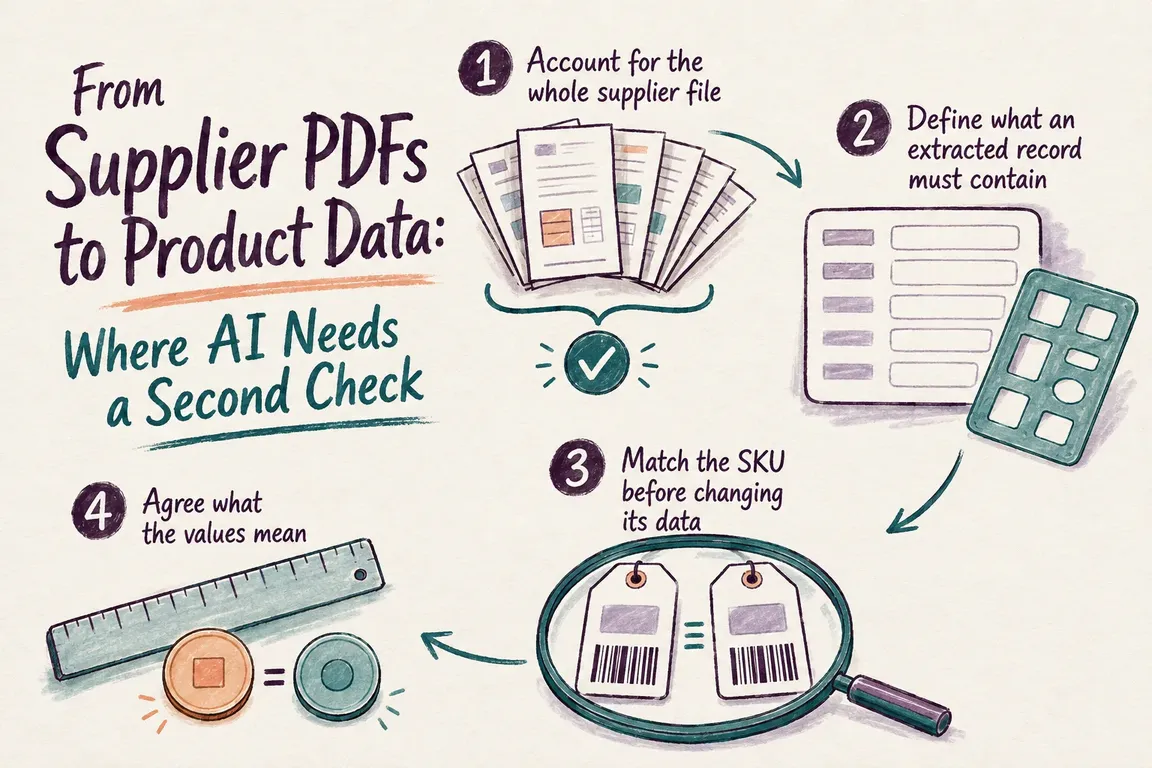
Check that the whole file is accounted for
OpenAI’s Responses API processes PDFs and spreadsheets differently. For vision-capable models, PDF input includes extracted text and page images. Spreadsheet file inputs use an augmentation process that parses up to the first 1,000 rows per sheet, with summaries and header metadata. These are limits of that input route, described in the official file-input documentation.
For complete workbook ingestion, read relevant sheets and rows in Python before using AI to interpret unclear content. Record the filename, version, sheet or page, and source record location. Explain exclusions such as headings, totals and discontinued products.
For PDFs, track page coverage and product completeness separately. A processed page may still contain a missed product. Check extracted records against visible tables or available supplier totals, and inspect dense layouts. Never treat a successful API response as evidence that the catalogue is complete.
Require evidence alongside extracted values
Use a consistent extraction schema: supplier, supplier identifier, description, raw price, currency, selling unit, pack quantity and source location. Keep raw wording alongside proposed values. Where information is missing, allow an explicit unknown rather than encouraging the model to fill every field.
OpenAI Structured Outputs can enforce a response schema, but the documentation warns that outputs can still contain mistakes. Your application must also handle refusals and incomplete responses before treating a record as extracted.
Verify critical values against the source, including any page reference supplied by the model. Review ambiguous evidence before approving a record; a confident-looking answer cannot settle an unclear selling unit.
| Checkpoint | Proceed when | Hold when |
|---|---|---|
| Coverage | Relevant records are accounted for | Pages, rows or products may be missing |
| Product match | An approved identifier maps to the intended SKU | The key is blank, unmatched or unexpectedly duplicated |
| Price and units | Currency, pack basis and measurement meaning are confirmed | A conversion requires an assumption |
| Change approval | Only agreed fields change under documented rules | A change exceeds an agreed review threshold |
| Import test | Destination records match the approved export | Rows fail, fields disappear or unexpected products appear |
Match the product before changing its data
Store identifiers as text. Leading zeros and punctuation may matter. If product codes are unique only within a supplier, use supplier plus identifier as the matching key. Reject blank and null keys before joining; pandas can match null keys to each other.
For implementation, retain incoming records with how="left", expose matches with indicator=True, and enforce the expected relationship with validate="one_to_one" or validate="many_to_one". The latter requires unique keys in the right-hand lookup. These controls are documented in pandas.merge.
Investigate duplicates instead of silently dropping them. Similar names can help a reviewer find a candidate, but require an approved mapping before updating an existing SKU.
Settle pack prices, units and commercial rules
If a supplier lists EUR 48 for a box of 12, EUR 4 per item is a possible conversion only after confirming that your catalogue sells those items individually. Keep purchase cost separate from retail price, and confirm tax treatment, minimum order quantity and the price’s effective date.
Measurements need definitions too. Product weight, shipping weight and pack weight are different fields. Confirm meaning and source unit before converting. Document decimal separators, rounding, attribute vocabulary and any currency conversion rule. Preserve raw and normalized values so a reviewer can follow the calculation.
Compare proposed updates with current catalogue values. Use agreed thresholds to flag unusual changes, and hold conflicting supplier prices for a commercial decision. A numeric value that passes formatting checks may still be unsuitable to publish.
Make the exception report usable
Each held record should show the source location, original value, proposed value, failed check and decision needed. Assign an owner: the catalogue lead might resolve attributes, while purchasing confirms pack quantities and prices.
Account for every incoming product as approved, held or deliberately excluded. Preserve links where one source product creates several destination rows. Record-level reconciliation matters as much as matching totals. Save reusable corrections as rules; keep one-off judgments attached to their records.
Test the destination, then expand the batch
Export approved records only. For WooCommerce, follow its CSV importer guide: use UTF-8 CSV, check column mappings, give variations unique SKUs and consistent parent references, and test a small import on staging before a large batch.
Include an existing-product update and variations where relevant. Inspect failed or skipped rows, then open the products and compare prices, attributes and relationships with the approved data. In WooCommerce 11.1 and later, qualifying unmatched variation rows can be created during an update import, so test the behavior on your installed version. Before production, back up the store and agree how to reverse the changes.
Scope a first supplier-data workflow
Greg can help define the acceptance rules and build a Python/OpenAI workflow with traceable extraction, SKU matching, an exception report and a tested export. A representative supplier file and a catalogue export are useful starting points. Get in touch with Greg to discuss the first batch, the destination and the decisions your team needs to retain.
Related on GrN.dk
- AI automations need a spend dashboard before the first runaway bill
- Browser Automation for Operations and Agency Teams: What Should You Automate?
- Not Every AI Job Needs an Instant Answer: Batch the Backlog
Need help with this kind of work?
Discuss your supplier-data workflow with Greg Get in touch with Greg.










