By Greg Nowak. Updated 27 September 2026.
A browser-using AI agent can research suppliers, update a CRM, prepare CMS changes and move work between systems. It can also expose customer data, act in the wrong account, accept terms or obey malicious instructions embedded in a webpage.
The useful question is not simply, “Can the agent complete the task?” It is, “What authority should it have when the page is unfamiliar, misleading or wrong?” Answer that before connecting an agent to live business systems. A practical browser policy gives business owners, operations leads and delivery teams the same rules: where the agent may go, what it may handle, which actions need approval and when it must stop.
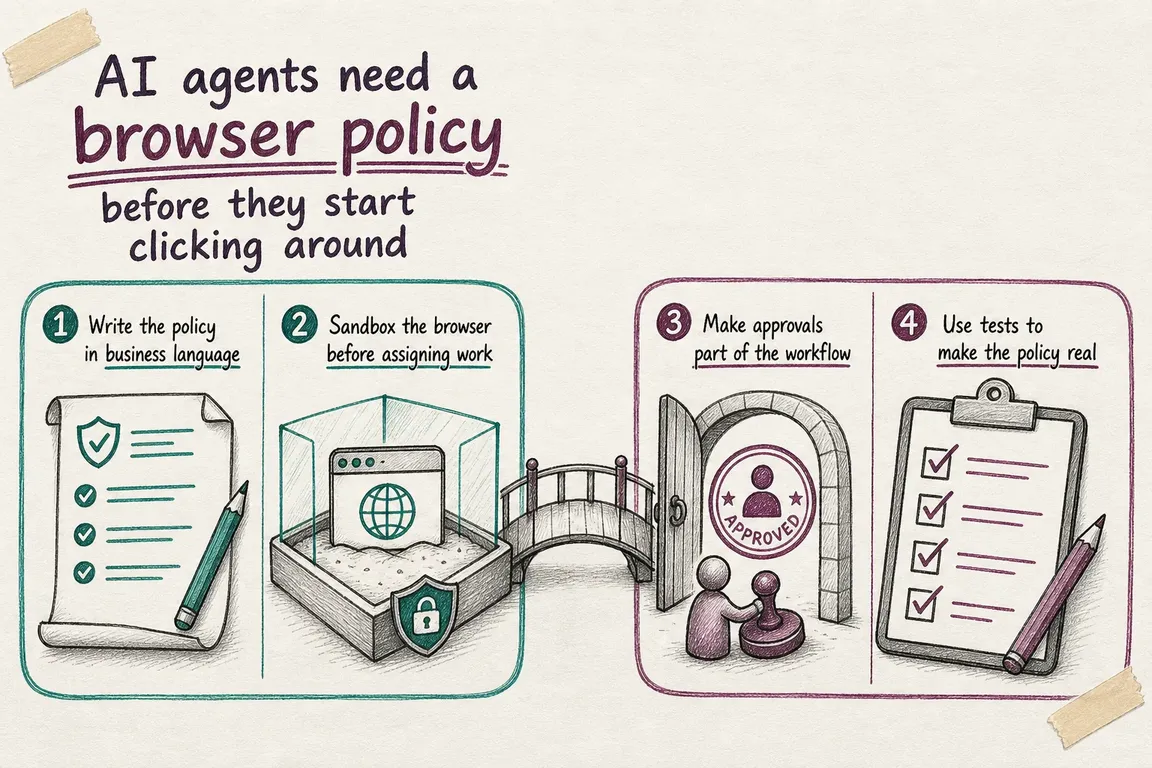
Treat the policy as an operating contract
“Be careful” is not a control. For each workflow, name the approved domains and accounts, permitted data, allowed actions, approval points, evidence to retain and stop conditions. Assign a business owner who can change or withdraw access.
Classify actions by consequence, not by how easy they are to automate. Reading a public product page is different from exporting customer records, even if both require only a few clicks. High-risk actions should be technically blocked unless a reviewed workflow explicitly enables them; a sentence in the system prompt is not enough.
| Risk level | Typical browser work | Default policy | Evidence to retain |
|---|---|---|---|
| Low | Read approved public pages; compare non-sensitive information | Automate within an allowlist | URLs, result and exceptions |
| Medium | Draft CRM updates, CMS edits, emails or supplier orders | Prepare automatically; a person approves the exact change | Before-and-after state, agent identity, approver and time |
| High | Payments, deletions, permission changes, bulk exports or contractual consent | Block by default; enable only after workflow-specific review | Full action record, authorization and outcome |
Treat webpages, emails, documents, images and downloaded files as untrusted input. Current OpenAI and Anthropic guidance describes prompt injection as an ongoing risk: external content can attempt to redirect an agent or persuade it to disclose information. Model-level defences help, but the surrounding system must still limit what a compromised or confused agent can reach and do.
Separate the agent from everyday browser sessions
Run the agent in a dedicated browser profile, container or virtual machine with minimal privileges. It should not inherit an employee’s saved passwords, extensions, downloads, open tabs or browsing history. Restrict network access to the domains required for the workflow, including genuine dependencies such as an identity provider or approved file store.
Give the agent its own identity wherever the application permits it. Shared employee credentials obscure accountability and often expose unrelated records. Apply least privilege inside every system: an agent checking delivery status does not need to edit bank details, while an agent drafting an article does not automatically need production publishing rights.
Agency teams should also separate clients. Use client-specific accounts, browser environments and storage locations so that a session, download or copied value from one account cannot drift into another.
Decide where downloads, screenshots and traces are stored, who may see them and when they are deleted. These records can contain personal information, confidential page content or session details. Retaining everything forever is not a sensible audit strategy; keep the minimum evidence needed for troubleshooting, accountability and applicable legal obligations.
Put approval beside the consequential click
A useful approval request shows the exact proposed action, not a broad goal such as “complete the order.” The reviewer should see the target system and account, recipients, fields being changed, information being disclosed, financial amount and any irreversible consequence.
Place the gate immediately before execution. An earlier approval can become stale if the cart, record, draft or signed-in account changes. If an agent can issue several browser actions in one batch, the approval check must happen before the consequential action runs—not after the batch has completed.
Credentials, security codes and payment details should be entered through a protected human-takeover flow rather than pasted into the agent conversation. If the product cannot keep those values away from the model, reconsider whether that workflow should be automated.
Define stop conditions just as explicitly. Pause on an unexpected domain, account mismatch, altered terms, duplicate entry, ambiguous record, authentication problem, suspected prompt injection or page state outside the tested route. A safe stop is a successful control, not a failed automation.
Test the guardrails, not only the happy path
Browser interfaces change. An agent may misread a modal, select a plausible-looking customer or continue after a redirect. Test the surrounding controls independently of the model. Playwright can exercise expected routes, retain traces and help confirm that account restrictions, approval gates and blocked actions still work.
npx playwright test --trace on
npx playwright show-report
Those commands are useful during local investigation. For continuous integration, Playwright recommends capturing a trace on the first retry rather than tracing every successful test, which adds unnecessary overhead. Trace Viewer can expose actions, DOM snapshots, logs and network activity. Protect the resulting files as operational data.
Acceptance testing should include an expired session, the wrong company account, a changed button label, an unexpected redirect, a duplicate record, missing permission, a hostile page instruction and a rejected approval. Deterministic tests can validate the boundaries around an agent; they cannot prove safe reasoning on every unseen page.
Start with one bounded workflow
Choose a first deployment with modest consequences, a named owner and an output that a person can verify quickly. Collecting order statuses, preparing CRM notes, checking supplier availability or drafting CMS changes are better pilots than payments or bulk account administration.
- Map the browser states from sign-in to recorded outcome.
- Classify every action as allowed, approval-required or blocked.
- Create a dedicated identity and restricted environment.
- Test normal routes, exceptions and prompt-injection attempts.
- Review early runs and expand permissions only when the evidence supports it.
The goal is not maximum autonomy. It is dependable relief from repetitive work without quietly handing business authority to software. If you need help mapping a workflow, setting approval gates or testing a controlled pilot, talk to Greg about your browser-agent rollout.
Related on GrN.dk
- OpenAI Computer Use: Browser Agents Need Credentials, Not Demos
- OpenAI File Search: Internal Docs Need Governance Before Trust
- Your AI Agent Has Shell Access. What Can It Reach?
Related on GrN.dk
- OpenAI Computer Use: Browser Agents Need Credentials, Not Demos
- Your AI Agent Has Shell Access. What Can It Reach?
- A Voice Agent Is Only Ready When the Human Handoff Works
Need help with this kind of work?
Plan a controlled browser-agent rollout Get in touch with Greg.










