By Greg Nowak. Updated 15 September 2026.
A website can look perfectly healthy while its content team struggles to update it. A broken block control, missing preview or setting that will not save can hold up a campaign just as effectively as a problem on the public page.
WordPress 7.1 shipped on 19 August 2026, and its post editor now always uses an iframe. If your site depends on custom blocks or plugins that extend the editor, include the authoring experience in your upgrade checks. If you have already upgraded, the same checks can help investigate problems editors are reporting.
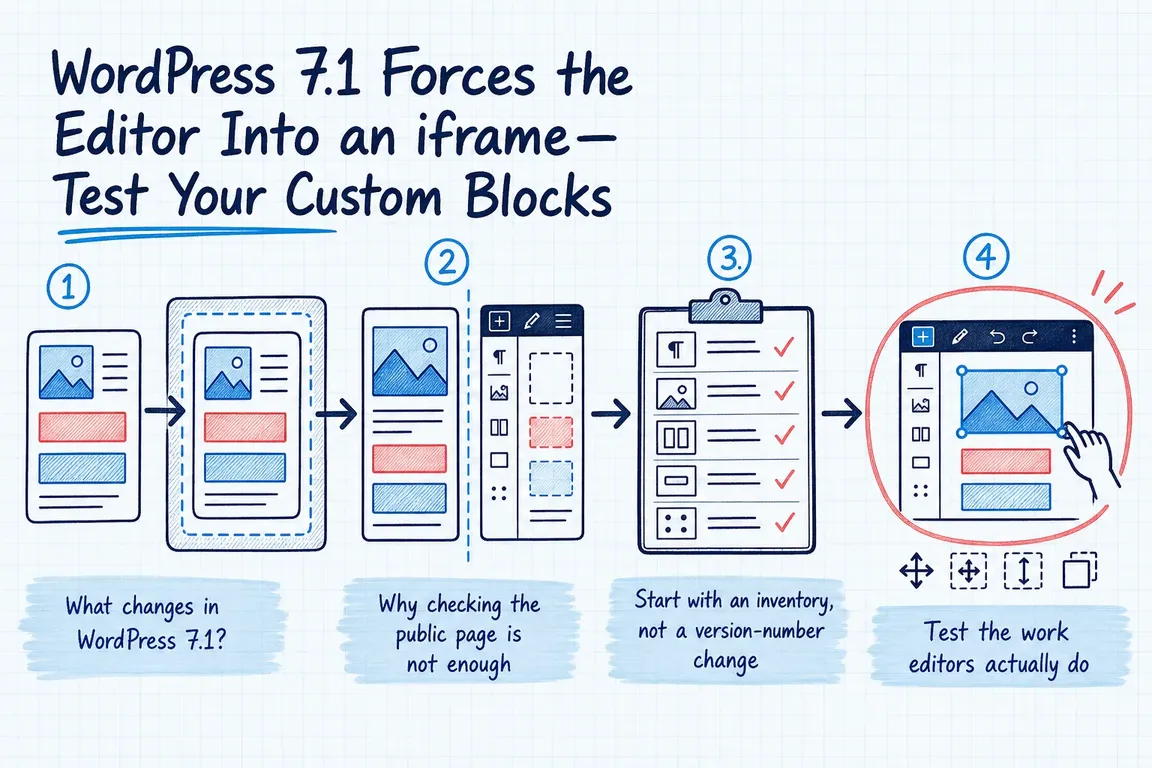
What changed in the WordPress 7.1 editor?
An iframe gives the editing canvas its own browser document, separate from the surrounding administration screen. This isolates content styles from admin styles and lets responsive layouts respond to the canvas width.
WordPress 7.0 retained a compatibility fallback: without the Gutenberg plugin, a block using API version 2 or lower could cause the post editor to leave the iframe. The decision depended on blocks in the current content, as explained in the 7.0 developer note.
In 7.1, that fallback is gone for both classic and block themes. An older API version does not automatically mean a block is broken. It means that block must now work inside the iframe. The 7.1 developer note says most blocks already work without changes.
Start with the blocks your team depends on
Ask the people who publish content to identify their essential layouts and controls. Include campaign pages, service pages, articles, shared patterns and any specialist content types. For agencies, check each client's configuration; a successful test on one site does not cover a different plugin and theme combination.
Create a short inventory: block name, owning plugin or theme, version, example content and developer or vendor responsible. Mark anything that would prevent someone from publishing or correcting an important page.
For custom code, inspect apiVersion in block.json. The current Block API version is 3; an omitted value defaults to 1. Treat this as a triage clue. Test compatibility before changing the declaration to "apiVersion": 3.
| Finding | Priority check | Next step |
|---|---|---|
| A critical block cannot save or reopen | Repeat on a copy of real content | Treat as a release blocker and assign an owner |
| Controls or interactive previews fail | Exercise each control and keyboard action | Review JavaScript document access and library setup |
| Editor styling differs from the public page | Compare spacing, typography and responsive views | Check stylesheet declarations and loading |
| API version is missing or below 3 | Run the complete editing workflow | Update metadata after compatibility is verified |
| A third-party block fails | Reproduce with recorded software versions | Send the vendor evidence and agree on a fix or replacement |
Run a complete publishing rehearsal
Use a staging copy with representative content and the theme, plugins and WordPress release you intend to run. Now that 7.1 is released, an old beta build should not be your acceptance environment. Keep the Gutenberg plugin configuration consistent with production for final testing.
For an earlier compatibility check, the migration handbook documents Gutenberg 23.6 or later as a way to force the iframe. Record that difference in your test results.
- Open an existing page. Check for recovery prompts, missing controls and browser console errors. Test with the user role your editors actually use.
- Build something new. Insert each important block, enter content, choose media and use its toolbar and sidebar settings.
- Change the structure. Move, duplicate and remove blocks. Try undo, redo and supported block transformations.
- Exercise the interactions. Check galleries, maps, sliders and similar components, including keyboard operation and responsive previews.
- Save and return. Reload the editor, confirm that settings persist, then inspect the published staging page.
Have an editor complete one realistic task, such as updating a service page and preparing it for publication. This adds a useful check for awkward behaviour that a developer clicking through individual controls may miss.
Record the content URL, block, steps, expected result, actual result and software versions. A screenshot or short recording makes a vendor handoff much easier. Retest the same steps after a fix.
Where developers should look first
Editor JavaScript runs in the parent administration page, while the canvas has a separate document and window. Code using those globals to find block content can therefore target the wrong document.
Start from the rendered block element: element.ownerDocument provides its document, and element.ownerDocument.defaultView provides its window. The iframe migration handbook recommends useRefEffect from @wordpress/compose for DOM behaviour that must follow changes to the referenced element. Return cleanup logic for listeners and library instances.
Pass external libraries the element directly where supported. If a dependency hardcodes global document access, seek an upstream fix or maintain a version-controlled patch. Accessing a library inside the iframe is a documented workaround, but requires accounting for asynchronous script loading.
Review asset declarations against the block metadata reference: editorScript and editorStyle are editor-only; script and style serve both contexts; viewScript and viewStyle serve the public view. Check PHP registration and enqueue logic alongside JavaScript when assets are missing.
Agree on what counts as ready
A useful sign-off identifies the workflows tested, fixes completed and unresolved issues with named owners. Confirm a recoverable backup and an agreed deployment window before upgrading. After deployment, repeat a short publishing check on the live site.
If a vendor dependency remains unresolved, make an explicit decision about waiting for a supported update, replacing the block or using a tested workaround. Give the content team clear instructions for any temporary limitation.
If you need someone to bring the inventory, developer work and editorial testing together, Greg can coordinate a focused WordPress compatibility project. Discuss your WordPress upgrade with Greg, starting with the blocks your team relies on and the publishing deadlines you need to protect.
Related on GrN.dk
- WordPress 7.0 Upgrade Planning: What Old Meta Boxes Still Mean
- Can’t Publish in WordPress? Fix the Invalid JSON Response Without Guesswork
- WordPress 7.0's React 19 Upgrade Makes Custom Block QA a Paid Compatibility Job
Need help with this kind of work?
Discuss your WordPress upgrade with Greg Get in touch with Greg.