Linux Laptop Power Management TLP

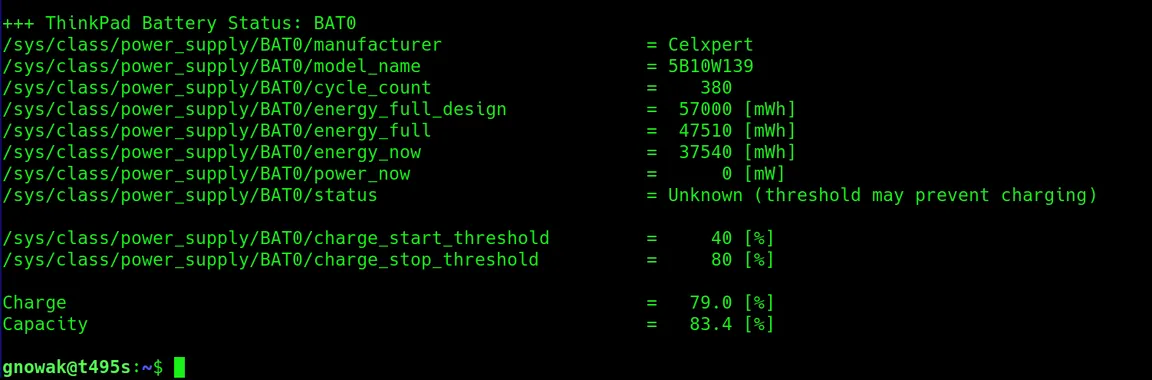
Example of battery status from TLP 2021-12-06 T495s

TLP is an advanced power management tool I use for my laptop that runs Linux. I have not tested the different settings, but it seems that the battery time is increased compared to not running it. :-) I only use it in battery-mode. There are some extra features for Thinkpad laptops.

TLP settings file Ubuntu: /etc/tlp.conf

Reload config: sudo tlp start

Check TLP status: sudo tlp-stat 

Check battery: upower -i /org/freedesktop/UPower/devices/battery_BAT0

Set charge: sudo tlp setcharge 40 80


Battery status 2021-12-06:

+++ Battery Features: Charge Thresholds and Recalibrate
natacpi    = active (data, thresholds)
tpacpi-bat = inactive (kernel module 'acpi_call' load error)
tp-smapi   = inactive (ThinkPad not supported)

+++ ThinkPad Battery Status: BAT0
/sys/class/power_supply/BAT0/manufacturer                   = Celxpert
/sys/class/power_supply/BAT0/model_name                     = 5B10W139
/sys/class/power_supply/BAT0/cycle_count                    =    380
/sys/class/power_supply/BAT0/energy_full_design             =  57000 [mWh]
/sys/class/power_supply/BAT0/energy_full                    =  47510 [mWh]
/sys/class/power_supply/BAT0/energy_now                     =  37540 [mWh]
/sys/class/power_supply/BAT0/power_now                      =      0 [mW]
/sys/class/power_supply/BAT0/status                         = Unknown (threshold may prevent charging)

/sys/class/power_supply/BAT0/charge_start_threshold         =     40 [%]
/sys/class/power_supply/BAT0/charge_stop_threshold          =     80 [%]

Charge                                                      =   79.0 [%]
Capacity                                                    =   83.4 [%]

gnowak@t495s:~$


Latest articles

Plan your PHP upgrade around checkout, enquiries and daily operations, with practical checks for compatibility, staging, deployment and rollback before support ends.

Claude Sonnet 4.5 has a tentative November 30 retirement date. Find affected workflows, check compatibility and test a supported replacement before switching.

Before closing an Apache patch ticket, check what is running, which fixes the package contains, and whether the updated service passes configuration and application checks.

Make monthly reporting easier to repeat with AI for Excel, Python and consistent checks. Get imports, error lists and reconciliation under control so the numbers can be verified.

A supplier PDF can influence more than an AI summary. Follow its path to a CRM update and see where validation, tool permissions and destination controls matter.

Check whether AI shopping channels show the right product, variant, price and availability, then trace discrepancies from your catalog through to checkout.

Add approved hours from Clockify to draft invoices in Dinero. AI writes service descriptions, while fixed rules govern amounts, approvals and reruns.

A blanket AI restriction can limit search discovery. Compare Google and Bing controls, agree content permissions, and check what your CMS actually delivers.

Measure AI automation costs per accepted result, including retries and human review. Check caching, batch processing and spending controls before scaling.

A 502 after maintenance can interrupt enquiries or checkout. Trace the NGINX-to-PHP connection, diagnose the failure, and check the fix survives a restart.