By Greg Nowak. Updated 21 October 2026.
An “AI-generated” label tells your audience something useful. It does not tell your team whether the image on the website is the version someone approved, which edits followed, or whether its provenance survived publication.
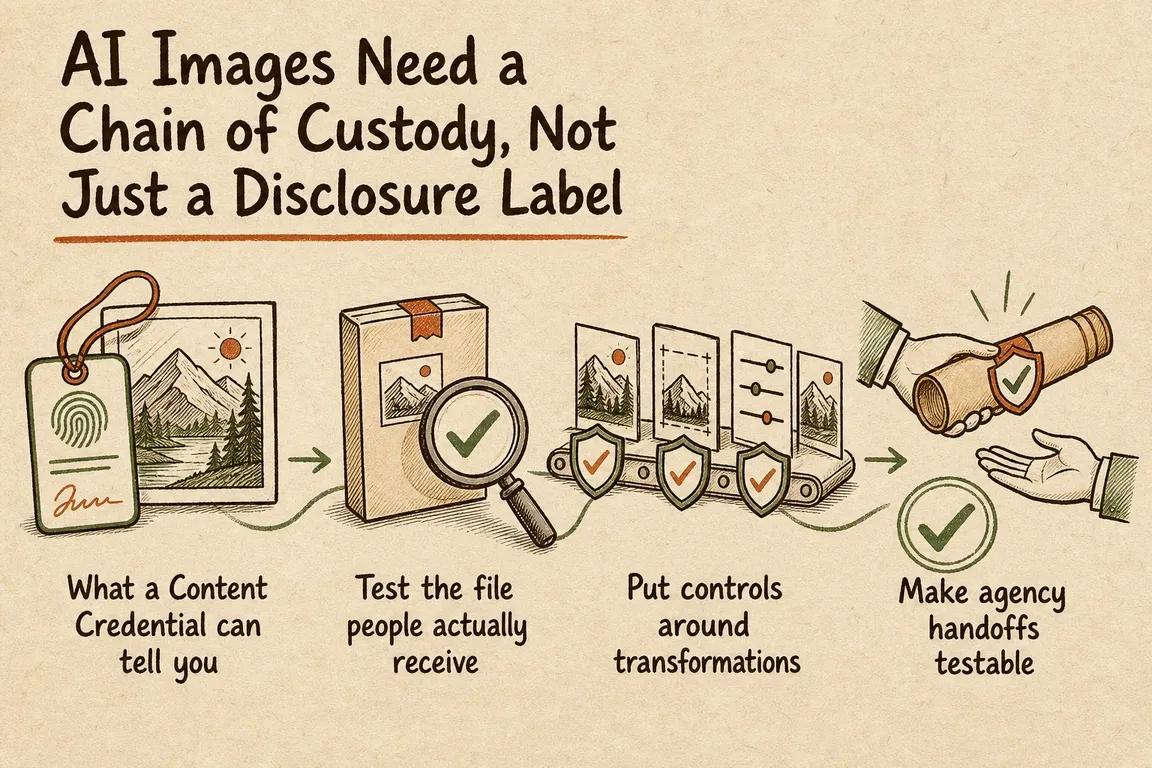
For a business working with designers, agencies and web suppliers, those are operational questions. Answering them requires a chain of custody: a documented connection between the source, the approved exports and the files people actually receive. You can start with a modest asset register and a few repeatable checks.
What Content Credentials actually establish
C2PA Content Credentials carry signed provenance claims, potentially including creation tools, recorded edits and relationships to earlier assets. Validation checks their integrity and connection to the asset; trust checks assess the signing credential against a configured trust policy. The C2PA implementation guidance explains these mechanisms.
They do not establish that the scene is true, that usage rights are cleared or that your business approved publication. Keep editorial approval and licensing records alongside provenance checks. A visible disclosure, a signed credential and an internal approval record serve different purposes.
Start with a record your team can maintain
Give each controlled source a stable asset ID. Keep the original unchanged, then link approved exports, verification reports, CMS entries and public placements to that ID. Your existing asset manager or project system may be sufficient.
Record who supplied the file, who approved it, when approval happened and what further edits are permitted. A checksum can identify an exact file at handoff; it will change when the file changes and does not establish authorship or rights.
| Checkpoint | Check and retain | Responsible role |
|---|---|---|
| Source intake | Untouched original, supplier, asset ID and credential report | Commissioning lead |
| Creative approval | Approved export, parent source, preset and approval record | Designer and approver |
| Agency handoff | Delivery register, file checksums and permitted transformations | Project lead |
| CMS processing | Stored master and representative generated sizes | Content team |
| Public delivery | Downloaded files, URLs, formats and verification reports | Web operations |
| Replacement | Active placements, replacement owner and completion status | Content owner |
Test what customers receive
Checking the original alone leaves most of the publishing route untested. Your workflow may crop an image in the CMS, generate responsive sizes and convert it again at the content delivery network. Each output needs its own evidence.
Start with 10–20 representative assets covering your main suppliers, editing tools and publishing routes. Include an image with a known credential so you can identify where it disappears.
- Inspect the untouched source and retain its report.
- Process it through the actual editing and export presets.
- Upload it through the normal CMS workflow.
- Download representative public renditions, including responsive sizes and negotiated formats such as WebP or AVIF.
- Compare results and identify the first stage where evidence changes or becomes unavailable.
Check the response’s actual file type rather than relying on its filename. If different browser requests receive different formats, test those variants separately. Include social publishing routes when they matter to the campaign.
Make credential checks reproducible
With C2PA Tool installed, these commands provide a quick inspection of the approved source and downloaded output:
c2patool approved-source.jpg --info
c2patool downloaded-public-file.jpg --info
The C2PA Tool documentation describes --info as a high-level report, including validation results. For a retained JSON report, run the tool without that option:
c2patool downloaded-public-file.jpg > public-file-report.jsonConfigure trust checking explicitly. Current versions support downloading and caching the official C2PA trust list with:
c2patool init trustSubsequent runs load those cached trust files. Record the tool version, settings, trust-list snapshot and check time so comparisons are meaningful. Refresh the list deliberately; an old snapshot helps reproduce a past check but should not silently become your permanent policy.
Keep credential presence, integrity and signer trust as separate fields. Distinguish “no credential found” from “unsupported file”, “lookup failed” and “validation failed”. None of those outcomes proves that an image was made by a human. C2PA checks also do not constitute a general watermark detector.
Agree the export and handoff rules
Ask agencies to deliver the controlled source, approved derivatives and their relationship, together with the expected credential status. “Final artwork” is too ambiguous when several exports and crops exist. Map their asset ID to your CMS record and campaign placements.
Export settings matter. Adobe’s current Photoshop export guidance documents Content Credentials for JPG and PNG through Export As. It offers attaching credentials to the file or publishing them to Adobe’s Content Credentials cloud, which supports recovery after stripping. That format limit concerns this Photoshop export route, not C2PA generally.
Test whichever option you choose through delivery. Before publishing credentials to public storage, review the attribution and history information being exposed. A cloud option is useful only if the verification route your audience uses can retrieve the evidence.
Decide what happens when evidence is missing
Agree the response before a deadline forces the decision. For an illustrative marketing image, your policy might allow a visibly labelled derivative when the approved source remains controlled and the loss is documented. For a sensitive image whose origin is central to the claim, pause publication until the gap is resolved.
If a transformation breaks validation, investigate it before adding a fresh signature. Signing an output does not reconstruct undocumented history. Keep any known gap visible in the asset record.
A useful first audit should leave you with a workflow map, tested export settings, named owners and an exception process. Repeat representative checks when suppliers, image processors or delivery settings change.
If your team needs help connecting creative approvals, agency delivery and website processing, Greg can help scope a focused provenance audit. Discuss your image workflow with Greg and identify which handoffs deserve attention first.
Related on GrN.dk
- Your AI Image Has Content Credentials. Will Your Website Keep Them?
- AI Research Assistants Need a Source Trail, Not Just Citations
- AI disclosure rules belong in your CMS, not a spreadsheet
Need help with this kind of work?
Discuss your image provenance workflow Get in touch with Greg.










