By Greg Nowak. Updated 14 October 2026.
Bulk deleting Cloudflare DNS records is straightforward. Deciding which records the business can safely lose takes more care. After a migration, vendor handover, or mistaken import, a zone can contain unfamiliar entries that still support email, customer logins, or domain verification.
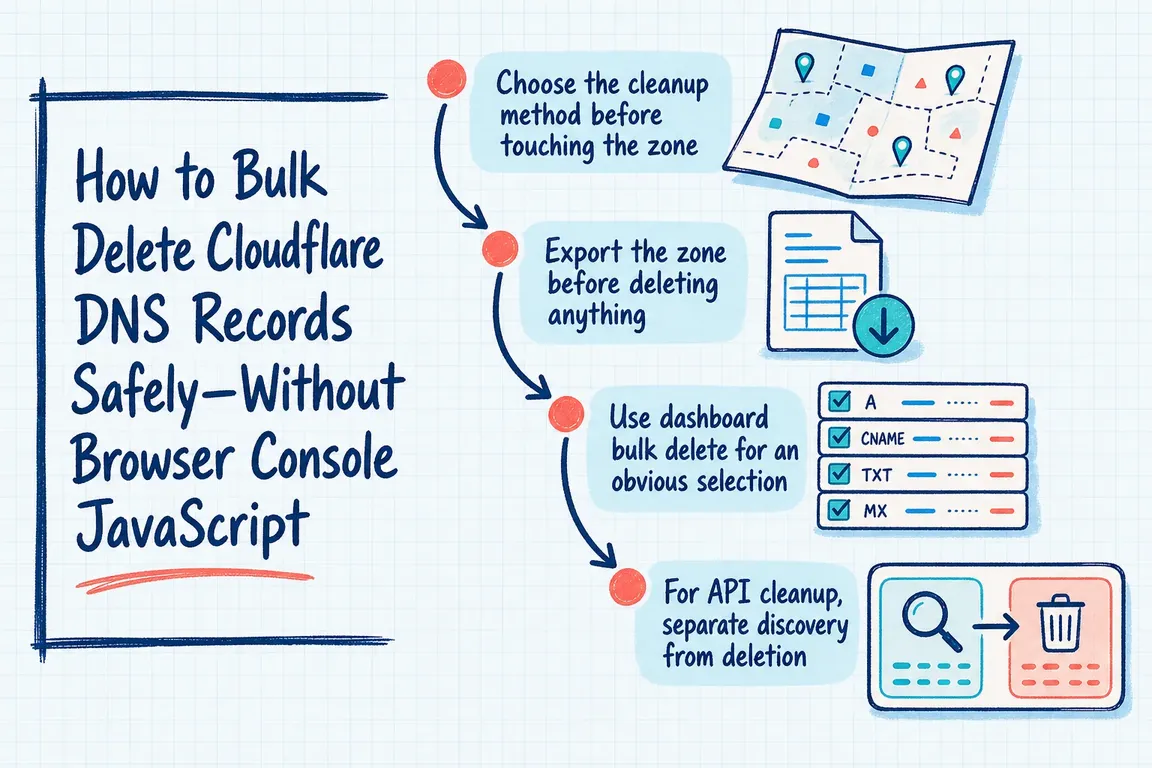
If you arrived here looking for browser-console JavaScript, Cloudflare already provides dashboard bulk deletion and an API. A script that clicks dashboard buttons depends on the page structure and makes the selection harder to review. My recommendation is to choose the simplest supported method that leaves you with a clear record of what changed.
Choose the method that fits the cleanup
| Situation | Method | Before proceeding |
|---|---|---|
| A small, obvious selection | Dashboard bulk delete | Check every selected name and value |
| Many records matching a precise rule | API inventory and individual deletes | Approve a fixed list of record IDs |
| Deletions accompanied by replacements | Batch API | Review the complete change together |
For an agency managing client domains, confirm the account and zone before preparing commands. Agree who approves the list, who executes it, and who tests the affected services. A business owner does not need to inspect JSON, but someone needs to explain why each group of records is being removed.
Back up the zone and identify what must stay
In DNS Records, use Import and Export to download a zone file. Alternatively, export through the API:
export ZONE_ID="your_zone_id"
# Load your read token securely into CLOUDFLARE_API_TOKEN.

curl --fail-with-body --silent --show-error \
  "https://api.cloudflare.com/client/v4/zones/$ZONE_ID/dns_records/export" \
  --header "Authorization: Bearer $CLOUDFLARE_API_TOKEN" \
  --output zone-before.txt
Check that the command succeeded and the file contains DNS records. Keep it with a JSON inventory and the change notes. Use a new working directory for each cleanup so an old approval file cannot be mistaken for the current one.
An export provides recovery material; restoration still needs review. Cloudflare exports proxy settings in cf-proxied tags, which take precedence over general import settings. Preserve those attributes and check fully qualified names before restoring records. See Cloudflare’s import and export guidance.
Review email records, ownership verification TXT records, certificate-related CAA records, SRV records, and delegated NS records separately. An unfamiliar value is a reason to find its owner. Keep migration fallbacks until the replacement service has been accepted.
Use dashboard bulk deletion for a clear selection
Open the zone’s DNS Records page, select the unwanted records, choose Delete records, then type DELETE to confirm. Cloudflare’s bulk-change documentation lists limits of 200 records per action on Free and 3,500 on Pro, Business, and Enterprise.
If selection requires repeated scrolling or remembering exceptions, prepare an API review file instead. Before confirming, save the selected list or a screenshot with the approval.
Build an API candidate list before granting write access
Create a token restricted to the affected zone, using read access for discovery. Cloudflare’s token setup instructions explain permissions and resource restrictions. Use a separate write token for execution and keep secrets out of shared scripts and tickets.
The following Bash example requires curl and jq. It selects TXT records at or below the example hostname old.example.com. That is a demonstration rule, not evidence those records are disposable:
(
  set -euo pipefail

  curl --fail-with-body --silent --show-error \
    "https://api.cloudflare.com/client/v4/zones/$ZONE_ID/dns_records?per_page=50000&page=1" \
    --header "Authorization: Bearer $CLOUDFLARE_API_TOKEN" \
    --output dns-records.json

  jq -e '.success == true and
    .result_info.total_pages == 1' dns-records.json > /dev/null

  jq -r '.result[]
    | select(.type == "TXT" and
        (.name == "old.example.com" or
         (.name | endswith(".old.example.com"))))
    | [.id, .type, .name, .content]
    | @tsv' dns-records.json > candidates.tsv

  wc -l candidates.tsv
  cat candidates.tsv
)
The completeness check stops this example if the response spans multiple pages. Retrieve and combine every page before filtering a larger inventory. Cloudflare’s list endpoint documents pagination and structured filters; its general search parameter is intended for human searches and should be avoided in automation.
Review each candidate’s name, value, owner, and removal reason. Remove exceptions from the review file. Only after approval, create the fixed execution list:
cut -f1 candidates.tsv > approved-record-ids.txtDelete approved IDs and keep the responses
Immediately before execution, retrieve a fresh inventory and compare the approved records with the snapshot, including their values and modification timestamps. If anything changed, resolve it before proceeding. Pause other DNS writers during the change where practical.
Load the zone-scoped write token into CLOUDFLARE_API_TOKEN. This loop uses Cloudflare’s delete endpoint, saves each response, and stops on a request or API failure:
(
  set -euo pipefail
  test -s approved-record-ids.txt

  while IFS= read -r id; do
    [[ "$id" =~ ^[0-9a-fA-F]{32}$ ]]

    curl --fail-with-body --silent --show-error \
      --request DELETE \
      "https://api.cloudflare.com/client/v4/zones/$ZONE_ID/dns_records/$id" \
      --header "Authorization: Bearer $CLOUDFLARE_API_TOKEN" \
      --output "delete-$id.json"

    jq -e '.success == true' "delete-$id.json" > /dev/null
    printf 'Deleted %s\n' "$id"
  done < approved-record-ids.txt
)
Individual deletes can leave a partially completed cleanup. If the loop stops, reconcile saved responses with a fresh inventory before resuming.
Coordinate replacements and test the services
For coordinated replacements, /dns_records/batch executes deletes, patches, puts, and posts in that order. A failed action prevents the batch from being applied. The database transaction is atomic, but propagation through Cloudflare’s network is not. Keep fallback destinations available where practical.
After execution, confirm that only approved records disappeared. Check critical names through multiple resolvers, then test the affected website, redirects, email, logins, and vendor verification. Keep the approval, snapshots, responses, and recovery instructions together, and revoke a temporary write token.
If ownership is unclear or several suppliers share the domain, Greg can help plan and coordinate the DNS cleanup, from the record review to the service checks and handover.
Related on GrN.dk
- Cloudflare Changed DoH JSON. What Else Is Parsing DNS as Text?
- Google Review Link Generators: What Small Teams Actually Need
- OpenAI Computer Use: Browser Agents Need Credentials, Not Demos
Need help with this kind of work?
Plan your DNS cleanup with Greg Get in touch with Greg.










