Home
GrN.dk

Main navigation

  • Articles
  • Cases
  • Services
  • Your Digital Project Manager
  • About Greg Nowak
  • Image Gallery
  • Contact
User account menu
  • Log in

Join my community / free newsletter — sign up here

Breadcrumb

  1. Home
  2. Cases

An AI receptionist that never misses a call — with the back office on screen

Client
GrN.dk — demo shelf (demo.grn.dk)
Sector
AI receptionist / small-business automation
Period
September 2026

demo.grn.dk/frontdesk ↗

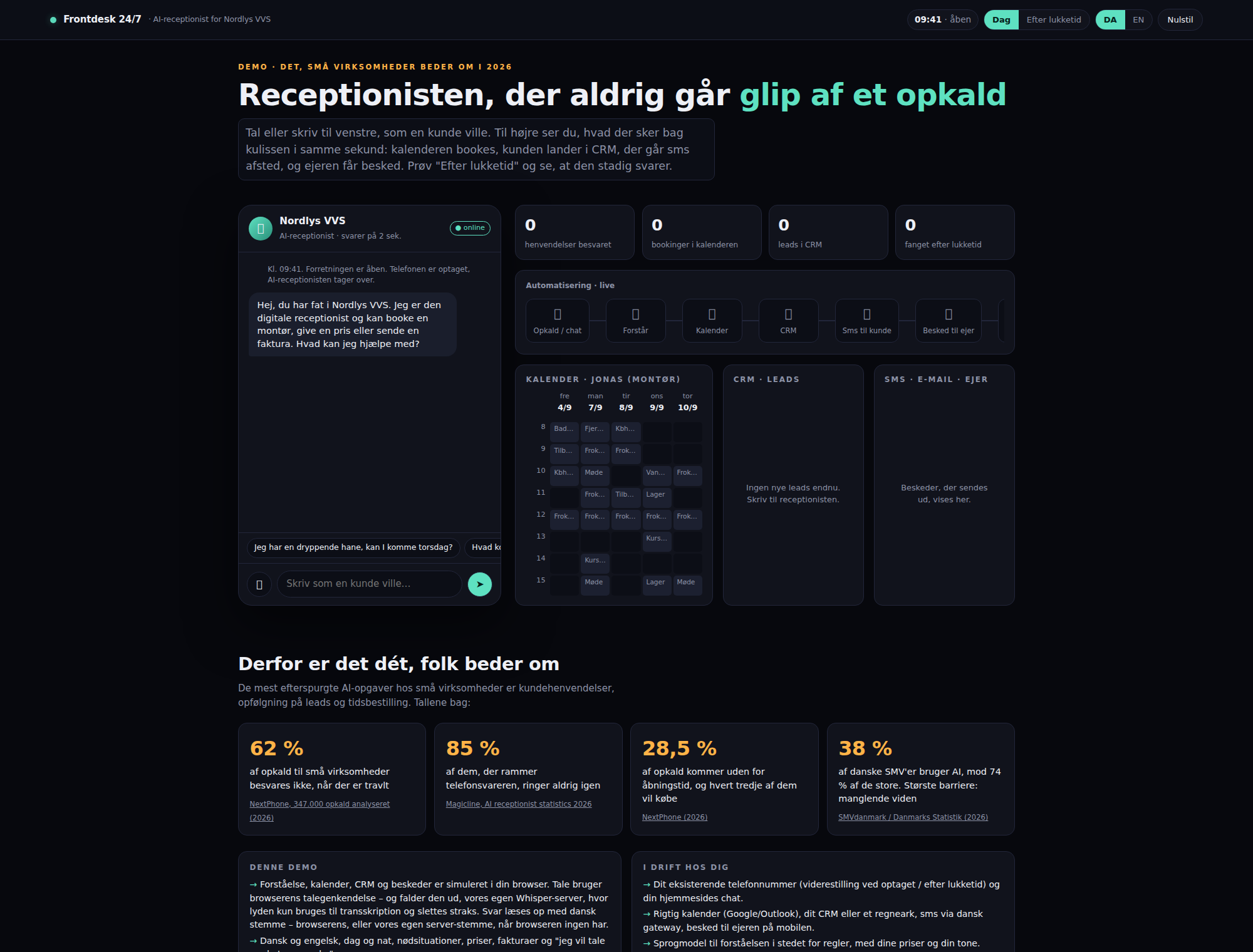
The Frontdesk 24/7 demo: a chat with the AI receptionist for Nordlys VVS on the left, and the animated back office — automation flow, calendar, CRM and SMS panels — on the right.

At a glance

Frontdesk 24/7 is an AI receptionist for a fictional Danish plumbing firm, Nordlys VVS, that you talk to the way a customer would — by voice or text, in opening hours or after them. The point of the demo is the split screen: while the receptionist answers on the left, the back office animates on the right — the calendar books itself, the caller lands in the CRM, a confirmation SMS goes out and the owner gets a message. Nothing is described; everything is shown happening.

Danish voice in: browser speech recognition first, own Whisper server (large-v3-turbo) as fallback
Neural Danish replies: edge-tts with a Piper fallback on the same server
Split screen all the way: every booking, CRM lead and SMS shows up in the animated back office the second it happens

The challenge

Small businesses miss calls — the demo opens with the industry numbers (62% of calls to small firms go unanswered when things are busy, and 85% of callers who hit voicemail never ring back). But an owner weighing an “AI receptionist” is usually shown a feature list, not the thing itself. And a Danish-speaking receptionist has a harder job than an English one: browser speech recognition is uneven in Danish, so a voice demo that only works in Chrome on a good day would sell the wrong story.

The solution

A static, framework-free page with a deliberately honest architecture. Understanding is rule-based NLU with slot filling — intents like booking, price and invoice, with the missing pieces (day, time, name, number) asked for one by one — so the conversation logic is inspectable and cheap to run. Voice input uses the browser’s own speech recognition first and falls back to our own Whisper server (large-v3-turbo, Danish) when the browser can’t; audio is used for transcription only and discarded. Replies are spoken with a neural Danish voice — edge-tts, with Piper on the same server as fallback — or the browser’s voice offline.

The back office is the sales argument: calendar, CRM, SMS and owner notifications are simulated in the browser and animate in the same second the receptionist acts. A day/after-hours toggle shows the 24/7 half of the promise, and the whole demo runs in Danish and English.

The results

The demo answers, books and follows up in Danish end to end — in a browser tab, with no install. A section at the bottom spells out what the production version connects to instead of the simulation: the firm’s real phone number via forwarding, a real calendar (Google/Outlook), the CRM or a spreadsheet, SMS through a Danish gateway, and a language model for understanding in place of the rules.

Like the rest of the demo shelf it exists to compress a sales conversation: instead of explaining what an AI receptionist would do for a trade business, it lets the owner ring one.

  • AI agents
  • Voice AI
  • Whisper
  • Custom Development

Got a project that needs the same kind of hands-on delivery?

Your digital project manager

Review Greg on Google

Greg Nowak Google Reviews


Written recommendations from Trafik og Veje, Aarhus Municipality (2011) and AgroTech (2010) — read them on LinkedIn.

Illustrated infographic summarizing: What Are Customers Asking? Let AI Find the Patterns in Support Tickets
What Are Customers Asking? Let AI Find the Patterns in Support Tickets
2026-09-04

AI-based ticket analysis can uncover recurring complaints, product defects and gaps in documentation—without the company needing yet another chatbot.

Illustrated infographic summarizing: OpenAI Has Machine Identity Now. Which Jobs Should Lose API Keys?
OpenAI Has Machine Identity Now. Which Jobs Should Lose API Keys?
2026-09-03

OpenAI’s X.509 workload identity can replace API keys for the right workloads. This practical framework helps teams decide where to start safely.

Illustrated infographic summarizing: WordPress 7.1 Exposes AI-Ready Actions. Who Gets to Run Them?
WordPress 7.1 Exposes AI-Ready Actions. Who Gets to Run Them?
2026-09-02

WordPress 7.1 helps AI agents discover and invoke site abilities. Here is how to keep exposure, authentication and permission firmly separate.

Illustrated infographic summarizing: From Sales Meeting to CRM: Automate Follow-Up Without Compromising Data Quality
From Sales Meeting to CRM: Automate Follow-Up Without Compromising Data Quality
2026-09-01

How to use AI for meeting notes and follow-up while fixed rules protect CRM data, customer matching and the sales pipeline from errors and premature changes.

Illustrated infographic summarizing: Your AI Gateway Can Name the User. Decide What That Log Is For
Your AI Gateway Can Name the User. Decide What That Log Is For
2026-08-31

Identity-aware AI Gateway logs can sharpen security and cost control, but only when attribution, access, retention, guardrails, and response are clearly defined.

Illustrated infographic summarizing: Zero Data Retention Is a Workflow Audit, Not a Checkbox
Zero Data Retention Is a Workflow Audit, Not a Checkbox
2026-08-30

Zero Data Retention covers the provider, not every copy in your stack. See how to audit endpoints, logs, storage, deletion and project-level controls.

Illustrated infographic summarizing: MCP 2026-07-28 Is an Auth Migration, Not a Version Bump
MCP 2026-07-28 Is an Auth Migration, Not a Version Bump
2026-08-29

MCP’s July 2026 release removes protocol sessions and tightens OAuth. Here’s a practical plan for migrating clients, servers and enterprise access safely.

Illustrated infographic summarizing: Turn a Technician’s Voice Note into a Work Order—Not Raw Audio
Turn a Technician’s Voice Note into a Work Order—Not Raw Audio
2026-08-28

Voice input can reduce the technician’s documentation burden when hours, materials and status are validated before the information is saved in the work order system.

Illustrated infographic summarizing: ChatGPT Disabled Personal Knowledge Sync. What Broke on Your Team?
ChatGPT Disabled Personal Knowledge Sync. What Broke on Your Team?
2026-08-27

ChatGPT retired personal sync connections for Enterprise and Edu. Here is how to find affected workflows, migrate access, and test permissions.

Illustrated infographic summarizing: Cloudflare’s September Bot Defaults Could Quietly Cut AI Visibility
Cloudflare’s September Bot Defaults Could Quietly Cut AI Visibility
2026-08-26

Cloudflare’s September bot defaults give publishers more control, but one training block could also cut search crawling and AI-driven discovery.

More articles
RSS feed

Footer

  • All articles
  • Contact

GrN.dk — AI automation, web platforms, web optimization, data handling and logistics.

© 2026 GrN.dk · LinkedIn · Contact · AI automation in Danish: nowa.dk

Behind GrN.dk: Individual Entrepreneur Codecrafter · Tax ID 305669096 · Bakhtrioni St. 22, 0194 Tbilisi, Georgia · official business register