By Greg Nowak. Last updated 2026-11-02.
After a PHP upgrade, opening the homepage is a sensible first check. You still need to know whether a customer can place an order, an enquiry reaches your team and the overnight import creates the right records. Each needs checking through to the result your business depends on.
The timing matters. PHP’s official support schedule puts the end of upstream security support for PHP 8.2 at 31 December 2026. From early November, that leaves roughly two months to investigate compatibility, fix problems and arrange deployment.
Before commissioning the upgrade, agree which activities must keep working and who will check them. That gives the host, developer and business team something concrete to work towards.
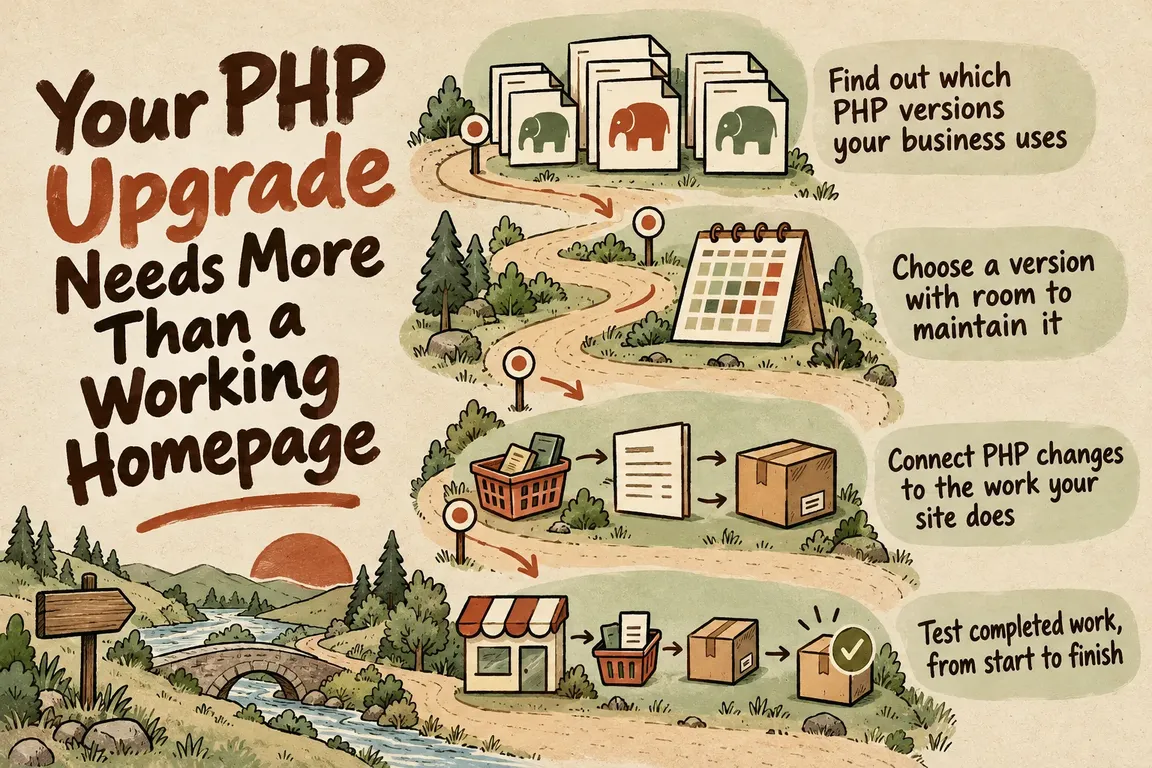
Find out which PHP versions your business uses
Ask for an inventory of the production environment. Start with the PHP version serving website requests, then check command-line scripts and scheduled jobs separately. Include background processes that handle imports, exports or other operational work. Record the runtime each one actually uses.
The inventory should also cover PHP extensions, relevant configuration, application dependencies and the database environment. For WordPress, include core, active plugins, the theme and custom code. The WordPress hosting handbook explains how PHP fits into the wider server environment, including additional requirements introduced by plugins and themes. It recommends testing the full stack before changing the production default.
Get the hosting arrangements in writing, too: which replacement versions are available, whether an automatic switch is scheduled and who controls it. If the host offers continued PHP 8.2 support, ask who provides it, what it covers and when it ends. Keep that arrangement separate from the upstream deadline so everyone knows which support they are relying on.
Choose a version with room to maintain it
A target version needs both a useful support window and evidence that your application works on it. PHP’s schedule lists security support through December 2027 for PHP 8.3, December 2028 for PHP 8.4 and December 2029 for PHP 8.5. Weigh that maintenance window against the compatibility work each option requires.
For WordPress, check your installed release against the official PHP compatibility table. It covers WordPress core. As the page acknowledges, most sites also use plugins and a theme, so those components need their own assessment.
Name the proposed PHP version in the project scope. Where a dependency blocks the move, identify it and agree what happens next: update the component, repair custom code, replace it or remove an unused feature. Give each unresolved decision an owner before booking deployment.
Connect PHP changes to the work your site does
The PHP 8.4 backward incompatibility guide gives some specific reasons to test beyond page loading. For example, str_getcsv() throws a ValueError when separator, enclosure or escape arguments have invalid lengths. Several image output functions also throw a ValueError for an invalid quality value.
If your application uses CSV imports or image generation, those are useful places to investigate. Test invalid inputs and error handling as well as successful runs. These examples do not mean your site has either problem; the developer needs to connect relevant runtime changes to the code and dependencies you actually have.
Keep the guide’s scope in mind. It covers the move from PHP 8.3 to 8.4, so it cannot serve as the complete assessment for an upgrade from PHP 8.2 or for every possible target version.
Test completed work, from start to finish
A contact page opening tells you very little about whether the message arrives. Write acceptance criteria around the completed activity, then name someone who can confirm the result. Use the relevant rows below as a starting point.
| Workflow | What to test in staging | Evidence needed for approval |
|---|---|---|
| Enquiries | Submit valid and invalid forms, with attachments where used. | Correct validation, a saved enquiry and delivery to the intended test inbox. |
| Checkout | Complete a test purchase and follow a failed payment path. | Correct totals, order status and confirmation, with no duplicate orders. |
| Customer access | Check login, password reset and restricted content for the relevant account roles. | Expected access permissions and successful recovery messages. |
| Publishing | Edit content and upload representative images or documents. | Changes saved correctly and expected media outputs generated. |
| Scheduled operations | Run representative imports and exports using the intended runtime. | Correct records and output files, supported by an inspected execution log. |
Order the checks by what failure would cost the business. Order completion, lead delivery and essential operational data deserve attention before cosmetic details. Keep the homepage check, and give every critical workflow its own pass or fail result.
Make staging answer the deployment question
Staging should represent the production environment you intend to deploy, including the target PHP version, extensions and relevant configuration. Document any differences so the people approving the upgrade understand what the tests can establish. Set controlled payment settings and message destinations, and agree how to exercise scheduled jobs and external integrations.
First establish the expected result for each critical workflow on the existing version. Then compare it with the proposed version, using representative files, account roles and input variations. Check application and PHP logs alongside what appears on screen, and include the errors and warnings you find in the findings.
A short issue register is enough if it records the affected workflow, reproduction steps, business consequence, proposed repair and retest result. When PHP code or dependencies change, rerun the affected acceptance checks.
By the end, the team should be able to say whether the upgrade is ready, ready subject to named conditions, or blocked by specific work. That is the decision staging needs to support.
Agree the deployment and recovery steps in advance
Get written deployment instructions that name who will make the change, which runtime settings they will apply and what they will check immediately afterwards. Include the command-line and scheduled processes identified in the inventory. A business representative should also confirm that the critical workflows deliver the expected results.
Decide what would trigger rollback before making the switch. A failed checkout or an import creating incorrect records might qualify. The recovery instructions need to identify the previous runtime and application state, the required backups and the steps to restore service.
Take particular care with data created after deployment. Before proposing a database restoration, explain what will happen to new orders, enquiries and other records.
Allow for the way the business operates. If an essential job runs overnight, include its next run in the acceptance plan. Name the person who will inspect it and define the result needed to close the upgrade.
Start with a scoped readiness review
A PHP upgrade readiness review gives you a defined first piece of work to commission. Ask for a runtime and dependency inventory, a justified target version, a prioritised workflow checklist, a repair backlog, and deployment and rollback instructions. Once the blockers are understood, ask for implementation estimates.
Greg could coordinate the review across your host, developers and business team, with responsibility for compatibility repairs and testing agreed as part of the scope. Contact GrN to discuss the activities your business depends on and what the review needs to cover. You should come away knowing what needs changing, who will handle it and which results will show that the upgrade is ready.
Related on GrN.dk
- NGINX Can Read JSON Before Routing—Should It Handle Your AI API?
- Apache 2.4.68: What to Check Before You Call It Patched
- Drupal 10 Ends in December: Upgrade First or Relaunch?
Need help with this kind of work?
Discuss your PHP upgrade readiness review Get in touch with Greg.